
Bash echo输出带颜色和背景的文本
Bash echo输出带颜色和背景的文本
1、先上效果图
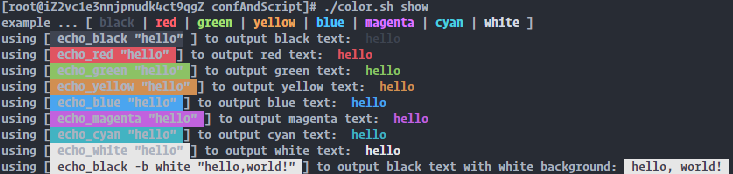
2、bash代码
#!/bin/bash

#*************************************************************

#Author:    yangruitao

#Date:      2020-11-04

#FileName:  color.sh

#*************************************************************

black="0"

red="1"

green="2"

yellow="3"

blue="4"

magenta="5"

cyan="6"

white="7"

# Color 为文本和背景设置颜色

function Color() {

    Content=""

    Fg="3$1"

    Bg="4$2"

    SetColor="\e[$Fg;${Bg}m "

    EndColor=" \e[0m"

    for((i=3;i<=$#;i++)); do

        j=${!i}

        Content="${Content} $j "

    done

    echo -e ${SetColor}${Content}${EndColor}

}

# echo_black 输出黑色文本 可加背景颜色参数(背景默认不设置)

function echo_black() {

    if [ "$1" == "-b" ]; then

        Bg=$(($2))

        Content=$3

    else

        Bg="8"

        Content=$1

    fi

    Color $black $Bg $Content

}

# echo_red 输出红色文本 可加背景颜色参数(背景默认不设置)

function echo_red() {

   if [ "$1" == "-b" ]; then

        Bg=$(($2))

        Content=$3

    else

        Bg="8"

        Content=$1

    fi

    Color $red $Bg $Content

}

# echo_green 输出绿色文本 可加背景颜色参数(背景默认不设置)

function echo_green() {

    if [ "$1" == "-b" ]; then

        Bg=$(($2))

        Content=$3

    else

        Bg="8"

        Content=$1

    fi

    Color $green $Bg $Content

}

# echo_yellow 输出黄色文本 可加背景颜色参数(背景默认不设置)

function echo_yellow() {

    if [ "$1" == "-b" ]; then

        Bg=$(($2))

        Content=$3

    else

        Bg="8"

        Content=$1

    fi

    Color $yellow $Bg $Content

}

# echo_blue 输出蓝色文本 可加背景颜色参数(背景默认不设置)

function echo_blue() {

    if [ "$1" == "-b" ]; then

        Bg=$(($2))

        Content=$3

    else

        Bg="8"

        Content=$1

    fi

    Color $blue $Bg $Content

}

# echo_magenta 输出洋红色文本 可加背景颜色参数(背景默认不设置)

function echo_magenta() {

    if [ "$1" == "-b" ]; then

        Bg=$(($2))

        Content=$3

    else

        Bg="8"

        Content=$1

    fi

    Color $magenta $Bg $Content

}

# echo_cyan 输出青色文本 可加背景颜色参数(背景默认不设置)

function echo_cyan() {

    if [ "$1" == "-b" ]; then

        Bg=$(($2))

        Content=$3

    else

        Bg="8"

        Content=$1

    fi

    Color $cyan $Bg $Content

}

# echo_white 输出白色文本 可加背景颜色参数(背景默认不设置)

function echo_white() {

    if [ "$1" == "-b" ]; then

        Bg=$(($2))

        Content=$3

    else

        Bg="8"

        Content=$1

    fi

    Color $white $Bg $Content

}

#main

echo -e "example ... [\e[1;30m black \e[0m|\e[1;31m red \e[0m|\e[1;32m green \e[0m|\e[1;33m yellow \e[0m|\e[1;34m blue \e[0m|\e[1;35m magenta \e[0m|\e[1;36m cyan \e[0m|\e[1;37m white \e[0m]"

echo -en "using [\e[1;40m echo_black \"hello\"\e[0m ] to output black text: "

echo_black "hello"

echo -en "using [\e[1;41m echo_red \"hello\" \e[0m] to output red text: "

echo_red "hello"

echo -en "using [\e[1;42m echo_green \"hello\" \e[0m] to output green text: "

echo_green "hello"

echo -en "using [\e[1;43m echo_yellow \"hello\" \e[0m] to output yellow text: "

echo_yellow "hello"

echo -en "using [\e[1;44m echo_blue \"hello\" \e[0m] to output blue text: "

echo_blue "hello"

echo -en "using [\e[1;45m echo_magenta \"hello\" \e[0m] to output magenta text: "

echo_magenta "hello"

echo -en "using [\e[1;46m echo_cyan \"hello\" \e[0m] to output cyan text: "

echo_cyan "hello"

echo -en "using [\e[1;47m echo_white \"hello\" \e[0m] to output white text: "

echo_white "hello"

echo -en "using [\e[30;47m echo_black -b white \"hello,world!\" \e[0m] to output black text with white background: "

echo_black -b white "hello, world!"
3、其他脚本中使用示例
example.sh
#!/bin/bash

#导入color.sh脚本,即可调用里面的函数(若exmaple.sh与color.sh不在同一目录,下面的导入记得使用color.sh的绝对路径)

. color.sh

echo_red "red message"

echo_blue -b white "blue message, white background"

Bash echo输出带颜色和背景的文本的更多相关文章
- 让shell脚本中的echo输出带颜色
转载自:http://www.linuxidc.com/Linux/2014-12/110463.htm 让echo输出带颜色的方法有两种 1.在shell脚本中定义颜色变量,使用echo -e调用变 ...
- echo如何输出带颜色的文本
本文链接:https://blog.csdn.net/qualcent/article/details/7106483 ######################################## ...
- Bootstrap-全局样式的文本颜色和背景颜色
.text-五种颜色 文本颜色.text-info文本浅蓝颜色-提示.text-warning文本黄色-警告颜色.text-success文本绿色-成功颜色.text-primary文本深蓝色-警 ...
- 【MFC系列】MFC快速设置控件文本字体、大小、颜色、背景
以静态文本为例,分享一下怎么修改文本字体.大小.颜色.背景等参数.其他文本.控件等可参照修改. 1.修改字体.大小 这个很简单,首先在Dlg类中声明一个CFont类型的成员变量: 然后在类的初始化函数 ...
- echo -e "\033[字背景颜色;字体颜色m字符串\033[0m
格式: echo -e "\033[字背景颜色;字体颜色m字符串\033[0m" 例如: echo -e "\033[41;36m something here \033 ...
- (转)TextView 设置背景和文本颜色的问题
在做一个项目,突然遇到如下问题 比如:在color.xml中定义了几个颜色 <color name="white">#FFFFFF</color> < ...
- (转)shell脚本输出带颜色字体
shell脚本输出带颜色字体 原文:http://blog.csdn.net/andylauren/article/details/60873400 输出特效格式控制:\033[0m 关闭所有属性 ...
- Shell~echo -e 颜色输出
echo -e 可以控制字体颜色和背景颜色输出 从一个例子开始: # echo -e "\e[1;33;41m test content \e[0m" 输出效果: . \e 转义起 ...
- php 扫描url死链接 \033[31m ANSI Linux终端输出带颜色
* 从Packagist上搜索需要的包 https://packagist.org/ * 通过composer下载依赖包 composer require guzzlehttp/guzzlecompo ...
随机推荐
- Python-随机模块-random
random 生成随机变量 生成 [0, 1) 随机数 .random import random random_number = random.random() print(random_numbe ...
- Hbuilder获取手机当前地理位置的天气
前言:前面一段时间,公司项目里有一个需求 是获取当前手机地理位置当天的天气情况 将实时天气信息提供给客户.在网上搜索资料时候,发现知识很零碎,自己实现以后整理出来,方便于各位的学习与使用. 一.获取 ...
- Python练习题 002:奖金计算
[Python练习题 002]企业发放的奖金根据利润提成.利润(I)低于或等于10万元时,奖金可提10%:利润高于10万元,低于20万元时,低于10万元的部分按10%提成,高于10万元的部分,可可提成 ...
- 64位Win7下H3C的iMC无法查看“网络拓扑”的解决方法、心路历程
64位Win7下H3C的iMC无法查看"网络拓扑"的解决方法.心路历程
- 088 01 Android 零基础入门 02 Java面向对象 02 Java封装 01 封装的实现 02 封装的代码实现
088 01 Android 零基础入门 02 Java面向对象 02 Java封装 01 封装的实现 02 封装的代码实现 本文知识点:Java封装的代码实现 说明:因为时间紧张,本人写博客过程中只 ...
- Zookeeper基础理论
Zookeeper是分布式开源协调服务, 主要用来解决分布式集群中应用系统的一致性问题. 本质上是分布式小文件存储系统. 特性 全局数据一致性(集群中每个服务器保存一份相同的数据副本,Client ...
- 匿名内部类和Lambda表达式是一样的吗?
先看一下匿名内部类长什么样子: 1 package com.jvm.demo.test2; 2 3 public class InnerClassTest { 4 5 public static vo ...
- c 判断端口是否已被使用
isPortOpen.c #include <stdio.h> #include <stdlib.h> #include <string.h> #include & ...
- python`最简单的爬虫`实现
不管怎么样,一天一更的好习惯一定要保持,现在一天不写点东西都感觉不踏实,总会感觉少了点什么,废话少说,记录一下今天初学的spider(甚至说不上是spider,I'm so vagetable [/认 ...
- 云原生 go-zero 微服务框架
0. go-zero介绍 go-zero是一个集成了各种工程实践的web和rpc框架.通过弹性设计保障了大并发服务端的稳定性,经受了充分的实战检验. go-zero包含极简的API定义和生成工具goc ...