
Saltstack自动化扩容
一. etcd服务的安装和使用
1.安装etcd应用:
wget https://github.com/coreos/etcd/releases/download/v2.2.5/etcd-v2.2.5-linux-amd64.tar.gz -O etcd-v2.2.5-linux-amd64.tar.gz

tar -zxvf etcd-v2.2.5-linux-amd64.tar.g

cp etcd etcdctl /usr/local/bin/
2.启动etcd服务:
mkdir -p /data/etcd    #创建数据存储目录

nohup etcd -name auto_scale --data-dir /data/etcd/ \

     --listen-peer-urls 'http://172.16.1.211:2380,http://172.16.1.211:7001' \

     --listen-client-urls 'http://172.16.1.211:2379,http://172.16.1.211:4001' \

     --advertise-client-urls 'http://172.16.1.211:2379,http://172.16.1.211:4001' &
3.提交key到etcd中:
curl -s http://172.16.1.211:2379/v2/keys/message -XPUT -d value="hello world" | python -m json.tool #结果通过python的json模块转义输出,增加可读性。
4.获取刚才提交的key值:
curl -s http://172.16.1.211:2379/v2/keys/message | python -m json.tool
5.删除刚才提交的key:
curl -s http://172.16.1.211:2379/v2/keys/message -XDELETE | python -m json.tool
6.提交带10秒过期时间的key:
curl -s http://172.16.1.211:2379/v2/keys/ttl_use -XPUT -d value="hello world 1" -d ttl=10 | python -m json.tool
二. 实现Salt自动化让Haproxy扩容
1.配置salt的pillar连接etcd:
yum install python-pip

pip install python-etcd #安装python的etcd包

vim /etc/salt/master

#底部添加

etcd_pillar_config:

  etcd.host: 172.16.1.211

  etcd.port: 4001

ext_pillar:

  - etcd: etcd_pillar_config root=/salt/haproxy/   #root参数是指定etcd里面的目录
2.测试通过salt获取pillar:
curl -s http://172.16.1.211:2379/v2/keys/salt/haproxy/backend_www_wmj_com/web-node1 -XPUT -d value="172.16.1.213:8080" | python -m json.tool

salt '*' pillar.item
3.让salt模板自动添加haproxy的backend:
vim /srv/salt/prod/cluster/files/haproxy-outside.cfg

#server web-node1  172.16.1.213:8080 check inter 2000 rise 30 fall 15

#使用for循环获取etcd的key值

{% for web,web_ip in pillar.backend_www_wmj_com.iteritems() %} server {{ web }} {{ web_ip }} check inter 2000 rise 30 fall 15 {% endfor %}
4.添加一台haproxy的节点:
curl -s http://172.16.1.211:2379/v2/keys/salt/haproxy/backend_www_wmj_com/web-node3 -XPUT -d value="172.16.1.215:8080" | python -m json.tool

salt '*' state.sls cluster.haproxy-outside env=prod
5.简单的自动化扩容脚本:
#!/bin/bash

create_host(){

        echo "create host"

}

deploy_service(){

        salt '*' state.sls nginx.install env=prod

}

deploy_code(){

        echo "deploy code ok"

}

service_check(){

        STATUS=$(curl -s --head http://172.16.1.213:8080/ | grep '200 OK')

        if [ -n "$STATUS" ];then

                echo "HTTP ok"

        else

                echo "HTTP not ok"

                exit 1

        fi

}

etcd_key(){

        curl -s http://172.16.1.211:2379/v2/keys/salt/haproxy/backend_www_wmj_com/web-node4 -XPUT -d value="172.16.1.213:8080"

}

sync_state(){

        salt '*' state.sls cluster.haproxy-outside env=prod

}

main(){

        create_host

       deploy_service

        deploy_code

        service_check

        etcd_key

        sync_state

}

main
############################################################################################
|
1
2
3
|
[root@node1 src]# tar xf etcd-v3.2.9-linux-amd64.tar.gzcd etcd-v3.2.9-linux-amd64cp etcd etcdctl /usr/local/bin/ |
然后开启etcd集群:
1、首先创建数据目录:mkdir /data/etcd -p
2、开启服务:
|
1
|
nohup etcd --name auto_scale --data-dir /data/etcd/ --listen-peer-urls http://192.168.44.134:2380,http://192.168.44.134:7001 --listen-client-urls http://192.168.44.134:2379,http://192.168.44.134:4001 --advertise-client-urls http://192.168.44.134:2379,http://192.168.44.134:4001 & |
|
1
2
3
4
5
|
[root@node1 ~]# netstat -tunlp|grep etcdtcp 0 0 192.168.44.134:2379 0.0.0.0:* LISTEN 52094/etcd tcp 0 0 192.168.44.134:2380 0.0.0.0:* LISTEN 52094/etcd tcp 0 0 192.168.44.134:7001 0.0.0.0:* LISTEN 52094/etcd tcp 0 0 192.168.44.134:4001 0.0.0.0:* LISTEN 52094/etcd |
1、创建一个key/value
|
1
|
[root@node1 ~]# curl -s http://192.168.44.134:2379/v2/keys/key1 -XPUT -d value="Hello world" |
2、获取创建的key/value
|
1
|
[root@node1 ~]# curl -s http://192.168.44.134:2379/v2/keys/salt/haproxy/backend_www/www1 |
3、删除创建的key/value
|
1
|
[root@node1 ~]# curl -s http://192.168.44.134:2379/v2/keys/key1 -XDELETE |
或者将上面的输出结果以json格式输出:
|
1
2
3
4
5
6
7
8
9
10
|
[root@node1 ~]# curl -s http://192.168.44.134:2379/v2/keys/salt/haproxy/backend_www/www1|python -m json.tool{ "action": "get", "node": { "createdIndex": 9, "key": "/salt/haproxy/backend_www/www1", "modifiedIndex": 9, "value": "192.168.44.134:8080" }} |
将etcd配置在saltstack中,结合使用:
1、首先需要安装依赖包:
|
1
2
3
4
5
6
7
|
####config etcd my_etcd_config: etcd.host: 192.168.44.134 etcd.port: 4001ext_pillar: - etcd: my_etcd_config root=/salt/haproxy |
3、重启master
|
1
|
[root@node1 ~]# /etc/init.d/salt-master restart |
|
1
2
3
4
5
6
7
8
9
10
11
12
13
|
[root@node1 ~]# salt '*' pillar.itemsnode2: ---------- backend_www: ---------- zabbix-agent: ---------- Zabbix_Server: 192.168.44.134 zabbix-agent-host: ---------- zabbix_host: node2 |
现在通过添加etcd的key来增加haproxy后端的节点服务器:
|
1
|
curl -s http://192.168.44.134:2379/v2/keys/salt/haproxy/backend_www/www1 -XPUT -d value="192.168.44.134:8081"|python -m json.tool |
2、查看pillar
|
1
2
3
4
5
6
7
|
[root@node1 ~]# salt '*' pillar.itemsnode1: ---------- backend_www: ---------- www1: 192.168.44.134:8081 |
3、修改haproxy配置文件:vim /srv/salt/prod/cluster/files/haproxy-outside.cfg
|
1
2
3
|
{% for www,www_ip in pillar.backend_www.iteritems() %}server {{ www }} {{ www_ip }} check inter 1000{% endfor %} |
4、修改haproxy状态配置文件:vim /srv/salt/prod/cluster/haproxy-outside.sls
|
1
2
3
4
5
6
7
8
|
haproxy-service: file.managed: - name: /etc/haproxy/haproxy.cfg - source: salt://cluster/files/haproxy-outside.cfg - user: root - group: root - mode: 644 - template: jinja 新增一行,使用jinja模板,使用变量 |
测试并验证:

|
1
2
3
4
5
6
7
8
9
10
11
12
13
14
15
16
17
18
19
20
|
[root@node1 ~]# curl -s http://192.168.44.134:2379/v2/keys/salt/haproxy/backend_www/www2 -XPUT -d value="192.168.44.134:8080"|python -m json.tool { "action": "set", "node": { "createdIndex": 14, "key": "/salt/haproxy/backend_www/www2", "modifiedIndex": 14, "value": "192.168.44.134:8080" }}[root@node1 ~]# curl -s http://192.168.44.134:2379/v2/keys/salt/haproxy/backend_www/www3 -XPUT -d value="192.168.44.135:8080"|python -m json.tool { "action": "set", "node": { "createdIndex": 15, "key": "/salt/haproxy/backend_www/www3", "modifiedIndex": 15, "value": "192.168.44.135:8080" }} |
查看设置的pillar:
|
1
2
3
4
5
6
7
8
9
10
11
|
[root@node1 ~]# salt '*' pillar.itemsnode2: ---------- backend_www: ---------- www1: 192.168.44.134:8081 www2: 192.168.44.134:8080 www3: 192.168.44.135:8080 |
执行salt状态配置文件:

自动化运维-基于etcd加saltstack的自动化扩容
# tar -xf etcd-v2.2.1-linux-amd64.tar.gz

# cd etcd-v2.2.1-linux-amd64

# cp etcd etcdctl /usr/local/bin/
查看版本
# etcd --version
创建数据目录
# mkdir -p /data/etcd
后台运行进程
# nohup etcd --name auto_scale --data-dir /data/etcd/ --listen-peer-urls 'http://192.168.3.12:2380,http://192.168.3.12:7001' --listen-client-urls 'http://192.168.3.12:2379,http://192.168.3.12:4001' --advertise-client-urls 'http://192.168.3.12:2379,http://192.168.3.12:4001' &
创建key和value
# curl -s http://192.168.3.12:2379/v2/keys/message -XPUT -d value="hello world" | python -m json.tool
结果
{

"action": "set",

"node": {

"createdIndex": 5,

"key": "/message",

"modifiedIndex": 5,

"value": "hello world"

}

}
查看key和value
# curl -s http://192.168.3.12:2379/v2/keys/message | python -m json.tool
结果
{

"action": "get",

"node": {

"createdIndex": 5,

"key": "/message",

"modifiedIndex": 5,

"value": "hello world"

}

}
删除key,可以看到查不到了
# curl -s http://192.168.3.12:2379/v2/keys/message -XDELETE | python -m json.tool
结果
{

"action": "delete",

"node": {

"createdIndex": 5,

"key": "/message",

"modifiedIndex": 6

},

"prevNode": {

"createdIndex": 5,

"key": "/message",

"modifiedIndex": 5,

"value": "hello world"

}

}
查看删除
# curl -s http://192.168.3.12:2379/v2/keys/message | python -m json.tool
结果
{

"cause": "/message",

"errorCode": 100,

"index": 6,

"message": "Key not found"

}
建一个只存在25秒的键值,25秒后发现该键值查不到了
# curl -s http://192.168.3.12:2379/v2/keys/ttl_use -XPUT -d value='hello world 1' -d ttl=25 | python -m json.tool
结果
{

"action": "set",

"node": {

"createdIndex": 9,

"expiration": "2017-04-18T03:04:54.538607442Z",

"key": "/ttl_use",

"modifiedIndex": 9,

"ttl": 25,

"value": "hello world 1"

}

}
查看
# curl -s http://192.168.3.12:2379/v2/keys/ttl_use | python -m json.tool
结果
{

"action": "get",

"node": {

"createdIndex": 9,

"expiration": "2017-04-18T03:04:54.538607442Z",

"key": "/ttl_use",

"modifiedIndex": 9,

"ttl": 24,

"value": "hello world 1"

}
编辑salt,修改etcd相关配置
# vim /etc/salt/master

etcd_pillar_config:

etcd.host: 192.168.3.12

etcd.port: 4001

ext_pillar:

- etcd: etcd_pillar_config root=/salt/haproxy/
重启服务
# /etc/init.d/salt-master restart
测试
curl -s http://192.168.3.12:2379/v2/keys/salt/haproxy/backend_www_chinasoft_com/web-node1 -XPUT -d value="192.168.3.12:8080" | python -m json.tool
结果
{

"action": "set",

"node": {

"createdIndex": 11,

"key": "/salt/haproxy/backend_www_chinasoft_com/web-node1",

"modifiedIndex": 11,

"value": "192.168.3.12:8080"

}
安装etcd
# yum install -y python-pip

# pip search python-etcd

# pip install python-etcd
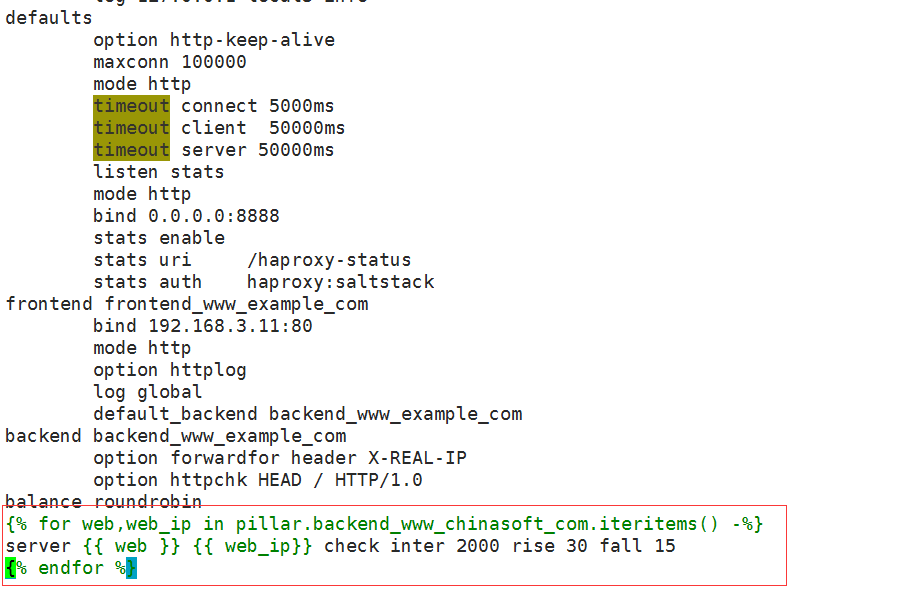
1)编写haproxy的配置文件
vim /srv/salt/prod/cluster/files/haproxy-outside.cfg


 balance roundrobin

 {% for web,web_ip in pillar.backend_www_chinasoft_com.iteritems() -%}

 server {{ web }} {{ web_ip}} check inter 2000 rise 30 fall 15

 {% endfor %}
2)编写sls文件
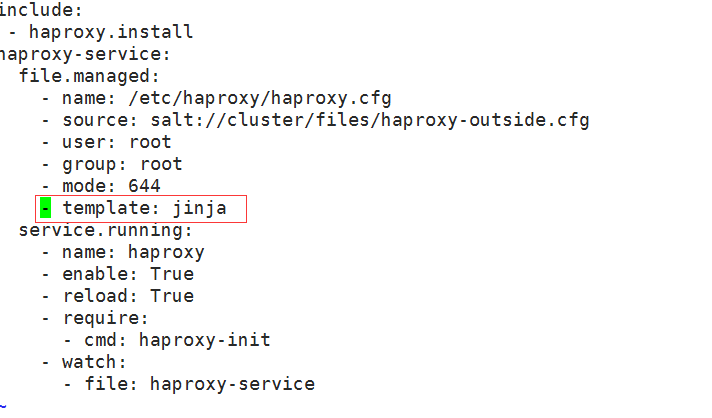
vim /srv/salt/prod/cluster/haproxy-outside.sls

include:

- haproxy.install

haproxy-service:

file.managed:

- name: /etc/haproxy/haproxy.cfg

- source: salt://cluster/files/haproxy-outside.cfg

- user: root

- group: root

- mode: 644

- template: jinja # 添加了jinja这一行

service.running:

- name: haproxy

- enable: True

- reload: True

- require:

- cmd: haproxy-init

- watch:

- file: haproxy-service
执行以下高级状态,如果报错jinja has no attibute backend_www_chinasoft_com重启一下master即可
# salt '*' state.highstate
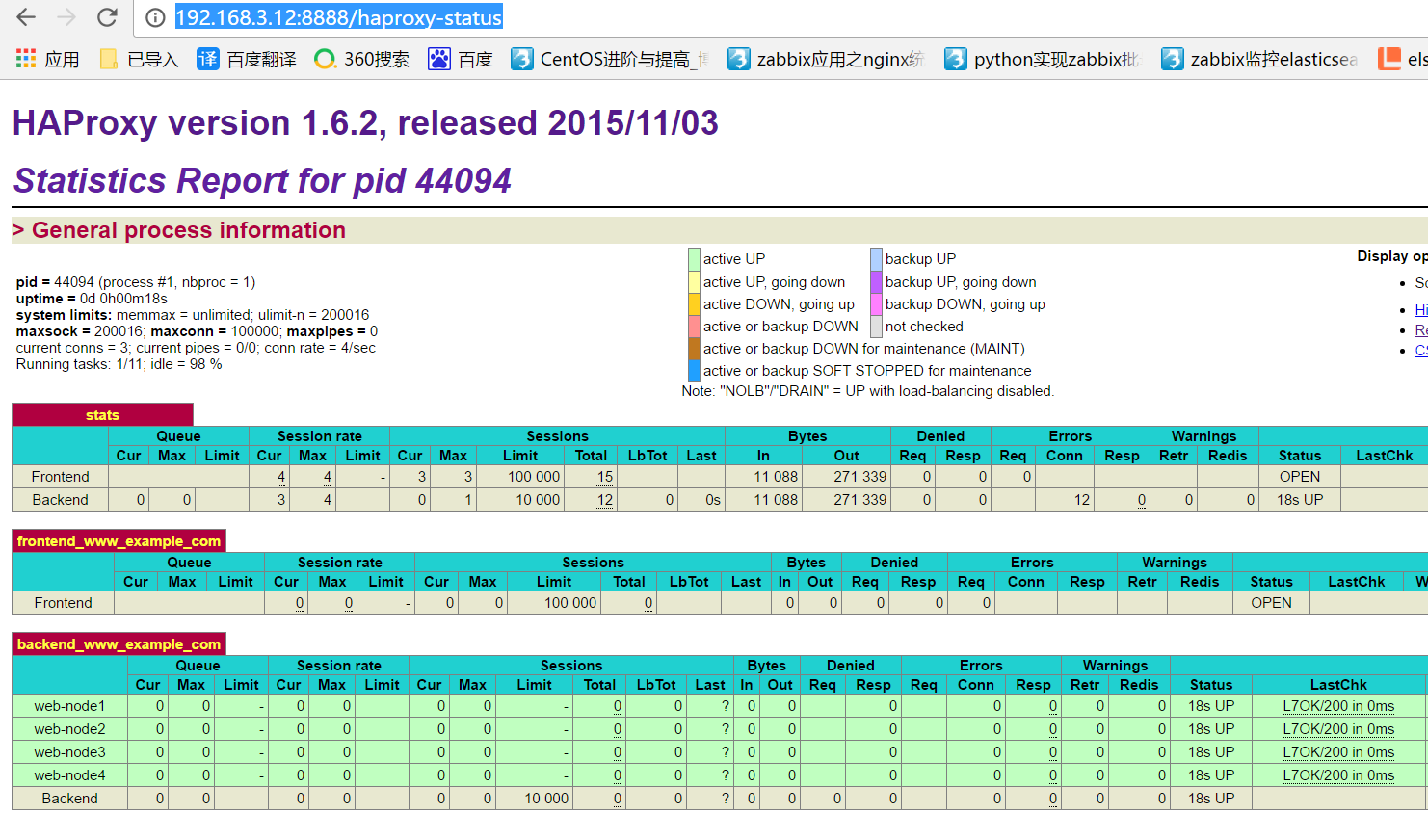
此时向haproxy添加backend主机
curl -s http://192.168.3.12:2379/v2/keys/salt/haproxy/backend_www_chinasoft_com/web-node2 -XPUT -d value="192.168.3.12:8080" | python -m json.tool

curl -s http://192.168.3.12:2379/v2/keys/salt/haproxy/backend_www_chinasoft_com/web-node3 -XPUT -d value="192.168.3.12:8080" | python -m json.tool

curl -s http://192.168.3.12:2379/v2/keys/salt/haproxy/backend_www_chinasoft_com/web-node4 -XPUT -d value="192.168.3.12:8080" | python -m json.tool
执行变更
# salt '*' state.highstate
通过访问haproxy的管理界面可以看到成功添加 http://192.168.3.12:8888/haproxy-status
可以看到pillar的选项,如果不能看到需要修改/etc/salt/master (pillar_opts: False)
# salt '*' pillar.items
结果
node2.chinasoft.com:

----------

backend_www_chinasoft_com:

----------

web-node1:

192.168.3.12:8080

web-node2:

192.168.3.12:8080

web-node3:

192.168.3.12:8080

web-node4:

192.168.3.12:8080

zabbix-agent:

----------

Zabbix_Server:

192.168.3.13

mini1:

----------

backend_www_chinasoft_com:

----------

web-node1:

192.168.3.12:8080

web-node2:

192.168.3.12:8080

web-node3:

192.168.3.12:8080

web-node4:

192.168.3.12:8080

zabbix-agent:

----------

Zabbix_Server:

192.168.3.13
编写脚本实现自动添加haproxy后端服务器
# vim auto_add_haproxynode.sh

#!/bin/bash

MAIN_ADD_HOST=$1

create_host(){

echo 'create host ok'

}

deploy_service(){

ADD_HOST_PORT='8080'

}

deploy_code(){

echo 'deploy code ok'

}

service_check(){

STATUS=$(curl -s --head http://"$ADD_HOST":"$ADD_HOST_PORT"/ |grep "200 OK")

if [ -n "$STATUS" ];then

echo 'status check ok'

else

echo 'status check not ok'

exit

fi

}

etcd_key(){

ADD_HOST=$1

curl http://192.168.3.12:2379/v2/keys/salt/haproxy/backend_www_chinasoft_com/$ADD_HOST -XPUT -d value="192.168.3.19:${ADD_HOST_PORT}"

}

sync_state(){

salt '*' state.sls cluster.haproxy-outside env=prod

}

main(){

create_host;

deploy_service;

deploy_code;

etcd_key $MAIN_ADD_HOST;

sync_state;

}

main $1
执行脚本,可以看到成功添加
# ./auto_add_haproxynode.sh web-node18
Saltstack自动化扩容的更多相关文章
- saltstack自动化运维系列11基于etcd的saltstack的自动化扩容
saltstack自动化运维系列11基于etcd的saltstack的自动化扩容 自动化运维-基于etcd加saltstack的自动化扩容# tar -xf etcd-v2.2.1-linux-amd ...
- 基于saltstack自动化部署高可用kubernetes集群
SaltStack自动化部署HA-Kubernetes 本项目在GitHub上,会不定期更新,大家也可以提交ISSUE,地址为:https://github.com/skymyyang/salt-k8 ...
- 七天学会SALTSTACK自动化运维 (3)
七天学会SALTSTACK自动化运维 (3) 导读 SLS TOP.SLS MINION选择器 SLS文件的编译 总结 参考链接 导读 SLS SLS (aka SaLt State file) 是 ...
- 七天学会SALTSTACK自动化运维 (2)
七天学会SALTSTACK自动化运维 (2) 导读 Grains Pillar 总结 参考链接 导读 上一篇主要介绍了安装和基本的使用方法,但是我认为如果理解了相关概念的话,使用会更加顺手,因为毕竟每 ...
- Saltstack自动化操作记录(2)-配置使用 【转】
之前梳理了Saltstack自动化操作记录(1)-环境部署,下面说说saltstack配置及模块使用: 为了试验效果,再追加一台被控制端minion机器192.168.1.118需要在master控制 ...
- Saltstack自动化操作记录(1)-环境部署【转】
早期运维工作中用过稍微复杂的Puppet,下面介绍下更为简单实用的Saltstack自动化运维的使用. Saltstack知多少Saltstack是一种全新的基础设施管理方式,是一个服务器基础架构集中 ...
- Saltstack自动化操作记录(2)-配置使用
之前梳理了Saltstack自动化操作记录(1)-环境部署,下面说说saltstack配置及模块使用: 为了试验效果,再追加一台被控制端minion机器192.168.1.118需要在master控制 ...
- Saltstack自动化操作记录(1)-环境部署
早期运维工作中用过稍微复杂的Puppet,下面介绍下更为简单实用的Saltstack自动化运维的使用. Saltstack知多少Saltstack是一种全新的基础设施管理方式,是一个服务器基础架构集中 ...
- saltstack自动化运维系列⑩SaltStack二次开发初探
saltstack自动化运维系列⑩SaltStack二次开发初探 1.当salt运行在公网或者网络环境较差的条件下,需要配置timeout时间vim /etc/salt/master timeout: ...
随机推荐
- WPF中常用控件(TreeView, ComboBox, DataGrid, ListView)使用MVVM模式绑定的demo
之前几篇关于TreeView的博客中只是贴了源代码,并没有把整个项目上传到github.最近就想着把我常用的几个控件做成一个demo,这样也方便自己以后查看.本人也是WPF新手,但是我并没有打算就往这 ...
- $_SERVER["QUERY_STRING"],$_SERVER["REQUEST_URI"],$_SERVER["SCRIPT_NAME"] 和$_SERVER["PHP_SELF"]
$_SERVER["QUERY_STRING"],$_SERVER["REQUEST_URI"],$_SERVER["SCRIPT_NAME" ...
- Python:读取Excel表格时出现的u'\u51c6’ 无法正确显示汉字
读取Excel后,想显示其中一行的元素,结果读出来是这样[u'\u51c6\u8003\u8bc1\u53f7', u'\u8003\u751f\u59d3\u540d'],始终不显示正常的汉字 依照 ...
- 错误try……except……else……finally 记录错误logging 抛出错误raise
1.错误处理机制 try--except--finally 格式: try: 可能出错的代码 except xxx1Error as e: 处理1 except xxx2Error as e: 处理2 ...
- C语言刷 堆(优先队列)
703. 数据流中的第 K 大元素 /* 小根堆 */ typedef struct { int heapCapacity; int heapSize; int *heap; } KthLargest ...
- 震撼的Linux全景图:业界成熟的内核架构长什么样?
1)Linux怎么来的? Linus 为了方便访问大学服务器中的资源 ,在自己的机器上写了一个文件系统和硬盘驱动,这样就可以把自己需要的资源下载到自己的机器中.随后linus把这款操作系统雏形开源,成 ...
- [BOI2019][第K大问题][暴力剪枝]D2T1 Olympiads
目录 题意 输入格式 输出格式 样例 Input Output 数据范围 时间限制 思路 代码 题意 有\(N\)个人,现在你要从中选出\(K\)个人出来,然后让这\(K\)个人一起参加\(K\)场比 ...
- 【AIA】培训感悟
最主要一个感悟,有钱了一定要买香港的保险.存个100万,年薪30就行,先把这个做目标.
- 使用 AHK 在 VS Code 中根据上下文自动切换输入法状态
平常在VS Code打公式,中英文切换一直狂点 Shift 手都快按断了,于是试图用 AutoHotKey 搞一些自动切换输入法程序,让它根据当前输入环境自动切输入法. 之前在网上搜到的是切换键盘的( ...
- LGP4841题解
无向联通图计数板子 首先,这个太难了,先让我们来求一个简单的: 无向图计数. 一共 \(\frac {n \times (n+1)} 2\) 条可能存在的边,枚举一条边是否存在,就有 \(2^{\fr ...