
OpenLayers结合JSTS实现空间运算
1. 引言
空间运算利用几何函数来接收输入的空间数据,对其进行分析,然后生成输出数据,输出数据为针对输入数据执行分析的派生结果。
可从空间运算中获得的派生数据包括:
- 作为输入要素周围缓冲区的面
- 作为对几何集合执行分析的结果的单个要素
- 作为比较结果以确定不与其他要素位于同一物理空间的要素部分的单个要素
- 作为比较结果以查找与其他要素的物理空间相交的要素部分的单个要素
- 由彼此不位于同一物理空间的输入要素部分组成的多部分 (multipart) 要素
- 作为两个几何的并集的要素
参考文档:空间运算—ArcMap | 文档 (arcgis.com)
JTS (Java Topology Suite) Java拓扑套件,是Java的处理地理数据的API。JTS支持一套完整的二元谓词操作。二元谓词方法将两个几何图形作为参数,返回一个布尔值来表示几何图形是否有指定的空间关系。它支持的空间关系有:相等(equals)、分离(disjoint)、相交(intersect)、相接(touches)、交叉(crosses)、包含于(within)、包含(contains)、覆盖/覆盖于(overlaps)
JTS的Github地址为:locationtech/jts: The JTS Topology Suite is a Java library for creating and manipulating vector geometry. (github.com)
JSTS是JTS的JavaScript版,并且对OpenLayers很友好
JSTS的Github地址为:bjornharrtell/jsts: JavaScript Topology Suite (github.com)
OpenLayers与JSTS集成的官方示例:JSTS Integration (openlayers.org)
本文参考OpenLayers与JSTS集成的官方示例,使用示例数据和原生JavaScript,进行求交运算和缓冲区运算,并进行可视化
2. 代码实现
2.1 引入CDN
使用JSTS、OpenLayers、jQuery的在线CDN引入
    <!-- openlayers cdn -->

    <script src="https://cdn.jsdelivr.net/gh/openlayers/openlayers.github.io@master/en/v6.14.1/build/ol.js"></script>

    <link rel="stylesheet" href="https://cdn.jsdelivr.net/gh/openlayers/openlayers.github.io@master/en/v6.14.1/css/ol.css">

    <!-- JSTS cdn -->

    <script src="https://unpkg.com/jsts@2.3.0/dist/jsts.min.js"></script>

    <!-- jQuery cdn -->

    <script src="https://code.jquery.com/jquery-3.3.1.min.js"

        integrity="sha256-FgpCb/KJQlLNfOu91ta32o/NMZxltwRo8QtmkMRdAu8=" crossorigin="anonymous"></script>
2.2 页面初始化
构建HTML初始页面,新建一个地图容器,设置一些简单的CSS样式
<!DOCTYPE html>

<html lang="en">

<head>

    <meta charset="UTF-8">

    <meta http-equiv="X-UA-Compatible" content="IE=edge">

    <meta name="viewport" content="width=device-width, initial-scale=1.0">

    <title>Document</title>

    <!-- openlayers cdn -->

    <script src="https://cdn.jsdelivr.net/gh/openlayers/openlayers.github.io@master/en/v6.14.1/build/ol.js"></script>

    <link rel="stylesheet"

        href="https://cdn.jsdelivr.net/gh/openlayers/openlayers.github.io@master/en/v6.14.1/css/ol.css">

    <!-- JSTS cdn -->

    <script src="https://unpkg.com/jsts@2.3.0/dist/jsts.min.js"></script>

    <!-- jQuery cdn -->

    <script src="https://code.jquery.com/jquery-3.3.1.min.js"

        integrity="sha256-FgpCb/KJQlLNfOu91ta32o/NMZxltwRo8QtmkMRdAu8=" crossorigin="anonymous"></script>

    <style>

        html,

        body,

        #map {

            height: 100%;

        }

    </style>

</head>

<body>

    <div id="map"></div>

</body>

</html>
2.3 Buffer操作
Buffer操作参考OpenLayers与JSTS集成的官方示例:JSTS Integration (openlayers.org),实现代码如下:
        const linesSource = new ol.source.Vector();

        $.ajax({

            url: 'https://openlayers.org/en/latest/examples/data/geojson/roads-seoul.geojson',

            dataType: 'json',

            success: function (data) {

                // console.log(data)

                var features = new ol.format.GeoJSON().readFeatures(data, {

                    featureProjection: 'EPSG:3857'

                });

                const parser = new jsts.io.OL3Parser();

                parser.inject(

                    ol.geom.Point,

                    ol.geom.LineString,

                    ol.geom.LinearRing,

                    ol.geom.Polygon,

                    ol.geom.MultiPoint,

                    ol.geom.MultiLineString,

                    ol.geom.MultiPolygon

                );

                for (let i = 0; i < features.length; i++) {

                    const feature = features[i];

                    // convert the OpenLayers geometry to a JSTS geometry

                    const jstsGeom = parser.read(feature.getGeometry());

                    // create a buffer of 40 meters around each line

                    const buffered = jstsGeom.buffer(10);

                    // convert back from JSTS and replace the geometry on the feature

                    feature.setGeometry(parser.write(buffered));

                }

                linesSource.addFeatures(features)

                var linesVector = new ol.layer.Vector({

                    source: linesSource,

                });

                // map.addLayer(vector);

                var map = new ol.Map({

                    target: 'map',

                    layers: [

                        // new ol.layer.Tile({

                        //     source: new ol.source.OSM()

                        // }),

                        linesVector,

                    ],

                    view: new ol.View({

                        center: ol.proj.fromLonLat([126.979293, 37.528787]),

                        zoom: 15

                    })

                });

            }

        })
2.4 相交运算
相交运算(intersection)的主要代码如下,具体见下一小结的全部代码:
for (let index = 0; index < jstsgeoarr.length; index++) {

                    for (let index2 = index + 1; index2 < jstsgeoarr.length; index2++) {

                        if (jstsgeoarr[index].intersection(jstsgeoarr[index2]).toText() != 'LINESTRING EMPTY') {

                            point = jstsgeoarr[index].intersection(jstsgeoarr[index2])

                            jstsPoints.push(point)

                        }

                    }

                }
2.5 结果可视化
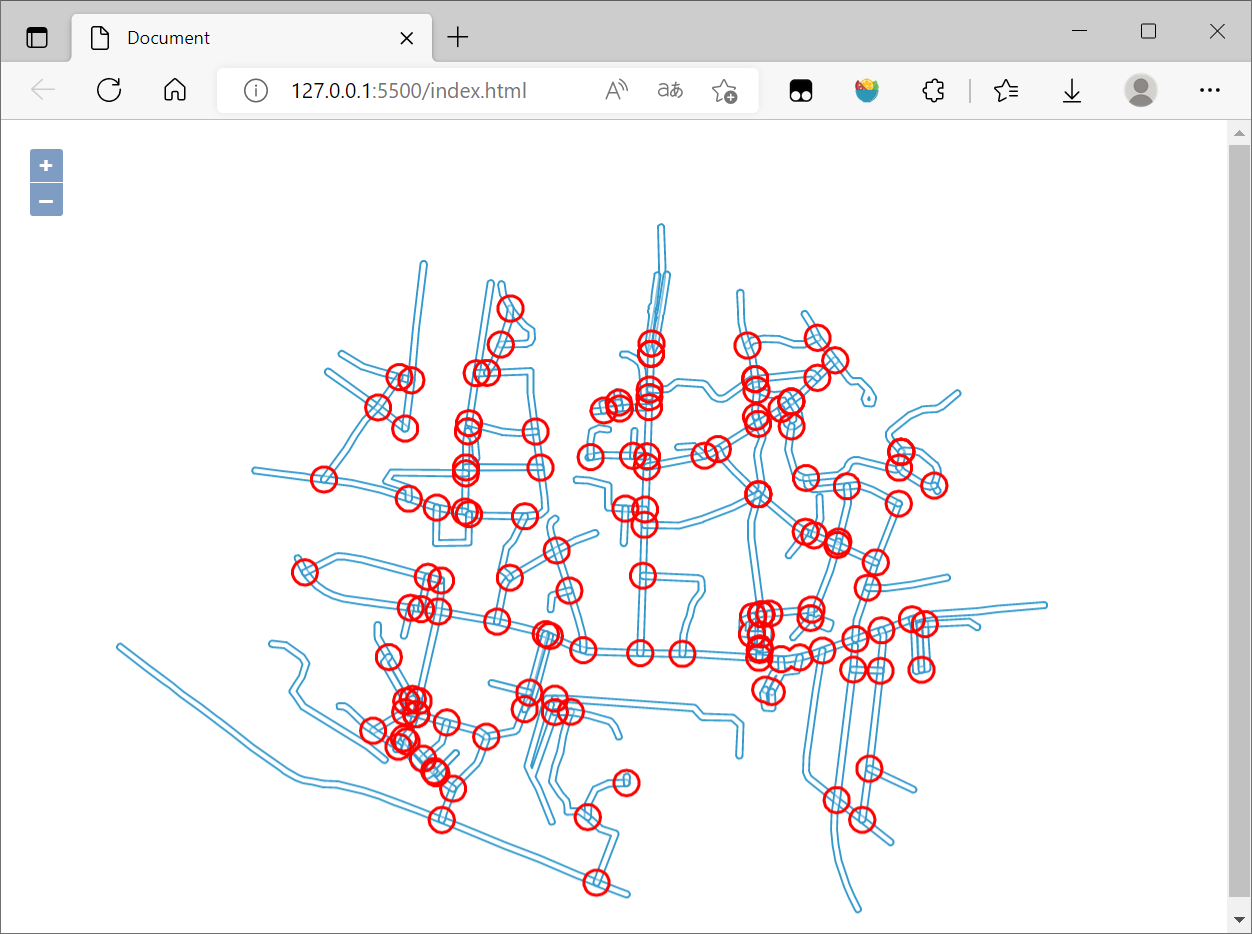
将相交运算与缓冲区操作结合在一起使用OpenLayers进行可视化,全部代码如下:
<!DOCTYPE html>

<html lang="en">

<head>

    <meta charset="UTF-8">

    <meta http-equiv="X-UA-Compatible" content="IE=edge">

    <meta name="viewport" content="width=device-width, initial-scale=1.0">

    <title>Document</title>

    <!-- openlayers cdn -->

    <script src="https://cdn.jsdelivr.net/gh/openlayers/openlayers.github.io@master/en/v6.14.1/build/ol.js"></script>

    <link rel="stylesheet"

        href="https://cdn.jsdelivr.net/gh/openlayers/openlayers.github.io@master/en/v6.14.1/css/ol.css">

    <!-- JSTS cdn -->

    <script src="https://unpkg.com/jsts@2.3.0/dist/jsts.min.js"></script>

    <!-- jQuery cdn -->

    <script src="https://code.jquery.com/jquery-3.3.1.min.js"

        integrity="sha256-FgpCb/KJQlLNfOu91ta32o/NMZxltwRo8QtmkMRdAu8=" crossorigin="anonymous"></script>

    <style>

        html,

        body,

        #map {

            height: 100%;

        }

    </style>

</head>

<body>

    <div id="map"></div>

    <script>

        const pointsSource = new ol.source.Vector();

        const linesSource = new ol.source.Vector();

        var jstsgeoarr = [];

        var jstsPoints = [];

        $.ajax({

            url: 'https://openlayers.org/en/latest/examples/data/geojson/roads-seoul.geojson',

            dataType: 'json',

            success: function (data) {

                // console.log(data)

                var features = new ol.format.GeoJSON().readFeatures(data, {

                    featureProjection: 'EPSG:3857'

                });

                const parser = new jsts.io.OL3Parser();

                parser.inject(

                    ol.geom.Point,

                    ol.geom.LineString,

                    ol.geom.LinearRing,

                    ol.geom.Polygon,

                    ol.geom.MultiPoint,

                    ol.geom.MultiLineString,

                    ol.geom.MultiPolygon

                );

                for (let i = 0; i < features.length; i++) {

                    const feature = features[i];

                    // convert the OpenLayers geometry to a JSTS geometry

                    const jstsGeom = parser.read(feature.getGeometry());

                    // create a buffer of 40 meters around each line

                    const buffered = jstsGeom.buffer(10);

                    // const length = jstsGeom.length();

                    jstsgeoarr.push(jstsGeom)

                    // convert back from JSTS and replace the geometry on the feature

                    feature.setGeometry(parser.write(buffered));

                }

                for (let index = 0; index < jstsgeoarr.length; index++) {

                    for (let index2 = index + 1; index2 < jstsgeoarr.length; index2++) {

                        if (jstsgeoarr[index].intersection(jstsgeoarr[index2]).toText() != 'LINESTRING EMPTY') {

                            point = jstsgeoarr[index].intersection(jstsgeoarr[index2])

                            jstsPoints.push(point)

                        }

                    }

                }

                var intersectionfeatures = [];

                for (let i = 0; i < jstsPoints.length; i++) {

                    const jstsPoint = jstsPoints[i];

                    const buffered = jstsPoint.buffer(40);

                    intersectionfeature = new ol.format.WKT().readFeatures(buffered.toText());

                    pointsSource.addFeatures(intersectionfeature)

                }

                linesSource.addFeatures(features)

                var linesVector = new ol.layer.Vector({

                    source: linesSource,

                });

                var pointsVector = new ol.layer.Vector({

                    source: pointsSource,

                    style: new ol.style.Style({

                        stroke: new ol.style.Stroke({

                            color: '#ff0000',

                            width: 2

                        })

                    })

                });

                // map.addLayer(vector);

                var map = new ol.Map({

                    target: 'map',

                    layers: [

                        // new ol.layer.Tile({

                        //     source: new ol.source.OSM()

                        // }),

                        linesVector,

                        pointsVector

                    ],

                    view: new ol.View({

                        center: ol.proj.fromLonLat([126.979293, 37.528787]),

                        zoom: 15

                    })

                });

            }

        });

    </script>

</body>

</html>
最后在浏览器查看:
3. 参考资料
[1]空间运算—ArcMap | 文档 (arcgis.com)
[2]JTS Java空间几何计算、距离、最近点、subLine等 稳健的一比,持续更新中_lakernote的博客-CSDN博客_java jts
[3]JSTS Integration (openlayers.org)
[4]GIS算法:8_JavaScript拓扑套件turf - 知乎 (zhihu.com)
[5]JTS基本概念和使用_runing9的博客-CSDN博客_jts
[6]OpenLayers v6.14.1 API - Class: WKT
[7]OpenLayers结合JSTS实现空间扩展 - 朱凤丽 (zhufengli.com)
[8]JTS Java空间几何计算、距离、最近点、subLine等 稳健的一比,持续更新中_lakernote的博客-CSDN博客_java jts
[9]JSTS demonstration (bjornharrtell.github.io)
OpenLayers结合JSTS实现空间运算的更多相关文章
- (转)R空间数据处理与可视化
前言 很多朋友说在R里没法使用高德地图,这里给出一个基于leaflet包的解决方法. library(leaflet) # 添加高德地图 m <- leaflet() %>% addTil ...
- MySQL中的GIS几何函数和空间分析函数
MySQL空间扩展不仅提供了空间数据的存储能力,而且还具备一些空间运算能力,这些功能通过MySQL内建的几何函数实现.最简单的几何函数昨天已经有所涉及,也就是转换WTK的GEOMFROMTEXT和AS ...
- OpenGIS 介绍
转自:http://www.blogjava.net/sinoly/archive/2007/09/25/148002.html 值此FOSS4G大会即将召开之日,最近我会在Blog上依次介绍一些Op ...
- GIS应用及OpenGIS介绍
转自:http://blog.csdn.net/cdl2008sky/article/details/7266680 GIS的三大应用第一类是政府应用,“电子政务” 是当今政府加强信息化建设的新方向, ...
- OpenGIS 介绍(转)
值此FOSS4G大会即将召开之日,最近我会在Blog上依次介绍一些OpenGIS标准.架构及用于实现的软件.一方面给初涉此行的朋友一个快速入门的概览,另一方面也是对我接触OpenGIS近一年来的总结. ...
- Gamma校正与线性空间
基础知识部分 为了方便理解,首先会对(Luminance)的相关概念做一个简单介绍.如果已经了解就跳到后面吧. 我们用Radiant energy(辐射能量)来描述光照的能量,单位是焦耳(J),因为光 ...
- 转自一个CG大神的文章
<如何学好游戏3D引擎编程>此篇文章献给那些为了游戏编程不怕困难的热血青年,它的神秘要我永远不间断的去挑战自我,超越自我,这样才能攀登到游戏技术的最高峰 ——阿哲VS自 ...
- 转载:[转]如何学好3D游戏引擎编程
[转]如何学好3D游戏引擎编程 Albert 本帖被 gamengines 从 游戏引擎(Game Engine) 此文为转载,但是值得一看. 此篇文章献给那些为了游戏编程不怕困难的热血青年,它的 ...
- PRML读书会第七章 Sparse Kernel Machines(支持向量机, support vector machine ,KKT条件,RVM)
主讲人 网神 (新浪微博: @豆角茄子麻酱凉面) 网神(66707180) 18:59:22 大家好,今天一起交流下PRML第7章.第六章核函数里提到,有一类机器学习算法,不是对参数做点估计或求其分 ...
- ArcGIS 帮助(10.2、10.2.1 和 10.2.2)收集
帮助首页 [Oracle基础] 快速浏览:Oracle 地理数据库 什么是 Oracle Spatial? 设置到 Oracle 的连接 存储在 Oracle 地理数据库中的系统表 结合企业级地理数据 ...
随机推荐
- 【py模板】missingno画缺失直观图,matplotlib和sns画箱线图
import missingno as msn import pandas as pd train = pd.read_csv('cupHaveHead1.csv') msn.matrix(train ...
- JavaScript:操作符:赋值运算符和空赋值(??=)
=号是赋值运算,即返回符号右边的结果,同时将结果赋值给符号左边的变量,考虑下面代码的运行结果: 赋值运算b = 1 + 1,做了两件事,先返回符号右边的结果,即2,这个2将参与a = 1 + 2的计算 ...
- 聊聊Cookie、Session、Token 背后的故事
摘要:Cookie.Session.Token 这三者是不同发展阶段的产物 本文分享自华为云社区<Cookie.Session.Token 背后的故事>,作者: 龙哥手记. 1. 网站交互 ...
- ABC193F Engines
简要题意 给出 \(n\) 个向量,求其子集的和的最大模长. \(1 \leq n \leq 100\) 思路 先说结论:选出的几个向量,一定是极角排序后的某一段(环形)区间. 这个不难感性理解,比如 ...
- 真正“搞”懂HTTP协议08之重定向
我们知道,用来传输页面的协议就是HTTP协议,全称是超文本传输协议,而浏览器展示的页面则是用HTML编写的,HTML的全称则是超文本标记语言.你看,都叫做超文本,我在第一篇文章的时候也详细的聊过,超文 ...
- dfs 返回值用bool相对void会快一点
力扣 剑指 Offer 12. 矩阵中的路径 超时代码 dfs返回值是void,用类内的全局变量flag表示找到或没找到. class Solution { public: bool flag; in ...
- Typora 最后一个免费版本
介绍 Typora 是一款轻量级的 Markdown 编辑器,其最为出众的特点是: 所见即所得. Typora 于2021年11月23日推出了第一个正式版,并转为收费.不过价格也算合理,89元/3台设 ...
- DQL_分组查询-DQL_分页查询
DQL_分组查询 分组查询: 1. 语法 : group by 分组字段 ; 2.注意 : 1. 分组之后查询的字段 : 分组字段 , 聚合函数 2.where 和 having 的区别 ? 1. w ...
- 【随笔记】Android 命令行联网、更新DNS、同步网络时间
一.命令行联网 # 启用网卡 busybox ifconfig wlan0 up # 启用服务 wpa_supplicant -iwlan0 -Dnl80211 -c/system/etc/wifi/ ...
- vue学习笔记(一) ---- vue指令(过滤器)
一.什么是过滤器 官方文档:https://cn.vuejs.org/v2/guide/filters.html 二.过滤器的使用 没有使用过滤器之前: <div id="app&qu ...