
Vue学习之--------深入理解Vuex之getters、mapState、mapGetters(2022/9/3)
这一篇博客的内容是在上一篇博客的基础上进行:深入理解Vuex、原理详解、实战应用
@
1、getters的使用
1.1 概念
当state中的数据需要经过加工后再使用时,可以使用getters加工。
1.2 用法
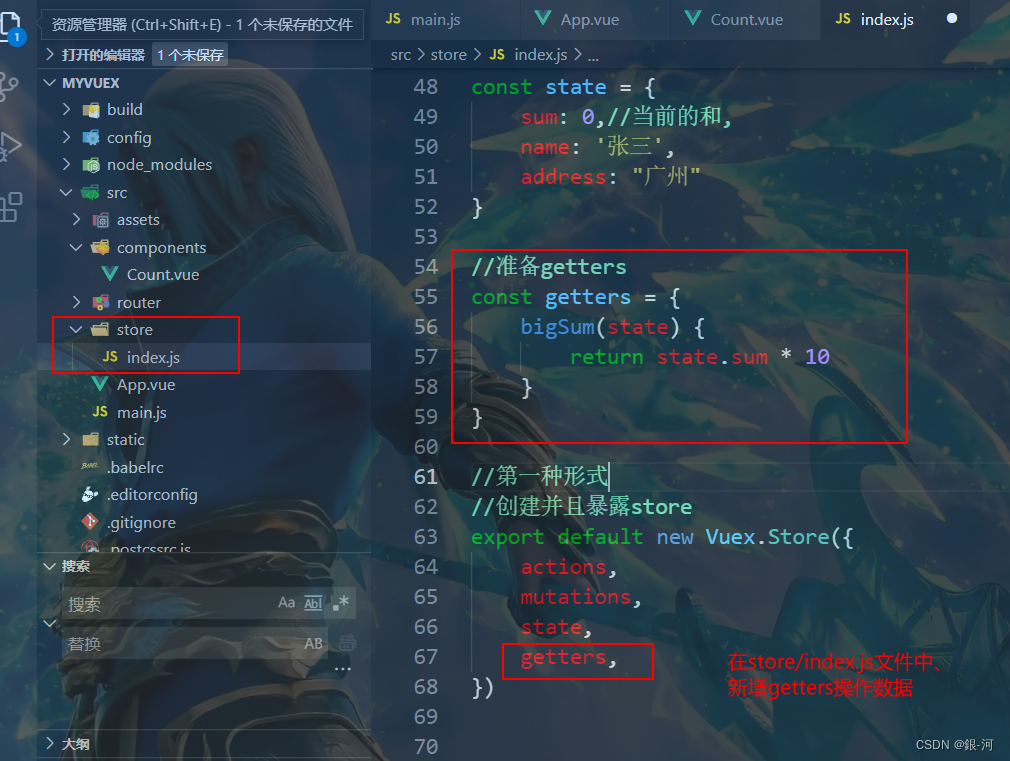
在store.js中追加getters配置
   const getters = {

   	bigSum(state){

   		return state.sum * 10

   	}

   }

   //创建并暴露store

   export default new Vuex.Store({

   	......

   	getters

   })
1.3 如何读取数据
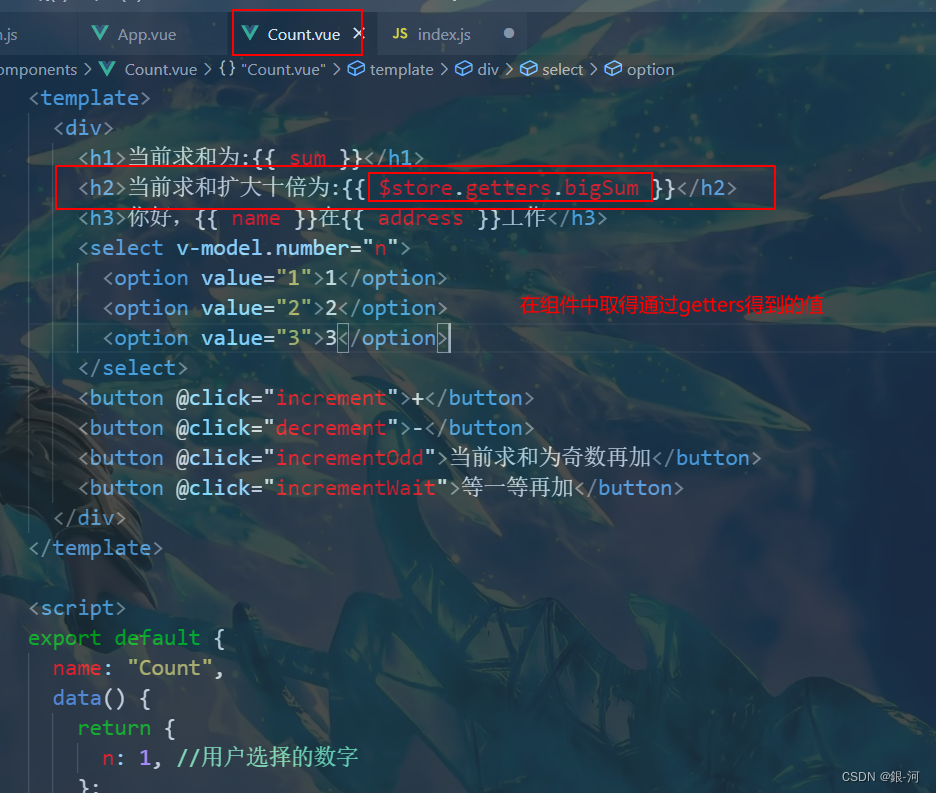
组件中读取数据:$store.getters.bigSum
2、getters在项目中的实际应用
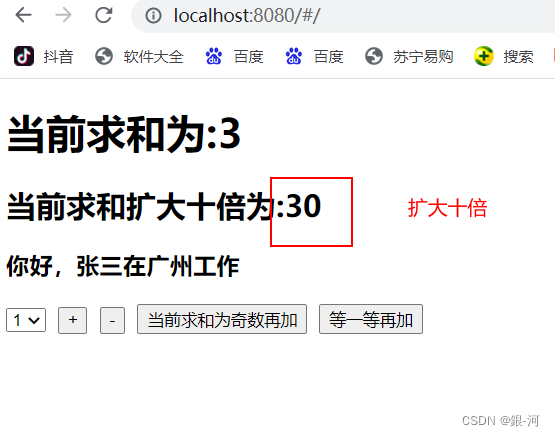
3、测试效果
4、mapState和mapGetters的引出
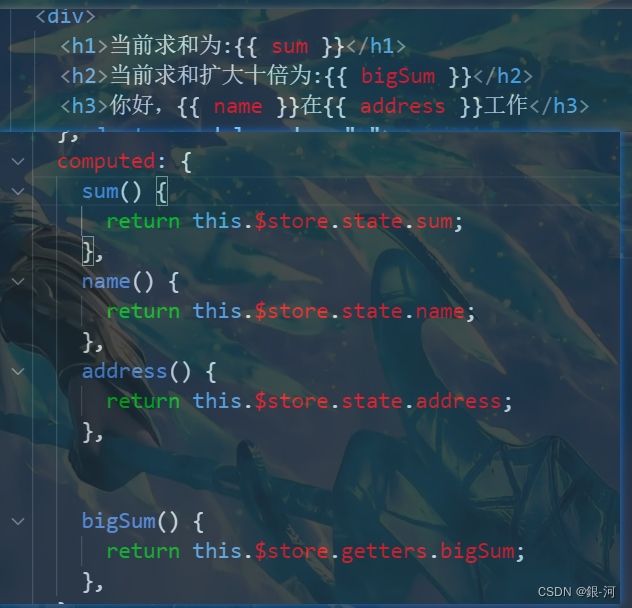
4.1 先看之前在组件中取值的方法
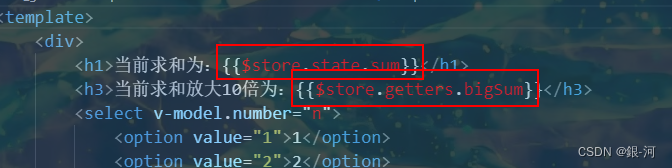
4.2 如何优化插值表达式中取值的操作呢?
可以在computed中进行设置,这样插值表达式的内容就可以简写
5、四个map方法的介绍和使用
5.1、mapState方法
用于帮助我们映射state中的数据为计算属性
- 用法:
   computed: {

       //借助mapState生成计算属性:sum、school、subject(对象写法)

        ...mapState({sum:'sum',school:'school',subject:'subject'}),

       //借助mapState生成计算属性:sum、school、subject(数组写法)

       ...mapState(['sum','school','subject']),

   },
5.2、mapGetters方法
用于帮助我们映射getters中的数据为计算属性
- 用法:
   computed: {

       //借助mapGetters生成计算属性:bigSum(对象写法)

       ...mapGetters({bigSum:'bigSum'}),

       //借助mapGetters生成计算属性:bigSum(数组写法)

       ...mapGetters(['bigSum'])

   },
5.3 mapActions方法
用于帮助我们生成与actions对话的方法,即:包含$store.dispatch(xxx)的函数
   methods:{

       //靠mapActions生成:incrementOdd、incrementWait(对象形式)

       ...mapActions({incrementOdd:'jiaOdd',incrementWait:'jiaWait'})

       //靠mapActions生成:incrementOdd、incrementWait(数组形式)

       ...mapActions(['jiaOdd','jiaWait'])

   }
5.4 mapMutations方法
用于帮助我们生成与mutations对话的方法,即:包含$store.commit(xxx)的函数
- 用法
   methods:{

       //靠mapActions生成:increment、decrement(对象形式)

       ...mapMutations({increment:'JIA',decrement:'JIAN'}),

       //靠mapMutations生成:JIA、JIAN(对象形式)

       ...mapMutations(['JIA','JIAN']),

   }
备注:mapActions与mapMutations使用时,若需要传递参数需要:在模板中绑定事件时传递好参数,否则参数是事件对象。
6、在项目中的实际应用
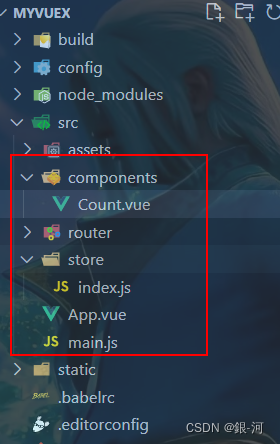
6.1 项目结构
6.2 store/index.js
//该文件用于创建Vuex中最为核心的store

//引入Vuex

import Vuex from 'vuex'

//引入Vue

import Vue from 'vue'

//使用插件

Vue.use(Vuex)

//准备action-- 用于响应组件中的动作

const actions = {

    jia(context, value) {

        context.commit('JIA', value)

    },

    jiaOdd(context, value) {

        if (context.state.sum % 2) {

            context.commit('JIA', value)

        }

    },

    jiaWait(context, value) {

        setTimeout(() => {

            context.commit('JIA', value)

        }, 500);

    }

}

//准备mutations-- 用于操作数据(state)

const mutations = {

    JIA(state, value) {

        state.sum += value

    },

    JIAN(state, value) {

        state.sum -= value

    }

}

//准备state--用于存储数据

const state = {

    sum: 0,//当前的和,

    name: '张三',

    address: "广州"

}

//准备getters

const getters = {

    bigSum(state) {

        return state.sum * 10

    }

}

//第一种形式

//创建并且暴露store

export default new Vuex.Store({

    actions,

    mutations,

    state,

    getters,

})

//第二种形式

// //创建store

// const store = new Vuex.Store({

//     actions,

//     mutations,

//     state,

// })

// //导出store

// export default store
6.3 Count.vue
实际上就是简化代码的操作、之前原始写法保留、比较参考
<template>

  <div>

    <h1>当前求和为:{{ sum }}</h1>

    <h2>当前求和扩大十倍为:{{ bigSum }}</h2>

    <h3>你好,{{ name }}在{{ address }}工作</h3>

    <select v-model.number="n">

      <option value="1">1</option>

      <option value="2">2</option>

      <option value="3">3</option>

    </select>

    <button @click="increment(n)">+</button>

    <button @click="decrement(n)">-</button>

    <button @click="incrementOdd(n)">当前求和为奇数再加</button>

    <button @click="incrementWait(n)">等一等再加</button>

  </div>

</template>

<script>

import { mapState, mapGetters, mapActions, mapMutations } from "vuex";

export default {

  name: "Count",

  data() {

    return {

      n: 1, //用户选择的数字

    };

  },

  methods: {

    /* 自己亲自写的方法

     decrement() {

      this.$store.commit("JIAN", this.n);

    },

    increment() {

      this.$store.commit("jia", this.n);

    },

    */

    //借助mapMutations生成对应的方法,方法中会调用commit去联系mutations(对象写法)

    ...mapMutations({ increment: "JIA", decrement: "JIAN" }),

    //借助mapMutations生成对应的方法,方法中会调用commit去联系mutations(数组写法)。方法的调用要改写为JIA(n)

    // ...mapMutations(['JIA','JIAN

    /*

    incrementOdd() {

      this.$store.dispatch("jiaodd", this.n);

    },

    incrementWait() {

      this.$store.dispatch("jiaWait", this.n);

    },

  */

    //借助mapActions生成对应的方法,方法中会调用dispatch去联系actions(对象写法)

    ...mapActions({ incrementOdd: "jiaOdd", incrementWait: "jiaWait" }),

    //借助mapActions生成对应的方法,方法中会调用dispatch去联系actions(数组写法)

    // ...mapActions(['jiaOdd','jiaWait'])

  },

  computed: {

    /* 自己写计算属性

    sum() {

      return this.$store.state.sum;

    },

    name() {

      return this.$store.state.name;

    },

    address() {

      return this.$store.state.address;

    },

    */

    //  借助mapState生成计算属性,从state中读取数据(对象写法)

    // ...mapState({he:'sum',xingming:'name',dizhi:'address'}),

    //数组写法

    ...mapState(["sum", "name", "address"]),

    // bigSum() {

    //   return this.$store.getters.bigSum;

    // },

    //借助mapGatters生成计算属性,从getters中读取数据,(对象写法)

    // ...mapGetters({bigSum:'bigSum'})

    //数组写法

    ...mapGetters(["bigSum"]),

  },

};

</script>

<style lang="css">

button {

  margin-left: 5px;

}

</style>
6.4 App.vue
<template>

	<div>

		<Count/>

	</div>

</template>

<script>

	import Count from './components/Count'

	export default {

		name:'App',

		components:{Count},

	}

</script>
6.5 main.js
// The Vue build version to load with the `import` command

// (runtime-only or standalone) has been set in webpack.base.conf with an alias.

import Vue from 'vue'

import App from './App'

import router from './router'

//引入store

import store from './store/index.js'

Vue.config.productionTip = false

/* eslint-disable no-new */

new Vue({

  el: '#app',

  router,

  store,

  render: h => h(App),

  beforenCreate() {

    Vue.prototype.$bus = this

  }

})
7、测试效果(视频展示)
[video(video-E7AS1bh7-1662199116703)(type-csdn)(url-https://live.csdn.net/v/embed/236077)(image-https://video-community.csdnimg.cn/vod-84deb4/88cc32c2509c40ce8879a9fb074824dd/snapshots/f0779060781c49858d2222148b714ec5-00003.jpg?auth_key=4815643083-0-0-743d2b21cb5e7a8171735f62f6e37491)(title-vuex)]

Vue学习之--------深入理解Vuex之getters、mapState、mapGetters(2022/9/3)的更多相关文章
- Vue学习之--------深入理解Vuex之模块化编码(2022/9/4)
在以下文章的基础上 1.深入理解Vuex.原理详解.实战应用:https://blog.csdn.net/weixin_43304253/article/details/126651368 2.深入理 ...
- Vue学习之--------深入理解Vuex之多组件共享数据(2022/9/4)
在上篇文章的基础上:Vue学习之--------深入理解Vuex之getters.mapState.mapGetters 1.在state中新增用户数组 2.新增Person.vue组件 提示:这里使 ...
- Vue学习之--------深入理解Vuex、原理详解、实战应用(2022/9/1)
@ 目录 1.概念 2.何时使用? 3.搭建vuex环境 3.1 创建文件:src/store/index.js 3.2 在main.js中创建vm时传入store配置项 4.基本使用 4.1.初始化 ...
- vue学习【四】vuex快速入门
大家好,我是一叶,今天我们继续踩坑.今天的内容是vuex快速入门,页面传值不多的话,不建议vuex,直接props进行父子间传值就行,使用vuex就显得比较臃肿. 我们先预览一下效果,如图1所示. 图 ...
- 理解Vuex的辅助函数mapState, mapActions, mapMutations用法
在讲解这些属性之前,假如我们项目的目录的结构如下: ### 目录结构如下: demo1 # 工程名 | |--- dist # 打包后生成的目录文件 | |--- node_modules # 所有的 ...
- [转]理解Vuex的辅助函数mapState, mapActions, mapMutations用法
原文地址:https://www.cnblogs.com/tugenhua0707/p/9794423.html 在讲解这些属性之前,假如我们项目的目录的结构如下: ### 目录结构如下: demo1 ...
- vuex 的使用 mapState, mapGetters, mapMutations, mapActions
state => 基本数据getters => 从基本数据派生的数据mutations => 提交更改数据的方法,同步!actions => 像一个装饰器,包裹mutation ...
- Vue学习系列(四)——理解生命周期和钩子
前言 在上一篇中,我们对平时进行vue开发中遇到的常用指令进行归类说明讲解,大概已经学会了怎么去实现数据绑定,以及实现动态的实现数据展示功能,运用指令,可以更好更快的进行开发.而在这一篇中,我们将通过 ...
- vue学习笔记(五):对于vuex的理解 + 简单实例
优点:通过定义和隔离状态管理中的各种概念并强制遵守一定的规则,我们的代码将会变得更结构化且易维护.使用vuex来引入外部状态管理,将业务逻辑切分到组件外,可以避免重复的从服务端抓取数据. 详情请参考官 ...
随机推荐
- while,do while,for循环语句
循环语句 循环包含三大语句-----while语句 do while语句 for语句 循环三要素 初始值(初始的变量值) 迭代量(基于初始值的改变) 条件(基于初始值的判断) while语句 var ...
- HTTP配置
目录 HTTP配置 虚拟主机 相同IP不同端口 不同IP相同端口 相同IP相同端口不同域名 Linux修改hosts文件 Windows修改hosts文件 配置https HTTP配置 虚拟主机 虚拟 ...
- 【安全通告】关于 DolphinScheduler 漏洞情况的说明
点击上方 蓝字关注我们 [安全通报] [影响程度:低] Apache DolphinScheduler 社区邮件列表最近通告了 1 个漏洞,考虑到有很多用户并未订阅此邮件列表,我们特地在此进行情况说明 ...
- 深入分析FragmentPagerAdapter和FragmentStatePagerAdapter
最近遇到比较奇怪的bug,TableLayout+ViewPager实现点击顶部tab切换viewpager视图.但是在Viewpager设置dapter时,最开始设置的是FragmentPagerA ...
- SpingBoot解析Excel数据
前言 在最近的工作中,由于导入模板除了前三列(姓名.手机号.实发工资)固定:其余的列不固定,并且可以做到两个模板的数据都能够正常入库进行对应业务处理. 一.数据模板数据展示: (1)模板一 (2)模板 ...
- C#.NET ORM FreeSql 读取使用 US7ASCII 的 Oracle 数据库中文显示乱码问题
前言 关于 Oracle US7ASCII 中文乱码的问题,Ado.Net 和 Odbc 无法解决.包括最新的.Net Core..NET6..NET7 都无法解决这个问题. FreeSql 对 Or ...
- OpenCV CMake VSCode Windows 平台下运行配置及其解决方案
前言 最近在搞 计算机图形学相关的东西,有个 demo 用到了 opencv,找了 google 一圈,发现国内都没有比较好的配置和解决的办法,要不就是几年前的教程,最近正好踩坑完,其中经历了自己编译 ...
- 第九篇:vue条件语句
好家伙,终于有个简单了的 v-if 条件判断 <div id="app"> <p v-if="seen">现在你看到我了</ ...
- 第七章 完成kubernetes集群部署并验证
在其中一运算个节点上操作就行 创建nginx资源配置清单的yaml文件 [root@hdss7-21 ~]# vim /opt/kubernetes/conf/nginx-ds.yaml apiVer ...
- linux下安装Elasticsearch(单机版和集群版)
一.linux下安装Elasticsearch(单机) 1.软件下载 下载地址:https://www.elastic.co/cn/downloads/past-releases/elasticsea ...