
elasticsearchTemplate that could not be found
***************************
APPLICATION FAILED TO START
***************************
Description:
Method mvcConversionService in org.springframework.boot.autoconfigure.web.servlet.WebMvcAutoConfiguration$EnableWebMvcConfiguration required a bean named 'elasticsearchTemplate' that could not be found.
Action:
Consider defining a bean named 'elasticsearchTemplate' in your configuration.
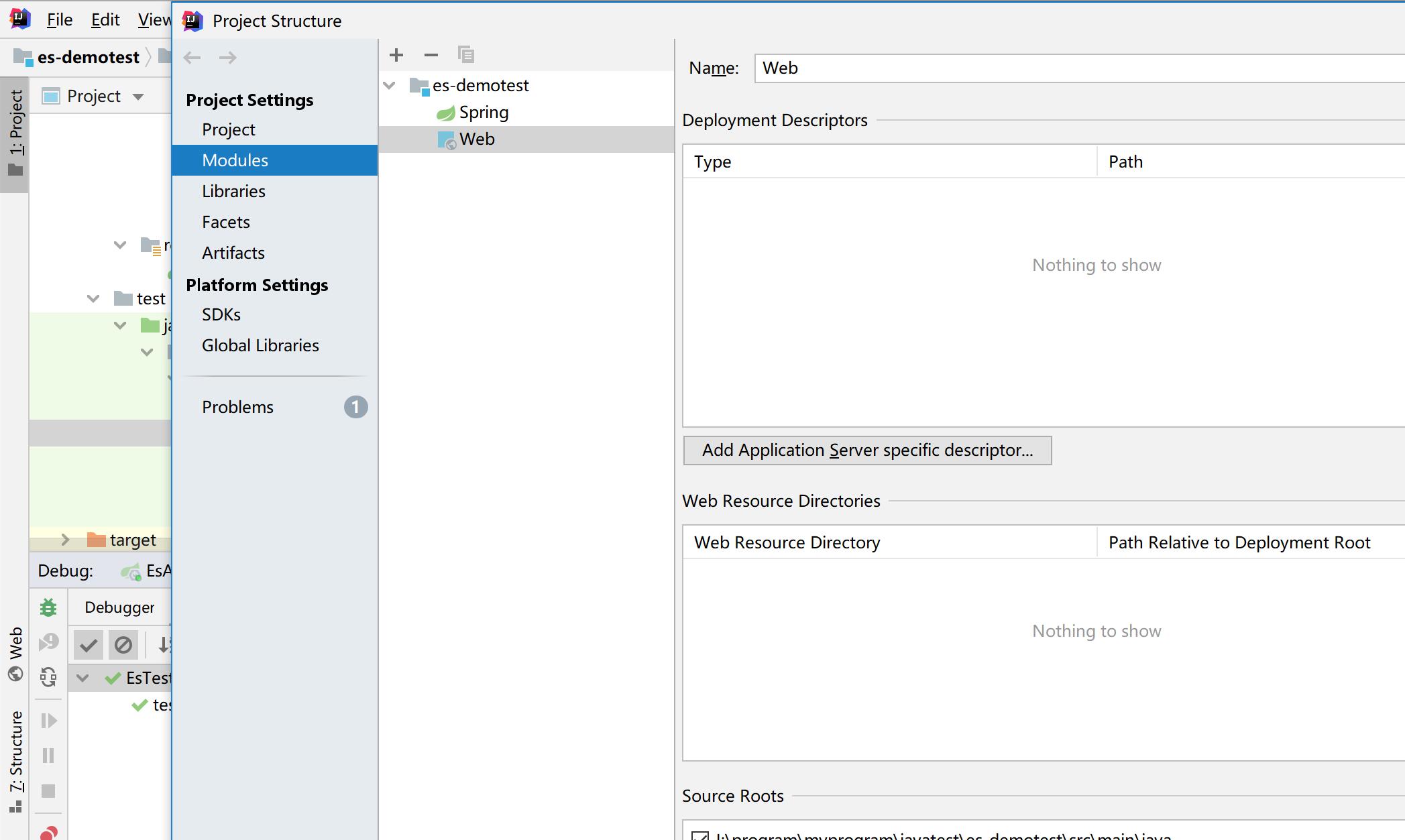
查找原因 (原来以为是'elasticsearch的版本问题,后面发现了项目的问题)
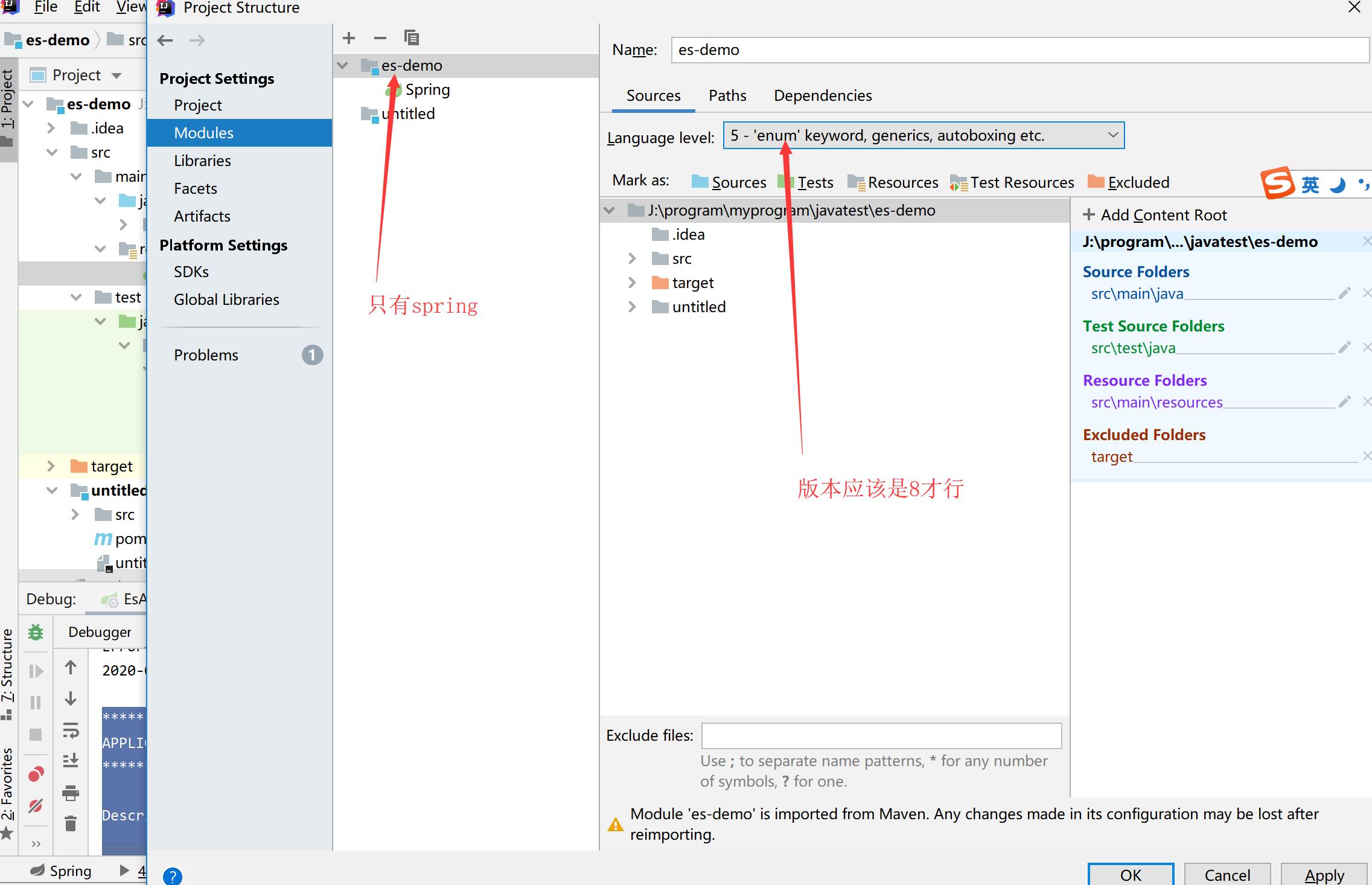
一般创建的maven 产生的
application.yml的配置文件
server:

  port: 19006

spring:

  application:

    name: essearch-service

  data:

    elasticsearch:

      cluster-name: elasticsearch

      cluster-nodes: 127.0.0.1:9300

#      local: false

      repositories:

        enabled: true
package com.leyou.es.pojo;

import lombok.Data;

import org.springframework.data.annotation.Id;

import org.springframework.data.elasticsearch.annotations.Document;

import org.springframework.data.elasticsearch.annotations.Field;

import org.springframework.data.elasticsearch.annotations.FieldType;

//import org.springframework.data.elasticsearch.annotations.Document;

//import org.springframework.data.elasticsearch.annotations.Field;

//import org.springframework.data.elasticsearch.annotations.FieldType;

/**

 * @author :cza

 * @date :2020/5/12 12:21

 * @description :

 * @modyified By:

 */

@Data

@Document(indexName = "heima3",type = "item",shards = 1,replicas = 0)

public class Item {

    @Id

    @Field(type= FieldType.Integer)

    private Integer id;

    @Field(type= FieldType.Text,analyzer = "ik_smart")

    private String title; //标题

    @Field(type= FieldType.Keyword)

    private String category; //分类

    @Field(type= FieldType.Keyword)

    private String brand; //品牌

    @Field(type= FieldType.Double)

    private Double price; //价格

    public Item(Integer id, String title, String category, String brand, Double price, String images) {

        this.id = id;

        this.title = title;

        this.category = category;

        this.brand = brand;

        this.price = price;

        this.images = images;

    }

    public Item() {

    }

    @Field(type= FieldType.Keyword,index = false)

    private  String images; //图片地址

}
package com.leyou.es.repository;

import com.leyou.es.pojo.Item;

import org.springframework.data.elasticsearch.repository.ElasticsearchRepository;

import java.awt.print.Pageable;

import java.util.List;

/**

 * @author :cza

 * @date :2020/5/13 1:59

 * @description :

 * @modyified By:

 */

public interface ItemRepository extends ElasticsearchRepository<Item,Integer> {

//   List<Item> findByPriceBetween(Double begin, Double end);

//    List<Item> findBypNameOrPrice(String name, Integer price);

//    List<Item> findByName(String name, Pageable page);

}
package com.leyou.es;

import com.leyou.es.pojo.Item;

import org.elasticsearch.search.aggregations.AggregationBuilders;

import org.elasticsearch.search.aggregations.Aggregations;

import org.elasticsearch.search.aggregations.bucket.terms.StringTerms;

import org.junit.Test;

import org.junit.runner.RunWith;

import org.springframework.beans.factory.annotation.Autowired;

import org.springframework.boot.test.context.SpringBootTest;

import org.springframework.data.elasticsearch.core.ElasticsearchTemplate;

import org.springframework.data.elasticsearch.core.aggregation.AggregatedPage;

import org.springframework.data.elasticsearch.core.query.NativeSearchQueryBuilder;

import org.springframework.test.context.junit4.SpringRunner;

import java.util.List;

/**

 * @author :cza

 * @date :2020/5/12 12:29

 * @description :

 * @modyified By:

 */

@RunWith(SpringRunner.class)

@SpringBootTest

public class EsTest {

    @Autowired

    private ElasticsearchTemplate elasticsearchTemplate;

    //@Autowired

    //private ItemRepository itemRepository;

    //@Autowired

    //private ElasticsearchRestTemplate elasticsearchRestTemplate;

    @Test

    public  void testCreateIndex(){

        //创建索引库

        elasticsearchTemplate.createIndex(Item.class);

        //映射关系

        elasticsearchTemplate.putMapping(Item.class);

    /*  //创建索引库

        elasticsearchRestTemplate.createIndex(Item.class);

        //映射关系

        elasticsearchRestTemplate.putMapping(Item.class);*/

    }

//    /**

//     * 插上全部

//     */

//      @Test

//    public  void insertIndexAll(){

//          List<Item> list=new ArrayList<>();

//          list.add(new Item(Integer.valueOf("1"),"坚果手机","手机","锤子",2699.00,"http://www.baidu.com"));

//          list.add(new Item(Integer.valueOf("2"),"华为Mate10手机","手机","华为",3699.00,"http://www.baidu.com"));

//          list.add(new Item(Integer.valueOf("3"),"小米Mi10手机","手机","小米",3099.00,"http://www.baidu.com"));

//          list.add(new Item(Integer.valueOf("3"),"小米Mi8手机","手机","小米",2399.00,"http://www.baidu.com"));

//

//          itemRepository.saveAll(list);

//    }

//

//    /**

//     * 查询所有

//     */

//    @Test

//    public  void testFind(){

//        Iterable<Item> all = itemRepository.findAll();

//        for (Item item :all){

//            System.out.println("item= "+item);

//        }

//    }

//

//    /**

//     * 根据价格查询

//     */

//    @Test

//    public  void testFindByPrice(){

//        Iterable<Item> all = itemRepository.findByPriceBetween(2000d,3500d);

//        for (Item item :all){

//            System.out.println("item= "+item);

//        }

//    }

//    @Test

//    public void search(){

//        //构建查询条件

//        NativeSearchQueryBuilder queryBuilder=new NativeSearchQueryBuilder();

//        //结果过滤

//        queryBuilder.withSourceFilter(new FetchSourceFilter(new String[]{"id","title","price"},null));

//        //添加基本分词查询

//        queryBuilder.withQuery(QueryBuilders.matchQuery("title","小米"));

//        //排序

//        queryBuilder.withSort(SortBuilders.fieldSort("price").order(SortOrder.DESC));

//        //分页

//        queryBuilder.withPageable( PageRequest.of(1,20));

//        Page<Item> items = this.itemRepository.search(queryBuilder.build());

//        long totalcount = items.getTotalElements();

//        System.out.println("totalcount="+totalcount);

//        for (Item item:items){

//            System.out.println(item);

//        }

//        List<Item> list = items.getContent();

//        for (Item item :list){

//            System.out.println("item="+list);

//        }

//    }

    @Test

    public  void testAgg(){

        NativeSearchQueryBuilder queryBuilder=new NativeSearchQueryBuilder();

        String aggName="popularBrand";

        queryBuilder.addAggregation(AggregationBuilders.terms(aggName).field("brand"));

        //查询并返回聚合结果

        AggregatedPage<Item> result = elasticsearchTemplate.queryForPage(queryBuilder.build(), Item.class);

        //解析聚合

        Aggregations aggs = result.getAggregations();

        //获取指定名称的聚合

        StringTerms terms = aggs.get(aggName);

        List<StringTerms.Bucket> buckets = terms.getBuckets();

        for (StringTerms.Bucket bucket:buckets){

            System.out.println("bucket.getKeyAsString="+bucket.getKeyAsString());

            System.out.println("bucket.getDocCount="+bucket.getDocCount());

        }

    }

}
  <parent>

        <groupId>org.springframework.boot</groupId>

        <artifactId>spring-boot-starter-parent</artifactId>

        <version>2.0.4.RELEASE</version>

        <relativePath></relativePath>

    </parent>

    <properties>

        <project.build.sourceEncoding>UTF-8</project.build.sourceEncoding>

        <project.reporting.outputEncoding>UTF-8</project.reporting.outputEncoding>

        <java.version>1.8</java.version>

        <spring-cloud.version>Finchley.SR1</spring-cloud.version>

        <mapper.starter.version>2.0.3</mapper.starter.version>

    </properties>

    <dependencyManagement>

        <dependencies>

            <!--springcloud-->

            <dependency>

                <groupId>org.springframework.cloud</groupId>

                <artifactId>spring-cloud-dependencies</artifactId>

                <version>${spring-cloud.version}</version>

                <type>pom</type>

                <scope>import</scope>

            </dependency>

            <!--通用Mapper启动器-->

            <dependency>

                <groupId>tk.mybatis</groupId>

                <artifactId>mapper-spring-boot-starter</artifactId>

                <version>${mapper.starter.version}</version>

            </dependency>

            <!--分页助手启动器-->

            <dependency>

                <groupId>com.github.pageHelper</groupId>

                <artifactId>pagehelper-spring-boot-starter</artifactId>

                <version>${pageHelper.starter.version}</version>

            </dependency>

            <!--mysql驱动-->

            <dependency>

                <groupId>mysql</groupId>

                <artifactId>mysql-connector-java</artifactId>

                <version>${mysql.version}</version>

            </dependency>

            <!--FASTDFS客户端-->

            <dependency>

                <groupId>com.github.tobato</groupId>

                <artifactId>fastdfs-client</artifactId>

                <version>${fastDFS.client.version}</version>

            </dependency>

        </dependencies>

    </dependencyManagement>

    <dependencies>

        <dependency>

            <groupId>org.projectlombok</groupId>

            <artifactId>lombok</artifactId>

        </dependency>

        <dependency>

            <groupId>org.apache.commons</groupId>

            <artifactId>commons-lang3</artifactId>

            <version>3.4</version>

        </dependency>

        <dependency>

            <groupId>org.springframework.boot</groupId>

            <artifactId>spring-boot-starter-web</artifactId>

        </dependency>

        <dependency>

            <groupId>org.springframework.boot</groupId>

            <artifactId>spring-boot-starter-data-elasticsearch</artifactId>

        </dependency>

        <dependency>

            <groupId>org.springframework.boot</groupId>

            <artifactId>spring-boot-starter-test</artifactId>

            <scope>test</scope>

        </dependency>

        <dependency>

            <groupId>org.apache.tomcat.embed</groupId>

            <artifactId>tomcat-embed-core</artifactId>

        </dependency>

        <dependency>

            <groupId>org.springframework.boot</groupId>

            <artifactId>spring-boot-starter-logging</artifactId>

        </dependency>

        <dependency>

            <groupId>com.fasterxml.jackson.core</groupId>

            <artifactId>jackson-databind</artifactId>

        </dependency>

        <dependency>

            <groupId>org.springframework</groupId>

            <artifactId>spring-webmvc</artifactId>

            <!--       <version>5.0.6.RELEASE</version>-->

        </dependency>

    </dependencies>

    <build>

        <plugins>

            <plugin>

                <groupId>org.springframework.boot</groupId>

                <artifactId>spring-boot-maven-plugin</artifactId>

            </plugin>

        </plugins>

    </build>
es的版本下载
下载 elasticsearch 5.5.0 版本
https://artifacts.elastic.co/downloads/elasticsearch/elasticsearch-5.5.0.zip
elasticsearch-analysis-ik 5.5.0 版本
https://github.com/medcl/elasticsearch-analysis-ik/releases/download/v5.5.0/elasticsearch-analysis-ik-5.5.0.zip
查询elasticsearch-analysis-ik 版本,比如5.6.3
https://github.com/medcl/elasticsearch-analysis-ik/releases?after=v5.6.3
下载地址:https://files.cnblogs.com/files/zhian/es-demotest.zip
elasticsearchTemplate that could not be found的更多相关文章
- Spring ElasticsearchTemplate 经纬度按距离排序
es实体,用 @GeoPointField 注解,值为:中间逗号隔开,如 29.477000,119.278536(经度, 维度) @Document(indexName = "v_inte ...
- ElasticSearch 工具类封装(基于ElasticsearchTemplate)
1.抽象接口定义 public abstract class SearchQueryEngine<T> { @Autowired protected ElasticsearchTempla ...
- ElasticSearchRepository和ElasticSearchTemplate的使用
Spring-data-elasticsearch是Spring提供的操作ElasticSearch的数据层,封装了大量的基础操作,通过它可以很方便的操作ElasticSearch的数据. 版本说明 ...
- elasticsearchTemplate操作es
ElasticsearchTemplate是spring对java api的封装 maven依赖: <dependency> <groupId>org.springframew ...
- springboot-elasticsearch项目启动报错:'elasticsearchTemplate' that could not be found
解决: 将elasticsearch的相关配置加入到application.yml配置文件中就可以解决
- elasticsearch使用操作部分
本片文章记录了elasticsearch概念.特点.集群.插件.API使用方法. 1.elasticsearch的概念及特点.概念:elasticsearch是一个基于lucene的搜索服务器.luc ...
- elasticsearch spring 集成
elasticsearch spring 集成 项目清单 elasticsearch服务下载包括其中插件和分词 http://download.csdn.net/detail/u0142011 ...
- Spring Data Elasticsearch
项目清单 elasticsearch服务下载包括其中插件和分词 http://download.csdn.net/detail/u014201191/8809619 项目源码 资源文件 ...
- Spring Boot + Elasticsearch
spring data elasticsearch elasticsearch 2.0.0.RELEASE 2.2.0 1.4.0.M1 1.7.3 1.3.0.RELEASE 1.5.2 1.2.0 ...
随机推荐
- C# 一维数组如何快速实现数组元素的数据类型的转换?
一.场景假设 假设有一串字符串如下所示,字符串中的数字之间已用英文状态下的逗号隔开.要求用此字符串中的数字快速生成int类型的数组,且尽可能使用最少的代码量. string str = "1 ...
- [STL] vector 可变数组
点击查看代码 #include<iostream> #include<vector> using namespace std; int main() { // 初始化 a 为 ...
- 架构师必备:Redis的几种集群方案
结论 有以下几种Redis集群方案,先说结论: Redis cluster:应当优先考虑使用Redis cluster. codis:旧项目如果仍在使用codis,可继续使用,但也推荐迁移到Redis ...
- elasticSearch 7.6.1 入门及elasticSearch整合springboot
一.ElasticSearch概述 官网:https://www.elastic.co/cn/downloads/elasticsearch Elaticsearch,简称为es,es是一个开源的高扩 ...
- django-rest-framework 基础四 过滤、排序、分页、异常处理
django-rest-framework 基础四 过滤.排序.分页.异常处理 目录 django-rest-framework 基础四 过滤.排序.分页.异常处理 1. 过滤 1.1 内置过滤类 1 ...
- Spring 源码(12)Spring Bean 的创建过程(3)
继续上一篇Spring Bean的创建过程的解读,上一篇介绍了Spring在创建过程中doGetBean方法,在执行过程中会调用getSingleton方法并且设置一个lambda表达式,这个lamb ...
- 原创工具14Finger-全能web指纹识别与分享平台
14Finger 功能齐全的Web指纹扫描和分享平台,基于vue3+django前后端分离的web架构,并集成了长亭出品的rad爬虫的功能,内置了一万多条互联网开源的指纹信息. Github:http ...
- 服务器/网络/虚拟化/云平台自动化运维-ansible
ansible与netconf的对比 首先明确一个概念,netconf是协议,ansible是python编写的工具 netconf 使用YANG建模,XML进行数据填充,使用netconf协议进行传 ...
- Spring Boot 动态修改 log level
引入依赖 <dependency> <groupId>org.springframework.boot</groupId> <artifactId>sp ...
- Redis设计与实现3.1:主从复制
主从复制 这是<Redis设计与实现>系列的文章,系列导航:Redis设计与实现笔记 SLAVEOF 新旧复制功能 旧版复制功能 旧版复制功能的实现为 同步 和 命令传播: 当刚连上Mas ...