
.net core 使用 textSharp生成pdf
引入Nuget包
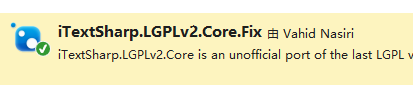
using iTextSharp.text;

using iTextSharp.text.pdf;

using System;

using System.IO;

namespace ConsoleApp1

{

    class Program

    {

        static void Main(string[] args)

        {

            //生成pdf

            Document document = new Document();

            var fileStream = File.Create("aa.pdf");

            PdfWriter pw = PdfWriter.GetInstance(document, fileStream);

            document.Open();

            //写入数据

            //注册字体

            string fontpath = "a.ttf";

            BaseFont customfont = BaseFont.CreateFont(fontpath, BaseFont.CP1252, BaseFont.EMBEDDED);

            var baseFont = new Font(customfont);

            baseFont.Color = new BaseColor(System.Drawing.Color.Red);

            baseFont.Size = 30;

            #region 头部

            PdfPTable tableLogo = new PdfPTable(3);

            tableLogo.DefaultCell.Border = Rectangle.NO_BORDER;

            tableLogo.DefaultCell.MinimumHeight = 40f;

            float[] headWidths = new float[] { 60f, 60f, 150f };

            tableLogo.SetWidths(headWidths);

            //logo

            var logo = iTextSharp.text.Image.GetInstance(File.ReadAllBytes("aa.png"));

            // logo.ScaleToFit(130 * 0.667f, 43 * 0.667f);

            var logoCell = new PdfPCell();

            logoCell.PaddingLeft = -1f;

            logoCell.MinimumHeight = 45f;

            logoCell.HorizontalAlignment = Element.ALIGN_LEFT;

            logoCell.Border = 0;

            logoCell.AddElement(logo);

            tableLogo.AddCell(logoCell);

            var sCell = new PdfPCell(new Paragraph("SmartFind", baseFont));

            sCell.Border = 0;

            sCell.PaddingLeft = 3f;

            sCell.PaddingBottom = 17f;

            sCell.MinimumHeight = 45f;

            sCell.HorizontalAlignment = Element.ALIGN_LEFT;

            sCell.VerticalAlignment = Element.ALIGN_BOTTOM;

            tableLogo.AddCell(sCell);

            var aCell = new PdfPCell();

            aCell.Border = 0;

            aCell.MinimumHeight = 45f;

            aCell.PaddingBottom = 17f;

            aCell.HorizontalAlignment = Element.ALIGN_LEFT;

            aCell.VerticalAlignment = Element.ALIGN_BOTTOM;

            var acc = new Paragraph("|  Accessories", baseFont);

            aCell.AddElement(acc);

            tableLogo.AddCell(aCell);

            document.Add(tableLogo);

            #endregion

            document.Add(new Paragraph(""));

            //页脚

            PDFFooter footer = new PDFFooter();

            footer.OnEndPage(pw, document);

            document.Close();

            fileStream.Dispose();

        }

        //This implementation is obviously not very good --> Though it should be enough for everyone to implement their own.

    }

    public class PDFFooter : PdfPageEventHelper

    {

        // write on top of document

        public override void OnOpenDocument(PdfWriter writer, Document document)

        {

            base.OnOpenDocument(writer, document);

            PdfPTable tabFot = new PdfPTable(new float[] { 1F });

            tabFot.SpacingAfter = 10F;

            PdfPCell cell;

            tabFot.TotalWidth = 300F;

            cell = new PdfPCell(new Phrase("Header"));

            tabFot.AddCell(cell);

            tabFot.WriteSelectedRows(0, -1, 150, document.Top, writer.DirectContent);

        }

        // write on start of each page

        public override void OnStartPage(PdfWriter writer, Document document)

        {

            base.OnStartPage(writer, document);

        }

        // write on end of each page

        public override void OnEndPage(PdfWriter writer, Document document)

        {

            base.OnEndPage(writer, document);

            //PdfPTable tabFot = new PdfPTable(new float[] { 1F });

            //tabFot.TotalWidth = 700f;

            //tabFot.DefaultCell.Border = 0;

            ////  var footFont = FontFactory.GetFont("Lato", 12 * 0.667f, new Color(60, 60, 60));

            //string fontpath = HttpContext.Current.Server.MapPath("~/App_Data");

            //BaseFont customfont = BaseFont.CreateFont(fontpath + "\\Lato-Regular.ttf", BaseFont.CP1252, BaseFont.EMBEDDED);

            //var footFont = new Font(customfont, 12 * 0.667f, Font.NORMAL, new Color(170, 170, 170));

            //PdfPCell cell;

            //cell = new PdfPCell(new Phrase("@ 2016 . All Rights Reserved", footFont));

            //cell.VerticalAlignment = Element.ALIGN_CENTER;

            //cell.Border = 0;

            //cell.PaddingLeft = 100f;

            //tabFot.AddCell(cell);

            //tabFot.WriteSelectedRows(0, -1, 150, document.Bottom, writer.DirectContent);

        }

        //write on close of document

        public override void OnCloseDocument(PdfWriter writer, Document document)

        {

            base.OnCloseDocument(writer, document);

        }

    }

}
.net core 使用 textSharp生成pdf的更多相关文章
- .net Core 使用 iTextSharp 生成PDF 简单示例
在 Nuget 中导入需要的插件: 实现的代码: 1 [HttpGet, Route("CreatePdf")] 2 public Response CreatePdf() 3 { ...
- 使用Rotativa在ASP.NET Core MVC中创建PDF
在本文中,我们将学习如何使用Rotativa.AspNetCore工具从ASP.NET Core中的视图创建PDF.如果您使用ASP.NET MVC,那么Rotativa工具已经可用,我们可以使用 ...
- NET Core MVC中创建PDF
使用Rotativa在ASP.NET Core MVC中创建PDF 在本文中,我们将学习如何使用Rotativa.AspNetCore工具从ASP.NET Core中的视图创建PDF.如果您使用ASP ...
- asp.net生成PDF文件参考 .
TextSharp 是用来生成 PDF 的一个组件,在 1998 年夏天的时候,Bruno Lowagie ,iText 的创作者,参与了学校的一个项目,当时使用 HTML 来生成报告,但是,使用 ...
- java生成pdf
介绍 本篇博客主要是为了介绍如何使用:flying-saucer+itext+freemark实现导出复杂点的pdf文件. 思路 先把pdf的内容以html形式准备好 使用freemarker将htm ...
- 如何在ASP.NET Core 中快速构建PDF文档
比如我们需要ASP.NET Core 中需要通过PDF来进行某些简单的报表开发,随着这并不难,但还是会手忙脚乱的去搜索一些资料,那么恭喜您,这篇帖子会帮助到您,我们就不会再去浪费一些宝贵的时间. 在本 ...
- C# Net Core 使用 itextsharp.lgplv2.core 把Html转PDF
C# Net Core 使用 itextsharp.lgplv2.core 把Html转PDF 只支持英文(中文我不知道怎么弄,懂的朋友帮我看一下)!!!!![补充:评论区的小伙伴已解决] 引入包it ...
- 前端生成PDF,让后端刮目相看
PDF 简介 PDF 全称Portable Document Format (PDF)(便携文档格式),该格式的显示与操作系统.分辨率.设备等因素没有关系,不论是在Windows,Unix还是在苹果公 ...
- 利用Java动态生成 PDF 文档
利用Java动态生成 PDF 文档,则需要开源的API.首先我们先想象需求,在企业应用中,客户会提出一些复杂的需求,比如会针对具体的业务,构建比较典型的具备文档性质的内容,一般会导出PDF进行存档.那 ...
随机推荐
- BC #62 div1 02
/* 数位DP题,设dp[n][k][j]为前n位最后一位是k时mod为j的个数.操作都相同,可以使用矩阵加速.本来对于每一位是7*10,可以把它压向一个向量. 加速矩阵为70*70,再加一维计算前缀 ...
- Codeforces Round #245 (Div. 1)——Guess the Tree
题目链接 题意: n个节点,给定每一个节点的子树(包含自己)的节点个数.每一个节点假设有子节点必定大于等于2.求这种数是否存在 n (1 ≤ n ≤ 24). 分析: 用类似DP的思路,从已知開始.这 ...
- PAT Broken Keyboard (20)
题目描写叙述 On a broken keyboard, some of the keys are worn out. So when you type some sentences, the cha ...
- [javase学习笔记]-7.7 thiskeyword的细节与应用
这一节我们接着上一节来继续学习thiskeyword. 我们之前在7.5节中的构造函数应注意的细节中提到过一个细节就是构造函数能够调用一般函数,但一般函数不能直接调用构造函数.可是我们没有深究构造函数 ...
- 【打CF,学算法——二星级】CF 520B Two Buttons
[CF简单介绍] 提交链接:Two Buttons 题面: B. Two Buttons time limit per test 2 seconds memory limit per test 256 ...
- Python3基础(十) 类的初印象
Python是一种面向对象的脚本语言,所以它也提供了面向对象编程的所有基本特征:允许多继承的类继承机制.派生类可以重写它父类的任何方法.一个方法可以调用父类中同名的方法.对象可以包含任意数量和类型的数 ...
- hdu3488Tour KM算法
//给一个有向图, //找出若干环,使得这些环覆盖全部点且每一个点仅仅能在一个环中 //问所得的全部环的全部边权值之和的最小值为多少 //对于每一个点仅仅有一个入度和一个出度.那么将每一个点拆成 // ...
- HDFS01
==============NameNode============== 管理文件系统的命名空间 记录每个文件数据在各个DataNode上的位置和副本信息 协调客户端对文件的访问 NameNode文件 ...
- 使用VS2005安装和编译QT4.53源码
学习Qt,当然是QT4好.可是装了4.86以后,网上下载的书中的例子大多无法直接用VS执行(个人不喜欢用QT Creator),即打开pro转换的时候出错(我也懒的研究为什么出错了).看了一下发布时间 ...
- maven 国内完整源
<?xml version="1.0" encoding="UTF-8"?> <project xmlns="http://mave ...