
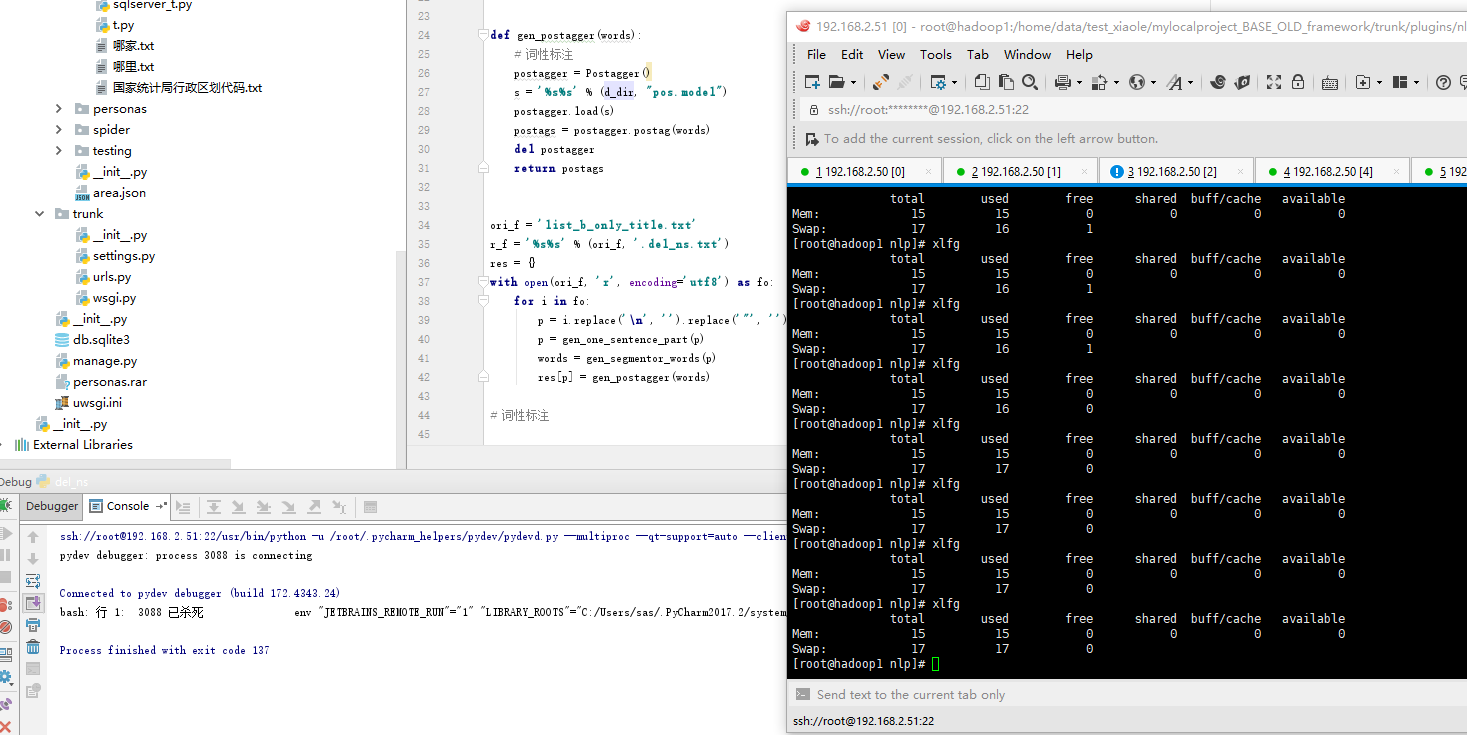
交换分区 在dd命令执行期间 top 其消耗系统约14%的cpu,而mem占比约为0
【资源不友好代码】
from pyltp import *

d_dir = '/usr/local/ltp_data_v3.4.0/'

def gen_one_sentence_part(paragraph):
    one_piece_split = [',', ',', '?', '?', '。', '.']
    for i in one_piece_split:
        paragraph = paragraph.split(i)[0]
    return paragraph

def gen_segmentor_words(paragraph):
    # 分词  其他分析依赖于该数据
    sentence = SentenceSplitter.split(paragraph)[0]
    segmentor = Segmentor()
    s = '%s%s' % (d_dir, "cws.model")
    segmentor.load(s)
    words = segmentor.segment(sentence)
    del sentence, segmentor
    return words

def gen_postagger(words):
    # 词性标注
    postagger = Postagger()
    s = '%s%s' % (d_dir, "pos.model")
    postagger.load(s)
    postags = postagger.postag(words)
    del postagger
    return postags

ori_f = 'list_b_only_title.txt'
r_f = '%s%s' % (ori_f, '.del_ns.txt')
res = {}
with open(ori_f, 'r', encoding='utf8') as fo:
    for i in fo:
        p = i.replace('\n', '').replace('"', '')
        p = gen_one_sentence_part(p)
        words = gen_segmentor_words(p)
        res[p] = gen_postagger(words)

【释放模型 model.release()】

free -g
在启动该脚本的前后内存与交换分区

root@hadoop1 tmp]# date
2017年 12月 14日 星期四 15:10:43 CST
[root@hadoop1 tmp]# xlfg
              total        used        free      shared  buff/cache   available
Mem:             15           0          14           0           0          14
Swap:             7           0           6
[root@hadoop1 tmp]# date
2017年 12月 14日 星期四 15:10:54 CST
[root@hadoop1 tmp]# xlfg
              total        used        free      shared  buff/cache   available
Mem:             15          13           0           0           0           1
Swap:             7           0           6
[root@hadoop1 tmp]# xlfg
              total        used        free      shared  buff/cache   available
Mem:             15          14           0           0           0           0
Swap:             7           0           6
[root@hadoop1 tmp]# date
2017年 12月 14日 星期四 15:11:01 CST
[root@hadoop1 tmp]# xlfg
              total        used        free      shared  buff/cache   available
Mem:             15          15           0           0           0           0
Swap:             7           1           6
[root@hadoop1 tmp]# xlfg
              total        used        free      shared  buff/cache   available
Mem:             15          15           0           0           0           0
Swap:             7           2           5
[root@hadoop1 tmp]# xlfg
              total        used        free      shared  buff/cache   available
Mem:             15          15           0           0           0           0
Swap:             7           2           5
[root@hadoop1 tmp]#

[root@hadoop1 nlp]# xlfg
              total        used        free      shared  buff/cache   available
Mem:             15           0          14           0           0          14
Swap:             7           0           6
[root@hadoop1 nlp]# dd if=/dev/zero of=/home/swap_xl bs=1024 count=1024*1024*4
dd: 无效的数字"1024*1024*4"
[root@hadoop1 nlp]# dd if=/dev/zero of=/home/swap_xl bs=1024 count=80^C
[root@hadoop1 nlp]# ^C
[root@hadoop1 nlp]# ^C
[root@hadoop1 nlp]# dd if=/dev/zero of=/home/swap_xl bs=1024 count=10485760
记录了10485760+0 的读入
记录了10485760+0 的写出
10737418240字节(11 GB)已复制,55.8535 秒,192 MB/秒
[root@hadoop1 nlp]# /sbin/mkswap /home/swap_xl
正在设置交换空间版本 1,大小 = 10485756 KiB
无标签,UUID=5121c17c-6664-40d3-a310-e79b24d7c6b1
[root@hadoop1 nlp]# /sbin/swapon /home/swap_xl
swapon: /home/swap_xl:不安全的权限 0644,建议使用 0600。
[root@hadoop1 nlp]# xlfg
              total        used        free      shared  buff/cache   available
Mem:             15           0           4           0          10          14
Swap:            17           0          16
[root@hadoop1 nlp]#
在SWAP空间不够用的情况下,如何手工添加SWAP空间?以下的操作都要在root用户下进行:
首先先建立一个分区,采用dd命令比如
dd if=/dev/zero of=/home/swap bs=1024 count=1024*1024
这样就会创建/home/swap这么一个分区文件。文件的大小是512000个block,一般情况下1个block为1K,所以这里空间是512M。接着再把这个分区变成swap分区。
/sbin/mkswap /home/swap
再接着使用这个swap分区。使其成为有效状态。
/sbin/swapon /home/swap
现在再用free -m命令查看一下内存和swap分区大小,就发现增加了512M的空间了。不过当计算机重启了以后,发现swap还是原来那么大,新的swap没有自动启动,还要手动启动。那我们需要修改/etc/fstab文件,增加如下一行
/home/swap swap swap defaults 0 0
你就会发现你的机器自动启动以后swap空间也增大了。
dd if=/dev/zero of=/home/swap_xl bs=1024 count=10485760
/sbin/mkswap /home/swap_xl
/sbin/swapon /home/swap_xl
[root@hadoop1 tmp]# dd --help
用法:dd [操作数] ...
或:dd 选项
Copy a file, converting and formatting according to the operands.
bs=BYTES read and write up to BYTES bytes at a time
cbs=BYTES convert BYTES bytes at a time
conv=CONVS convert the file as per the comma separated symbol list
count=N copy only N input blocks
ibs=BYTES read up to BYTES bytes at a time (default: 512)
if=FILE read from FILE instead of stdin
iflag=FLAGS read as per the comma separated symbol list
obs=BYTES write BYTES bytes at a time (default: 512)
of=FILE write to FILE instead of stdout
oflag=FLAGS write as per the comma separated symbol list
seek=N skip N obs-sized blocks at start of output
skip=N skip N ibs-sized blocks at start of input
status=LEVEL The LEVEL of information to print to stderr;
'none' suppresses everything but error messages,
'noxfer' suppresses the final transfer statistics,
'progress' shows periodic transfer statistics
N and BYTES may be followed by the following multiplicative suffixes:
c =1, w =2, b =512, kB =1000, K =1024, MB =1000*1000, M =1024*1024, xM =M
GB =1000*1000*1000, G =1024*1024*1024, and so on for T, P, E, Z, Y.
Each CONV symbol may be:
ascii from EBCDIC to ASCII
ebcdic from ASCII to EBCDIC
ibm from ASCII to alternate EBCDIC
block pad newline-terminated records with spaces to cbs-size
unblock replace trailing spaces in cbs-size records with newline
lcase change upper case to lower case
ucase change lower case to upper case
sparse try to seek rather than write the output for NUL input blocks
swab swap every pair of input bytes
sync pad every input block with NULs to ibs-size; when used
with block or unblock, pad with spaces rather than NULs
excl fail if the output file already exists
nocreat do not create the output file
notrunc 不截断输出文件
noerror 读取数据发生错误后仍然继续
fdatasync 结束前将输出文件数据写入磁盘
fsync 类似上面,但是元数据也一同写入
FLAG 符号可以是:
append 追加模式(仅对输出有意义;隐含了conv=notrunc)
direct 使用直接I/O 存取模式
directory 除非是目录,否则 directory 失败
dsync 使用同步I/O 存取模式
sync 与上者类似,但同时也对元数据生效
fullblock 为输入积累完整块(仅iflag)
nonblock 使用无阻塞I/O 存取模式
noatime 不更新存取时间
nocache 丢弃缓存数据
noctty 不根据文件指派控制终端
nofollow 不跟随链接文件
count_bytes treat 'count=N' as a byte count (iflag only)
skip_bytes treat 'skip=N' as a byte count (iflag only)
seek_bytes treat 'seek=N' as a byte count (oflag only)
Sending a USR1 signal to a running 'dd' process makes it
print I/O statistics to standard error and then resume copying.
$ dd if=/dev/zero of=/dev/null& pid=$!
$ kill -USR1 $pid; sleep 1; kill $pid
18335302+0 records in
18335302+0 records out
9387674624 bytes (9.4 GB) copied, 34.6279 seconds, 271 MB/s
Options are:
--help 显示此帮助信息并退出
--version 显示版本信息并退出
GNU coreutils online help: <http://www.gnu.org/software/coreutils/>
请向<http://translationproject.org/team/zh_CN.html> 报告dd 的翻译错误
要获取完整文档,请运行:info coreutils 'dd invocation'
交换分区 在dd命令执行期间 top 其消耗系统约14%的cpu,而mem占比约为0的更多相关文章
- 磁盘,fdisk分区,MBR,dd命令
光盘和磁盘.u盘.软盘.硬盘有什么区别 ①光盘: cdrom/dvdrom:光驱(光盘驱动器) rom:只读 ram:可以擦写 cd:700M dvd:4G ②软盘:flopp ...
- 【Linux命令】磁盘分区,格式化,挂载命令,创建交换分区(fdisk,mkfs,mount,umount)
友情链接 磁盘分区,格式化,挂载,创建交换分区:https://www.cnblogs.com/HeiDi-BoKe/p/11936998.html RAID工作级别:https://www.cnbl ...
- linux内存不足,swap交换分区创建
为什么需要swap 根 据Redhat公司的建议,Linux系统swap分区最适合的大小是物理内存的1-2倍.不过Linux上有些软件对swap分区得需求较大,例如要顺 利执行Oracle数据库软件, ...
- CentOS 挂载(U盘NTFS格式,新硬盘,增加交换分区,扩展根分区等)
1.挂载fat或者fat32分区的U盘 如果是用VM安装的linux,在vm里挂载U盘有两个前提: 第一,主机里的service要启动: 第二,U盘是连接到虚拟机,而不是主机,需要确认这点: 2.使用 ...
- 6个关于dd命令备份Linux系统的例子
数据丢失带来的损失是相当昂贵的.关键数据的丢失会对各种规模的企业带来影响.有几种方法来备份Linux系统,包括rsync的和rsnapshot等.本文提供有关使用dd命令备份Linux系统的6个实例. ...
- centos 交换分区
内容来自:http://www.huzs.net/?p=1683 一般在桌面型的用不到,因为现在内存都比较大,服务器就不一样了,但是建议无论是在桌面还是服务器上,都设置 swap 以下操作都是在 ro ...
- (转)Linux下增加交换分区的大小
场景:最近在Linux环境安装ELK相关软件时候发现机器特别的卡,所以就查看了Linux机器的内存使用情况,发现是内存和交换分区空间太小了. 对于虚拟机中的内存问题,可以直接通过更改虚拟机的硬件进行解 ...
- linux 添加交换分区
[操作简介] 增加swap分区方法: 1.新建磁盘分区作为swap分区 2.用文件作为swap分区 (操作更简单,我更常用) 下面介绍这两种方法:(都必须用root权限,操作过程应该小心谨慎.) ...
- Linux - 创建交换分区 swap
购买的 1GB 内存的 Linux 小机器,在编译安装 PHP 的时候内存捉急,只好开启 swap 交换分区来增大内存. [root@VM_139_38_centos php-7.2.12]# cat ...
随机推荐
- Linux基础(Ubuntu)
更换apt源为清华源 1.备份 /etc/apt/sources.list 2.vim 编辑 /etc/apt/sources.list 添加 deb http://mirrors.tuna.tsin ...
- JSP表达式语言(EL)
JSP表达式语言(EL)使得访问存储在JavaBean中的数据变得非常简单.JSP EL既可以用来创建算术表达式也可以用来创建逻辑表达式.在JSP EL表达式内可以使用整数型.浮点型.字符串.常量 ...
- Android TransitionDrawable:过渡动画Drawable
Android TransitionDrawable实现一种可以用动画表示的Drawable.写一个例子. package zhangphil.app; import android.graphics ...
- 2016上海站EC-final总结!
2016上海站EC-final总结 本想在知乎上发起一个话题:没有半点准备实力菜得抠脚的选手突然有机会参加final是什么体验.不过感觉这样太高调了,于是..... 以上说的就是事实,毫无准备.毫无状 ...
- HDU 4418 高斯消元解决概率期望
题目大意: 一个人在n长的路径上走到底再往回,走i步停下来的概率为Pi , 求从起点开始到自己所希望的终点所走步数的数学期望 因为每个位置都跟后m个位置的数学期望有关 E[i] = sigma((E[ ...
- 洛谷P3973 - [TJOI2015]线性代数
Portal Description 给定一个\(n\times n\)的矩阵\(B\)和一个\(1×n\)的矩阵\(C\).求出一个\(1×n\)的01矩阵\(A\),使得\(D=(A×B-C)×A ...
- 哀悼改变全站颜色为灰色CSS代码收藏
<style type="text/css"> *{ filter:progid:DXImageTransform.Microsoft.BasicIma ...
- 用 Gearman 分发 PHP 应用程序的工作负载【转载】
通过本文,了解工作分发系统 Gearman 并分发用 PHP.C.Ruby 及其他受支持语言编写的应用程序的工作负载. 尽管一个 Web 应用程序的大部分内容都与表示有关,但它的价值与竞争优势却可能体 ...
- 进程&进程池
进程 服务器中, s.listen(n) n不能无限大,以为内存不可能无限大,n表示内存同一时间接纳的等待连接数,可以看成一个(队列),取出一个拿去建立连接,然后再放进一个,队列中一直保持n个连接 请 ...
- BNUOJ Eeny Meeny Moo
Eeny Meeny Moo Time Limit: 1000ms Memory Limit: 65535KB 大家都有这种经验,当太多的人同时使用互联网的时候 ...