
vue 2.0多页面开发
1、为项目添加多个入口
找到\build\webpack.base.conf.js文件:
 module.exports = {

   //...,

   //vue的多页面开发:应用程序可以存在多个入口

   entry: {

     app: './src/main.js',

     product: './src/product.js'

   },

   //...

 }
2、为开发环境和生产环境配置入口对应的配置项
打开:\build\webpack.dev.conf.js
 const devWebpackConfig = merge(baseWebpackConfig, {

   //...

   plugins: [

     new webpack.DefinePlugin({

       'process.env': require('../config/dev.env')

     }),

     new webpack.HotModuleReplacementPlugin(),

     new webpack.NamedModulesPlugin(), // HMR shows correct file names in console on update.

     new webpack.NoEmitOnErrorsPlugin(),

     // https://github.com/ampedandwired/html-webpack-plugin

     new HtmlWebpackPlugin({

       filename: 'index.html',

       template: 'index.html',

       inject: true,

       chunks:['app']

     }),

     new HtmlWebpackPlugin({

       filename: 'product.html',

       template: 'product.html',

       inject: true,

       chunks:['product']

     }),

   //...

   ]

 })
打开:\build\webpack.prod.conf.js,plugins节点下面加:
 //...

 new HtmlWebpackPlugin({

       filename: process.env.NODE_ENV === 'testing'

         ? 'index.html'

         : config.build.index,

       template: 'index.html',

       inject: true,

       minify: {

         removeComments: true,

         collapseWhitespace: true,

         removeAttributeQuotes: true

         // more options:

         // https://github.com/kangax/html-minifier#options-quick-reference

       },

       // necessary to consistently work with multiple chunks via CommonsChunkPlugin

       chunksSortMode: 'dependency',

       chunks: ['manifest', 'vendor', 'app']

     }),

     new HtmlWebpackPlugin({

       filename: process.env.NODE_ENV === 'testing'

         ? 'product.html'

         : config.build.product,

       template: 'product.html',

       inject: true,

       minify: {

         removeComments: true,

         collapseWhitespace: true,

         removeAttributeQuotes: true

         // more options:

         // https://github.com/kangax/html-minifier#options-quick-reference

       },

       // necessary to consistently work with multiple chunks via CommonsChunkPlugin

       chunksSortMode: 'dependency',

       chunks: ['manifest', 'vendor', 'product']

     }),

 //...
3、配置编译环境
 build: {

     // Template for index.html

     index: path.resolve(__dirname, '../dist/index.html'),

     product: path.resolve(__dirname, '../dist/product.html'),

     //...

 }
4、根目录添加product.html
后面product关联的页面入口都是这个页面。
5、src目录添加product.js和product.vue
product.js类似于单页面的main.js的作用
import Vue from 'vue'

import product from './product.vue'

Vue.config.productionTip = false

/* eslint-disable no-new */

new Vue({

  el: '#product',

  render: h => h(product)

})
product.vue类似于单页面的App.vue的作用
 <template>

   <div id="prodcut">

     {{msg}}

   </div>

 </template>

 <script>

 export default {

   name: 'prodcut',

   data () {

     return {

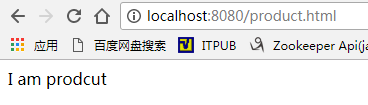
       msg: 'I am prodcut'

     }

   }

 }

 </script>
6、添加测试链接
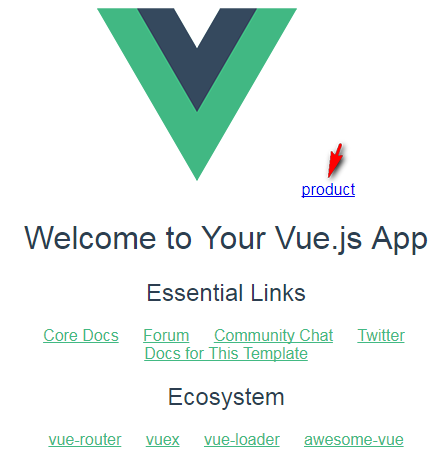
App.vue添加produt.html链接
 <template>

   <div id="app">

     <img src="./assets/logo.png">

     <a href="product.html">product</a><br>

     <router-view/>

   </div>

 </template>

 <script>

 export default {

   name: 'App'

 }

 </script>

 <style>

 #app {

   font-family: 'Avenir', Helvetica, Arial, sans-serif;

   -webkit-font-smoothing: antialiased;

   -moz-osx-font-smoothing: grayscale;

   text-align: center;

   color: #2c3e50;

   margin-top: 60px;

 }

 </style>
7、测试
可以看到编译后的文件index.html和product.html已经分别编译了,各自作为单页面的入口:

编译后的js也是各自的:
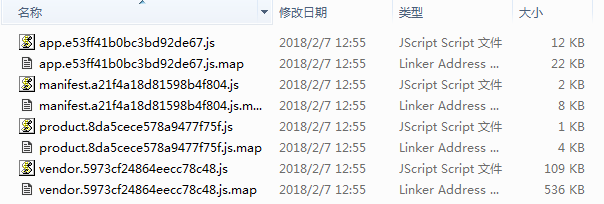
下面是演示效果:
8、源码
https://github.com/iprometheus/vue-multipage
9、参考文档
http://blog.csdn.net/Tank_in_the_street/article/details/73732801
vue 2.0多页面开发的更多相关文章
- vue.js2.0:如何搭建开发环境及构建项目
1,安装node.js Node.js官网:https://nodejs.org/en/ 进入Node.js官网,选择下载并安装Node.js.安装过程只需要点击“下一步”即可, 如下图,非常简单. ...
- 前端Vue项目——首页/课程页面开发及Axios请求
一.首页轮播图 1.elementUI走马灯 elementUI中 Carousel 走马灯,可以在有限空间内,循环播放同一类型的图片.文字等内容. 这里使用指示器样式,可以将指示器的显示位置设置在容 ...
- vue2.0多页面开发
我们平常用vue开发的时候总觉得vue好像就是专门为了单页面应用而诞生的,其实不是.因为vue在工程化开发的时候很依赖webpack,而webpack是将所有的资源整合到一块,弄成一个单页面.但是vu ...
- vue多页面与单页面开发的区别。
进入一家新的公司,要开发移动端app项目,前端技术选型时前端组长选的是vue的多页面开发,当时很蒙,vue不是单页面开发吗?咋出来多页面的.接触之后才发现确实存在也挺简单的,省去了路由表的配置.那就给 ...
- vue2.0与实战开发
慕课网实战 百度云 web前端实战: Node.js入门到企业Web开发中的应用 Web前端性能优化 让你的页面飞起来 前端跳槽面试必备技巧 前端JavaScript面试技巧全套 node.JS 线上 ...
- 【Alpaca】.Net版开源配置中心 - 技术选型 Vue 3.0
是否可以用 Vue 3.0 现有的Vue 2.* 不推荐,坐等Vue 3.0出迁移工具吧,手动改的话工作量还是不小的 新项目 考虑下团队内对Vue + TS + VS Code的熟练程度.过程中你会遇 ...
- vue搭建多页面开发环境
自从习惯开发了单页面应用,对多页面的页面间的相互跳转间没有过渡效果.难维护极度反感.但是最近公司技术老大说,当一个应用越来越大的时候单页面模式应付不来,但是没讲怎么应付不来,所以还得自己去复习一遍这两 ...
- 每天记录一点:NetCore获得配置文件 appsettings.json vue-router页面传值及接收值 详解webpack + vue + node 打造单页面(入门篇) 30分钟手把手教你学webpack实战 vue.js+webpack模块管理及组件开发
每天记录一点:NetCore获得配置文件 appsettings.json 用NetCore做项目如果用EF ORM在网上有很多的配置连接字符串,读取以及使用方法 由于很多朋友用的其他ORM如S ...
- vue-calendar 基于 vue 2.0 开发的轻量,高性能日历组件
vue-calendar-component 基于 vue 2.0 开发的轻量,高性能日历组件 占用内存小,性能好,样式好看,可扩展性强 原生 js 开发,没引入第三方库 Why Github 上很多 ...
随机推荐
- JVM虚拟机学习一:垃圾回收算法总结
1.java虚拟机中涉及到的数据类型 Java虚拟机中,数据类型可以分为两类:基本类型和引用类型. 基本类型的变量保存原始值,即:他代表的值就是数值本身:而引用类型的变量保存引用值.“引用值”代表了某 ...
- git 入门教程之协同开发
前面我们已经介绍过远程仓库的相关概念,不过那时并没有深入探讨,只是讲解了如何创建远程仓库以及推送最新工作成果到远程仓库,实际上远程仓库对于团队协同开发很重要,不仅仅是团队协同开发的基础,也是代码备份的 ...
- spring4笔记----PropertyOverrideConfigureer 重写占位符配置器(图)
- Sql Server 按格式输出日期
SELECT dbo.fn_Data(getdate(),'yyyymmdd') CREATE FUNCTION [dbo].[fn_Data] (@date as datetime, @format ...
- windows下安装mysql
windows 下安装mysql 1.先下载好 mysql5.7 版本的安装包,可以去官网自己下载,也可以从我的百度云分享 里面下载: 链接: https://pan.baidu.com/s/1VXk ...
- Java中 try--catch-- finally、throw、throws 的用法
一.try {..} catch {..}finally {..}用法 try { 执行的代码,其中可能有异常.一旦发现异常,则立即跳到catch执行.否则不会执行catch里面的内容 } catch ...
- ugui中toggle.isOn的属性笔记
准备知识 toggle:指unity3d引擎中UGUI的 toggle组件 (单选框) 本文使用lua语言描述 事件触发 使用unity的ugui,你如果细心观察会发现toggle在界面被关闭/隐藏( ...
- 8. svg学习笔记-文本
毫无疑问,文本也是svg中组成的重要部分,在svg中,用<text>元素来创建文本,文本的使用格式如下: <text x="20" y="30" ...
- 5. svg学习笔记-坐标系变换
之前我们编写图形元素的时候,编写好了位置大小就是固定的,通过坐标系变换,可以移动缩放,旋转图形,但必须声明的是,进行变换时是图形相对于坐标系的变化,就是图形是不发生变化的,而是坐标系发生了变化,比如缩 ...
- vue 之 .sync 修饰符
在一些情况下,我们可能会需要对一个 prop (父子组件传递数据的属性) 进行“双向绑定”. 在vue 1.x 中的 .sync 修饰符所提供的功能.当一个子组件改变了一个带 .sync 的prop的 ...