
RNN探索(2)之手写数字识别
这篇博文不介绍基础的RNN理论知识,只是初步探索如何使用Tensorflow,之后会用笔推导RNN的公式和理论,现在时间紧迫所以先使用为主~~
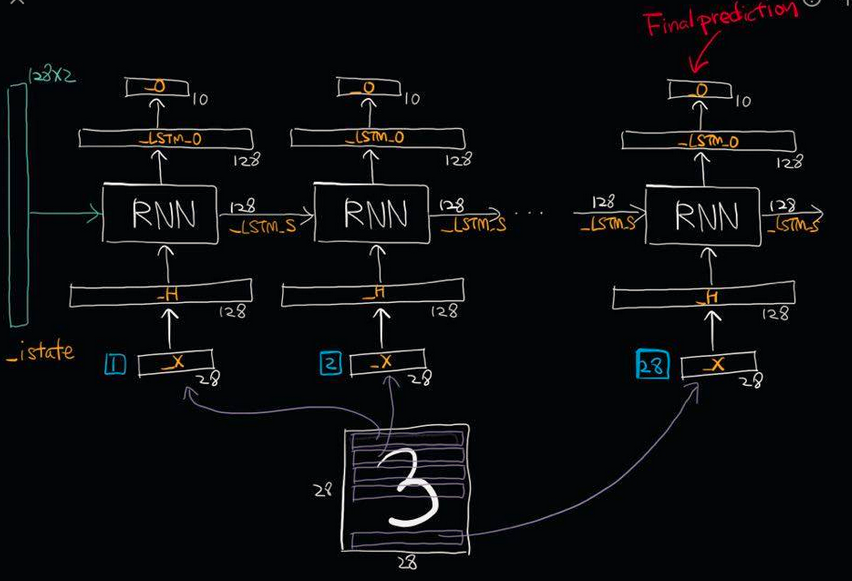
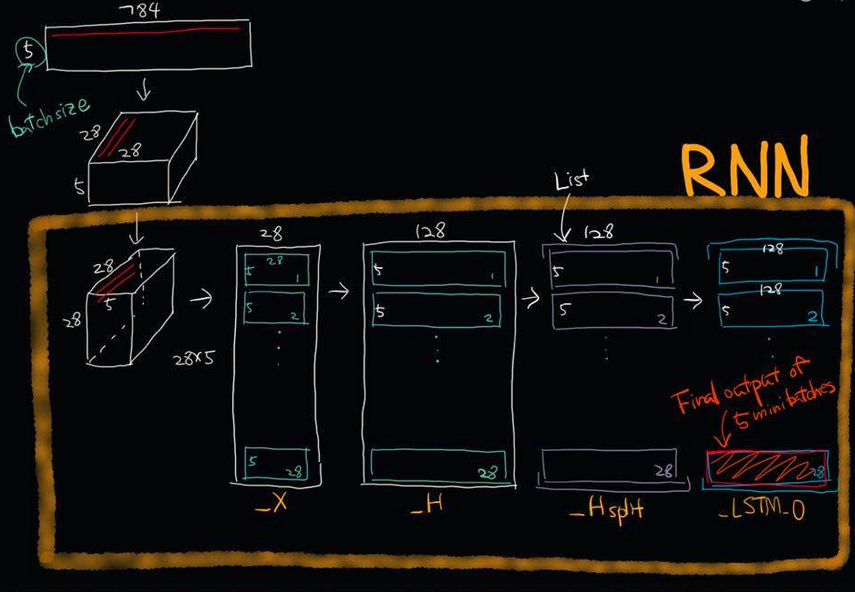
import numpy as np

import tensorflow as tf

import matplotlib.pyplot as plt

import tensorflow.examples.tutorials.mnist.input_data as input_data

from   tensorflow.contrib import rnn

mnist = input_data.read_data_sets("MNIST_data/",one_hot=True)

trainimgs, trainlabels, testimgs, testlabels \

 = mnist.train.images, mnist.train.labels, mnist.test.images, mnist.test.labels

ntrain, ntest, dim, nclasses \

 = trainimgs.shape[0], testimgs.shape[0], trainimgs.shape[1], trainlabels.shape[1]

print ("MNIST loaded")

dim_input   = 28       #28*1

dim_hidden  = 128      #28*128

dim_output  = 10       #

nsteps      = 28

weight = {

    "hidden":tf.Variable(tf.random_normal([dim_input,dim_hidden])),

    "out"   :tf.Variable(tf.random_normal([dim_hidden,dim_output]))

}

biases = {

    "hidden":tf.Variable(tf.random_normal([dim_hidden])),

    "out"   :tf.Variable(tf.random_normal([dim_output]))

}

def RNN(_X,_W,_b,_nsteps,_name):

    #[batchsize,nsteps*dim_input]-->>[batchsize,nsteps,dim_input]=[num,28,28]

    _X = tf.reshape(_X,[-1,28,28])

    #-->>[nsteps,batchsize,dim_input]==[28,num,28]

    _X = tf.transpose(_X,[1,0,2])

    #-->>[nsteps*batchsize,input]==[28*num,28]

    _X = tf.reshape(_X,[-1,28])

    #这里是共享权重,nsteps个weights全部一样的.

    _H = tf.matmul(_X,_W['hidden']) + _b["hidden"]

    _Hsplit = tf.split(_H,num_or_size_splits=nsteps,axis=0)

    with tf.variable_scope(_name,reuse=tf.AUTO_REUSE):#重复使用参数节约空间,防止报错

        #版本更新弃用

        #scop.reuse_variables()

        #设计一个计算单元

        lstm_cell = rnn.BasicLSTMCell(128,forget_bias=1.0)

        #版本更新已经弃用

        #lstm_cell = rnn_cell.BasicLSTMCell(dim_hidden,forget_bias=1.0)

        #利用RNN单元搭建网络,这里用的最简单的,其它以后在说

        _LSTM_0,_LSTM_S = rnn.static_rnn(lstm_cell,_Hsplit,dtype=tf.float32)

        #版本更新已经弃用

        #_LSTM_O, _LSTM_S = tf.nn.rnn(lstm_cell, _Hsplit,dtype=tf.float32)

    return  tf.matmul(_LSTM_0[-1],_W["out"])+_b["out"]

#使用GPU按需增长模式

config = tf.ConfigProto(allow_soft_placement=True)

gpu_options = tf.GPUOptions(per_process_gpu_memory_fraction=0.3)

config.gpu_options.allow_growth = True

if __name__== "__main__":

    learning_rate = 0.001

    x     = tf.placeholder(dtype=tf.float32,shape=[None,28*28],name="input_x")

    y     = tf.placeholder(dtype=tf.float32,shape=[None,10],name="output_y")

    pred  = RNN(x,weight,biases,nsteps,"basic")

    cost  = tf.reduce_mean(tf.nn.softmax_cross_entropy_with_logits(logits=pred, labels=y))

    optm  = tf.train.GradientDescentOptimizer(learning_rate).minimize(cost)

    accr  = tf.reduce_mean(tf.cast(tf.equal(tf.argmax(pred,1),tf.argmax(y,1)),dtype=tf.float32))

    init  = tf.global_variables_initializer()

    print("RNN Already")

    training_epochs = 50

    batch_size = 16

    display_step = 1

    sess = tf.Session(config=config)

    sess.run(init)

    print("Start optimization")

    for epoch in range(training_epochs):

        avg_cost = 0.

        total_batch = int(mnist.train.num_examples/batch_size)

        #total_batch = 100

        # Loop over all batches

        for i in range(total_batch):

            batch_xs, batch_ys = mnist.train.next_batch(batch_size)

            # Fit training using batch data

            feeds = {x: batch_xs, y: batch_ys}

            sess.run(optm, feed_dict=feeds)

            # Compute average loss

            avg_cost += sess.run(cost, feed_dict=feeds) / total_batch

        # Display logs per epoch step

        if epoch % display_step == 0:

            print("Epoch: %03d/%03d cost: %.9f" % (epoch, training_epochs, avg_cost))

            feeds = {x: batch_xs, y: batch_ys}

            train_acc = sess.run(accr, feed_dict=feeds)

            print(" Training accuracy: %.3f" % (train_acc))

            feeds = {x: testimgs, y: testlabels}

            test_acc = sess.run(accr, feed_dict=feeds)

            print(" Test accuracy: %.3f" % (test_acc))

    print("Optimization Finished.")
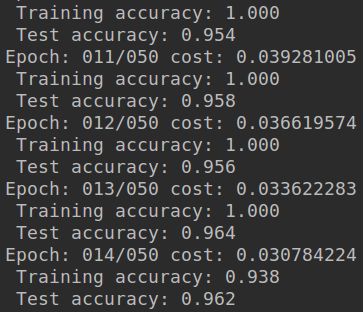
- 没有训练结束,使用的GTX1060训练了大概8分钟,如果训练结束感觉应该可以达到97%左右
- 因为是单层网络,深度不够,也没处理数据~~
- 这只是简单了解RNN工作流程,和如何用TF操作RNN
- 以后会慢慢补上~~
参考:
- 唐迪宇课程,因为版本问题会出现很多代码更新
- 其它中间忘记记录了,如有侵权请联系博主,抱歉~
RNN探索(2)之手写数字识别的更多相关文章
- 5 TensorFlow入门笔记之RNN实现手写数字识别
------------------------------------ 写在开头:此文参照莫烦python教程(墙裂推荐!!!) ---------------------------------- ...
- keras和tensorflow搭建DNN、CNN、RNN手写数字识别
MNIST手写数字集 MNIST是一个由美国由美国邮政系统开发的手写数字识别数据集.手写内容是0~9,一共有60000个图片样本,我们可以到MNIST官网免费下载,总共4个.gz后缀的压缩文件,该文件 ...
- TensorFlow使用RNN实现手写数字识别
学习,笔记,有时间会加注释以及函数之间的逻辑关系. # https://www.cnblogs.com/felixwang2/p/9190664.html # https://www.cnblogs. ...
- C#中调用Matlab人工神经网络算法实现手写数字识别
手写数字识别实现 设计技术参数:通过由数字构成的图像,自动实现几个不同数字的识别,设计识别方法,有较高的识别率 关键字:二值化 投影 矩阵 目标定位 Matlab 手写数字图像识别简介: 手写 ...
- Android+TensorFlow+CNN+MNIST 手写数字识别实现
Android+TensorFlow+CNN+MNIST 手写数字识别实现 SkySeraph 2018 Email:skyseraph00#163.com 更多精彩请直接访问SkySeraph个人站 ...
- 学习笔记CB009:人工神经网络模型、手写数字识别、多层卷积网络、词向量、word2vec
人工神经网络,借鉴生物神经网络工作原理数学模型. 由n个输入特征得出与输入特征几乎相同的n个结果,训练隐藏层得到意想不到信息.信息检索领域,模型训练合理排序模型,输入特征,文档质量.文档点击历史.文档 ...
- Tensorflow实战 手写数字识别(Tensorboard可视化)
一.前言 为了更好的理解Neural Network,本文使用Tensorflow实现一个最简单的神经网络,然后使用MNIST数据集进行测试.同时使用Tensorboard对训练过程进行可视化,算是打 ...
- kaggle 实战 (1): PCA + KNN 手写数字识别
文章目录 加载package read data PCA 降维探索 选择50维度, 拆分数据为训练集,测试机 KNN PCA降维和K值筛选 分析k & 维度 vs 精度 预测 生成提交文件 本 ...
- 用tensorflow搭建RNN(LSTM)进行MNIST 手写数字辨识
用tensorflow搭建RNN(LSTM)进行MNIST 手写数字辨识 循环神经网络RNN相比传统的神经网络在处理序列化数据时更有优势,因为RNN能够将加入上(下)文信息进行考虑.一个简单的RNN如 ...
随机推荐
- (转)Unity_什么是Draw Call? 什么是Batch?
開發遊戲時,一定被時時提醒要減少 Draw Call,當然UNITY也不例外,打開Game Window裡的 Stats,可以看到 Draw Call 與 Batched 的數字.但到底甚麼是 Dra ...
- 在Ubuntu15.10中,使用wxPython的webview和JS进行交互
在Ubuntu下进行wxPython开发,因为需求,所以使用了wxPython的webview和JS的交互. 在Windows下,下图显示的代码可以正常的运行,但是在Ubuntu下进行开发,以下的代码 ...
- ifconfig中lo、eth0、br0、wlan0接口
在 实体机上 ifconfig 命令用于 显示或配置网络设备(网络接口卡) 或修改. 1. 显示内容分析: lo 回环接口lo Link encap:Local Loopback inet addr ...
- Python循环_for&while
格式:for x in xs['James','Lily','Candy']: print(x) —————————————————————————————————— for循环就是把每个元素代入变量 ...
- zabbix监测图形界面显示方框乱码解决方法
思路如下:用Windows下中文字体进行替换,修改配置文件即可 详细步骤如下: 1.在Windows的控制面板里的字体中,选择一种中文字体,将该字体文件复制到桌面.例如,我选择了宋体 常规字体,复制到 ...
- Missile Command 导弹指令
发售年份 1980 平台 街机 开发商 雅达利(Atari) 类型 射击 https://www.youtube.com/watch?v=nokIGklnBGY
- 弹出的 Dialog 里,包含 Form,如何在关闭 Dialog 时,执行 resetFields(对整个表单进行重置,将所有字段值重置为初始值并移除校验结果)
做法: before-close 事件中,调用 resetFields 取消按钮事件中,调用 resetFields <el-dialog title="弹出窗口" :vis ...
- 图像三维灰度分布图——matlab
p=imread('C:\Users\wangd\Documents\MATLAB\1.jpg'); g=rgb2gray(p); % 转为灰阶图 gg=double(g); % 转为数值矩阵 gg= ...
- Xshell5 提示要继续使用此程序,您必须应用最新的更新或使用新版本
Xshell5 提示要继续使用此程序,您必须应用最新的更新或使用新版本 目录 问题描述 修改系统时间 安装新版本 下载 安装 回到顶部 问题描述 今天上线一个服务,上完准备看下OPS的发布结果,就 ...
- fatal: could not read Username for 'https://git.dev.tencent.com' 解决方法
在使用webhook自动部署时测试出现此问题,通过以下方法粗暴解决: vim .git/config 文件,在remote "origin" url中加入帐号密码,如图所示,格式 ...