
第二十二篇-Guideline基准线
效果图:
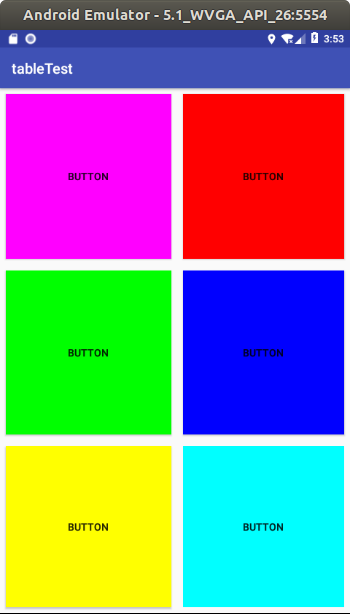
前5个是button填充的,最后一个是线性布局下放置一个button在填充。
layout.xml
<?xml version="1.0" encoding="utf-8"?>

<android.support.constraint.ConstraintLayout xmlns:android="http://schemas.android.com/apk/res/android"

    xmlns:app="http://schemas.android.com/apk/res-auto"

    xmlns:tools="http://schemas.android.com/tools"

    android:id="@+id/linearLayout"

    android:layout_width="match_parent"

    android:layout_height="match_parent">

    <android.support.constraint.Guideline

        android:id="@+id/guideline2"

        android:layout_width="wrap_content"

        android:layout_height="wrap_content"

        android:orientation="horizontal"

        app:layout_constraintGuide_percent="0.3365949" />

    <android.support.constraint.Guideline

        android:id="@+id/guideline3"

        android:layout_width="wrap_content"

        android:layout_height="wrap_content"

        android:orientation="horizontal"

        app:layout_constraintGuide_percent="0.6712329" />

    <android.support.constraint.Guideline

        android:id="@+id/guideline4"

        android:layout_width="wrap_content"

        android:layout_height="wrap_content"

        android:orientation="vertical"

        app:layout_constraintGuide_percent="0.5078125" />

    <Button

        android:background="#ff00ff"

        android:id="@+id/button"

        android:layout_width="0dp"

        android:layout_height="0dp"

        android:layout_marginBottom="8dp"

        android:layout_marginEnd="8dp"

        android:layout_marginStart="8dp"

        android:layout_marginTop="8dp"

        android:text="Button"

        app:layout_constraintBottom_toTopOf="@+id/guideline2"

        app:layout_constraintEnd_toStartOf="@+id/guideline4"

        app:layout_constraintStart_toStartOf="parent"

        app:layout_constraintTop_toTopOf="parent" />

    <Button

        android:background="#ff0000"

        android:id="@+id/button2"

        android:layout_width="0dp"

        android:layout_height="0dp"

        android:layout_marginBottom="8dp"

        android:layout_marginEnd="8dp"

        android:layout_marginStart="8dp"

        android:layout_marginTop="8dp"

        android:text="Button"

        app:layout_constraintBottom_toTopOf="@+id/guideline2"

        app:layout_constraintEnd_toEndOf="parent"

        app:layout_constraintStart_toStartOf="@+id/guideline4"

        app:layout_constraintTop_toTopOf="parent" />

    <Button

        android:background="#00ff00"

        android:id="@+id/button3"

        android:layout_width="0dp"

        android:layout_height="0dp"

        android:layout_marginBottom="8dp"

        android:layout_marginEnd="8dp"

        android:layout_marginStart="8dp"

        android:layout_marginTop="8dp"

        android:text="Button"

        app:layout_constraintBottom_toTopOf="@+id/guideline3"

        app:layout_constraintEnd_toStartOf="@+id/guideline4"

        app:layout_constraintStart_toStartOf="parent"

        app:layout_constraintTop_toTopOf="@+id/guideline2" />

    <Button

        android:background="#0000ff"

        android:id="@+id/button4"

        android:layout_width="0dp"

        android:layout_height="0dp"

        android:layout_marginBottom="8dp"

        android:layout_marginEnd="8dp"

        android:layout_marginStart="8dp"

        android:layout_marginTop="8dp"

        android:text="Button"

        app:layout_constraintBottom_toTopOf="@+id/guideline3"

        app:layout_constraintEnd_toEndOf="parent"

        app:layout_constraintStart_toStartOf="@+id/guideline4"

        app:layout_constraintTop_toTopOf="@+id/guideline2" />

    <Button

        android:background="#ffff00"

        android:id="@+id/button5"

        android:layout_width="0dp"

        android:layout_height="0dp"

        android:layout_marginBottom="8dp"

        android:layout_marginEnd="8dp"

        android:layout_marginStart="8dp"

        android:layout_marginTop="8dp"

        android:text="Button"

        app:layout_constraintBottom_toBottomOf="parent"

        app:layout_constraintEnd_toStartOf="@+id/guideline4"

        app:layout_constraintStart_toStartOf="parent"

        app:layout_constraintTop_toTopOf="@+id/guideline3" />

    <LinearLayout

        android:layout_width="0dp"

        android:layout_height="0dp"

        android:layout_marginBottom="8dp"

        android:layout_marginEnd="8dp"

        android:layout_marginStart="8dp"

        android:layout_marginTop="8dp"

        android:orientation="vertical"

        app:layout_constraintBottom_toBottomOf="parent"

        app:layout_constraintEnd_toEndOf="parent"

        app:layout_constraintStart_toStartOf="@+id/guideline4"

        app:layout_constraintTop_toTopOf="@+id/guideline3">

        <Button

            android:background="#00ffff"

            android:id="@+id/button7"

            android:layout_width="match_parent"

            android:layout_height="match_parent"

            android:text="Button" />

    </LinearLayout>

</android.support.constraint.ConstraintLayout>
ok。
第二十二篇-Guideline基准线的更多相关文章
- Python开发【第二十二篇】:Web框架之Django【进阶】
Python开发[第二十二篇]:Web框架之Django[进阶] 猛击这里:http://www.cnblogs.com/wupeiqi/articles/5246483.html 博客园 首页 ...
- 第二十二篇、IO多路复用 一
一.简介io多路复用 可以监听多个文件描述符(socket对象)(文件句柄),一旦文件句柄出现变化,就会感知到 Linux中的 select,poll,epoll(内核2.6以上) 都是IO多路复用的 ...
- Python之路【第二十二篇】CMDB项目
浅谈ITIL TIL即IT基础架构库(Information Technology Infrastructure Library, ITIL,信息技术基础架构库)由英国政府部门CCTA(Central ...
- Python之路【第二十二篇】:Django之Model操作
Django之Model操作 一.字段 AutoField(Field) - int自增列,必须填入参数 primary_key=True BigAutoField(AutoField) - bi ...
- Python之路(第二十二篇) 面向对象初级:概念、类属性
一.面向对象概念 1. "面向对象(OOP)"是什么? 简单点说,“面向对象”是一种编程范式,而编程范式是按照不同的编程特点总结出来的编程方式.俗话说,条条大路通罗马,也就说我们使 ...
- flask第二十二篇——模板【4】过滤器
请关注微信公众号:自动化测试实战 先来教大家一个pycharm设置默认模板的方法.我们每次新建模板或者平时写代码打开以后可能都要重复写# coding: utf-8这些代码,其实我们可以设置好模板,让 ...
- 【Python之路】第二十二篇--Django【基础篇】
1 Django流程介绍 MTV模式 著名的MVC模式:所谓MVC就是把web应用分为模型(M),控制器(C),视图(V)三层:他们之间以一种插件似的,松耦合的方式连接在一起. 模型负责业 ...
- SpringBoot非官方教程 | 第二十二篇: 创建含有多module的springboot工程
转载请标明出处: 原文首发于:https://www.fangzhipeng.com/springboot/2017/07/11/springbot22-modules/ 本文出自方志朋的博客 这篇文 ...
- 第二十二篇 正在表达式 re模块
re模块****** 就本质而言,正则表达式时一种小型的,高度专业化的编程语言,在python里,它内嵌在python中,并通过re模块实现.正则表达式模式被编译成一系列的字节码.然后用C编写的匹配引 ...
随机推荐
- laravel5.3安装redis扩展包
1,编辑 laravel 根目录下的 composer.json 文件: "require": { "php": ">=5.6.4", ...
- 错误模块名称: KERNELBASE.dll
部署win服务时,经常会出现类似下面的错误,错误模块名称: KERNELBASE.dll. 日志名称: Application 来源: Application ...
- EChart.js 笔记一
一直对数据可视化比较感兴趣,当年 Alibaba 年报晚会上的大屏显示可谓是技惊四座,够震撼,将数据之美展现得淋漓尽致. 国内的前端数据可视化插件中,echart.js 算是热度很高的,也容易上手,算 ...
- jQuery代码优化的9种方法
前面的话 本文将详细介绍jQuery代码优化的9种方法 用对选择器 在jQuery中,可以用多种选择器,选择同一个网页元素.每种选择器的性能是不一样的,应该了解它们的性能差异 1.最快的选择器:id选 ...
- JS 单线程和事件循环
Js 是单线程,js代码从上到下依次执行,比如我们写了两个函数,肯定是上面的函数先执行,下面的函数后执行.但是这种单线程有一个非常大的问题,那就是遇到耗时的任务,后面的任务只能等待它执行完,才能进行. ...
- 【数学建模】day01-线性规划问题
线性规划问题是在一组线性约束条件下,求线性目标函数最大/最小值的问题.这些约束条件有不等式约束.等式约束以及边界约束,这和中学讲的线性规划无异. 此类问题的MATLAB标准形式为: 其中,max问 ...
- 数据库管理 trove openstack
Trove是数据库即服务的OpenStack.它旨在完全基于OpenStack运行,其目标是允许用户快速轻松地利用关系数据库的功能,而无需处理复杂的管理任务.云用户和数据库管理员可以根据需要配置和管理 ...
- luogu P2680 运输计划 (二分答案+树上差分)
题目背景 公元 20442044 年,人类进入了宇宙纪元. 题目描述 公元20442044 年,人类进入了宇宙纪元. L 国有 nn 个星球,还有 n-1n−1 条双向航道,每条航道建立在两个星球之间 ...
- SSL加速卡调研的原因及背景
SSL加速卡调研的原因及背景 SSL加速卡调研的原因及背景 网络信息安全已经成为电子商务和网络信息业发展的一个瓶颈,安全套接层(SSL)协议能较好地解决安全处理问题,而SSL加速器有效地提高了网络安全 ...
- pytorch CNN 手写数字识别
一个被放弃的入门级的例子终于被我实现了,虽然还不太完美,但还是想记录下 1.预处理 相比较从库里下载数据集(关键是经常失败,格式也看不懂),更喜欢直接拿图片,从网上找了半天,最后从CSDN上下载了一个 ...