
DOMElement之Offset
有明确目的的学习比较有效,我学习HTML offset相关概念是出自一个需求,那就是计算一个绝对定位的HTML元素相对于当前窗口的偏移距离,主要是Y方向的偏移,X方向同理。
要实现这个目的,首先要弄清楚HTML关于偏移距离的定义:
1. offsetTop
MDN的定义:The HTMLElement.offsetTop read-only property returns the distance of the current element relative to the top of the offsetParent node.
既然是distance,就涉及到比较的两个点,起点和终点(或者是两条平行线)。根据CSS盒子模型,HTMLElement元素有margin, border, padding和content. 计算的是margin edge到margin edge呢,border edge到border edge呢,是padding edge到padding edge呢,还是content edge到content edge呢?甚至是一个元素的padding edge到另外一个元素的margin edge呢?
这里所有的边,都是指代外面的边,如下图所示。
.png)
注:图片来自MDN
问题1:offsetTop计算的是当前元素相对于它的offsetParent元素的顶部的距离,那么是哪条边到哪条边的距离呢?
在回答这个问题之前,我们得先弄清楚offsetParent是个什么东西。
2. offsetParent
MDN的定义:The HTMLElement.offsetParent read-only property returns a reference to the object which is the closest (nearest in the containment hierarchy) positioned containing element. If the element is non-positioned, the nearest table cell or root element (html in standards compliant mode; body in quirks rendering mode) is the offsetParent. offsetParent returns null when the element has style.displayset to "none". The offsetParent is useful because offsetTop and offsetLeft are relative to its padding edge.
closet (nearest in the containment hierarchy) positioned containing element - 在包含层次结构(也就是当前元素的祖先元素)中离当前元素最近的,定位过的元素。也就是说是当前元素的父级(祖先)元素中,离当前元素最近的定位过的元素。那么又出现一个新的问题,什么是“定位过的元素”?
3. position
MDN的定义:The position CSS property chooses alternative rules for positioning elements, designed to be useful for scripted animation effects.
Position是一个CSS属性,来定义元素的定位规则,有下面一些值可以选择,一下内容来自w3.org,因为MDN声称有sticky一值可选,经过测试Chrome和IE都不支持,只有Firefox支持,此属性尚属于CSS3 draft阶段。
static The box is a normal box, laid out according to the normal flow. The 'top', 'right', 'bottom', and 'left' properties do not apply.
relative The box's position is calculated according to the normal flow (this is called the position in normal flow). Then the box is offset relative to its normal position. When a box B is relatively positioned, the position of the following box is calculated as though B were not offset. The effect of 'position:relative' on table-row-group, table-header-group, table-footer-group, table-row, table-column-group, table-column, table-cell, and table-caption elements is undefined.
absolute The box's position (and possibly size) is specified with the 'top', 'right', 'bottom', and 'left' properties. These properties specify offsets with respect to the box's containing block. Absolutely positioned boxes are taken out of the normal flow. This means they have no impact on the layout of later siblings. Also, though absolutely positioned boxes have margins, they do not collapse with any other margins.
fixed The box's position is calculated according to the 'absolute' model, but in addition, the box is fixed with respect to some reference. As with the 'absolute' model, the box's margins do not collapse with any other margins. In the case of handheld, projection, screen, tty, and tv media types, the box is fixed with respect to the viewport and does not move when scrolled. In the case of the print media type, the box is rendered on every page, and is fixed with respect to the page box, even if the page is seen through a viewport (in the case of a print-preview, for example). For other media types, the presentation is undefined. Authors may wish to specify 'fixed' in a media-dependent way. For instance, an author may want a box to remain at the top of the viewport on the screen, but not at the top of each printed page.
回到我们最初的问题,position是哪种值才算是“定位过的元素”呢?
从定义似乎看不出来什么,那么就来做测试吧。
 <!doctype html>

 <html>

 <head>

 <style>

 #parent_static { position: static; }

 #parent_absolute { position: absolute; top: 20px; }

 #parent_relative { position: relative; top: 60px; }

 #parent_fixed { position: fixed; top: 100px; }

 #child_static,#child_absolute,#child_relative,#child_fixed { position:absolute; top: 5px; width: 400px; border: 1px solid;}

 </style>

 </head>

 <body>

 <div id="parent_static"><div id="child_static"></div></div>

 <div id="parent_absolute"><div id="child_absolute"></div></div>

 <div id="parent_relative"><div id="child_relative"></div></div>

 <div id="parent_fixed"><div id="child_fixed"></div></div>

 <script src="http://apps.bdimg.com/libs/jquery/2.1.1/jquery.min.js"></script>

 <script>

 function getOffsetParentString(obj)

 {

     if(obj.offsetParent)

     {

         if(obj.offsetParent.id)

         {

             return obj.id + ":\t" + obj.offsetParent.id;

         }

         else

         {

             return obj.id + ":\t" + obj.offsetParent.tagName;

         }

     }

     else

     {

         return "null";

     }

 }

 $('#child_static').html(getOffsetParentString($('#child_static')[0]));

 $('#child_absolute').html(getOffsetParentString($('#child_absolute')[0]));

 $('#child_relative').html(getOffsetParentString($('#child_relative')[0]));

 $('#child_fixed').html(getOffsetParentString($('#child_fixed')[0]));

 </script>

 </body>

 </html>
结果如下:
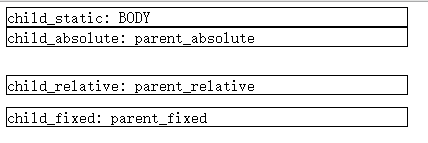
OK,从上面的测试我们可以得到一个结论,除了static方式的position(也是默认方式),其他的三个元素都是所谓的“positioned”。
那么回答之前的一个问题:什么是“定位过的元素”?
定位过的元素就是使用Position:relative|absolute|fixed作为定位方式的HTML元素。
那么接着offsetParent的定义也就清楚了,在当前元素的包含结构上的离它最近的定位过的父元素就是它的offsetParent,如果没有,默认就是HTML的body元素。
让我们回到最初的问题,offsetTop计算的是当前元素相对于它的offsetParent元素的顶部的距离,那么是哪条边到哪条边的距离呢?
继续用事实说话:
<!doctype html>

<html>

<head>

<style>

#parent_absolute { position: absolute; top: 8px;; margin: 1px; border: 2px solid blue; padding: 4px; width: 800px; height: 600px; }

#child_absolute { position:absolute; top: 16px; margin-top: 32px; border: 64px solid #ccc; padding: 128px;}

</style>

</head>

<body>

<div id="parent_absolute"><div id="child_absolute"></div></div>

<script src="http://apps.bdimg.com/libs/jquery/2.1.1/jquery.min.js"></script>

<script>

function getOffsetTopString(obj)

{

    if(obj.offsetParent)

    {

        if(obj.offsetParent.id)

        {

            return "OffsetTop of (" + obj.id + " - " + obj.offsetParent.id + "):\t" + obj.offsetTop;

        }

        else

        {

            return "OffsetTop of (" + obj.id + " - " + obj.offsetParent.tagName + "):\t" + obj.offsetTop;;

        }

    }

    else

    {

        return "null";

    }

}

$('#child_absolute').html(getOffsetTopString($('#child_absolute')[0]));

</script>

</body>

</html>
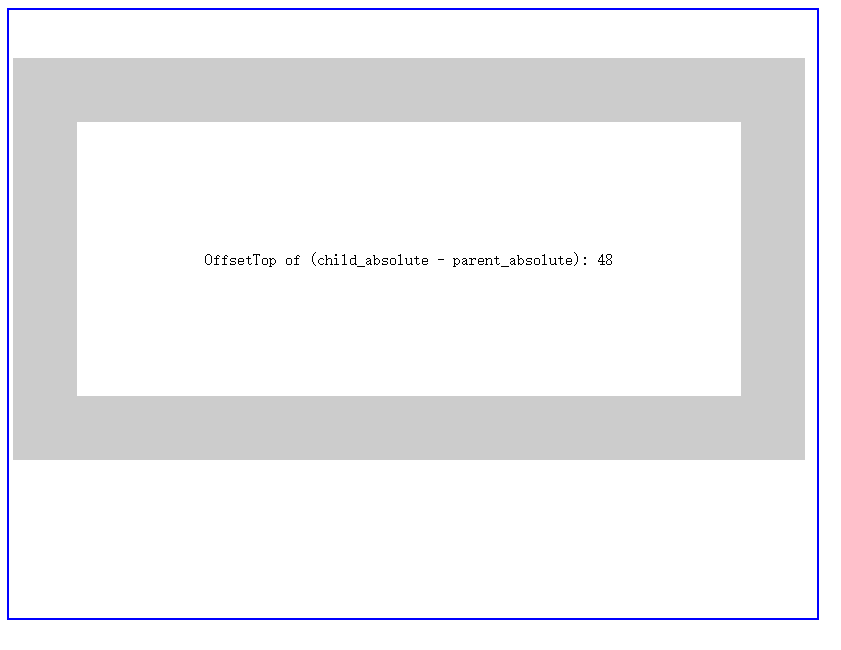
从测试结果可以看出,offsetTop的值是当前元素的"margin-top"+"top",但是还是无法回答我们之前的那个问题,这个值是哪条边到哪条边呢?因为我们不知道这个值是否覆盖了父元素的padding甚至是border
有一个解决方案是找一把pixel ruler(比如一个很小巧的免费软件叫JRuler)在屏幕上测量一下
另外一种方法是,把当前元素的margin-top设置为0px, top设置为-1px,看看这个元素的border会出现在哪个位置
把上面的code改成:
#child_absolute { position:absolute; top: -1px; margin-top: 0px; border: 64px solid #ccc; padding: 128px;}
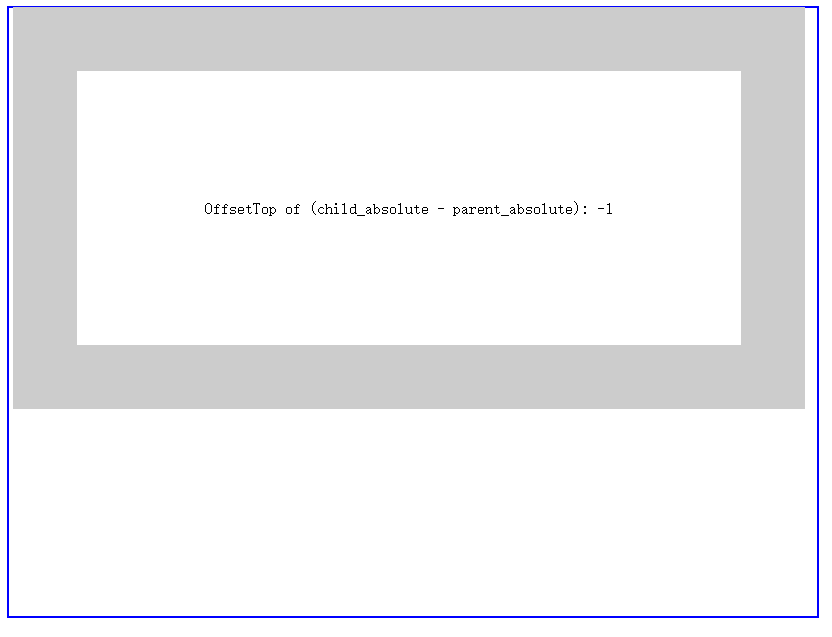
可以看到,当前元素覆盖了offsetParent元素的border一个像素。
那么现在我们可以回答一开始的问题了,offsetTop计算的是当前元素相对于它的offsetParent元素的顶部的距离,那么是哪条边到哪条边的距离呢?
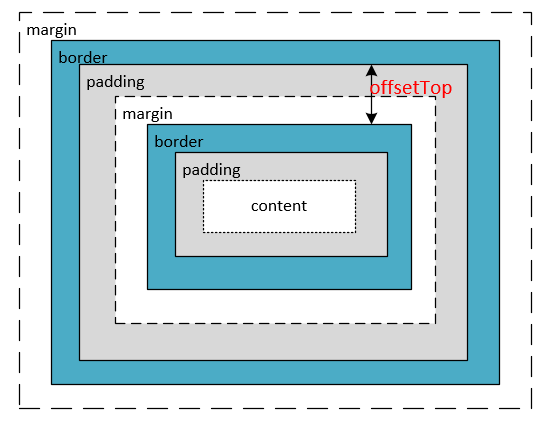
offsetTop是当前元素的border edge到它的offsetParent元素的padding edge的距离
用图来表示就是
注1:此图为原创
注2:不要误以为offsetTop = padding+margin, 图示所表达的意思是offsetTop是当前元素的border边界到其offsetParent元素的padding边界的距离
DOMElement之Offset的更多相关文章
- 云端js动态效果
效果图: <!DOCTYPE html PUBLIC "-//W3C//DTD XHTML 1.0 Transitional//EN" "http://www.w3 ...
- ThreeJS模拟人沿着路径运动-路径箭头使用纹理offset偏移
<!DOCTYPE html> <html lang="en"> <head> <meta charset="UTF-8&quo ...
- Kafka 如何读取offset topic内容 (__consumer_offsets)
众所周知,由于Zookeeper并不适合大批量的频繁写入操作,新版Kafka已推荐将consumer的位移信息保存在Kafka内部的topic中,即__consumer_offsets topic,并 ...
- offset、client、scroll开头的属性归纳总结
HTML元素有几个offset.client.scroll开头的属性,总是让人摸不着头脑.在书中看到记下来,分享给需要的小伙伴.主要是以下几个属性: 第一组:offsetWidth,offsetHei ...
- kafka主题offset各种需求修改方法
简要:开发中,常常因为需要我们要认为修改消费者实例对kafka某个主题消费的偏移量.具体如何修改?为什么可行?其实很容易,有时候只要我们换一种方式思考,如果我自己实现kafka消费者,我该如何让我们的 ...
- JavaScript学习笔记5 之 计时器 & scroll、offset、client系列属性 & 图片无缝滚动
一.计时器 setInterval ( 函数/名称 , 毫秒数 )表示每经过一定的毫秒后,执行一次相应的函数(重复) setTimeout ( 函数/名称 , 毫秒数 ) 表示经过一定的毫秒后,只执行 ...
- margin()与offset()的区别
margin() 简写属性在一个声明中设置所有外边距属性. offset() 方法返回或设置匹配元素相对于文档的偏移(位置).
- Excel——使用OFFSET、MATCH、COUNTA实现二级菜单
如图所示,接下来提供两种办法实现: 1.将A.B.C.D定义为名称NAME. 2.设置一级菜单单元格数据有效性为NAME. 3.设置二级菜单格数据有效为: =OFFSET($A$1,MATCH($A6 ...
- Excel——OFFSET函数
1.首先看下offset函数的参数设置: 说明:height,width表面它的返回值可以是一个数组,而并非一个值.这样,它就可以用于数据有效性等. 2.使用offset实现转置: 3.offset函 ...
随机推荐
- PHP 类中的常量
类中的常量与静态成员类似他们只属于类而不属于类的任何实例,访问形式与访问静态成员一样. 例如: <?php class MyConst{ const RED="Red"; c ...
- IO 常用
1. read file from folder DirectoryInfo folder = new DirectoryInfo(@"C:\Users\keatkeat\Desktop\K ...
- ECMAScript 发展历史
参考文献:https://developer.mozilla.org/zh-CN/docs/Web/JavaScript/Language_Resources
- 一道面试题与Java位操作 和 BitSet 库的使用
前一段时间在网上看到这样一道面试题: 有个老的手机短信程序,由于当时的手机CPU,内存都很烂.所以这个短信程序只能记住256条短信,多了就删了. 每个短信有个唯一的ID,在0到255之间.当然用户可能 ...
- HDU_2136——最大质因数,素数筛选法
Problem Description Everybody knows any number can be combined by the prime number. Now, your task i ...
- python+mysql数据库的简单操作
最近接了一个任务,测试某项类似于收益情况报表的功能,因计算公式复杂,单纯手算过于复杂,所以想到写成脚本 根据python的分治原则,先整了几个函数用于实现计算逻辑,后发现数据输入过于繁琐,所以决定使用 ...
- PHP发送POST请求的三种方式
class Request{ public static function post($url, $post_data = '', $timeout = 5){//curl $ch = curl_in ...
- javascript 缓冲运动demo
<!DOCTYPE html> <html lang="en"> <head> <meta charset="UTF-8&quo ...
- script标签的位置
1.在我们编写代码的时候,会在页面内使用<script>标签来写JS,虽然理论上script标签的位置放在哪里可以,但是还是有一点区别的. 2.为什么很多人把script标签放在底部: 初 ...
- CF 61E 树状数组+离散化 求逆序数加强版 三个数逆序
http://codeforces.com/problemset/problem/61/E 题意是求 i<j<k && a[i]>a[j]>a[k] 的对数 会 ...