
React问答小demo
在学习react初期,看了一些视频和资料,react基础知识差不多学完,跟着网上的一个教程,做了一个小型的问答demo。
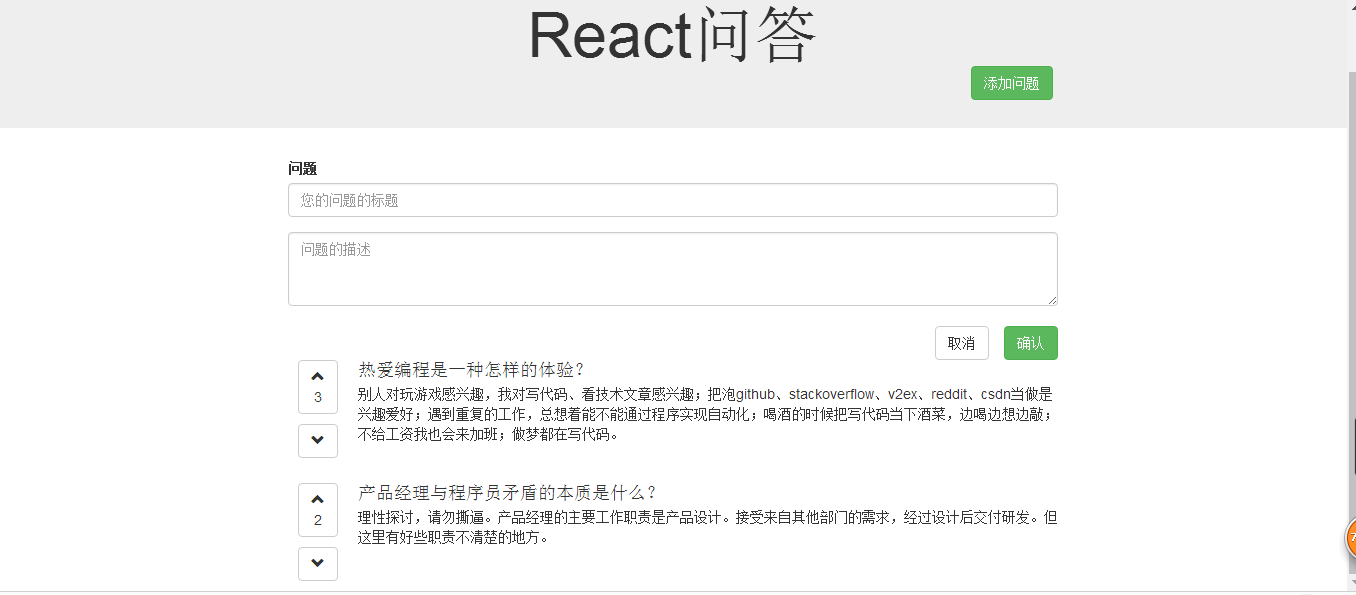
需求看图说:
1.点击“添加”按钮,显示问题输入表单,再次点击,隐藏表单。同时,点击“取消”按钮,隐藏表单。
2.输入问题标题和内容后,点击“确认”按钮,将问题显示在下方(按照投票数从高到低)。
3.每个问题有加票和减票功能,在点击的同时,将问题按照投票数从高到低排序。
实现过程:
一、开发环境和工具
1.npm init (生成package.json文件) (按照向导填写各个字段,最后生成 package.json 文件。
容易出错的是: name的值不要和包包同名 。
比如我们后续需要使用npm安装几个包包:browserify react reactify ...则name值如果写作“browserify”或“react”,此依赖会安装失败!
提示如下:
npm WARN install Refusing to install react as a dependency of itself)
2.npm install react --save npm install react-dom --save (最开始就是没有安装react-dom,所以一直渲染不出来)
3.npm install -g gulp
4.npm install --save-dev gulp gulp-browserify gulp-concat gulp-react gulp-connect lodash reactify
(这里注意一下,npm install --save 与 npm install --save-dev 的区别,一个放在package.json 的dependencies , 一个放在devDependencies里面,产品模式用dependencies,开发模式用devDep。)
5.bower init (生成bower.json文件)
6.bower install bootstrap --save
7.新建app文件夹,再在下面建一个js文件夹,创建main.js
8.新建dist文件(压缩后的文件放的地方)
9.创建gulpfile.js
二、代码开发
gulpfile.js内容如下:
 var gulp = require('gulp'),

     connect = require('gulp-connect'),

     browserify = require('gulp-browserify'),

     concat = require('gulp-concat'),

     port = process.env.port || 5000;

 gulp.task('browserify',function(){

     gulp.src('./app/js/main.js')

         .pipe(browserify({

             transform: 'reactify',

         }))

         .pipe(gulp.dest('./dist/js'))

 });

 // live reload

 gulp.task('connect',function(){

     connect.server({

         // root:'./',

         port: port,

         livereload: true

     })

 })

 // reload Js

 gulp.task('js',function(){

     gulp.src('./dist/**/*.js')

         .pipe( connect.reload() )

 })

 gulp.task('html',function(){

     gulp.src('./app/**/*.html')

         .pipe( connect.reload() )

 });

 gulp.task('watch',function(){

     gulp.watch('./dist/**/*.js',['js']);

     gulp.watch('./app/**/*.html',['html']);

     gulp.watch('./app/js/**/*.js',['browserify']);

 })

 gulp.task('default',['browserify']);

 gulp.task('serve',['browserify','connect','watch']);
静态页面html:
 <!DOCTYPE html>

 <html>

 <head>

     <meta charset="utf8">

     <title>React问答 app </title>

     <link rel="stylesheet" href="bower_components/bootstrap/dist/css/bootstrap.css">

     <style>

         .container{

             max-width: 800px;

         }

         .jumbotron .container{

             position: relative;

             max-width: 800px;

         }

         #add-question-btn{

             position: absolute;

             bottom: -20px;

             right: 20px;

         }

         form[name="addQuestion"] .btn{

             margin: 20px 0 0 15px;

         }

         .media-left{

             text-align: center;

             width:70px;

             float: left;

         }

         .media-left .btn{

             margin-bottom: 10px;

         }

         .vote-count{

             display: block;

         }

     </style>

 </head>

 <body>

 <div id="app">

     <div class="jumbotron text-center">

         <div class="container">

             <h1>React问答</h1>

             <button id="add-question-btn" class="btn btn-success">添加问题</button>

         </div>

     </div>

     <div class="main container">

         <form name="addQuestion" class="clearfix">

             <div class="form-group">

                 <label for="qtitle">问题</label>

                 <input type="text" class="form-control" id="qtitle" placeholder="您的问题的标题">

             </div>

             <textarea class="form-control" rows="3" placeholder="问题的描述"></textarea>

             <button class="btn btn-success pull-right">确认</button>

             <button class="btn btn-default pull-right">取消</button>

         </form>

         <div id="questions" class="">

             <div class="media">

                 <div class="media-left">

                     <button class="btn btn-default">

                         <span class="glyphicon glyphicon-chevron-up"></span>

                         <span class="vote-count">22</span>

                     </button>

                     <button class="btn btn-default">

                         <span class="glyphicon glyphicon-chevron-down"></span>

                     </button>

                 </div>

                 <div class="media-body">

                     <h4 class="media-heading">产品经理与程序员矛盾的本质是什么?</h4>

                     <p>理性探讨,请勿撕逼。产品经理的主要工作职责是产品设计。接受来自其他部门的需求,经过设计后交付研发。但这里有好些职责不清楚的地方。</p>

                 </div>

             </div>

             <div class="media">

                 <div class="media-left">

                     <button class="btn btn-default">

                         <span class="glyphicon glyphicon-chevron-up"></span>

                         <span class="vote-count">12</span>

                     </button>

                     <button class="btn btn-default">

                         <span class="glyphicon glyphicon-chevron-down"></span>

                     </button>

                 </div>

                 <div class="media-body">

                     <h4 class="media-heading">热爱编程是一种怎样的体验?</h4>

                     <p>别人对玩游戏感兴趣,我对写代码、看技术文章感兴趣;把泡github、stackoverflow、v2ex、reddit、csdn当做是兴趣爱好;遇到重复的工作,总想着能不能通过程序实现自动化;喝酒的时候把写代码当下酒菜,边喝边想边敲;不给工资我也会来加班;做梦都在写代码。</p>

                 </div>

             </div>

         </div>

     </div>

 </div>

 <!--

 <script src="/dist/js/main.js"></script>  -->

 </body>

 </html>
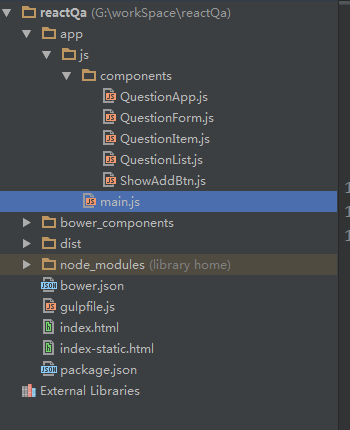
接下来的react代码转化,我就不详细谢了,在这里贴出我的项目文件展示:
index.html
 <!DOCTYPE html>

 <html>

 <head>

     <meta charset="utf8">

     <title>React问答 app </title>

     <link rel="stylesheet" href="bower_components/bootstrap/dist/css/bootstrap.css">

     <style>

         .container{

             max-width: 800px;

         }

         .jumbotron .container{

             position: relative;

             max-width: 800px;

         }

         #add-question-btn{

             position: absolute;

             bottom: -20px;

             right: 20px;

         }

         form[name="addQuestion"] .btn{

             margin: 20px 0 0 15px;

         }

         .media-left{

             text-align: center;

             width:70px;

             float: left;

         }

         .media-left .btn{

             margin-bottom: 10px;

         }

         .vote-count{

             display: block;

         }

     </style>

 </head>

 <body>

 <div id="app"> </div>

 <script src="/dist/js/main.js"></script>

 </body>

 </html>
main.js
 var React = require('react');

 var ReactDOM = require('react-dom');

 var QuestionApp = require('./components/QuestionApp.js');

 /* 模块名可使用相对路径(以./开头),或者是绝对路径(以/或C:之类的盘符开头)*/

 var mainCom = ReactDOM.render(

     <QuestionApp />,

     document.getElementById('app')

 );
QuestionApp.js
 var React = require('react');

 var ShowAddBtn = require('./ShowAddBtn.js');

 var QuestionForm = require('./QuestionForm.js');

 var QuestionList = require('./QuestionList.js');

 module.exports = React.createClass({

     getInitialState: function(){

         var questions = [

             {

                 key: 1,

                 title: '产品经理与程序员矛盾的本质是什么?',

                 description: '理性探讨,请勿撕逼。产品经理的主要工作职责是产品设计。接受来自其他部门的需求,经过设计后交付研发。但这里有好些职责不清楚的地方。',

                 voteCount: 2

             },

             {

                 key: 2,

                 title: '热爱编程是一种怎样的体验?',

                 description: '别人对玩游戏感兴趣,我对写代码、看技术文章感兴趣;把泡github、stackoverflow、v2ex、reddit、csdn当做是兴趣爱好;遇到重复的工作,总想着能不能通过程序实现自动化;喝酒的时候把写代码当下酒菜,边喝边想边敲;不给工资我也会来加班;做梦都在写代码。',

                 voteCount: 3

             }

         ];

         questions = this.questionSort(questions); //sort the init questions

         return {

             displayForm: false,

             questions: questions

         };

     },

     onToggleForm: function(){

         this.setState({

             displayForm: !this.state.displayForm

         });

     },

     onQuestionNew: function(newQuestion){

         newQuestion.key = this.state.questions.length + 1;

         var newQuestions = this.state.questions.concat(newQuestion);

         newQuestions = this.questionSort(newQuestions);

         this.setState({

             questions: newQuestions

         });

     },

     questionSort: function(questions){

         questions.sort(function(a,b){

             return b.voteCount - a.voteCount;

         });

         return questions;//之前一直报错,这里忘记return

     },

     onVote: function(nowKey, newVoteCount){

         var questions = this.state.questions;

         var index = 0;

         for(var i=0; i<questions.length; i++){

             if(questions[i].key == nowKey){

                 index = i;

             }

         }

         questions[index].voteCount = newVoteCount;

         questions = this.questionSort(questions);

         this.setState({

             questions: questions

         });

     },

     render: function(){

         return (

             <div>

                 <div className="jumbotron text-center">

                     <div className="container">

                         <h1>React问答</h1>

                         <ShowAddBtn onToggleForm={this.onToggleForm}/>

                     </div>

                 </div>

                 <div className="main container">

                     <QuestionForm onQuestionNew={this.onQuestionNew} displayForm={this.state.displayForm} onToggleForm={this.onToggleForm}/>

                     <QuestionList onVote={this.onVote} questions={this.state.questions}/>

                 </div>

             </div>

         )

     }

 });
ShowAddBtn.js
 var React = require('react');

 module.exports = React.createClass({

     render: function(){

         return (

             <button id="add-question-btn" className="btn btn-success" onClick={this.props.onToggleForm}>添加问题</button>

         )

     }

 });
QuestionForm.js
 var React = require('react');

 module.exports = React.createClass({

     handleSubmit: function(e){

         e.preventDefault();

         var newQuestion = {

             title: this.refs.title.value,

             description: this.refs.description.value,

             voteCount: 0

         };

         this.refs.questionForm.reset();

         this.props.onQuestionNew(newQuestion);

     },

     render: function(){

         return (

             <form name="addQuestion" className="clearfix" ref="questionForm"

                   style={{display: this.props.displayForm ? 'block' : 'none'}}

                   onSubmit={this.handleSubmit}>

                 <div className="form-group">

                     <label htmlFor="qtitle">问题</label>

                     <input ref="title" type="text" className="form-control" id="qtitle" placeholder="您的问题的标题"/>

                 </div>

                 <textarea ref="description" className="form-control" rows="3" placeholder="问题的描述"></textarea>

                 <button className="btn btn-success pull-right">确认</button>

                 <a className="btn btn-default pull-right" onClick={this.props.onToggleForm}>取消</a>

             </form>

         )

     }

 });
QuestionList.js
 var React = require('react');

 var QuestionItem = require('./QuestionItem.js');

 module.exports = React.createClass({

     render: function(){

         var questions = this.props.questions;

         var _this = this;//这里的this要单独保存,否则下面的map中的this指的是循环的每个对象

         var questionComps = questions.map(function(qst){

             return <QuestionItem

                 key={qst.key}

                 questionKey={qst.key}

                 title={qst.title}

                 description={qst.description}

                 voteCount={qst.voteCount}

                 onVote={_this.props.onVote}/>

         });

         //开始一直报错,是因为这里,render里面,return(), 没有写最外层div

         return (

             <div id="questions" className="">

                 {questionComps}/*直接放个数组在这里,他会自动去循环*/

             </div>

         )

     }

 });
QuestionItem.js
 var React = require('react');

 module.exports = React.createClass({

     voteUp: function(){

         var newVoteCount = parseInt(this.props.voteCount, 10) + 1;

         //this.props.questionKey这里必须重

         // 新定义一个questionKey属性, 不能this.props.key

         this.props.onVote(this.props.questionKey, newVoteCount);

     },

     voteDown: function(){

         var newVoteCount = parseInt(this.props.voteCount, 10) - 1;

         this.props.onVote(this.props.questionKey, newVoteCount);

     },

     render: function(){

         return (

             <div className="media">

                 <div className="media-left">

                     <button className="btn btn-default" onClick={this.voteUp}>

                         <span className="glyphicon glyphicon-chevron-up"></span>

                         <span className="vote-count">{this.props.voteCount}</span>

                     </button>

                     <button className="btn btn-default" onClick={this.voteDown}>

                         <span className="glyphicon glyphicon-chevron-down"></span>

                     </button>

                 </div>

                 <div className="media-body">

                     <h4 className="media-heading">{this.props.title}</h4>

                     <p>{this.props.description}</p>

                 </div>

             </div>

         )

     }

 });
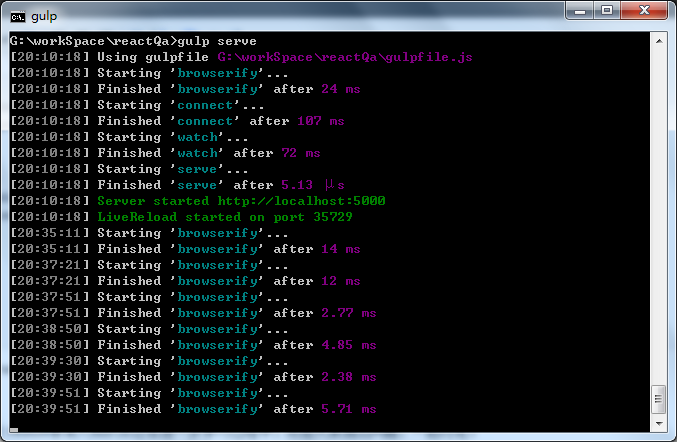
到这里,所有代码就完成了,在命令行里面执行gulp serve命令,然后在浏览器中访问localhost:5000。
到此整个小demo就算完成了。对于react-router, react redux等深入知识点还在进一步学习过程中,欢迎大家提出问题,一起讨论。
React问答小demo的更多相关文章
- 助你了解react的小demo
React是个啥 React 是一个用于构建用户界面的 JAVASCRIPT 库. React主要用于构建UI,很多人认为 React 是 MVC 中的 V(视图). React 起源于 Facebo ...
- MobX+react使用小demo
第一次接触mobx,网上找了很多例子,写此主要总结一下create-react-app + mobx入门 create-react-app myreact cd myreact npm install ...
- 学习react,动手实现一个小demo(仿知乎问答)
学习react也有一周的时间,最近自己做了个仿知乎问答的小demo,项目源码在github上:https://github.com/yang302/reactQa 使用技术:bower+gulp+re ...
- swiper嵌套小demo(移动端触摸滑动插件)
swiper(移动端触摸滑动插件) tip:自己敲得Swiper 的小demo,可以复制粘贴看看效果哦. swiper的js包css包下链接地址 : https://github.com/Clear ...
- React Native八大Demo
参考资料:http://www.cnblogs.com/shaoting/p/7148240.html 下一个项目公司也打算使用react native.大致看了下原型设计,写几个小demo先试试水. ...
- 新手 gulp+ seajs 小demo
首先,不说废话,它的介绍和作者就不在多说了,网上一百度一大堆: 我在这里只是来写写我这2天抽空对seajs的了解并爬过的坑,和实现的一个小demo(纯属为了实现,高手请绕道); 一.环境工具及安装 1 ...
- Nancy之基于Nancy.Hosting.Self的小Demo
继昨天的Nancy之基于Nancy.Hosting.Aspnet的小Demo后, 今天来做个基于Nancy.Hosting.Self的小Demo. 关于Self Hosting Nancy,官方文档的 ...
- Nancy之基于Nancy.Owin的小Demo
前面做了基于Nancy.Hosting.Aspnet和Nancy.Hosting.Self的小Demo 今天我们来做个基于Nancy.Owin的小Demo 开始之前我们来说说什么是Owin和Katan ...
- Nancy之基于Self Hosting的补充小Demo
前面把Hosting Nancy with ASP.NET.Self Hosting Nancy和Hosting Nancy with OWIN 以demo的形式简单描述了一下. 这篇是为Self H ...
随机推荐
- ajax_post方式
test_ajax_post.html <!DOCTYPE HTML PUBLIC "-//W3C//DTD HTML 4.01 Transitional//EN" &quo ...
- Bzoj3990 [SDOI2015]排序
Time Limit: 20 Sec Memory Limit: 128 MBSubmit: 651 Solved: 338 Description 小A有一个1-2^N的排列A[1..2^N], ...
- html行内元素 和 块状元素 总结
块状元素 address - 地址blockquote - 块引用center - 举中对齐块dir - 目录列表div - 常用块级容易,也是CSS layout的主要标签dl - 定义列表fiel ...
- linux的sudo apt-get install 和dpkg -i <package.deb>命令
ubuntu统一的安装软件命令 sudo apt-get install ** sudo dpkg -i <package.deb>
- mongodb权威指南读书笔记
一个服务器能不能运行多个不同端口的mongo实例? 如果两个对象不相等,hashcode一定不相等:如果两个对象相等,hashcode相等或者不相等? 修改器速度42页 update({},{&quo ...
- Debugging Failed Because Integrated Windows Authentication Is Not Enabled
To enable integrated Windows authentication Log onto the Web server using an administrator account. ...
- CodeIgniter目录结构
1.1 application 是你自己的项目存放文件的目录(控制器.模型和视图等!) (1)分析application文件夹中的目录 (1.1) cache文件是放缓存文件 (1 ...
- Windows下配置环境变量和需不需要重启问题
http://blog.163.com/guomaolin_gavin/blog/static/19961830720121114929321/
- maven实现tomcat热部署
1.使用maven+tomcat事项热部署 1.1修改tomcat-user.xml <role rolename="manager-gui"/> <!--man ...
- pod install后出现: [!] `<PBXResourcesBuildPhase UUID=`xxxx`>` attempted to initialize an object with an unknown UUID
[!] `<PBXResourcesBuildPhase UUID=`xxx`>` attempted to initialize an object with an unknown UU ...