
Python读取Excel数据并根据列名取值
一直想将自己接触到的东西梳理一遍,可就是迈不出第一步,希望从这篇总结开始不要再做行动的矮人了。
最近测试过程中需要用到python读取excel用例数据,于是去了解和学习了下xlrd库,这里只记录使用过程中读取excel数据相关操作。
一、安装xlrd库
可以下载xlrd库包到本地安装,也可以通过pip命令安装,这里我选择pip命令:
pip install xlrd
二、使用xlrd读取excel数据
具体详细的操作可以参考xlrd库操作说明文档,以下是两种读取excel数据的方法:
1、根据Excel中sheet名称读取数据:
 def readExcelDataByName(fileName, sheetName):

     table = None

     errorMsg = None

     try:

         data = xlrd.open_workbook(fileName)

         table = data.sheet_by_name(sheetName)

     except Exception, msg:

         errorMsg = msg
     return table, errorMsg
2、根据Excel中sheet的序号获取:
 def readExcelDataByIndex(fileName, sheetIndex):

     table = None

     errorMsg = ""

     try:

         data = xlrd.open_workbook(fileName)

         table = data.sheet_by_index(sheetIndex)

     except Exception, msg:

         errorMsg = msg

     return table, errorMsg
3、根据列名获取相应序号,由于有时读取excel中列数据时,需要通过列头名称获取相应的列中的值,所以写了下面这个返回列名所在表格中的index。然后就可以直接通过table.cell_value(i, getColumnIndex(table,'列名'))获取列的值。
 def getColumnIndex(table, columnName):

     columnIndex = None

     for i in range(table.ncols):

         if(table.cell_value(0, i) == columnName):

             columnIndex = i

             break

      return columnIndex
下面加入需要读取如下excel表格中的数据,在读取数据时直接根据列名去获取相应的值。

根据列名读取相应的值,代码如下:
 #!/usr/bin/python

 # coding=utf-8

 __author__ = 'Paul'

 import xlrd

 import chardet

 import traceback

 def getColumnIndex(table, columnName):

     columnIndex = None

     #print table

     for i in range(table.ncols):

         #print columnName

         #print table.cell_value(0, i)

         if(table.cell_value(0, i) == columnName):

             columnIndex = i

             break

     return columnIndex

 def readExcelDataByName(fileName, sheetName):

     #print fileName

     table = None

     errorMsg = ""

     try:

         data = xlrd.open_workbook(fileName)

         table = data.sheet_by_name(sheetName)

     except Exception, msg:

         errorMsg = msg

     return table, errorMsg

 def readExcelDataByIndex(fileName, sheetIndex):

     table = None

     errorMsg = ""

     try:

         data = xlrd.open_workbook(fileName)

         table = data.sheet_by_index(sheetIndex)

     except Exception, msg:

         errorMsg = msg

     return table, errorMsg

 if __name__ == '__main__':

     #example

     xlsfile= 'F:/test_AutoTesting/TestCase/RunList.xlsx'

     table = readExcelDataByName(xlsfile, 'Sheet1')[0]

     #获取第一行的值

     testcase_id = table.cell_value(1, getColumnIndex(table,'TestCaseID'))

     app_config = table.cell_value(1, getColumnIndex(table,'APPConfig'))

     print u'测试用例ID为:%s'%(testcase_id)

     print u'配置信息为:%s'%(app_config)
得出结果如下:
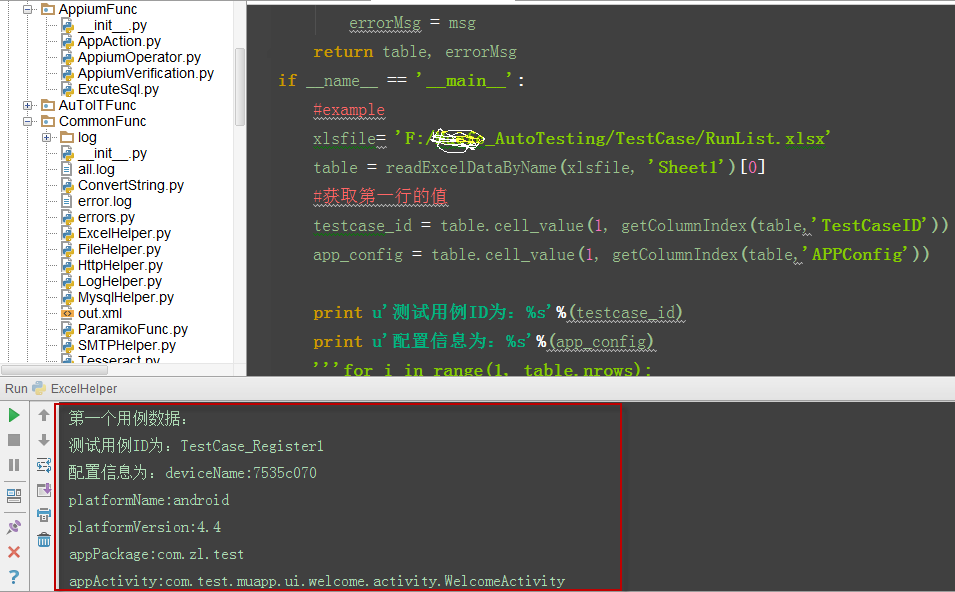
4、读取excel中的文本或数值转换成了float的问题
有时Excel中的值为20,但读取出来的值却变成了20.0,这与我们想要的不大一致,特别是做UI自动化测试过程中需要下拉选择值时就完全选不出想要的选项了。目前我想到的是通过下面的语句来处理:
if isinstance(inputValue,float):    #判断读取到的值是否为float

    if inputValue==int(inputValue): #判断读取到的值与转成int后的值是否相等,如果相等则转成int

    inputValue = int(inputValue)

    inputValue = str(inputValue) #转成str
Python读取Excel数据并根据列名取值的更多相关文章
- python 读取excel数据并将测试结果填入Excel
python 读取excel数据并将测试结果填入Excel 读取一个Excel中的一条数据用例,请求接口,然后返回结果并反填到excel中.过程中会生成请求回来的文本,当然还会生成一个xml文件.具体 ...
- Python读取excel 数据
1.安装xlrd 2.官网 通过官网来查看如何使用python读取Excel,python excel官网: http://www.python-excel.org/ 实例: (1)Excel内容 把 ...
- Python读取Excel数据
今天一同学给我发来一个Excel文件,让我帮他找一些信息,打开一开 8000多条数据.自己手工处理是不可能完成的的啦.作为一名程序员,当然要用程序来处理.处理生活中的问题当然是Python最为方便啦. ...
- python读取excel数据并以第一行标题加内容组成字典格式返回
excel结构如图所示: 代码: import xlrd ''' 通用获取excel数据 @:param path excel文件路径 @:param sheet_name excel文件里面shee ...
- python读取excel数据为json格式(兼容xls\xlsx)
做自动化时需要从excel读取数据: 本文实现将excel文件数据读取为json格式,方便自动化调用 读取xls文件 使用xlrd读取xls文件代码: import xlrd def read_xls ...
- python读取excel数据,并可视化展现
#-*- coding: utf-8 -*- import pandas as pda import matplotlib.pyplot as pyl import matplotlib.font_m ...
- python 读取excel数据
import xlrd book = xlrd.open_workbook(file_path)#打开文件 sheet = book.sheet_by_index(0) #获取第一个工作簿 print ...
- Python 读取Excel数据 xlrd
#导入相关模块 from xlrd import open_workbook #打开excel file = open_workbook("test.xlsx") #获取sheet ...
- python 读取excel数据插入到另外一个excel
#-*-coding:utf-8-*- import xlrd import xlwt def excel_copy(dir_from, dir_to, sheet_name): '''从一个exce ...
随机推荐
- 利用svg技术实现在线动画演示
搜索MDCC的论文,发现了这个站点,里面有演示动画,居然是通过svg来实现的. 分享给大家看看: 有空研究下,做一个类似的演示,展示一下OceanBase内部的常见操作. 展示一个svg做的游戏: h ...
- tarjan算法大意
Tarjan算法 (以发现者Robert Tarjan命名)是一个在图中寻找强连通分量的算法.算法的基本思想为:任选一结点开始进行深度优先搜索dfs(若深度优先搜索结束后仍有未访问的结点,则再从中任选 ...
- Android eng版系统烧录
这里我只能记录下过程 Android有四层,最底层的Linux是一个kernel,然后是运行时库层,驱动大部分在这两层完成,接着是Framework层,主要是Android源码,最后是在源码基础上进行 ...
- JS HTML DOM
HTML DOM (文档对象模型) 当网页被加载时,浏览器会创建页面的文档对象模型(Document Object Model). HTML DOM 模型被构造为对象的树. HTML DOM 树 通过 ...
- linux之iptable案例
转自:http://blog.csdn.net/bill_lee_sh_cn/article/details/4401896 1.一对一流量完全DNAT 首先说一下网络环境,普通主机一台做防火墙用,网 ...
- SQL Server 动态行转列(轉載)
一.本文所涉及的内容(Contents) 本文所涉及的内容(Contents) 背景(Contexts) 实现代码(SQL Codes) 方法一:使用拼接SQL,静态列字段; 方法二:使用拼接SQL, ...
- Python 3 学习笔记2
教程链接:http://www.liaoxuefeng.com/wiki/0014316089557264a6b348958f449949df42a6d3a2e542c000 高级特性 切片 取一个l ...
- Insert into a Cyclic Sorted List
Given a node from a cyclic linked list which has been sorted, write a function to insert a value int ...
- Java 网络编程(六) 使用无连接的数据报(UDP)进行通信
连接地址:http://www.cnblogs.com/mengdd/archive/2013/03/10/2952673.html 使用无连接的数据报(UDP)进行通信 什么是Datagram? 数 ...
- String VS Cstring(字符串)
#include<string> 与 #include<string.h> 这是两个完全不同的头文件,前者用于C++,后者用于C,一般把这两个头文件都包括进去. 越来越觉得需要 ...