
《GPU高性能编程CUDA实战中文》中第四章的julia实验
在整个过程中出现了各种问题,我先将我调试好的真个项目打包,提供下载。
 /*

 * Copyright 1993-2010 NVIDIA Corporation.  All rights reserved.

 *

 * NVIDIA Corporation and its licensors retain all intellectual property and

 * proprietary rights in and to this software and related documentation.

 * Any use, reproduction, disclosure, or distribution of this software

 * and related documentation without an express license agreement from

 * NVIDIA Corporation is strictly prohibited.

 *

 * Please refer to the applicable NVIDIA end user license agreement (EULA)

 * associated with this source code for terms and conditions that govern

 * your use of this NVIDIA software.

 *

 */

 #include <GL\glut.h>

 #include "cuda.h"

 #include "cuda_runtime.h"

 #include "device_launch_parameters.h"

 #include "../common/book.h"

 #include "../common/cpu_bitmap.h"

 #define DIM 1000

 struct cuComplex {

     float   r;

     float   i;

     __device__ cuComplex(float a, float b) : r(a), i(b)  {}

     __device__ float magnitude2(void) {

         return r * r + i * i;

     }

     __device__ cuComplex operator*(const cuComplex& a) {

         return cuComplex(r*a.r - i*a.i, i*a.r + r*a.i);

     }

     __device__ cuComplex operator+(const cuComplex& a) {

         return cuComplex(r + a.r, i + a.i);

     }

 };

 __device__ int julia(int x, int y) {

     const float scale = 1.5;

     float jx = scale * (float)(DIM /  - x) / (DIM / );

     float jy = scale * (float)(DIM /  - y) / (DIM / );

     cuComplex c(-0.8, 0.156);

     cuComplex a(jx, jy);

     int i = ;

     for (i = ; i<; i++) {

         a = a * a + c;

         if (a.magnitude2() > )

             return ;

     }

     return ;

 }

 __global__ void kernel(unsigned char *ptr) {

     // map from blockIdx to pixel position

     int x = blockIdx.x;

     int y = blockIdx.y;

     int offset = x + y * gridDim.x;

     // now calculate the value at that position

     int juliaValue = julia(x, y);

     ptr[offset *  + ] =  * juliaValue;

     ptr[offset *  + ] = ;

     ptr[offset *  + ] = ;

     ptr[offset *  + ] = ;

 }

 // globals needed by the update routine

 struct DataBlock {

     unsigned char   *dev_bitmap;

 };

 int main(void) {

     DataBlock   data;

     CPUBitmap bitmap(DIM, DIM, &data);

     unsigned char    *dev_bitmap;

     HANDLE_ERROR(cudaMalloc((void**)&dev_bitmap, bitmap.image_size()));

     data.dev_bitmap = dev_bitmap;

     dim3    grid(DIM, DIM);

     kernel << <grid,  >> >(dev_bitmap);

     HANDLE_ERROR(cudaMemcpy(bitmap.get_ptr(), dev_bitmap,

         bitmap.image_size(),

         cudaMemcpyDeviceToHost));

     HANDLE_ERROR(cudaFree(dev_bitmap));

     bitmap.display_and_exit();

 }
期间出现的问题:
问题一
calling a host function("cuComplex::cuComplex") from a __device__/__global__ function("julia") is not allowed

calling a host function("cuComplex::cuComplex") from a __device__/__global__ function("julia") is not allowed

calling a host function("cuComplex::cuComplex") from a __device__/__global__ function("cuComplex::operator *") is not allowed

calling a host function("cuComplex::cuComplex") from a __device__/__global__ function("cuComplex::operator +") is not allowed
这个原因是在原著中提供的代码有问题,原著中结构体中的代码为
cuComplex(float a, float b) : r(a), i(b) {}
将其修改如下即可:
__device__ cuComplex(float a, float b) : r(a), i(b) {}
问题二
error LNK2019: 无法解析的外部符号 ___glutInitWithExit@12,该符号在函数 _glutInit_ATEXIT_HACK@8 中被引用 1>GEARS.obj : error LNK2019: 无法解析的外部符号 ___gl
这个原因是我的OpenGL文件没有引对
#include <GL\glut.h>
其中glut.h文件要在下面的路径下
C:\Program Files (x86)\Microsoft Visual Studio 12.0\VC\include\GL
如果GL文件夹不在,要手动创建,结构如下图所示:

注意:
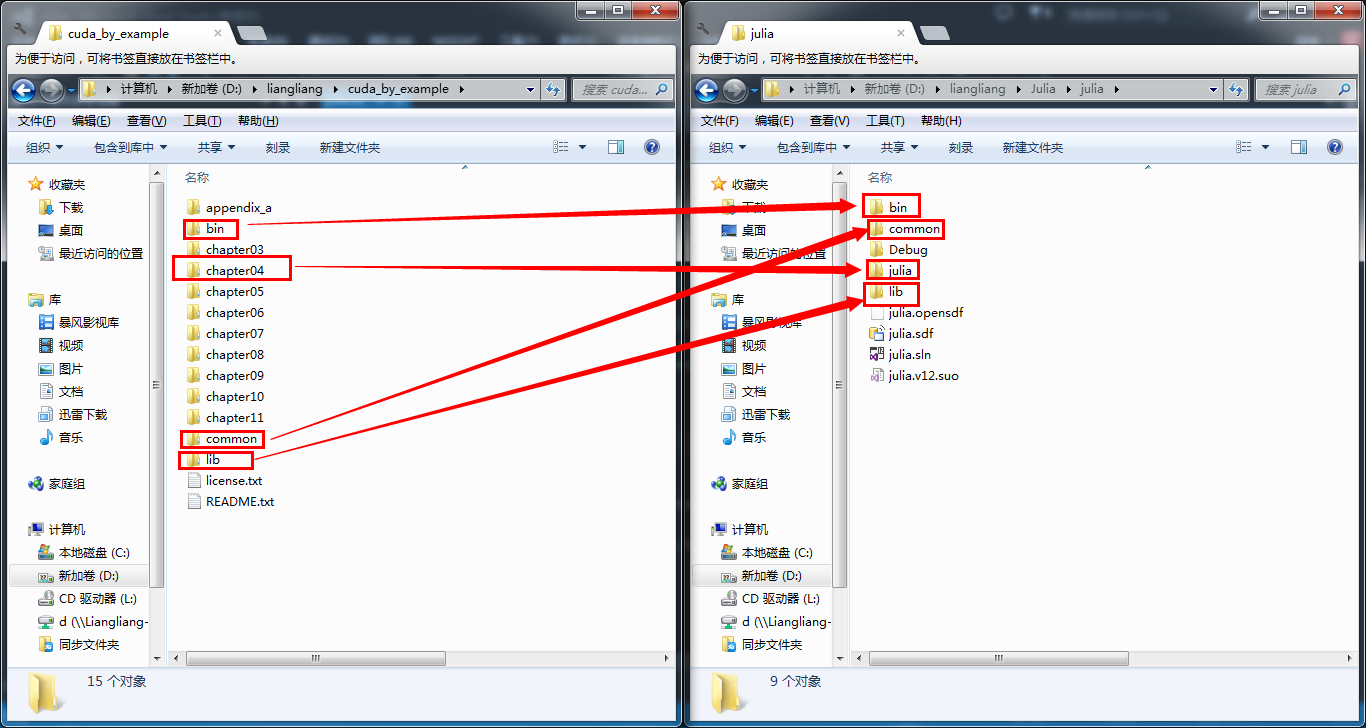
为了运行示例代码,需要抽取可运行的部分,同时为了减少手动修改的麻烦,也要注意各各个文件目录的层次关系,我的截图如下:
千辛万苦走下来就为了下面这张图:

确实挺好看的。赞一个!
《GPU高性能编程CUDA实战中文》中第四章的julia实验的更多相关文章
- [问题解决]《GPU高性能编程CUDA实战》中第4章Julia实例“显示器驱动已停止响应,并且已恢复”问题的解决方法
以下问题的出现及解决都基于"WIN7+CUDA7.5". 问题描述:当我编译运行<GPU高性能编程CUDA实战>中第4章所给Julia实例代码时,出现了显示器闪动的现象 ...
- 《GPU高性能编程CUDA实战》第五章 线程并行
▶ 本章介绍了线程并行,并给出四个例子.长向量加法.波纹效果.点积和显示位图. ● 长向量加法(线程块并行 + 线程并行) #include <stdio.h> #include &quo ...
- 《GPU高性能编程CUDA实战》第四章 简单的线程块并行
▶ 本章介绍了线程块并行,并给出两个例子:长向量加法和绘制julia集. ● 长向量加法,中规中矩的GPU加法,包含申请内存和显存,赋值,显存传入,计算,显存传出,处理结果,清理内存和显存.用到了 t ...
- 《GPU高性能编程CUDA实战》第十一章 多GPU系统的CUDA C
▶ 本章介绍了多设备胸膛下的 CUDA 编程,以及一些特殊存储类型对计算速度的影响 ● 显存和零拷贝内存的拷贝与计算对比 #include <stdio.h> #include " ...
- 《GPU高性能编程CUDA实战》附录二 散列表
▶ 使用CPU和GPU分别实现散列表 ● CPU方法 #include <stdio.h> #include <time.h> #include "cuda_runt ...
- 《GPU高性能编程CUDA实战》第七章 纹理内存
▶ 本章介绍了纹理内存的使用,并给出了热传导的两个个例子.分别使用了一维和二维纹理单元. ● 热传导(使用一维纹理) #include <stdio.h> #include "c ...
- 《GPU高性能编程CUDA实战》第六章 常量内存
▶ 本章介绍了常量内存的使用,并给光线追踪的一个例子.介绍了结构cudaEvent_t及其在计时方面的使用. ● 章节代码,大意是有SPHERES个球分布在原点附近,其球心坐标在每个坐标轴方向上分量绝 ...
- 《GPU高性能编程CUDA实战》第三章 CUDA设备相关
▶ 这章介绍了与CUDA设备相关的参数,并给出了了若干用于查询参数的函数. ● 代码(已合并) #include <stdio.h> #include "cuda_runtime ...
- 《GPU高性能编程CUDA实战》附录一 高级原子操作
▶ 本章介绍了手动实现原子操作.重构了第五章向量点积的过程.核心是通过定义结构Lock及其运算,实现锁定,读写,解锁的过程. ● 章节代码 #include <stdio.h> #incl ...
随机推荐
- atom快捷键
文件切换 ctrl-shift-s 保存所有打开的文件 cmd-shift-o 打开目录 cmd-\ 显示或隐藏目录树 ctrl-0 焦点移到目录树 目录树下,使用a,m,delete来增加,修改和删 ...
- putty提示Network error:Software caused connection abort
在 sshd host 的 /etc/ssh/sshd_config 设定: TCPKeepAlive yes,和将LoginGraceTime的值设为0,默认为2m,然后使用service sshd ...
- angularJS处理table中checkbox的选中状态
<!DOCTYPE html> <html> <head> <meta charset="UTF-8"> <title> ...
- vue中比较完美请求的栗子(使用 axios 访问 API)
vue中比较完美请求的栗子(使用 axios 访问 API) 官网地址:https://vuejs.bootcss.com/v2/cookbook/using-axios-to-consume-api ...
- [Leetcode]005. Longest Palindromic Substring
public String longestPalindrome(String s) { int start = 0, end = 0; for (int i = 0; i < s.length( ...
- 转 nagios监控oracle运行状况
https://blog.csdn.net/heizistudio/article/details/8638488 nrpe安装脚本 nagios-plugins-1.4.13.tar.gznrpe- ...
- Spring学习(五)事务管理
Spring 事务管理: 一.事务概念: 1.什么是事务? 事务是应用程序中一系列严密的操作,所有操作必须成功完成,否则在每个操作中所作的所有更改都会被撤消.也就是事务具有原子性,一个事务中的一系列的 ...
- Abp 添加阿里云短信发送
ABP中有短信发送接口ISmsSender public interface ISmsSender { Task<string> SendAsync(string number, stri ...
- Fence Repair (二叉树求解)(优先队列,先取出小的)
题目链接:http://poj.org/problem?id=3253 Fence Repair Time Limit: 2000MS Memory Limit: 65536K Total Sub ...
- 使用Foxfly.Net读取STEP文件
Foxfly.Net是具备基本的几何建模和CAD文件读取功能.本文主要介绍读取STP/STEP文件的使用方法. 1.初始化 项目中引入FoxflyNet.dll程序集,在Program.cs中初始化建 ...