
Qt Quick之TableView的使用
本博只是简单的展示TableView的基本使用(TableView、style:TableViewStyle、headerDelegate、rowDelegate、itemDelegate、TableViewColumn、ListModel及访问和修改Model),关于更多属性和方法的使用可以参考TableView QML Type
1. 效果图
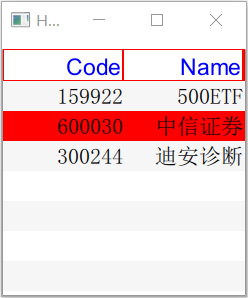
2. 代码实现
import QtQuick 2.9

import QtQuick.Window 2.2

import QtQuick.Controls 1.4

import QtQuick.Controls.Styles 1.4

Window {

    visible: true

    width:

    height:

    title: qsTr("Hello World")

    TableView

    {

        id:stockTable;

        anchors.left: parent.left;

        anchors.top:parent.top;

        anchors.topMargin: ;

        anchors.right: parent.right;

        anchors.bottom: parent.bottom;

        //alternatingRowColors : true;

        style:TableViewStyle

        {

            id:tstyle;

            backgroundColor:"white";

            alternateBackgroundColor:"#f6F6F6";

            textColor:"black";

            // 设置TableView的头部

            headerDelegate: Canvas

            {

                implicitWidth:;

                implicitHeight:;

                onPaint:

                {

                    var ctx = getContext("2d");

                    ctx.lineWidth = ;

                    ctx.strokeStyle="red";

                    ctx.fillStyle="blue";

                    ctx.beginPath();

                    console.log("width:",width,"--","height:",height);

                    ctx.rect(,,width,height);

                    ctx.stroke();

                    ctx.font="14pt sans-serif";

                    ctx.textAlign="right"

                    ctx.textBaseLine="middle";

                    ctx.fillText(styleData.value,width-,height/+);

                }

            }

            // 设置行

            rowDelegate:Rectangle

            {

                height:;

                color: styleData.selected? "red":

                    (styleData.alternate ? tstyle.backgroundColor :

                                           tstyle.alternateBackgroundColor);

            }

            // 设置单元格

            itemDelegate: Text

            {

                text:styleData.value;

                font.pointSize:;

                verticalAlignment:Text.AlignVCenter;

                horizontalAlignment:Text.AlignRight;

            }

        }

        TableViewColumn

        {

            role:"code";

            title:qsTr("Code");

            width:;

            movable: false;

        }

        TableViewColumn

        {

            role:"name";

            title:qsTr("Name");

            width:;

            movable: false;

        }

        ListModel {

              id: libraryModel

              ListElement {

                  code: ""

                  name: "500ETF"

              }

              ListElement {

                  code: ""

                  name: "中信证券"

              }

              ListElement {

                  code: ""

                  name: "迪安诊断"

              }

          }

        model: libraryModel;

    }

}
3. 访问和修改Model
(1) 访问数据
    itemDelegate: Text

            {

                text:styleData.value;

                font.pointSize:;

                verticalAlignment:Text.AlignVCenter;

                horizontalAlignment:Text.AlignRight;

                MouseArea

                {

                    anchors.fill:parent;

                    onClicked:

                    {

                        console.log("currentRow:",styleData.row, "-", styleData.column);

                        console.log(libraryModel.get(styleData.row).code, "-",

                                    libraryModel.get(styleData.row).name);

                    }

                }

            }
(2)删除数据
    rowDelegate:Rectangle

            {

                height:;

                color: styleData.selected? "red":

                    (styleData.alternate ? tstyle.backgroundColor :

                                           tstyle.alternateBackgroundColor);

                MouseArea

                {

                    anchors.fill:parent;

                    onClicked:

                    {

                        libraryModel.remove(styleData.row);

                    }

                }

            }
(3)修改数据
    itemDelegate: Text

            {

                text:styleData.value;

                font.pointSize:;

                verticalAlignment:Text.AlignVCenter;

                horizontalAlignment:Text.AlignRight;

                MouseArea

                {

                    anchors.fill:parent;

                    onClicked:

                    {

                        console.log("currentRow:",styleData.row, "-", styleData.column);

                        console.log(libraryModel.get(styleData.row).code, "-",

                                    libraryModel.get(styleData.row).name);

                        libraryModel.set(styleData.row, {"code":"888888", "name":"modify"});

                    }

                }

            }
(4)添加数据
    rowDelegate:Rectangle

            {

                height:;

                color: styleData.selected? "red":

                    (styleData.alternate ? tstyle.backgroundColor :

                                           tstyle.alternateBackgroundColor);

                MouseArea

                {

                    anchors.fill:parent;

                    onClicked:

                    {

                        //libraryModel.remove(styleData.row);

                        libraryModel.append({"code":"666666", "name":"add"});

                    }

                }

            }
Qt Quick之TableView的使用的更多相关文章
- Qt 学习之路 :Qt Quick Controls
自 QML 第一次发布已经过去一年多的时间,但在企业应用领域,QML 一直没有能够占据一定地位.很大一部分原因是,QML 缺少一些在企业应用中亟需的组件,比如按钮.菜单等.虽然移动领域,这些组件已经变 ...
- Qt Quick Controls 与 Qt Quick Controls 2的区别(详细对照)
Qt Quick Controls 原本是为支持桌面平台而开发的,后来又加入了移动平台和嵌入式平台的支持.它们应用非常广泛,因为它们提供了足够灵活的样式系统,以允许开发具有平台相关或者无关风格的应用程 ...
- 《Qt Quick 4小时入门》学习笔记4
http://edu.csdn.net/course/detail/1042/14806?auto_start=1 Qt Quick 4小时入门 第七章:处理鼠标与键盘事件 1.处理鼠标事件 鼠标信号 ...
- 《Qt Quick 4小时入门》学习笔记3
http://edu.csdn.net/course/detail/1042/14807?auto_start=1 Qt Quick 4小时入门 第八章:Qt Quick中的锚(anchors)布局 ...
- 《Qt Quick 4小时入门》学习笔记2
http://edu.csdn.net/course/detail/1042/14805?auto_start=1 Qt Quick 4小时入门 第五章:Qt Quick基本界面元素介绍 1. ...
- 《Qt Quick 4小时入门》学习笔记
http://edu.csdn.net/course/detail/1042/14804?auto_start=1 Qt Quick 4小时入门 第五章:Qt Quick里的信号与槽 QML中 ...
- 从头学Qt Quick(3)-- 用QML写一个简单的颜色选择器
先看一下效果图: 实现功能:点击不同的色块可以改变文字的颜色. 实现步骤: 一.创建一个默认的Qt Quick工程: 二.添加文件Cell.qml 这一步主要是为了实现一个自定义的组件,这个组件就是我 ...
- 从头学Qt Quick(1) --体验快速构建动态效果界面
自2005年Qt4发布以来,Qt已经为成千上万的应用程序提供了框架服务,现在Qt已经基本上支持所有的开发平台了,这里面既包含了桌面.嵌入式领域,也包括了Android.IOS.WP等移动操作平台,甚至 ...
- Qt Quick实现的涂鸦程序
之前一直以为 Qt Quick 里 Canvas 才干够自绘.后来发觉不是,原来还有好几种方式都能够画图! 能够使用原始的 OpenGL(Qt Quick 使用 OpenGL 渲染).能够构造QSGN ...
随机推荐
- sql server 字符串函数大全
平常会用到一些函数处理字符串,用的不算频繁,所以每次用到的时候就忘记了,这次在网上找了一篇文档,担心突然某一天这篇文章找不到了,然后就把文章的内容复制了一份: /* 1,ASCII返回字符表达式中最左 ...
- task15-18
[说明]貌似maven在真实的项目实战中挺重要的,可以省去大量的工作,有必要单独学习一下 15.创建一个新的maven项目 16.在src/main/java下随便创建一个java文件,clean,i ...
- 开启貌似已经过时很久的新坑:SharePoint服务器端对象模型
5年前(嗯,是5年前),SharePoint 2010刚发布的时候,曾经和kaneboy试图一起写一本关于SharePoint 2010开发的书,名字叫<SharePoint 2010 应用开发 ...
- 九度OJ 1180:对称矩阵 (矩阵计算)
时间限制:1 秒 内存限制:32 兆 特殊判题:否 提交:2637 解决:1354 题目描述: 输入一个N维矩阵,判断是否对称. 输入: 输入第一行包括一个数:N(1<=N<=100),表 ...
- Unable to determine IP address from host name
- greenlet和gevent模块的区别?
协程是一中多任务实现方式,它不需要多个进程或线程就可以实现多任务. yield能实现协程,不过实现过程不易于理解,greenlet是在这方面做了改进,通过switch. greenlet可以实现协程, ...
- ABAP 内表
定义内表 1. 先声明表结构, 再根据表结构定义内表. TYPES: BEGIN OF w_itab, a(10), b(10), END OF w_itab. DATA: itab1 type ...
- 2014阿里实习生面试题——MySQL如何实现索引的
这是2014阿里实习生北京站二面的一道试题: 在MySQL中,索引属于存储引擎级别的概念,不同存储引擎对索引的实现方式是不同的,比如MyISAM和InnoDB存储引擎. MyISAM索引实现: MyI ...
- PHP eval函数使用介绍
eval()函数中的eval是evaluate的简称,这个函数的作用就是把一段字符串当作PHP语句来执行. 复制代码代码如下: eval("echo'hello world';") ...
- LeetCode:救生艇【881】
LeetCode:救生艇[881] 题目描述 第 i 个人的体重为 people[i],每艘船可以承载的最大重量为 limit. 每艘船最多可同时载两人,但条件是这些人的重量之和最多为 limit. ...