
Spring4.x、SpringMVC和DButils整合
tomcat 8、Spring 4.X、JDK1.8
需要jar包:
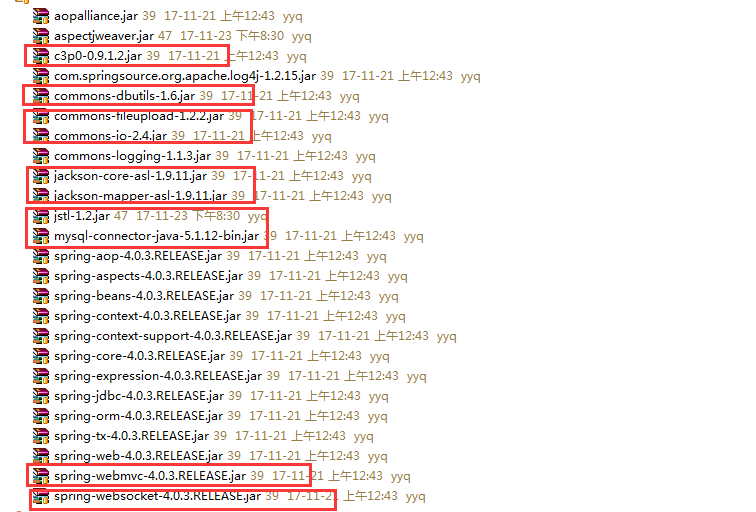
1)日志组件:log4j
 # debug < info < warn < error

 log4j.rootLogger=warn, console, file

 ###################console####################

 log4j.appender.console=org.apache.log4j.ConsoleAppender

 log4j.appender.console.layout=org.apache.log4j.PatternLayout

 log4j.appender.console.layout.ConversionPattern=%d{yyy-MMM-dd HH:mm:ss} %p %m %L %n

 ###################file######################

 log4j.appender.file=org.apache.log4j.RollingFileAppender

 log4j.appender.file.File=../logs/SpuerPPP.log

 log4j.appender.file.MaxFileSize=5kb

 log4j.appender.file.MaxBackupIndex=100

 log4j.appender.file.layout=org.apache.log4j.PatternLayout

 log4j.appender.file.layout.ConversionPattern=%d %c.%M()-%m%n
2)web.xml:注册spring组件为项目启动时加载
 <?xml version="1.0" encoding="UTF-8"?>

 <web-app xmlns:xsi="http://www.w3.org/2001/XMLSchema-instance" xmlns="http://xmlns.jcp.org/xml/ns/javaee" xsi:schemaLocation="http://xmlns.jcp.org/xml/ns/javaee http://xmlns.jcp.org/xml/ns/javaee/web-app_3_1.xsd" id="WebApp_ID" version="3.1">

   <welcome-file-list>

     <welcome-file>index.jsp</welcome-file>

   </welcome-file-list>

   <servlet>

     <servlet-name>springMVC</servlet-name>

     <servlet-class>org.springframework.web.servlet.DispatcherServlet</servlet-class>

     <init-param>

       <param-name>contextConfigLocation</param-name>

       <param-value>classpath:spring.xml</param-value>

     </init-param>

     <load-on-startup>1</load-on-startup>

   </servlet>

   <servlet-mapping>

     <servlet-name>springMVC</servlet-name>

     <url-pattern>*.do</url-pattern>

   </servlet-mapping>

   <filter>

     <filter-name>CharacterEncodingFilter</filter-name>

     <filter-class>org.springframework.web.filter.CharacterEncodingFilter</filter-class>

     <init-param>

       <param-name>encoding</param-name>

       <param-value>UTF-8</param-value>

     </init-param>

   </filter>

   <filter-mapping>

     <filter-name>CharacterEncodingFilter</filter-name>

     <url-pattern>/*</url-pattern>

   </filter-mapping>

 </web-app>
3)spring.xml:整合
 <?xml version="1.0" encoding="UTF-8"?>

 <beans xmlns="http://www.springframework.org/schema/beans"

     xmlns:xsi="http://www.w3.org/2001/XMLSchema-instance"

     xmlns:p="http://www.springframework.org/schema/p"

     xmlns:context="http://www.springframework.org/schema/context"

     xmlns:aop="http://www.springframework.org/schema/aop"

     xmlns:tx="http://www.springframework.org/schema/tx"

     xmlns:mvc="http://www.springframework.org/schema/mvc"

     xsi:schemaLocation="

         http://www.springframework.org/schema/beans

         http://www.springframework.org/schema/beans/spring-beans.xsd

         http://www.springframework.org/schema/context

         http://www.springframework.org/schema/context/spring-context.xsd

         http://www.springframework.org/schema/aop

         http://www.springframework.org/schema/aop/spring-aop.xsd

         http://www.springframework.org/schema/tx

         http://www.springframework.org/schema/tx/spring-tx.xsd

         http://www.springframework.org/schema/mvc

         http://www.springframework.org/schema/mvc/spring-mvc-4.0.xsd">

     <!-- 配置数据源信息-c3p0 -->

     <bean id="dataSource" class="com.mchange.v2.c3p0.ComboPooledDataSource">

         <property name="driverClass" value="com.mysql.jdbc.Driver"></property>

         <property name="jdbcUrl" value="jdbc:mysql://47.93.197.247:3306/SuperPPP"></property>

         <property name="user" value="yyq"></property>

         <property name="password" value="yyq"></property>

         <property name="initialPoolSize" value="5"></property>

         <property name="maxPoolSize" value="10"></property>

         <property name="maxStatements" value="100"></property>

         <property name="acquireIncrement" value="2"></property>

     </bean>

     <!-- DBUtils的queryRunner注入 -->

     <bean id="queryRunner" class="org.apache.commons.dbutils.QueryRunner" scope="prototype">

         <constructor-arg name="ds" ref="dataSource"/>

     </bean>

     <!-- 组件扫描 -->

     <context:component-scan base-package="henu.superppp" />

     <!-- 事务管理器 -->

     <bean id="txManager" class="org.springframework.jdbc.datasource.DataSourceTransactionManager">

         <property name="dataSource" ref="dataSource"/>

     </bean>

     <!-- 注解式事务管理 -->

     <tx:annotation-driven transaction-manager="txManager"/>

     <!-- aop注解方式 -->

     <aop:aspectj-autoproxy/>

     <!-- MVC相关配置 -->

     <!-- 拦截器,进行轻量级访问控制 -->

     <!-- 文件上传 -->

     <bean id="multipartResolver" class="org.springframework.web.multipart.commons.CommonsMultipartResolver">

         <property name="defaultEncoding" value="UTF-8"/>

         <property name="maxUploadSize" value="10000000"/>

     </bean>

  <!-- 处理请求返回json字符串的中文乱码问题 以及映射器、适配器和试图解析器的自动配置-->
    <mvc:annotation-driven>
        <mvc:message-converters>
            <bean class="org.springframework.http.converter.StringHttpMessageConverter">
                <property name="supportedMediaTypes">
                    <list>
                        <value>application/json;charset=UTF-8</value>
                        <value>text/html;charset=UTF-8</value>
                    </list>
                </property>
            </bean>
        </mvc:message-converters>
    </mvc:annotation-driven>

     <!-- 解析器 -->

     <bean class="org.springframework.web.servlet.view.InternalResourceViewResolver">

         <property name="prefix" value="/WEB-INF/jsps/"/>

         <property name="suffix" value=".jsp"/>

     </bean>

 </beans>
Spring4.x、SpringMVC和DButils整合的更多相关文章
- SSM Spring SpringMVC Mybatis框架整合Java配置完整版
以前用着SSH都是老师给配好的,自己直接改就可以.但是公司主流还是SSM,就自己研究了一下Java版本的配置.网上大多是基于xnl的配置,但是越往后越新的项目都开始基于JavaConfig配置了,这也 ...
- SpringBoot+SpringMVC+MyBatis快速整合搭建
作为开发人员,大家都知道,SpringBoot是基于Spring4.0设计的,不仅继承了Spring框架原有的优秀特性,而且还通过简化配置来进一步简化了Spring应用的整个搭建和开发过程.另外Spr ...
- SpringMVC与MyBatis整合之日期格式转换
在上一篇博客<SpringMVC与MyBatis整合(一)——查询人员列表>中遗留了日期格式转换的问题,在这篇记录解决过程. 对于controller形参中pojo对象,如果属性中有日期类 ...
- 3.springMVC+spring+Mybatis整合Demo(单表的增删该查,这里主要是贴代码,不多解释了)
前面给大家讲了整合的思路和整合的过程,在这里就不在提了,直接把springMVC+spring+Mybatis整合的实例代码(单表的增删改查)贴给大家: 首先是目录结构: 仔细看看这个目录结构:我不详 ...
- SpringMVC与mybatis整合
一.逆向工程生成基础信息 <?xml version="1.0" encoding="UTF-8"?> <!DOCTYPE generator ...
- spring-mvc + shiro框架整合(sonne_game网站开发04)
这篇文章讲的内容是在之前spring + mybatis + spring-mvc + freemarker框架整合的代码的基础上.有需要的可以看看我博客的前两篇文章. 另外,本文章所讲相关所有代码都 ...
- Spring+SpringMVC+MyBatis+easyUI整合基础篇(六)maven整合SSM
写在前面的话 承接前文<Spring+SpringMVC+MyBatis+easyUI整合基础篇(五)讲一下maven>,本篇所讲述的是如何使用maven与原ssm项目整合,使得一个普 ...
- Spring+SpringMVC+MyBatis+easyUI整合基础篇(八)mysql中文查询bug修复
写在前面的话 在测试搜索时出现的问题,mysql通过中文查询条件搜索不出数据,但是英文和数字可以搜索到记录,中文无返回记录.本文就是写一下发现问题的过程及解决方法.此bug在第一个项目中点这里还存在, ...
- Spring+SpringMVC+MyBatis+easyUI整合基础篇(十一)SVN服务器进阶
日常啰嗦 上一篇文章<Spring+SpringMVC+MyBatis+easyUI整合基础篇(十)SVN搭建>简单的讲了一下SVN服务器的搭建,并没有详细的介绍配置文件及一些复杂的功能, ...
随机推荐
- 【转】 Pro Android学习笔记(四三):Fragment(8):再谈Transaction和管理器
目录(?)[-] Transaction的一些操作 再谈FragmentManager 调用其他fragment的方法 唤起activity 唤起fragment和相互通信 一些其它 Transact ...
- 四种生成和解析XML文档的方法介绍
解析XML的方法越来越多,但主流的方法也就四种,即:DOM.SAX.JDOM和DOM4J 1.DOM(Document Object Model) DOM是用与平台和语言无关的方式表示XML文档的官方 ...
- Jenkins配置邮件SMTP(使用QQ邮箱)
一.QQ邮箱中开启SMTP服务 进入QQ邮箱的设置页面,选择开启POP3/SMTP服务 需要发送一条短信开启服务,成功后,会收到一个密码,一定要截图.复制密码保存好 二.Jenkins中配置SMTP ...
- mkfs在特定的分区上建立 linux 文件系统
Linux mkfs命令用于在特定的分区上建立 linux 文件系统 使用方式 : mkfs [-V] [-t fstype] [fs-options] filesys [blocks]参数 : ...
- 创建sharepoint网站
1.首先打开管理中心 输入用户名和密码(默认是本机的管理员名称及密码) 在“应用程序管理”选择“管理WEB应用程序” 新建应用程序 选择一个没有占用的端口,选择允许匿名访问 数据库名称一般为WSS_C ...
- 4、在线blast比对结果解析(保守结构域)
转载:http://www.bio1000.com/experiment/fenzi/237846.html 标签: NCBI Blast LASTP 摘要 : NCBI BLAST比对结果报告分析: ...
- Luogu 4868 Preprefix sum
类似于树状数组维护区间的方法. 每一次询问要求$\sum_{i = 1}^{n}\sum_{j = 1}^{i}a_j$. 展开一下: $\sum_{i = 1}^{n}\sum_{j = 1}^{i ...
- From COM to COM 侯捷 1998.06.12
摘要: 本文簡介 C++ Object Model 和 Component Object Model 的基本概念,並引介四本書籍: 1. Inside The C++ Object Model 2. ...
- C# Collection was modified;enumeration operation may not execute
一.问题描述 在做 数组.列表.集合遍历时,可能我们会遇见这个问题.Collection was modified;enumeration operation may not execute ,翻译的 ...
- 结合jenkins以及PTP平台的性能回归测试
此文已由作者余笑天授权网易云社区发布. 欢迎访问网易云社区,了解更多网易技术产品运营经验. 1背景简介 1.1 jenkins Jenkins是一个用Java编写的开源的持续集成工具.在与Oracle ...