
如何在ASP.NET页面中使用异步任务(PageAsyncTask)
在页面加载期间,可能有些操作是要比较耗用时间的(例如调用外部资源,要长时间等待其返回),正常情况下,这个操作将一直占用线程。而大家知道,ASP.NET在服务端线程池中的线程数是有限的,如果一直占用的话,就会导致其他操作需要等待。
在ASP.NET 2.0中,提供了一种异步页的技术。微软有一个专门的文档介绍这个技术
看看下面这个图,很重要
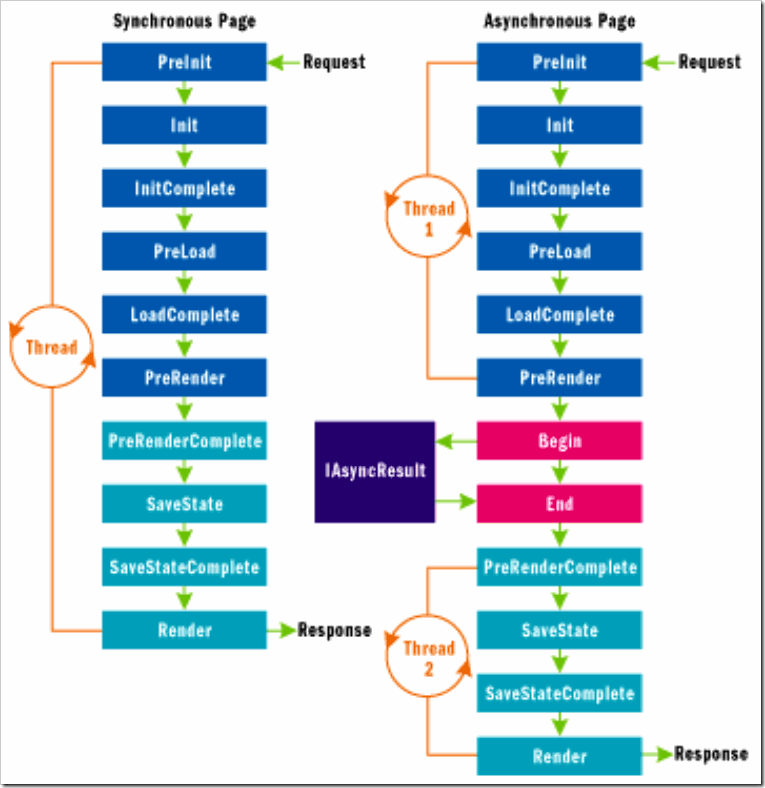
【注意】ASP.NET的异步机制与windows From的异步机制有一个根本区别,就是因为Response不可以分布发送到客户端的,所以,这个异步的效果对客户端来说可能是效果不明显的。也就说客户还是一样等待所有的操作完成之后才能看到页面。但是,使用了异步技术后,服务器端的线程能得到更好的利用,从另外一个层面是提高性能。
下面我用一个简单的例子来演示如何使用该技术
1. 页面需要启用async支持
<%@ Page Language="C#" AutoEventWireup="true" CodeBehind="Default.aspx.cs" Inherits="WebApplication2._Default" Async="true" %>
<!DOCTYPE html PUBLIC "-//W3C//DTD XHTML 1.0 Transitional//EN" "http://www.w3.org/TR/xhtml1/DTD/xhtml1-transitional.dtd">
<html xmlns="http://www.w3.org/1999/xhtml" >
<head runat="server">
<title></title>
<link rel="Stylesheet" href="default.css" />
</head>
<body>
<form id="form1" runat="server">
<div id="mydiv" runat="server">
</div>
</form>
</body>
</html>
2.通过一个独立的类型(class)定义长时间执行任务的操作
using System;
using System.Collections.Generic;
using System.Web;
using System.Threading;
namespace WebApplication2
{
public class LongTimeTask
{
public string Result = string.Empty;
public HelloWorldHandler handler;
public delegate string HelloWorldHandler();
public string HelloWorld()
{
Thread.Sleep(5000);
return "Hello,world";
}
public IAsyncResult OnBegin(object sender, EventArgs e,
AsyncCallback cb, object extraData)
{
handler = new HelloWorldHandler(this.HelloWorld);
return handler.BeginInvoke(cb, extraData);
}
public void OnEnd(IAsyncResult ar)
{
Result = handler.EndInvoke(ar);
}
public void OnTimeout(IAsyncResult ar)
{
Result = "超时了";
}
}
}
3. 在页面的Page_Load事件中,注册异步任务
LongTimeTask task;
protected void Page_Load(object sender, EventArgs e)
{
task= new LongTimeTask();
PageAsyncTask asynctask = new PageAsyncTask(task.OnBegin, task.OnEnd, task.OnTimeout, null);
RegisterAsyncTask(asynctask);
}
4. 在页面的OnPreRenderComplete的方法里面接收异步任务的结果
protected override void OnPreRenderComplete(EventArgs e)
{
mydiv.InnerHtml = task.Result;
}
【注意】值得一说的是,如果是调用Web Service,也可能会需要比较长时间,但因为Web Service的异步调用有内部的支持。不需要我们像上面这样复杂。
例如,有下面这样一个服务
using System;
using System.Collections.Generic;
using System.Web;
using System.Web.Services;
using System.Threading;
namespace WebApplication2
{
/// <summary>
/// demoService 的摘要说明
/// </summary>
[WebService(Namespace = "http://tempuri.org/")]
[WebServiceBinding(ConformsTo = WsiProfiles.BasicProfile1_1)]
[System.ComponentModel.ToolboxItem(false)]
public class demoService : System.Web.Services.WebService
{
[WebMethod]
public string HelloWorld()
{
Thread.Sleep(5000);
return "Hello World";
}
}
}
添加对其引用之后,我们在页面代码中大致是这样的
using System;
using System.Collections.Generic;
using System.Web;
using System.Web.UI;
using System.Web.UI.WebControls;
using System.Linq;
using System.Threading;
namespace WebApplication2
{
public partial class _Default : System.Web.UI.Page
{
protected void Page_Load(object sender, EventArgs e)
{
localhost.demoService proxy = new localhost.demoService();
proxy.HelloWorldCompleted += new WebApplication2.localhost.HelloWorldCompletedEventHandler(proxy_HelloWorldCompleted);//绑定一个完成事件
proxy.HelloWorldAsync();//开始异步调用
}
void proxy_HelloWorldCompleted(object sender, WebApplication2.localhost.HelloWorldCompletedEventArgs e)
{
mydiv.InnerHtml = e.Result;
}
}
}
可以看到,这种方式简单多了。
其他内置支持异步的场景还有IO操作。这里就不一一描述了
如何在ASP.NET页面中使用异步任务(PageAsyncTask)的更多相关文章
- 如何在asp.net页面使用css和js
一.如何在asp.net页面中使用css1.可以直接写在需要样式控制的控件里 例如:<div style="border:#ff6100 1px solid">< ...
- 如何在 ASP.NET MVC 中集成 AngularJS(2)
在如何在 ASP.NET MVC 中集成 AngularJS(1)中,我们介绍了 ASP.NET MVC 捆绑和压缩.应用程序版本自动刷新和工程构建等内容. 下面介绍如何在 ASP.NET MVC 中 ...
- 如何在ASP.NET Core中实现CORS跨域
注:下载本文的完整代码示例请访问 > How to enable CORS(Cross-origin resource sharing) in ASP.NET Core 如何在ASP.NET C ...
- 如何在ASP.NET Core中实现一个基础的身份认证
注:本文提到的代码示例下载地址> How to achieve a basic authorization in ASP.NET Core 如何在ASP.NET Core中实现一个基础的身份认证 ...
- 如何在 ASP.NET MVC 中集成 AngularJS(3)
今天来为大家介绍如何在 ASP.NET MVC 中集成 AngularJS 的最后一部分内容. 调试路由表 - HTML 缓存清除 就在我以为示例应用程序完成之后,我意识到,我必须提供两个版本的路由表 ...
- [转]如何在ASP.NET Core中实现一个基础的身份认证
本文转自:http://www.cnblogs.com/onecodeonescript/p/6015512.html 注:本文提到的代码示例下载地址> How to achieve a bas ...
- 如何在 ASP.NET MVC 中集成 AngularJS(1)
介绍 当涉及到计算机软件的开发时,我想运用所有的最新技术.例如,前端使用最新的 JavaScript 技术,服务器端使用最新的基于 REST 的 Web API 服务.另外,还有最新的数据库技术.最新 ...
- 如何在ASP.NET Core中应用Entity Framework
注:本文提到的代码示例下载地址> How to using Entity Framework DB first in ASP.NET Core 如何在ASP.NET Core中应用Entity ...
- [转] c# 模拟Asp.net页面中的某个按钮的点击,向web服务器发出请求
在没有做题目中所述的内容的时候,感觉这应该是很简单的东西,但是当真正开始做的时候却发现,有很多问题现在在这里写出来,供和我一样水平不高的参考一下. 在写本文之前参照了一下文章 欢迎使用CSDN论坛阅读 ...
随机推荐
- dup的使用(二)
转自:http://blog.csdn.net/yeyuangen/article/details/6852682 一个进程在此存在期间,会有一些文件被打开,从而会返回一些文件描述符,从shell中运 ...
- HDU 1940
//比赛的时候卡了三个点.今天卡了两个点.真心不愿意再看了. // 自己按照直线相交的思路的敲得.题意里说了不是按照final rank 给的.但是.这样就和标程输出不同. //就是觉得AC突然就不那 ...
- linux command dialog
Linux command dialog [Purpose] Learning how to use dialog commad, do man-machine interaction ...
- XE7 Unit scope names
今天编译RM报表 7.0 for XE7 ,build设计时包,提示 {$IFDEF JPEG}, JPEG{$ENDIF} 没有找到 JPEG.DCU,这个应该是XE7自带. 后来 在项目选项里,编 ...
- python执行系统命令后获取返回值
import os, subprocess # os.system('dir') #执行系统命令,没有获取返回值,windows下中文乱码 # result = os.popen('dir') #执行 ...
- C++静态成员变量和静态成员函数
数据成员可以分静态变量.非静态变量两种. 静态成员:静态类中的成员加入static修饰符,即是静态成员.可以直接使用类名+静态成员名访问此静态成员,因为静态成员存在于内存,非静态成员需要实例化才会分配 ...
- 全球DEM数据GMT绘制
http://gmt-china.org/download/
- Java eclipse Myeclipse tomcat安装及配置
Java eclipse Myeclipse tomcat安装及配置作者:天涯 来源:中国自学编程网 发布日期:1223857747目前,开发Java网页程序,最流行的就是用Myeclipse来进行编 ...
- Appium 并发多进程基于 Pytest框架
前言: 之前通过重写unittest的初始化方法加入设备参数进行并发,实现了基于unittest的appium多设备并发,但是考虑到unittest的框架实在过于简陋,也不方便后期的Jenkins的持 ...
- 对线性模型进行最小二乘法学习的实例(使用三角多项式基函数 Python实现)
该文为个人学习时的学习笔记.最小二乘法在统计学中需要验证数据的多重共性性等问题,需要做相关的假设检验,这里我们假设一切为理想状态. 最小二乘法 一个简单的应用就是进行线性模型的拟合,一般情况下我们 ...