
opencart安装和使用PHPMailer
一、安装PHPMailer
1)先给opencart项目安装vqmod
- 下载最新版本: http://code.google.com/p/vqmod (目前最新版本是vqmod-2.5.1-standard)
- 把解压出来的文件放到opencart根目录下
- 执行 http://www.yoursite.com/vqmod/install
- 你能看到成功信息“VQMOD ALREADY INSTALLED!”. 如果没有,就检查3,4步
2)下载PHPMailerV2.1.zip
把PHPMailerV2.1.zip解压出来的文件夹 upload下的文件:
system/library/phpmailer
vqmod/xml/PHPMailerV2.xml
分别放到opencart项目对应的目录下:
system/library/
vqmod/xml/
二、修复PHPMailerV2.1.zip的PHPMailerV2.xml的2个bug,不知道为啥开发改插件的人没发现
1)PHPMailerV2.xml文件中添加的send()函数,编译生成会导致多出一个'}',去掉126行的'}';
2)xml中的host_name,port,username,password跟opencart项目的变量不对应,应该改成smtp_hostname,smtp_port,smtp_username,smtp_password;
旧xml
 <modification>

     <id>PHPMailer</id>

     <version>2.0</version>

     <vqmver>1.0.4</vqmver>

     <author>SpotOnSolutions.net</author>

     <file name="system/library/mail.php">

         <operation>

             <search position="before"><![CDATA[

             class Mail

             ]]></search>

             <add><![CDATA[include_once(DIR_SYSTEM . 'library/phpmailer/class.phpmailer.php');]]></add>

         </operation>

         <operation>

             <search position="before"><![CDATA[

                 protected $subject;

             ]]></search>

             <add><![CDATA[    protected $readreceipt;]]></add>

         </operation>

         <operation>

             <search position="before"><![CDATA[

                 public function setSubject

             ]]></search>

             <add><![CDATA[    public function setReadReceipt($readreceipt) {

         $this->readreceipt = $readreceipt;

     }

             ]]></add>

         </operation>

         <operation>

             <search position="before"><![CDATA[public function send() {]]></search>

             <add><![CDATA[/*]]></add>

         </operation>

         <operation>

             <search position="bottom" offset="2"><![CDATA[

             public function send() {

             ]]></search>

             <add><![CDATA[*/

     public function send() {

         if (!$this->to) {

             trigger_error('Error: E-Mail to required!');

             exit();

         }

         if (!$this->from) {

             trigger_error('Error: E-Mail from required!');

             exit();

         }

         if (!$this->sender) {

             trigger_error('Error: E-Mail sender required!');

             exit();

         }

         if (!$this->subject) {

             trigger_error('Error: E-Mail subject required!');

             exit();

         }

         if ((!$this->text) && (!$this->html)) {

             trigger_error('Error: E-Mail message required!');

             exit();

         }

         $mail  = new PHPMailer();

         $mail->CharSet = "UTF-8";

         if (is_array($this->to)) {

             foreach ($this->to as $toTmp){

                 $mail->AddAddress($toTmp);

             }

         } else {

             $mail->AddAddress($this->to);

         }

         if(!empty($this->readreceipt)) {

             $mail->ConfirmReadingTo = $this->readreceipt;

         }

         $mail->Subject = $this->subject;

         $mail->AddReplyTo($this->from, $this->sender);

         $mail->SetFrom($this->from, $this->sender);

         $mail->AddReplyTo($this->from, $this->sender);

         if (!$this->html) {

             $mail->Body = $this->text;

         } else {

             $mail->MsgHTML($this->html);

             if ($this->text) {

                 $mail->AltBody = $this->text;

             } else {

                 $mail->AltBody = 'This is a HTML email and your email client software does not support HTML email!';

             }

         }

         foreach ($this->attachments as $attachment) {

             if (file_exists($attachment['file'])) {

                 $mail->AddAttachment($attachment['file']);

             }

         }

         if ($this->protocol == 'smtp') {

             $mail->IsSMTP();

             $mail->Host = $this->hostname;

             $mail->Port = $this->port;

             if($this->port == '587'){

                 $mail->SMTPAuth = true;

                 $mail->SMTPSecure = "tls";

             } elseif ($this->port == '465') {

                 $mail->SMTPAuth = true;

                 $mail->SMTPSecure = "ssl";

             }

             if (!empty($this->username)  && !empty($this->password)) {

                 $mail->SMTPAuth = true;

                 $mail->Host = $this->hostname;

                 $mail->Username = $this->username;

                 $mail->Password = $this->password;

             }

         }

         $mail->Send();

     }

             ]]></add>

         </operation>

     </file>

 </modification>
修复后的xml:
 <modification>

     <id>PHPMailer</id>

     <version>2.0</version>

     <vqmver>1.0.4</vqmver>

     <author>SpotOnSolutions.net</author>

     <file name="system/library/mail.php">

         <operation>

             <search position="before"><![CDATA[

             class Mail

             ]]></search>

             <add><![CDATA[include_once(DIR_SYSTEM . 'library/phpmailer/class.phpmailer.php');]]></add>

         </operation>

         <operation>

             <search position="before"><![CDATA[

                 protected $subject;

             ]]></search>

             <add><![CDATA[    protected $readreceipt;]]></add>

         </operation>

         <operation>

             <search position="before"><![CDATA[

                 public function setSubject

             ]]></search>

             <add><![CDATA[    public function setReadReceipt($readreceipt) {

         $this->readreceipt = $readreceipt;

     }

             ]]></add>

         </operation>

         <operation>

             <search position="before"><![CDATA[public function send() {]]></search>

             <add><![CDATA[/*]]></add>

         </operation>

         <operation>

             <search position="bottom" offset="2"><![CDATA[

             public function send() {

             ]]></search>

             <add><![CDATA[*/

     public function send() {

         if (!$this->to) {

             trigger_error('Error: E-Mail to required!');

             exit();

         }

         if (!$this->from) {

             trigger_error('Error: E-Mail from required!');

             exit();

         }

         if (!$this->sender) {

             trigger_error('Error: E-Mail sender required!');

             exit();

         }

         if (!$this->subject) {

             trigger_error('Error: E-Mail subject required!');

             exit();

         }

         if ((!$this->text) && (!$this->html)) {

             trigger_error('Error: E-Mail message required!');

             exit();

         }

         $mail  = new PHPMailer();

         $mail->CharSet = "UTF-8";

         if (is_array($this->to)) {

             foreach ($this->to as $toTmp){

                 $mail->AddAddress($toTmp);

             }

         } else {

             $mail->AddAddress($this->to);

         }

         if(!empty($this->readreceipt)) {

             $mail->ConfirmReadingTo = $this->readreceipt;

         }

         $mail->Subject = $this->subject;

         $mail->AddReplyTo($this->from, $this->sender);

         $mail->SetFrom($this->from, $this->sender);

         $mail->AddReplyTo($this->from, $this->sender);

         if (!$this->html) {

             $mail->Body = $this->text;

         } else {

             $mail->MsgHTML($this->html);

             if ($this->text) {

                 $mail->AltBody = $this->text;

             } else {

                 $mail->AltBody = 'This is a HTML email and your email client software does not support HTML email!';

             }

         }

         foreach ($this->attachments as $attachment) {

             if (file_exists($attachment['file'])) {

                 $mail->AddAttachment($attachment['file']);

             }

         }

         if ($this->protocol == 'smtp') {

             $mail->IsSMTP();

             $mail->Host = $this->smtp_hostname;

             $mail->Port = $this->smtp_port;

             if($this->smtp_port == '587'){

                 $mail->SMTPAuth = true;

                 $mail->SMTPSecure = "tls";

             } elseif ($this->smtp_port == '465') {

                 $mail->SMTPAuth = true;

                 $mail->SMTPSecure = "ssl";

             }

             if (!empty($this->smtp_username)  && !empty($this->smtp_password)) {

                 $mail->SMTPAuth = true;

                 $mail->Host = $this->smtp_hostname;

                 $mail->Username = $this->smtp_username;

                 $mail->Password = $this->smtp_password;

             }

         }

         $mail->Send();

             ]]></add>

         </operation>

     </file>

 </modification>
三、配置opencart后台的mail设置
系统设置->网店设置->编辑
协议选择SMTP,我使用的是smtp.126.com,用户名是你的邮箱 xxx@126.com。注意:你的邮箱必须是开通了smtp权限的才可以
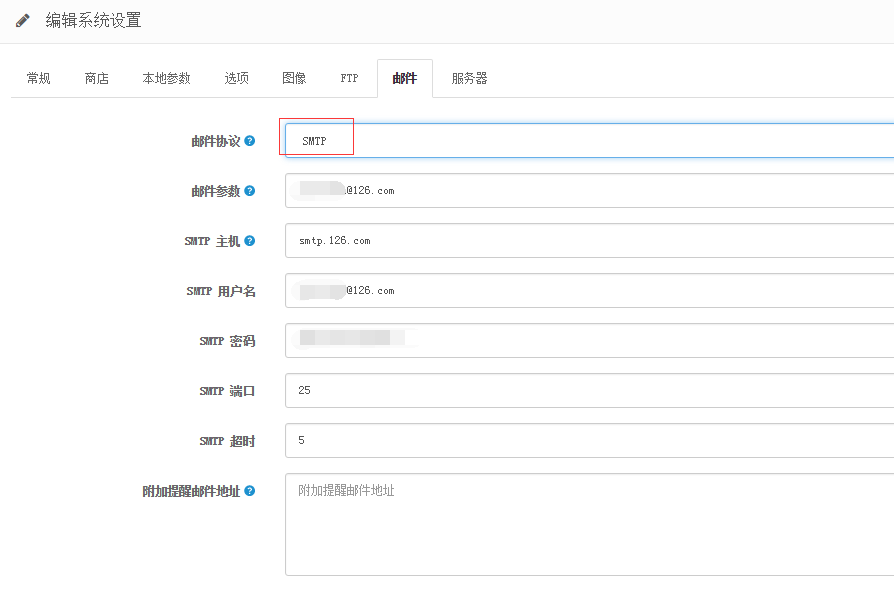
最重要的一点:常规 设置里的E-Mail必须填写成跟 邮件 上面的用户的邮箱一致,因为opencart发邮件所使用的是 常规 设置里的E-Mail

到此完毕!
opencart安装和使用PHPMailer的更多相关文章
- opencart 安装
1:安装 php5 apache2 mysql 2:下载opencart wget https://github.com/opencart/opencart/archive/master.zi ...
- 在Linux CentOS6系统中安装开源CMS程序OpenCart的教程
OpenCart是一个开放源码的店面,旨在为您提供灵活和细粒度的在线店面管理.在开始之前,您应该已经在您的Linode上设置了一个LAMP堆栈.您还应该设置主机名. PHP设置 为了使用OpenCar ...
- OpenCart本地调试环境搭建
OpenCart简介: 免费开源网络版电子商务系统,是建立在线商务网站首选之一.有众多用户和开发基础,结合其丰富特性与模板插件,可最大化定制在线商店.(也就是用来方便开网店的) 本地调试准备: Fir ...
- 修改opencart extension插件代码后无法重新安装的解决办法
有时我们在为opencart安装一些插件后,发现有些地方需要细微的调整,然后去修改插件代码重新安装,但是却没有成功.开始有点怀疑是不是不能修改代码,但也不至于啊,不然开发者怎么制作插件.应该是哪里出了 ...
- 使用PHP利用phpmailer发送电子邮件
先来几句废话: phpMailer是一个非常强大的php发送邮件类,可以设定发送邮件地址.回复地址.邮件主题.html网页,上传附件,并且使用起来非常方便. phpMailer的特点: ...
- tp 5 实现邮件发送
参考博客: https://www.cnblogs.com/ccdr/p/14751548.htmlhttps://www.cnblogs.com/ccdr/p/14751548.html 1:qq邮 ...
- opencart在空间中安装出错,连接不上mysql
客户要求,要在国外某空间安装opencart.话说opencart根本没怎么搞过,也不太清楚,php也是半吊子,临时看了几天,硬着头皮上把. 出错,安装进行到数据库连接设置的时候,死活连接不上,开始以 ...
- OpenCart 如何安装 vQmod 教程
vQmod (全称 Virtual Quick Mod),是 OpenCart (PHP 开源电商网站系统)上一个可以以虚拟方式修改原文件内容而设计的一个插件系统.它的使用很简单,我们先用 xml 的 ...
- 用composer安装php代码(以安装phpmailer为例)
1.安装composer.exe软件 2.下载composer.phar 3.创建composer.json文件 { "require": { "php": & ...
随机推荐
- ajax post data 获取不到数据,注意contentType
$.ajax({ url:'/web/register/', type:"POST", data:{'user':'66'}, dataType:'json', 这个东西困惑我一天 ...
- 规格化设计-----JSF(第三次博客作业)
从20世纪60年代开始,就存在着许多不同的形式规格说明语言和软件开发方法.在形式规格说明领域一些最主要的发展过程列举如下: 1969-1972 C.A.R Hoare撰写了"计算机编程的公理 ...
- svn出错:directory 'xxxx' is out of date
- 【转】json与jsonp区别浅析(json才是目的,jsonp只是手段)
一言以蔽之,json返回的是一串数据:而jsonp返回的是脚本代码(包含一个函数调用): JSON其实就是JavaScript中的一个对象,跟var obj={}在质上完全一样,只是在量上可以无限扩展 ...
- 063——VUE中vue-router之重定向redirct的使用
<!DOCTYPE html> <html lang="en"> <head> <meta charset="UTF-8&quo ...
- PHP:第三章——PHP中控制函数的函数
<pre> <?php header("Content-Type:text/html;charset=utf-8"); /******************** ...
- POJ 2488 DFS
DES:给一个n行m列的棋盘.马以L型走.问能否从某一位置开始走完棋盘上的每个位置.若能继续输出字典序最小的一条路径. 很典型的dfs.搜的时候就按照字典序从小到大的顺序.搜到第一条路径时停止搜索输出 ...
- Oracle 备份与恢复 15 个典型问题
1.问:Oracle11g数据库数据量有50T,每天增量50g左右,该如何制定备份方案,如何验证备份的有效性? 答:50T的数据也不大,运营商的地市级市数据基本都在100T以上了,只要备份环境允许的话 ...
- Criteria 使用指南
转自:http://www.blogjava.net/jerry-zhaoj/archive/2009/03/03/257546.html Restrictions的几个常用限定查询方法如下表所示: ...
- Django小示例
创建项目,在命令行中输入:django-admin startproject mysite 则会创建一个名为mysite的项目.项目结构如下: +mysite |--+ugo | | ...