
iOS UI-集合视图(UICollectionView)
BowenCollectionViewCell.xib
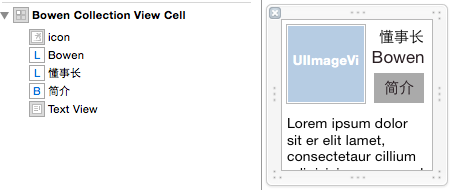

 #import <UIKit/UIKit.h>

 @interface BowenCollectionViewCell : UICollectionViewCell

 @property (weak, nonatomic) IBOutlet UIImageView *iconImageView;

 @property (weak, nonatomic) IBOutlet UILabel *lalName;

 @property (weak, nonatomic) IBOutlet UILabel *lblPosition;

 @property (weak, nonatomic) IBOutlet UIButton *btnManInfo;

 @property (weak, nonatomic) IBOutlet UITextView *textViewStory;

 @end

 #import "BowenCollectionViewCell.h"

 @implementation BowenCollectionViewCell

 - (void)awakeFromNib {

     // Initialization code

 }

 @end

 #import "ViewController.h"

 #import "BowenCollectionViewCell.h"

 /*

  集合视图:UICollertionView

  三个协议、两个代理、四或五个方法

  UICollectionViewDataSource          加载数据

  UICollectionViewDelegate            执行代理

  UICollectionViewDelegateFlowLayout  布局

  使用步骤

  0.创建单元格ID

  1.创建布局(横向布局、纵向布局)

  2.创建集合视图,设置代理

  3.注册单元格

  4.加载视图

  */

 @interface ViewController ()<UICollectionViewDataSource,UICollectionViewDelegate,UICollectionViewDelegateFlowLayout>

 @property (nonatomic, strong) UICollectionView *collectionView;

 @property (nonatomic, strong) NSIndexPath *indexPath;

 @end

 @implementation ViewController

 static NSString *cellIdentyfier = @"cellIndentyfier";

 - (void)viewDidLoad {

     [super viewDidLoad];

 //    1.创建布局(横向布局、纵向布局)

     UICollectionViewFlowLayout *layout = [[UICollectionViewFlowLayout alloc] init];

     [layout setScrollDirection:UICollectionViewScrollDirectionHorizontal];

 //    2.创建集合视图,设置代理

     self.collectionView = [[UICollectionView alloc] initWithFrame:self.view.bounds collectionViewLayout:layout];

     self.collectionView.dataSource =self;

     self.collectionView.delegate = self;

 //    3.注册单元格(item)

     [self.collectionView registerClass:[UICollectionViewCell class] forCellWithReuseIdentifier:cellIdentyfier];

 //    4.加载视图

     [self.view addSubview:self.collectionView];

 //      加载nib文件

     [self.collectionView registerNib:[UINib nibWithNibName:@"BowenCollectionViewCell" bundle:[NSBundle mainBundle]] forCellWithReuseIdentifier:cellIdentyfier];

 }

 #pragma mark - 数据源

 // 加载组数

 - (NSInteger)numberOfSectionsInCollectionView:(UICollectionView *)collectionView

 {

     return ;

 }

 // item的个数

 - (NSInteger)collectionView:(UICollectionView *)collectionView numberOfItemsInSection:(NSInteger)section

 {

     return ;

 }

 // item中的单元格加载数据的方法

 - (UICollectionViewCell *)collectionView:(UICollectionView *)collectionView cellForItemAtIndexPath:(NSIndexPath *)indexPath

 {

     //集合视图的单元格本身就是一个View,什么自带控件都没有

     //如果想使用集合视图的item

     //1.直接往上面添加控件(不推荐) 官方规定:这个加载方法只能加载数据

     //2.自定义item使用

     BowenCollectionViewCell *cell = [collectionView dequeueReusableCellWithReuseIdentifier:cellIdentyfier forIndexPath:indexPath];

     cell.contentView.backgroundColor = [UIColor whiteColor];

     //每个button都是不一样的

     cell.btnManInfo.tag = indexPath.section* + indexPath.row;

     [cell.btnManInfo addTarget:self action:@selector(btnManInfoClick:) forControlEvents:UIControlEventTouchUpInside];

     return cell;

 }

 // 按钮关联方法

 - (void)btnManInfoClick:(id)sender

 {

     UIButton *tempBtn = (UIButton*)sender;

     NSInteger section = tempBtn.tag/;

     NSInteger row = tempBtn.tag%;

     switch (section) {

         case :

             if (row ==) {

                 NSLog(@"第0分组第0元素");

             }

             else{

                 NSLog(@"第0分组第1元素");

             }

             break;

         case :

             if (row ==) {

                 NSLog(@"第1分组第0元素");

             }

             else{

                 NSLog(@"第1分组第1元素");

             }

             break;

         default:

             break;

     }

 }

 #pragma mark - 代理方法

 // 监听行被选中执行的代理方法

 - (void)collectionView:(UICollectionView *)collectionView didSelectItemAtIndexPath:(NSIndexPath *)indexPath

 {

     NSLog(@"%@",indexPath);

 }

 #pragma mark - 布局

 // item的尺寸

 - (CGSize)collectionView:(UICollectionView *)collectionView layout:(UICollectionViewLayout*)collectionViewLayout sizeForItemAtIndexPath:(NSIndexPath *)indexPath

 {

     return CGSizeMake(, );

 }

 // 每组的Header尺寸

 - (CGSize)collectionView:(UICollectionView *)collectionView layout:(UICollectionViewLayout*)collectionViewLayout referenceSizeForHeaderInSection:(NSInteger)section

 {

     return CGSizeMake(, );

 }

 #pragma mark - 状态栏

 // 隐藏状态栏

 - (BOOL)prefersStatusBarHidden

 {

     return YES;

 }

 - (void)didReceiveMemoryWarning {

     [super didReceiveMemoryWarning];

     // Dispose of any resources that can be recreated.

 }

 @end
一、UICollectionViewController的使用
[self.collectionView registerClass:[UICollectionViewCell class] forCellWithReuseIdentifier:@"product"];
- (UICollectionViewCell *)collectionView:(UICollectionView *)collectionView cellForItemAtIndexPath:(NSIndexPath *)indexPath
{
UICollectionViewCell *cell = [collectionView dequeueReusableCellWithReuseIdentifier:@"product" forIndexPath:indexPath];
return cell;
}
- (id)init
{
// 1.流水布局
UICollectionViewFlowLayout *layout = [[UICollectionViewFlowLayout alloc] init];
// 2.每个cell的尺寸
layout.itemSize = CGSizeMake(100, 100);
return [super initWithCollectionViewLayout:layout];
}
二、UICollectionViewFlowLayout
@property (nonatomic) CGSize itemSize;
@property (nonatomic) CGFloat minimumInteritemSpacing;
@property (nonatomic) CGFloat minimumLineSpacing;
@property (nonatomic) UIEdgeInsets sectionInset;
三、UICollectionView常用数据源方法
- (NSInteger)numberOfSectionsInCollectionView:(UICollectionView *)collectionView;
- (NSInteger)collectionView:(UICollectionView *)collectionView numberOfItemsInSection:(NSInteger)section;
- (UICollectionViewCell *)collectionView:(UICollectionView *) collectionView cellForItemAtIndexPath:(NSIndexPath *)indexPath;
UICollectionView的数据源必须实现第二个方法和第三个方法,第一个方法不实现默认就是1组
@property (nonatomic, strong) UICollectionViewLayout *collectionViewLayout;
@property (nonatomic, strong) UIView *backgroundView;
@property (nonatomic) BOOL allowsSelection;
@property (nonatomic) BOOL allowsMultipleSelection;
五、UICollectionViewFlowLayout常用属性
七、注册cell的三种方式:
1> 用nib(xib)来注册cell,表示cell如何去创建, 在注册同时必须给cell设置重用标识
2> 用类(纯代码)来注册cell,表示cell用代码来创建,在注册同时必须cell设置重用标识
3> 在storyboard中给cell,设置重用标识时会同时注册cell
1纯代码实现
常见错误
错误1> ICollectionView must be initialized with a non-nil layout parameter
实例化(创建)UICollectionView的同时必须指定一个非空的layout
用UICollectionViewLayout这个类直接创建出来的布局对应就是一个空的布局,里面什么也没有
一般情况用UICollectionViewFlowLayout(流水布局,它创建出来有默认的itemSize,和行间距等等)
错误警告
negative or zero item sizes are not supported in the flow layout
UICollectionViewFlowLayout 不支持负得或为0尺寸cell
当itemSize等于 CGSizeZero 数据源方法返回每一个cell的方法不会执行,说明只有cell有尺寸时才能返回cell
layout.itemSize = CGSizeZero;
用class来注册 cell(告诉collectionView中的cell如何创建),并给cell添加重用标识
[collectionView registerClass:[CZAppCell class] forCellWithReuseIdentifier:ID];
2.用xib实现
// 加载xib
UINib *nib = [UINib nibWithNibName:@"CZAppCell" bundle:nil];
// 通过xib来注册,告诉collectionView如何去创建cell,并指定重用标识
[self.collectionView registerNib:nib forCellWithReuseIdentifier:ID];
// 实例化xib
CZAppCell *cell = [[nib instantiateWithOwner:nil options:nil] lastObject];
// 根据xib中的cell的尺寸来设置布局属性中cell的尺寸
self.flowLayout.itemSize = cell.bounds.size;
3.用storyboard实现
给storyboard的cell会只需添加重用标识即可自动注册
iOS UI-集合视图(UICollectionView)的更多相关文章
- iOS:集合视图UICollectionView、集合视图控制器UICollectionViewController、集合视图单元格UICollectionViewCell(创建表格的另一种控件)
两种创建表格方式的比较:表格视图.集合视图(二者十分类似) <1>相同点: 表格视图:UITableView(位于storyboard中,通过UIViewController控制器实现 ...
- IOS中集合视图UICollectionView中DecorationView的简易使用方法
转载自: http://www.it165.net/pro/html/201312/8575.html Decoration View是UICollectionView的装饰视图.苹果官方给的案例 ...
- 集合视图UICollectionView 介绍及其示例程序
UICollectionView是一种新的数据展示方式,简单来说可以把它理解成多列的UITableView.如果你用过iBooks的话,可 能你还对书架布局有一定印象,一个虚拟书架上放着你下载和购买的 ...
- swift:创建集合视图UICollectionView
swift中创建集合视图和OC中差不多,主要是实现UICollectionViewDataSource数据源协议和UICollectionViewDelegateFlowLayout自定义布局协议,其 ...
- 集合视图 UICollectionView
什么是UICollectionView UICollectionView是一种新的数据展示方式,简单来说可以把他理解成多列的UITableView(请一定注意这是UICollectionView的最最 ...
- IOS UI 滚动视图 UIScrollView
UIScrollView 常用属性 scrollView.maximumZoomScale= 2.0; // 缩放最大比例 scrollView.minimumZoomScale = 0.2;// ...
- UICollectionView集合视图的概念
如何创建UICollectionView 集合视图的布局UICollectionViewFlowLayout 自定义cell 布局协议UICollectionViewDelegateFlowLayou ...
- 集合视图控制器(CollectionViewController) 、 标签控制器(TabBarController) 、 高级控件介绍
1 创建集合视图,设置相关属性以满足要求 1.1 问题 集合视图控制器UIConllectionViewController是一个展示大量数据的控制器,系统默认管理着一个集合视图UICollectio ...
- UICollectionView(集合视图)以及自定义集合视图
一.UICollectionView集合视图 其继承自UIScrollView. UICollectionView类是iOS6新引进的API,用于展示集合视图,布局 ...
- 【推荐】iOS集合视图的可重新排序的layout
在实际项目中你或许会遇到在一个集合视图中移动一项到另外一个位置,那么此时我们需要对视图中的元素进行重新排序,今天推荐一个很好用的第三方类LXReorderableCollectionViewFlowL ...
随机推荐
- 小K(wifi)插座剖解
1.主控 AR9331 400MHZ MIPS 24k内核 2.flash:w9425G6JH-5 1352P 6316CF500ZY RAM 32M
- 小工具:使用Python自动生成MD风格链接
很久之前我在Github上搞了一个LeetCode的仓库,但一直没怎么维护.最近发现自己刷了不少LC的题目了,想搬运到这个仓库上. 玩Github最重要的当然是写README了,MD的逼格决定了项目牛 ...
- Linux虚拟内存和物理地址的理解【转】
本文转载自:http://blog.csdn.net/dlutbrucezhang/article/details/9058583 在多任务操作系统中的每一个进程都运行在一个属于它自己的内存沙盘中.这 ...
- BIOS、MBR、UEFI和GPT关系
很多用户在新买电脑,或是给已有电脑重装系统时都出现过怎么都无法引导U盘安装的情况.究其原因,还是没能搞清楚BIOS.MBR.UEFI和GPT的复杂关系.所以,今天小编就和大家分享一下它们之间的爱恨情仇 ...
- cmder的使用和编码问题解决
cmder 是一款 windows 下的命令集合软件,它可以集合各种系统下的命令,并且操作非常快速方便.安装有两个版本,一个是简化版(4.27M),一个是完全版(75.7M),它们的唯一区别:完全版包 ...
- java多线程编程模式
前言 区别于java设计模式,下面介绍的是在多线程场景下,如何设计出合理的思路. 不可变对象模式 场景 1. 对象的变化频率不高 每一次变化就是一次深拷贝,会影响cpu以及gc,如果频繁操作会影响性能 ...
- Pro Git读书笔记 - 分支
Git 分支介绍. 几乎所有的版本控制系统都以某种形式支持分支. 使用分支意味着你可以把你的工作从开发主线上分离开来,以免影响开发主线. 在很多版本控制系统中,这是一个略微低效的过程--常常需要完全创 ...
- 关于react native的快捷键和常用规范
一:快捷键 1.让其自更新----shift+cmd+z 选择热更新 2.cmd+r ---重新刷新 3 二:常用规范: 1.文件也是一种组件 所以应该命名规则和组件名的命名规则相同 -----使用 ...
- [BZOJ]|[Ural] Formula 1-----插头DP入门
1519. Formula 1 Time limit: 1.0 secondMemory limit: 64 MB Background Regardless of the fact, that Vo ...
- Cocos2d-x学习笔记(八)精灵对象的创建
精灵类即是Sprite,它实际上就是一张二维图. 它首先直接继承了Node类,因此,它具有节点的特征,同时,它也直接继承了TextureProtocol类,因此,它也具有纹理的基本特征. 这里,有必要 ...