
Hystrix【入门】
公共依赖配置:
<parent>

        <groupId>org.springframework.boot</groupId>

        <artifactId>spring-boot-starter-parent</artifactId>

        <version>2.0.3.RELEASE</version>

        <relativePath/>

</parent>

<properties>

        <project.build.sourceEncoding>UTF-8</project.build.sourceEncoding>

        <project.reporting.outputEncoding>UTF-8</project.reporting.outputEncoding>

        <java.version>1.8</java.version>

        <spring-cloud.version>Finchley.RELEASE</spring-cloud.version>

</properties>

<dependencyManagement>

        <dependencies>

            <dependency>

                <groupId>org.springframework.cloud</groupId>

                <artifactId>spring-cloud-dependencies</artifactId>

                <version>${spring-cloud.version}</version>

                <type>pom</type>

                <scope>import</scope>

            </dependency>

        </dependencies>

</dependencyManagement>
1、创建client-server工程
1.1、client-server工程pom依赖:
<!--加上上面的公共依赖-->

<dependencies>

        <dependency>

            <groupId>org.springframework.cloud</groupId>

            <artifactId>spring-cloud-starter-netflix-eureka-client</artifactId>

        </dependency>

        <dependency>

            <groupId>org.springframework.cloud</groupId>

            <artifactId>spring-cloud-starter-netflix-hystrix</artifactId>

        </dependency>
</dependencies>

<build>

        <plugins>

            <plugin>

                <groupId>org.springframework.boot</groupId>

                <artifactId>spring-boot-maven-plugin</artifactId>

            </plugin>

        </plugins>

</build>
1.2、client-server工程启动类:
import org.springframework.boot.SpringApplication;

import org.springframework.boot.autoconfigure.SpringBootApplication;

import org.springframework.cloud.client.discovery.EnableDiscoveryClient;

import org.springframework.cloud.netflix.hystrix.EnableHystrix;

@SpringBootApplication

@EnableHystrix//开启断路器注解

@EnableDiscoveryClient

public class ClientApplication {

    public static void main(String[] args) {

        SpringApplication.run(ClientApplication.class, args);

    }

}
1.3、client-server工程配置文件:client-server\src\main\resources\bootstrap.yml
server:

  port: 8888

spring:

  application:

    name: sc-client-service

eureka:

  client:

    serviceUrl:

      defaultZone: http://${eureka.host:127.0.0.1}:${eureka.port:8761}/eureka/

  instance:

    prefer-ip-address: true
1.4、编写模拟使用hystrix场景代码:
/**

 * 用户接口

 */

public interface IUserService {

    String getUser(String username) throws Exception;

}
import org.springframework.stereotype.Component;

import com.netflix.hystrix.contrib.javanica.annotation.HystrixCommand;

import cn.springcloud.book.service.IUserService;

/**

 * 具体用户接口实现类

 */

@Component

public class UserServiceImpl implements IUserService {

    @Override

    @HystrixCommand(fallbackMethod = "defaultUser")//降级

    public String getUser(String username) throws Exception {

        if ("spring".equals(username)) {

            return "This is real user";

        } else {

            throw new Exception();

        }

    }

    /**

     * 出错则调用该方法返回友好错误

     *

     * @param username

     * @return

     */

    public String defaultUser(String username) {

        return "The user does not exist in this system";

    }

}
import org.springframework.beans.factory.annotation.Autowired;

import org.springframework.web.bind.annotation.GetMapping;

import org.springframework.web.bind.annotation.RequestParam;

import org.springframework.web.bind.annotation.RestController;

import cn.springcloud.book.service.IUserService;

/**

 * 测试API

 */

@RestController

public class TestController {

    @Autowired

    private IUserService userService;

    @GetMapping("/getUser")

    public String getUser(@RequestParam String username) throws Exception{

        return userService.getUser(username);

    }

}
2、创建eureka-server工程
2.1、eureka-server工程pom文件:
<!--加上上面的公共依赖-->

<dependencies>

        <dependency>

            <groupId>org.springframework.cloud</groupId>

            <artifactId>spring-cloud-starter-netflix-eureka-server</artifactId>

        </dependency>

</dependencies>

<build>

        <plugins>

            <plugin>

                <groupId>org.springframework.boot</groupId>

                <artifactId>spring-boot-maven-plugin</artifactId>

            </plugin>

        </plugins>

</build>
2.2、eureka-server工程启动类:
import org.springframework.boot.SpringApplication;

import org.springframework.boot.autoconfigure.SpringBootApplication;

import org.springframework.cloud.netflix.eureka.server.EnableEurekaServer;

@SpringBootApplication

@EnableEurekaServer

public class EurekaServerApplication {

    public static void main(String[] args) {

        SpringApplication.run(EurekaServerApplication.class, args);

    }

}
2.3、eureka-server工程配置文件:eureka-server\src\main\resources\bootstrap.yml
server:

  port: 8761

eureka:

  instance:

    hostname: localhost

  client:

    registerWithEureka: false

    fetchRegistry: false

    serviceUrl:

      defaultZone: http://localhost:8761/eureka/
3、启动2个工程
访问接口:
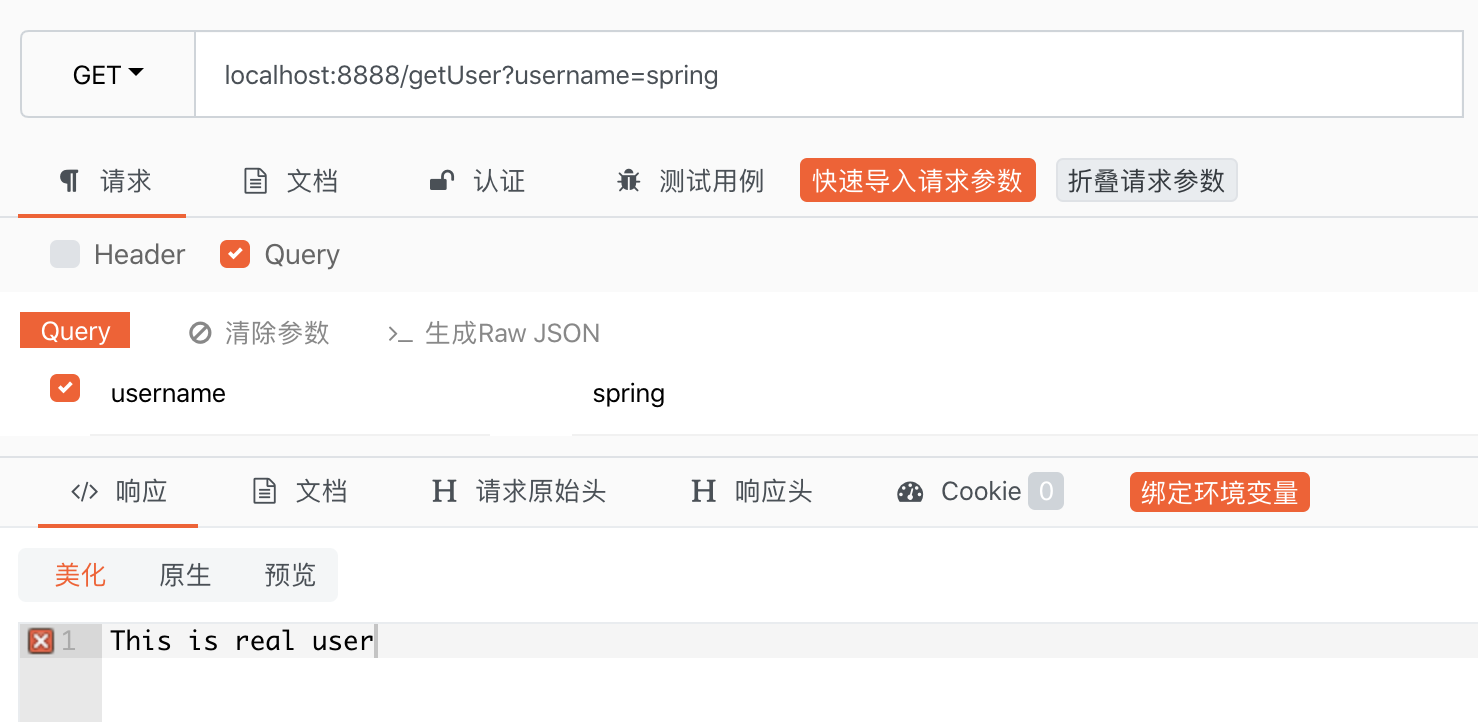
第一次传入spring
第二次传入:springcloud
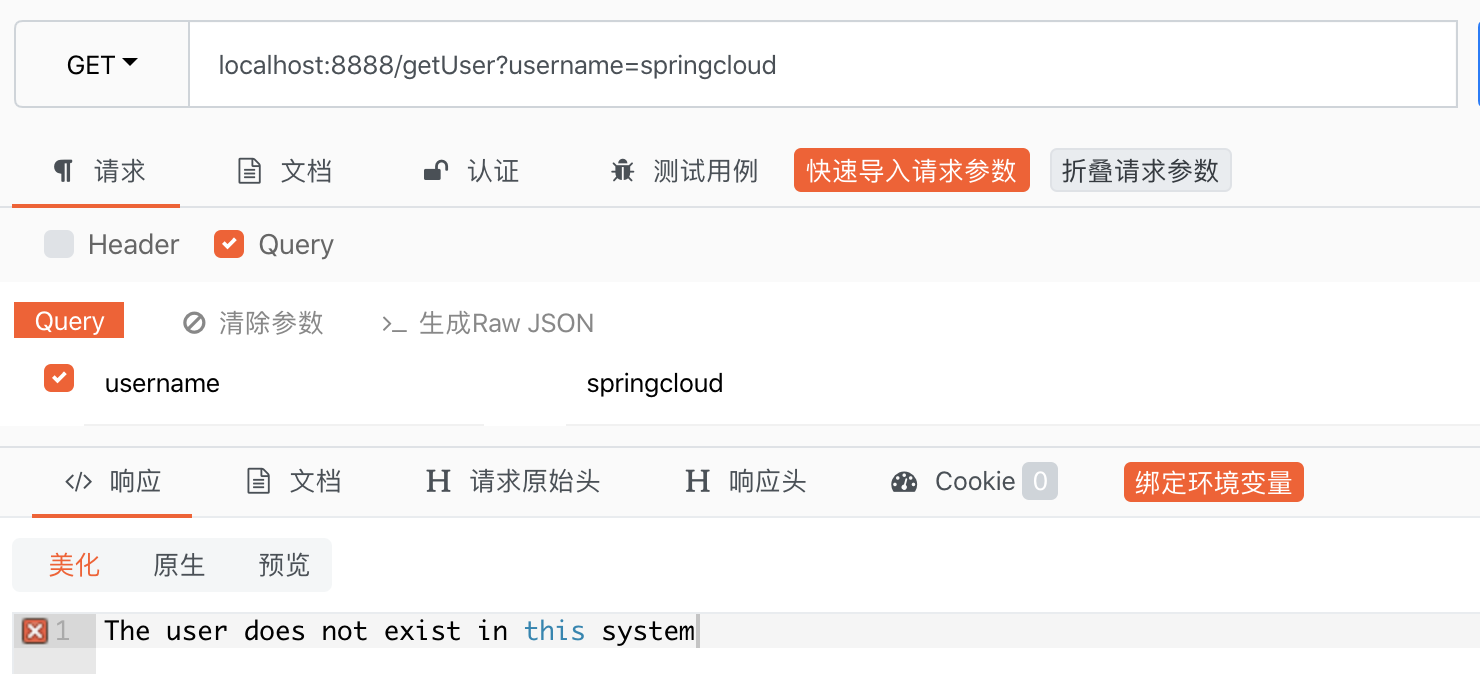
说明执行了 fallbackMethod 定义的指定方法!
Hystrix【入门】的更多相关文章
- Hystrix入门教程
Hystrix入门教程 一·什么是Hystrix?Hystrix有什么作用?使用Hystrix有哪些适用场景 Hystrix是springCloud的组件之一,Hystrix 可以让我们在分布式系统中 ...
- Spring-cloud(六) Hystrix入门
前提 一个可用的Eureka注册中心(文中以之前博客中双节点注册中心,不重要) 一个连接到这个注册中心的服务提供者 快速入门 项目搭建 搭建一个新maven项目,artifactid为Ribbon-c ...
- SpringCloud(六) Hystrix入门
前提 一个可用的Eureka注册中心(文中以之前博客中双节点注册中心,不重要) 一个连接到这个注册中心的服务提供者 快速入门 项目搭建 搭建一个新maven项目,artifactid为Ribbon-c ...
- 微服务容错限流Hystrix入门
为什么需要容错限流 复杂分布式系统通常有很多依赖,如果一个应用不能对来自依赖 故障进行隔离,那么应用本身就处在被拖垮的风险中.在一个高流量的网站中,某个单一后端一旦发生延迟,将会在数秒内导致 所有应用 ...
- Hystrix入门与分析(二):依赖隔离之线程池隔离
1.依赖隔离概述 依赖隔离是Hystrix的核心目的.依赖隔离其实就是资源隔离,把对依赖使用的资源隔离起来,统一控制和调度.那为什么需要把资源隔离起来呢?主要有以下几点: 1.合理分配资源,把给资源分 ...
- Hystrix入门与分析(一):初识Hystrix
在以前的文章中,我们介绍过使用Gauva实现限流的功能,现在我们来了解一下如何在服务框架中实现熔断和降级的方法. 简介Hystrix 大型系统架构的演进基本上都是这样一个方向:从单体应用到分布式架构. ...
- Hystrix入门执行过程
netflix-hystrix团队开发了hystrix-javanica,使用流行的java注解以及函数式编程,来替代hystrix枯燥的编程方法. 其主要是HystrixCommand注解的使用. ...
- Hystrix入门指南
Introduction 1.Where does the name come from? hystrix对应的中文名字是“豪猪”,豪猪周身长满了刺,能保护自己不受天敌的伤害,代表了一种防御机制,这与 ...
- Hystrix入门
hystrix对应的中文名字是“豪猪”,豪猪周身长满了刺,能保护自己不受天敌的伤害,代表了一种防御机制,这与hystrix本身的功能不谋而合,因此Netflix团队将该框架命名为Hystrix,并使用 ...
- 转 Hystrix入门指南 Introduction
https://www.cnblogs.com/gaoyanqing/p/7470085.html
随机推荐
- 【CSP模拟赛】坏天平(数学&思维)
蹭兄弟学校的题目做还不用自己出题的感觉是真的爽 题目描述 nodgd有一架快要坏掉的天平,这架天平右边的支架有问题,如果右边的总重量比左边多太多,天平就彻底坏掉了.现在nodgd手上有n种砝码,质量分 ...
- 判断qq浏览器和uc浏览器?
判断在iphone手机上打开的是uc浏览器还是qq浏览器 <html lang="en"> <head> <meta charset="ut ...
- radio得值
$('input[name="ylqxjylcldnbModel.jylb"]:checked').val(); <input type="radio" ...
- 解决tecplot中壁面速度不为0的问题
当直接将fluent的.cas文件和.dat文件导入tecplot中进行后处理的时候,我们会发现,壁面速度不为0的情况(见上图). 出现这样问题的原因为:fluent的计算数据是存储在每个单元的中心位 ...
- OpenFOAM-双柱及群柱绕流
这次的教程是紧接前几次的教程,设置与前几次教程类似,但是对于设置上稍微有一点点区别,就是在设置值的时候,出现了$internalField,其实这是一个字符串替换,就是在出现$internalFiel ...
- spring boot 之注册
注册数据库 使用spring boot 之登录笔记 的数据库 在server 层 User create(String username, String password, String email ...
- SOA面向服务体系架构
SOA概念 1.什么是SOA 面向服务的体系结构(Service-Oriented Architecture,SOA)是一个组件模型. 它将应用程序的不同功能单元(称为服务)通过这些服务之间定义良好的 ...
- JVM常量的含义与反编译助记符详解
1.定义一个常量 public class MyTest2 { public static void main(String[] args) { System.out.println(MyParent ...
- [Java/File]读取日文CSV文件不乱码
try { StringBuilder sb=new StringBuilder(); sb.append("\nContent in File:'"+filePathname+& ...
- [English]常用中英文对照表
Always have been 一直如此 accordingly:相应地 assumption:假定 brace:大括号 branket:中括号 comma:逗号MISC:Miscellaneous ...