
Intel realSense ubuntu 16.04+python 环境配置指南
1. 安装librealsense2-dkms 以及librealsense2-utils
1、Register the server's public key:

sudo apt-key adv --keyserver keys.gnupg.net --recv-key C8B3A55A6F3EFCDE || sudo apt-key adv --keyserver hkp://keyserver.ubuntu.com:80 --recv-key C8B3A55A6F3EFCDE


(In case the public key still cannot be retrieved, check and specify proxy settings: export http_proxy="http://<proxy>:<port>"

, and rerun the command. See additional methods in the following link.)

2、Add the server to the list of repositories:

Ubuntu  LTS:

sudo add-apt-repository "deb http://realsense-hw-public.s3.amazonaws.com/Debian/apt-repo xenial main" -u

Ubuntu  LTS:

sudo add-apt-repository "deb http://realsense-hw-public.s3.amazonaws.com/Debian/apt-repo bionic main" -u

3、Install the libraries (see section below if upgrading packages):

sudo apt-get install librealsense2-dkms

sudo apt-get install librealsense2-utils

The above two lines will deploy librealsense2 udev rules, build and activate kernel modules, runtime library and executable demos and tools.

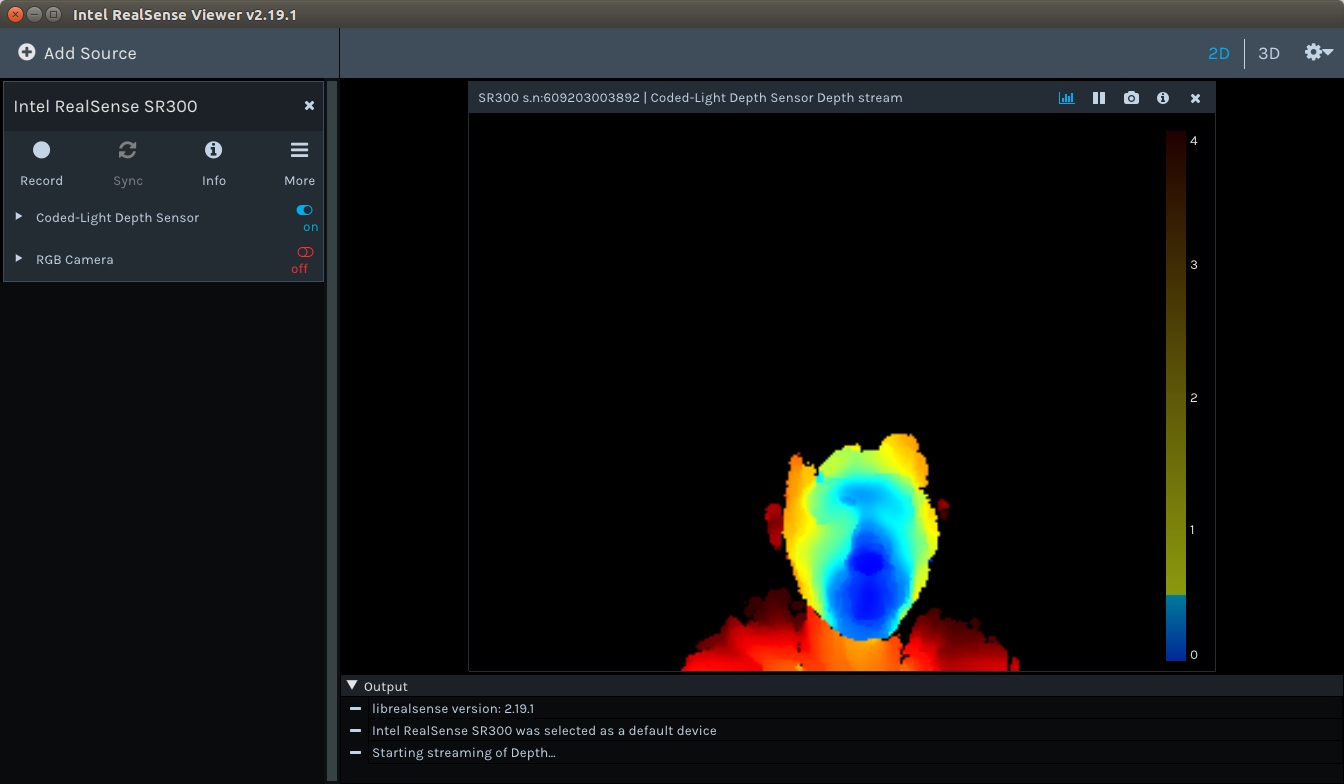
Reconnect the Intel RealSense depth camera and run: realsense-viewer to verify the installation.
配置好了之后 输入realSense-viewer是这个样子~
2. 配置warpper----python环境
下载https://github.com/IntelRealSense/librealsense项目到本地
Building From Source Ubuntu 14.04/16.04 LTS Ensure apt-get is up to date

1、sudo apt-get update && sudo apt-get upgrade

Note: Use sudo apt-get dist-upgrade, instead of sudo apt-get upgrade, in case you have an older Ubuntu 14.04 version

Install Python and its development files via apt-get (Python  and  both work)


2、sudo apt-get install python python-dev or sudo apt-get install python3 python3-dev

Note: The project will only use Python  if it can't use Python 3

Run the top level CMake command with the following additional flag -DBUILD_PYTHON_BINDINGS=bool:true:

3、mkdir build

  cd build

  cmake ../ -DBUILD_PYTHON_BINDINGS=bool:true

Note: To force compilation with a specific version on a system with both Python  and Python  installed, add the following flag to CMake command: -DPYTHON_EXECUTABLE=[full path to the exact python executable]

(cmake常用套路了)

 make -j4

 sudo make install

4、update your PYTHONPATH environment variable to add the path to the pyrealsense library

export PYTHONPATH=$PYTHONPATH:/usr/local/lib

Alternatively, copy the build output (librealsense2.so and pyrealsense2.so) next to your script.

Note: Python  module filenames may contain additional information, e.g. pyrealsense2.cpython-35m-arm-linux-gnueabihf.so)
Python 接口使用的例子:
# First import the library

import pyrealsense2 as rs

try:

    # Create a context object. This object owns the handles to all connected realsense devices

    pipeline = rs.pipeline()

    pipeline.start()

    while True:

        # Create a pipeline object. This object configures the streaming camera and owns it's handle

        frames = pipeline.wait_for_frames()

        depth = frames.get_depth_frame()

        if not depth: continue

        # Print a simple text-based representation of the image, by breaking it into 10x20 pixel regions and approximating the coverage of pixels within one meter

        coverage = []*

        for y in xrange():

            for x in xrange():

                dist = depth.get_distance(x, y)

                if  < dist and dist < :

                    coverage[x/] +=

            if y% is :

                line = ""

                for c in coverage:

                    line += " .:nhBXWW"[c/]

                coverage = []*

                print(line)
Intel realSense ubuntu 16.04+python 环境配置指南的更多相关文章
- Ubuntu 16.04 ROS环境配置
最近新入职一家公司,是搞智能无人驾驶的,用的操作系统是Ubuntu和ros,之前没接触过ros系统,既然公司用那就必须的学习啊,话不多说先装它一个ros玩玩... 1. Ubuntu 安装 ROS K ...
- Ubuntu 16.04 Go环境搭建 Go环境+Sublime配置
Ubuntu 16.04 Go环境搭建 Go环境+Sublime配置 1. 安装Go 下载地址https://golang.org/dl/ (需要翻下) 下载到类似go1.8.3.linux-amd6 ...
- Ubuntu 16.04 python和OpenCV安装
Ubuntu 16.04 python和OpenCV安装:最进在做深度学习和计算机视觉的有关内容,因此要在python中用到opencv.我的电脑装的是Ubuntu 16.04,python 2.7和 ...
- 如何在Ubuntu 16.04上安装配置Redis
如何在Ubuntu 16.04上安装配置Redis Redis是一个内存中的键值存储,以其灵活性,性能和广泛的语言支持而闻名.在本指南中,我们将演示如何在Ubuntu 16.04服务器上安装和配置Re ...
- Ubuntu 16.04 samba相关配置
samba是 SMB/CIFS网络协议的重新实现,它作为NFS的补充使得在Linux和Windows系统之间进行文件共享.打印更容易实现. 相关介绍: SAMBA套件: (1)samba:这个套件主要 ...
- Ubuntu 16.04 root环境变量不生效问题解决方案
在Ubuntu 16.04中配置JDK环境变量,但是在切换到root时不生效 . 在/etc/profile中添加如下: export JAVA_HOME=/opt/java/jdk1..0_151 ...
- Ubuntu 16.04 服务器上配置使用 Docker
Docker基础概念 在使用Docker之前,我们先了解下几个Docker的核心概念 Docker Daemon Docker引擎,就是运行在后台的一个守护进程,在我们启动它之后,我们就可以通过Doc ...
- Ubuntu 16.04 安装和配置 Redis
因为发现之前手动安装的 redis 与现有的教程不一样,所以总结统一一下安装的标准步骤. 安装依赖项 为了获取最新版本的 Redis,我们将从源代码进行编译和安装.下载源代码之前,需要先安装一些编译所 ...
- Ubuntu 16.04上thunderbird配置163邮箱出现“配置无法被验证-请查看用户名或密码是否正确?”
在Ubuntu 16.04 上用thunderbird配置163免费邮箱时出现的提示信息如图1: 图1 提示信息 网上有不少方法都说是将接收和发出的主机名分别改为 imap.ym.163.com 和 ...
随机推荐
- 转载:scala中的:+\+:\::\:::
原文链接:https://segmentfault.com/a/1190000005083578 初学Scala的人都会被Seq的各种操作符所confuse.下面简单列举一下各个Seq操作符的区别. ...
- 微信小程序之如何定义页面标题
效果图: 这个标题是在哪里定义的呢?type.js核心代码如下(通常这段代码放在onLoad函数体内): wx.setNavigationBarTitle({ title: "支出类型列表& ...
- 刷题记录:[LCTF]bestphp's revenge
目录 刷题记录:[LCTF]bestphp's revenge 一.知识点 1.SoapClient触发反序列化导致ssrf 2.serialize_hander处理session方式不同导致sess ...
- 20189220 余超《Linux内核原理与分析》第一周作业
实验一 Linux系统简介 通过实验一主要是学习到了Linux 的历史简介,linux与windows之间的区别,主要是免费和收费,软件和支持,安全性,使用习惯,可制定性,应用范畴等.linux具有稳 ...
- linux系统备份恢复到本机或是别的机器上
ubuntu系统备份还原到相同电脑.另一台电脑.(tar方式) 原创 laukal 发布于2018-07-28 15:35:14 阅读数 2205 收藏 展开 最近一直搞Xtion2,openni2, ...
- (转)nginx 安全配置文档
原文:https://www.cnblogs.com/heaven-xi/p/9961357.html#top 1.配置文档中有多处明确写出了nginx的配置文件路径,该路径是测试环境中的路径,线上系 ...
- Flutter UI系统
我们可以看到,无论是Android SDK还是iOS的UIKit 的职责都是相同的,它们只是语言载体和底层的系统不同而已.那么可不可以实现这么一个UI系统:可以使用同一种编程语言开发,然后针对不同操作 ...
- 【Log】logback实现每个类和包自定义级别输出
本例想实现对类或者包中的日志,自定义级别输出 方法一 1.自定义日志级别方式如下: 代码文件:Logger monitorLogger = LoggerFactory.getLogger(" ...
- precommit那些事儿
一.使用背景 我们有将 lint 命令添加进 npm scripts 中,但是很多人在提交代码时都会忘记或者没有习惯去执行检查,结果就是导致不符合规范的代码被上传到远端代码仓库. 二.问题分析 我们可 ...
- odoo 上下文
order = self.env[model].browse(id)if order: order.with_context(write_type='voucher_generation').writ ...