
App更新之dialog数字进度条
App更新之dialog数字进度条
前言:现在一般的Android软件都是需要不断更新的,当你打开某个app的时候,如果有新的版本,它会提示你有新版本需要更新。当有更新时,会弹出一个提示框,点击下载,则在通知来创建一个数字进度条进行下载,下载成功后才到安装界面。
效果:
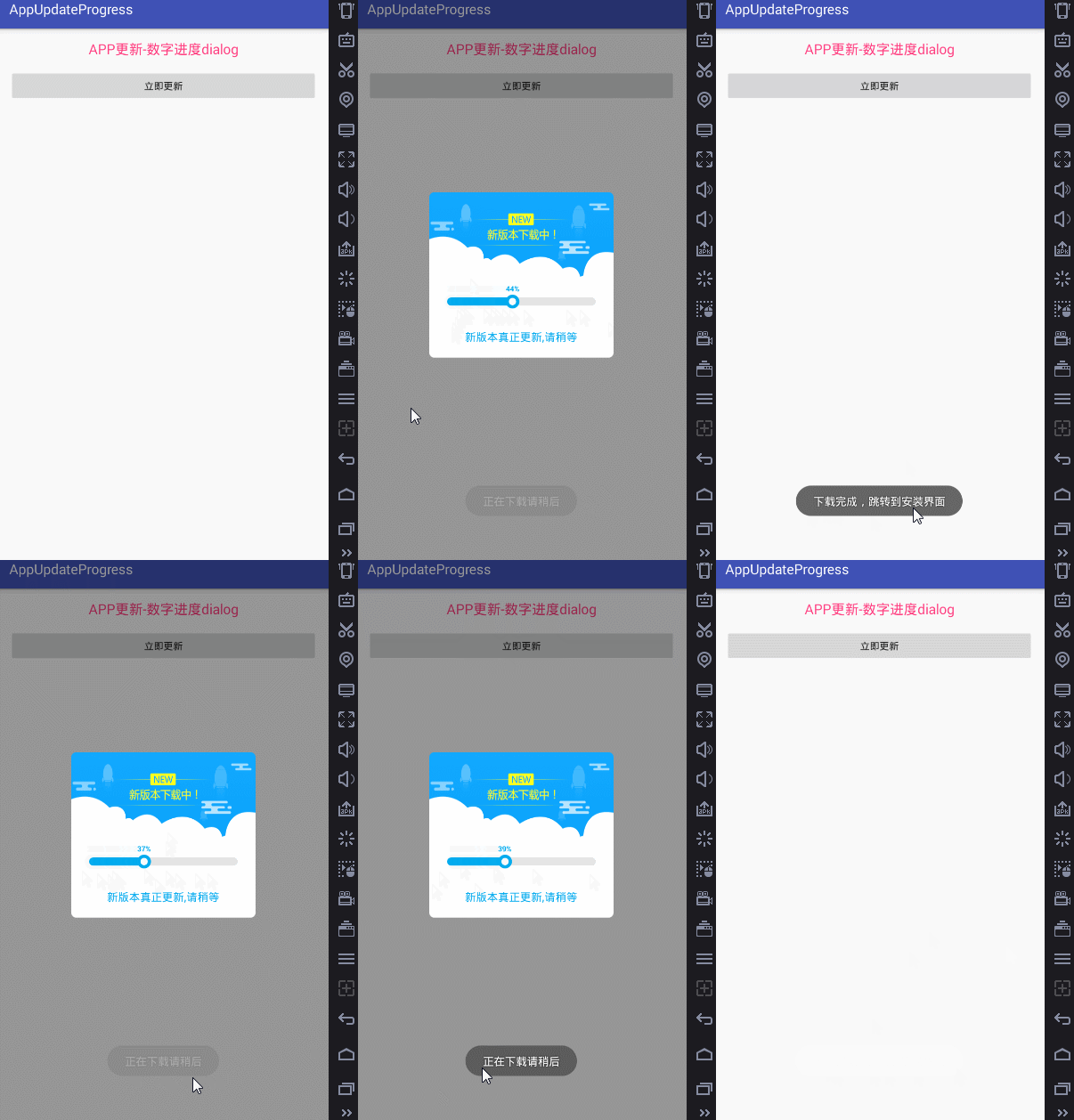
开发环境:AndroidStudio2.2.1+gradle-2.14.1
涉及知识:
1.Handler机制
2.自定义控件+Canvas绘画
3.自定义dialog
部分代码:
public class NumberProgressBar extends View {

    /**

     * 右侧未完成进度条的颜色

     */

    private int paintStartColor = 0xffe5e5e5;

    /**

     * Contxt

     */

    private Context context;

    /**

     * 主线程传过来进程 0 - 100

     */

    private int progress;

    /**

     * 得到自定义视图的宽度

     */

    private int viewWidth;

    private RectF pieOval;

    private RectF pieOvalIn;

    /**

     * 得到自定义视图的Y轴中心点

     */

    private int viewCenterY;

    /**

     * 已完成的画笔

     */

    private Paint paintInit = new Paint();

    /**

     * 未完成进度条画笔的属性

     */

    private Paint paintStart = new Paint();

    /**

     * 大圆的画笔

     */

    private Paint paintEndBig = new Paint();

    /**

     * 小圆的画笔

     */

    private Paint paintSmall = new Paint();

    /**

     * 画中间的百分比文字的画笔

     */

    private Paint paintText = new Paint();

    /**

     * 要画的文字的宽度

     */

    private int textWidth;

    /**

     * 画文字时底部的坐标

     */

    private float textBottomY;

    private int smallR;//小圆的半径

    private int bigR;//大圆半径

    private float radius;

    private int jR;//气泡矩形

    /**

     * 文字总共移动的长度(即从0%到100%文字左侧移动的长度)

     */

//    private int totalMovedLength;

    public NumberProgressBar(Context context, AttributeSet attrs) {

        super(context, attrs);

        this.context = context;

        // 构造器中初始化数据

        smallR = dip2px(context, 4);//小圆半径

        bigR = dip2px(context, 8);//大圆半径

        radius = dip2px(context, 10) / 2;//进度条高度

        jR = dip2px(context, 6);//矩形

        initData();

    }

    /**

     * 初始化数据

     */

    private void initData() {

        // 未完成进度条画笔的属性

        paintStart.setColor(paintStartColor);

        paintStart.setStrokeWidth(dip2px(context, 1));

        paintStart.setDither(true);

        paintStart.setAntiAlias(true);

        paintStart.setStyle(Paint.Style.FILL);

        // 已完成进度条画笔的属性

        paintInit.setColor(context.getResources().getColor(R.color.blue));

        paintInit.setStrokeWidth(dip2px(context, 1));

        paintInit.setAntiAlias(true);

        paintInit.setDither(true);

        paintInit.setStyle(Paint.Style.FILL);

        // 小圆画笔

        paintSmall.setColor(Color.WHITE);

        paintSmall.setAntiAlias(true);

        paintSmall.setStyle(Paint.Style.FILL);

        // 大圆画笔

        paintEndBig.setColor(context.getResources().getColor(R.color.blue));

        paintEndBig.setAntiAlias(true);

        paintEndBig.setStyle(Paint.Style.FILL);

        // 百分比文字画笔的属性

        int paintTextSizePx = sp2px(context, 11);  //设置百分比文字的尺寸

        paintText.setColor(context.getResources().getColor(R.color.blue));

        paintText.setTextSize(paintTextSizePx);

        paintText.setAntiAlias(true);

        paintText.setTypeface(Typeface.DEFAULT_BOLD);

    }

    @Override

    protected void onMeasure(int widthMeasureSpec, int heightMeasureSpec) {

        super.onMeasure(widthMeasureSpec, heightMeasureSpec);

    }

    @Override

    protected void onDraw(Canvas canvas) {

        super.onDraw(canvas);

        //得到float型进度

        float progressFloat = progress / 100.0f;

        int viewHeight = getMeasuredHeight();//得到控件的高度

        viewWidth = getMeasuredWidth() - 4 * jR;

        viewCenterY = viewHeight - bigR;

        float currentMovedLen = viewWidth * progressFloat + 2 * jR;

        String str = progress + "%";

        Rect bounds = new Rect();

        paintText.getTextBounds(str, 0, str.length(), bounds);

        textWidth = bounds.width();

        textBottomY = bounds.height();

/**

 * 1:绘画的文本

 * 2.距离x的位移

 * 3.距离Y的位移

 * 4.画笔对象

 */

        canvas.drawText(str, currentMovedLen - textWidth / 2,

                viewCenterY - smallR / 2 - bigR / 2 - 2 * jR + textBottomY / 2,

                paintText);//文字

        //圆角矩形初始的

        canvas.drawRoundRect(new RectF(2 * jR, viewCenterY - radius, currentMovedLen,

                        viewCenterY + radius),

                radius, radius, paintInit);

        //圆角矩形--进行中

        canvas.drawRoundRect(new RectF(currentMovedLen, viewCenterY - radius, viewWidth + 2 * jR,

                viewCenterY + radius), radius, radius, paintStart);

        pieOval = new RectF(currentMovedLen - bigR, viewCenterY - bigR, currentMovedLen + bigR, viewCenterY + bigR);

        pieOvalIn = new RectF(currentMovedLen - smallR, viewCenterY - smallR, currentMovedLen + smallR, viewCenterY + smallR);

        //大圆

        canvas.drawArc(pieOval, 0, 360, true, paintEndBig);

        //小圆

        canvas.drawArc(pieOvalIn, 0, 360, true, paintSmall);

    }

    /**

     * @param progress 外部传进来的当前进度

     */

    public void setProgress(int progress) {

        this.progress = progress;

        invalidate();

    }

    public static int dip2px(Context ctx, float dp) {

        float density = ctx.getResources().getDisplayMetrics().density;

        int px = (int) (dp * density + 0.5f);

        return px;

    }

    public static int sp2px(Context context, float spValue) {

        return (int) TypedValue.applyDimension(TypedValue.COMPLEX_UNIT_SP, spValue, context.getResources().getDisplayMetrics());

    }

}
App更新之dialog数字进度条的更多相关文章
- 数字进度条组件NumberProgressBar
数字进度条组件NumberProgressBar NumberProgressBar是一款数字进度条组件.它不仅可以通过进度条的变化展现进度,还可以通过跟随文字精确表示进度值.开发者可以对进度条进行 ...
- 【转】24. android dialog ——ProgressDialog 进度条对话框详解
原文网址:http://blog.csdn.net/jamesliulyc/article/details/6375598 首先在onCreateDialog方法里创建一个ProgressDialog ...
- dialog的进度条
import android.app.Activity; import android.app.ProgressDialog; import android.os.Bundle; import and ...
- Android中通过线程实现更新ProgressDialog(对话进度条)
作为开发者我们需要经常站在用户角度考虑问题,比如在应用商城下载软件时,当用户点击下载按钮,则会有下载进度提示页面出现,现在我们通过线程休眠的方式模拟下载进度更新的演示,如图(这里为了截图方便设置对话进 ...
- ListView总结(多选框ListViiew,动态加载,多线程更新ListView中的进度条)
Why ListView? ListView 如果仅仅出于功能上的需求ListView可能没有存在的必要,ListView能作的事情基本上ScrollView也能胜任.ListView存在的最根本的原 ...
- Dialog详解(包括进度条、PopupWindow、自定义view、自定义样式的对话框)
Dialog详解(包括进度条.PopupWindow.自定义view.自定义样式的对话框) Android中提供了多种对话框,在实际应用中我们可能会需要修改这些已有的对话框.本实例就是从实际出发, ...
- App更新(Android)
App更新(Android) 前言:现在一般的Android软件都是需要不断更新的,当你打开某个app的时候,如果有新的版本,它会提示你有新版本需要更新.该项目实现的就是这个功能.并且有强制更新和更 ...
- webview的进度条的加载,webview的使用以及handle的理解与使用
Webview的几个关键方法要介绍一些: 谷歌官方文档是这么说的; A WebView has several customization points where you can add your ...
- MFC 进度条控件
1.进度条 主要用来进行数据读写.文件拷贝和磁盘格式等操作时的工作进度提示情况,如安装程序等,伴随工作进度的进展,进度条的矩形区域从左到右利用当前活动窗口标题条的颜色来不断填充. 2.进度条控制在MF ...
随机推荐
- 我把双系统的win10抹除了现在开机只按option还是会出现双系统选择,怎么把那个win10给取消了或删除掉
找到解决方法了,按步骤来吧,准备:[打开Finder如果你在侧边设备一栏里看不到 Macintosh HD 就打开Finder设置>边栏>勾选硬盘,如果能看到请无视这一行]1. 打开终端执 ...
- 【Eclipse】编译使用Makefile的C工程
创建MakeFile project新建src文件夹,将文件复制到里面.右击makefile,make targets->create->名称填上allmake targets->b ...
- 003javascript语句
javascript语句和java差不多,注意==和===区别 <!DOCTYPE HTML PUBLIC "-//W3C//DTD HTML 4.01//EN" " ...
- 计算2..n的素数
def check(2) , do: true def check(n) when n >2 do b = for x <- (Enum.into 2..n-1,[]),do: x if ...
- eclipse 配置mapreduce环境出错
初学mapreduce,想在eclipse上配置mapreduce的环境,网上之类的教程,很多但是按照教程配之后,并不能正常运行. 碰到下面的错误: 15/10/17 20:10:39 INFO jv ...
- R语言矩阵matrix函数
矩阵是元素布置成二维矩形布局的R对象. 它们包含相同原子类型的元素.尽管我们可以创建只包含字符或只逻辑值的矩阵,但是它们没有多大用处.我们使用的是在数学计算中含有数字元素矩阵. 使用 matrix() ...
- C++实现二叉排序树
1.定义 二叉排序树(Binary Sort Tree),又称二叉查找树(Binary Search Tree),亦称二叉搜索树. 二叉排序树或者是一棵空树,或者是具有下列性质的二叉树: (1)若左子 ...
- 一句话讲清URI、URL、URN
关于URI,URL ,URN URN(Uniform Resource Name):统一资源名称 URL(Uniform Resource Locator):统一资源定位符 URI(Uniform R ...
- 基于node安装gulp-一些命令
1.win+r:进入cdm 2.node -v:查询是否安装node 3.npm install -g gulp:安装gulp 4.gulp -v:查看是否安装gulp 5.cd desk:进入桌面 ...
- Java如何操作对象(bean)进行动态排序?
原文出自:https://blog.csdn.net/seesun2012 简介如题:Java如何操作对象(bean)进行动态排序?Java实体类(bean)动态排序? 原理:利用反射根据指定的属性值 ...