
Delphi Android USB Interface with the G2
来源:http://www.bverhue.nl/g2dev/?p=65

Delphi Android USB Interface with the G2

Leave a reply

I first tried to use Libusb to connect my Android tablet with the G2. I managed to compile the libusb sources for Android and call it from the application, only to run into the “No permissions” error on trying to open the device.

There is no easy solution for this at the moment, other than havng to root the device and do other complex things, which very much narrows down the public who could eventually use the application.

So I tried the other method, using the “Java native interface”, which turned out to be very easy. Here is an example application which uses this method to interface over USB.

It involves 3 steps:

    Writting the JNI API header unit

    Writing the application

    Defining a device filter in the AndroidManifest.template.xml file

There is one important requirement: the Android device must support “Host mode” and you should use a USB OTG cable to connect to the G2.

Host mode means that the Android device can play the role of host to the usb slave device (the G2) and the OTG cable, because of special wiring, triggers the device into host mode.

First the API header unit for the USB functions has to be created. I used the example over here: http://www.pclviewer.com/android/, which  deals with the Bluetooth interface as an example.

I’ve not exposed all classes or methods at the moment, just the ones I needed for my application.
unit Androidapi.JNI.USB;

// (c) B.J.H. Verhue 2014

// JNI USB API converted from api-versions.xml

interface

uses

  Androidapi.JNIBridge,

  Androidapi.JNI.JavaTypes,

  Classes;

type

// =============================================================================

//

//                                 UsbEndPoint

//

// =============================================================================

  JUsbEndPoint = interface;

  JUsbEndPointClass = interface(JObjectClass)

  ['{4B9757DB-9DF8-4E8A-B981-E318D099B0A1}']

  end;

  [JavaSignature('android/hardware/usb/UsbEndpoint')]

  JUsbEndPoint = interface(JObject)

  ['{2D1BCC63-C184-41D0-A23A-78E256F8E1D4}']

    function init:JUsbEndPoint; cdecl;

    function getAddress:integer; cdecl;

    function getAttributes:integer; cdecl;

    function getDirection:integer; cdecl;

    function getEndpointNumber:integer; cdecl;

    function getInterval:integer; cdecl;

    function getMaxPacketSize:integer; cdecl;

    function getType:integer; cdecl;

  end;

  TJUsbEndPoint = class(TJavaGenericImport<JUsbEndPointClass, JUsbEndPoint>) end;

// =============================================================================

//

//                                 UsbInterface

//

// =============================================================================

  JUsbInterface = interface;

  JUsbInterfaceClass = interface(JObjectClass)

  ['{245DC801-9BF6-4014-B84A-62F44A8C3DB9}']

  end;

  [JavaSignature('android/hardware/usb/UsbInterface')]

  JUsbInterface = interface(JObject)

  ['{82D91C14-A4AA-47D7-BA6A-5B05B86F6856}']

    function init:JUsbInterface; cdecl;

    function getEndpoint(i : integer): JUsbEndPoint; cdecl;

    function getEndpointCount: integer; cdecl;

    function getId: integer; cdecl;

    function getInterfaceClass: integer; cdecl;

    function getInterfaceProtocol: integer; cdecl;

    function getInterfaceSubclass: integer; cdecl;

  end;

  TJUsbInterface = class(TJavaGenericImport<JUsbInterfaceClass, JUsbInterface>) end;

// =============================================================================

//

//                               UsbDeviceConnection

//

// =============================================================================

  JUsbDeviceConnection = interface;

  JUsbDeviceConnectionClass = interface(JObjectClass)

  ['{447D85BC-BA61-4BBA-A803-563071D90D85}']

  end;

  [JavaSignature('android/hardware/usb/UsbDeviceConnection')]

  JUsbDeviceConnection = interface(JObject)

  ['{D613CA69-DD0E-404A-A064-828E09429145}']

    function init:JUsbDeviceConnection; cdecl;

    function bulkTransfer(UsbEndpoint: JUsbEndpoint; data: TJavaArray<Byte>; length : integer; timeout : integer): integer; cdecl;

    function claimInterface(UsbInterface: JUsbInterface; ForceClaim: boolean): boolean; cdecl;

    procedure close; cdecl;

    function releaseInterface(UsbInterface: JUsbInterface): boolean; cdecl;

  end;

  TJUsbDeviceConnection = class(TJavaGenericImport<JUsbDeviceConnectionClass, JUsbDeviceConnection>) end;

// =============================================================================

//

//                                   UsbDevice

//

// =============================================================================

  JUsbDevice = interface;

  JUsbDeviceClass = interface(JObjectClass)

  ['{38F968EC-5B0B-4018-A302-4DC469509254}']

  end;

  [JavaSignature('android/hardware/usb/UsbDevice')]

  JUsbDevice = interface(JObject)

  ['{35B16245-52F3-409B-86BF-259F3A8F4845}']

    function getProductId:integer; cdecl;

    function getVendorId:integer; cdecl;

    function getInterface(i: integer):JUSBInterface; cdecl;

    function getInterfaceCount: integer; cdecl;

  end;

  TJUsbDevice = class(TJavaGenericImport<JUsbDeviceClass, JUsbDevice>) end;

// =============================================================================

//

//                                 UsbManager

//

// =============================================================================

  JUsbManager = interface;

  JUsbManagerClass = interface(JObjectClass)

  ['{D4A4DDAC-EE30-4123-A0BE-76F8E95FAC55}']

  end;

  [JavaSignature('android/hardware/usb/UsbManager')]

  JUsbManager = interface(JObject)

  ['{5E8A5FA6-64DA-4C90-9D52-988D66E6728E}']

    function getDeviceList:JHashMap; cdecl;

    function hasPermission(UsbDevice:JUsbDevice):boolean; cdecl;

    function openDevice(UsbDevice:JUsbDevice):JUsbDeviceConnection; cdecl;

  end;

  TJUsbManager = class(TJavaGenericImport<JUsbManagerClass, JUsbManager>) end;

implementation

end.
Second writing the application.
I’ve made a simple Android application in XE5 bases on a blank mobile form. The application has four buttons:
1.List devices, this lists all connected USB devices
2.Open, this opens the G2 devivce, if it is found
3.Message, this sends an “Init” message to the G2
4.Close, this closes the device
The messages are shown in a Memo control. Here is the code:
unit UnitUSBTestJNI;

// (c) B.J.H. Verhue 2014

// G2 USB communication using JNI API DEMO

interface

uses

  System.SysUtils, System.Types, System.UITypes, System.Classes, System.Variants,

  FMX.Types, FMX.Controls, FMX.Forms, FMX.Graphics, FMX.Dialogs, FMX.Layouts,

  FMX.Memo, FMX.StdCtrls,

  Androidapi.JNIBridge,

  Androidapi.JNI.GraphicsContentViewText,

  Androidapi.JNI.JavaTypes,

  Androidapi.JNI.USB;

type

  // Thread for receiving messages from G2

  TUSBThread = class(TThread)

  private

    [Weak] FUsbDeviceConnection : JUSBDeviceConnection;

    [Weak] FUsbEPII : JUSBEndPoint;

    [Weak] FUsbEPBI : JUSBEndPoint;

    FLogMessage : string;

    FBytesRead : integer;

    FIBuffer,

    FBBuffer : TJavaArray<Byte>;

  protected

    procedure Execute; override;

  public

    constructor Create( CreateSuspended: Boolean);

    destructor Destroy; override;

    procedure ProcessMessage;

    procedure WriteLog;

    procedure DumpIMessage;

    procedure DumpBMessage;

    property UsbDeviceConnection : JUSBDeviceConnection read FUsbDeviceConnection write FUsbDeviceConnection;

    property UsbEPII : JUSBEndPoint read FUsbEPII write FUsbEPII;

    property UsbEPBI : JUSBEndPoint read FUsbEPBI write FUsbEPBI;

  end;

  TForm1 = class(TForm)

    Panel1: TPanel;

    bListDevices: TButton;

    Memo1: TMemo;

    bOpen: TButton;

    bMessage: TButton;

    bClose: TButton;

    procedure bListDevicesClick(Sender: TObject);

    procedure bOpenClick(Sender: TObject);

    procedure bCloseClick(Sender: TObject);

    procedure bMessageClick(Sender: TObject);

  private

    FUsbActive : boolean;

    FUsbThread : TUSBThread;

    FUsbManager : JUSBManager;

    FUsbDevice : JUSBDevice;

    FUsbInterface : JUSBInterface;

    FUsbEPII, FUsbEPBI, FUsbEPBO : JUSBEndPoint;

    FUsbDeviceConnection : JUSBDeviceConnection;

    function GetUsbActive: boolean;

    procedure SetUsbActive(const Value: boolean);

    procedure DumpMessage( data : TJavaArray<Byte>; size : integer);

  public

    property UsbActive : boolean read GetUsbActive write SetUsbActive;

  end;

var

  Form1: TForm1;

implementation

uses

  FMX.Helpers.Android;

{$R *.fmx}

function CrcClavia( Seed: Integer; aVal: Integer): Word;

var

   i    : Integer;

   aCrc : Integer;

   k    : Integer;

begin

  // Calculates the G2 checksum for messages

   k    := ((( Seed shr 8) xor aVal) and 255) shl 8;

   aCrc := 0;

   for i := 1 to 8

   do begin

     if ( aCrc xor k) and $8000 <> 0

     then aCrc := ( aCrc shl 1) xor $1021

     else aCrc := aCrc shl 1;

     k := k shl 1;

   end;

   Result := (( Seed shl 8) xor aCrc) and $ffff;

end;

procedure TForm1.bListDevicesClick(Sender: TObject);

var JavaObject : JObject;

    DeviceList : JHashMap;

    Device : JUSBDevice;

    i : Jiterator;

    s : JString;

begin

  // Device discovery...

  // Get pointer to UsbManager

  JavaObject := SharedActivityContext.getSystemService(TJContext.JavaClass.USB_SERVICE);

  FUsbManager := TJUSBManager.Wrap((JavaObject as ILocalObject).GetObjectID);

  // Get a list of connected slave devices

  DeviceList := FUsbManager.getDeviceList;

  s := DeviceList.toString;

  Memo1.Lines.Add(jstringtostring(s));

  // Get pointer to G2 Device

  FUsbDevice := nil;

  i := DeviceList.values.iterator;

  while i.hasNext do begin

    Device := TJUSBDevice.Wrap((i.next as ILocalObject).GetObjectID);

    if (Device.getVendorId = 4092) and (Device.getProductId = 2) then

      FUsbDevice := Device;

    Memo1.Lines.Add('VendorID ' + IntToStr(Device.getVendorId) + ', ProductID ' + IntToStr(Device.getProductId));

  end;

  if assigned(FUsbDevice) then

    bOpen.Enabled := assigned(FUsbDevice);

end;

procedure TForm1.bCloseClick(Sender: TObject);

begin

  if UsbActive then

    UsbActive := False;

end;

procedure TForm1.bMessageClick(Sender: TObject);

var bytes_written, size, i : integer;

    crc : Word;

    Buffer : TJavaArray<Byte>;

begin

  // Send "Init" message to G2

  if assigned(FUsbDeviceConnection) then begin

    Buffer := TJavaArray<Byte>.Create(5);

    try

      Size := 1 + 2 + 2;

      Buffer.Items[0] := size div 256;

      Buffer.Items[1] := size mod 256;

      Buffer.Items[2] := $80;

      // Calc CRC

      Crc := 0;

      i := 2;

      while i < (Size-2) do begin

        Crc := CrcClavia(Crc, Buffer.Items[i]);

        inc(i);

      end;

      Buffer.Items[3] := crc div 256;

      Buffer.Items[4] := crc mod 256;

      bytes_written := FUsbDeviceConnection.bulkTransfer(FUsbEPBO, Buffer, Size, 100);

    finally

      Buffer.Free;

    end;

  end;

end;

procedure TForm1.bOpenClick(Sender: TObject);

begin

  UsbActive := True;

end;

procedure TForm1.DumpMessage(data: TJavaArray<Byte>; size : integer);

var p, i, c : integer;

    char_line, line : string;

begin

  // Dump message in HEX and Char values

  Memo1.BeginUpdate;

  try

    c := 0;

    i := 0;

    p := 0;

    line := '';

    char_line := '';;

    while (i<size) do begin

      if c < 16 then begin

        line := line + IntToHex(data.Items[i], 2) + ' ';

        if data.Items[i] >= 32 then

          char_line := char_line + chr(data.Items[i])

        else

          char_line := char_line + '.';

        inc(c);

        inc(i);

      end else begin

        Memo1.Lines.Add(IntToHex(p, 6) + ' - ' + line + ' ' + char_line);

        p := i;

        c := 0;

        line := '';

        char_line := '';

      end;

    end;

    if c <> 0 then

      Memo1.Lines.Add(IntToHex(p, 6) + ' - ' + line + stringofchar(' ', 16*3 - Length(line) + 1) + char_line);

  finally

    Memo1.EndUpdate;

  end;

end;

function TForm1.GetUsbActive: boolean;

begin

  result := FUsbActive;

end;

procedure TForm1.SetUsbActive(const Value: boolean);

begin

  if Value then begin

    // Activate the USB inteface with G2

    // Get interface

    Memo1.Lines.Add('# Interfaces ' + IntToStr(FUsbDevice.getInterfaceCount));

    FUsbInterface := FUsbDevice.getInterface(0);

    Memo1.Lines.Add('# Endpoints ' + IntToStr(FUsbInterface.getEndpointCount));

    // Get 3 endpoints

    FUsbEPII := FUsbInterface.getEndpoint(0);

    Memo1.Lines.Add('Endpoint ' + IntToStr(FUsbEPII.getEndpointNumber));

    FUsbEPBI := FUsbInterface.getEndpoint(1);

    Memo1.Lines.Add('Endpoint ' + IntToStr(FUsbEPBI.getEndpointNumber));

    FUsbEPBO := FUsbInterface.getEndpoint(2);

    Memo1.Lines.Add('Endpoint ' + IntToStr(FUsbEPBO.getEndpointNumber));

    // Check permisions

    if FUsbManager.hasPermission(FUsbDevice) then begin

      Memo1.Lines.Add('Permissions o.k.');

    end else begin

      raise Exception.Create('No permission...');

    end;

    // Open device

    FUsbDeviceConnection := FUsbManager.openDevice(FUsbDevice);

    if not assigned( FUsbDeviceConnection) then

      raise Exception.Create('Failed to open device.');

    if not FUsbDeviceConnection.claimInterface(FUsbInterface, True) then

      raise Exception.Create('Failed to claim interface.');

    FUsbActive := Value;

    // Start listening thread

    FUsbThread := TUsbThread.Create(True);

    FUsbThread.FUsbDeviceConnection := FUsbDeviceConnection;

    FUsbThread.FUsbEPII := FUsbEPII;

    FUsbThread.FUsbEPBI := FUsbEPBI;

    FUsbThread.Start;

  end else begin

    // Deactivate the USB connection

    FUsbActive := Value;

    if assigned(FUsbDeviceConnection) then begin

      // Release interface

      if not FUsbDeviceConnection.releaseInterface(FUsbInterface) then

        Memo1.Lines.Add('Failed to release the interface');

      // Close device and free the thread

      if assigned(FUsbThread) then begin

        FUsbThread.Terminate;

        FUsbDeviceConnection.close;

        FUsbThread.DisposeOf;

      end else

        FUsbDeviceConnection.close;

      Memo1.Lines.Add('Device is closed');

    end;

  end;

end;

{ TUSBThread }

constructor TUsbThread.Create( CreateSuspended: Boolean);

begin

  FreeOnTerminate := False;

  inherited;

  FIBuffer := TJavaArray<Byte>.Create(16);

  FBBuffer := TJavaArray<Byte>.Create(8192);

end;

destructor TUsbThread.Destroy;

begin

  FBBuffer.Free;

  FIBuffer.Free;

end;

procedure TUsbThread.Execute;

var size : integer;

begin

  FLogMessage := 'Thread started.';

  synchronize(WriteLog);

  // The G2 sends first a short message over the interrupt endpoint of max 16 bytes

  // This may be followed by a longer message (extended message)

  while assigned(FUsbDeviceConnection) and (not Terminated) do begin

    FBytesRead := FUsbDeviceConnection.bulkTransfer(FUsbEPII, FIBuffer, 16, 0);

    if FBytesRead > 0 then begin

      synchronize(DumpIMessage);

      if FIBuffer.Items[0] and $f = 1 then begin

        // Extended message

        size := (FIBuffer.Items[1] shl 8) or FIBuffer.Items[2];

        FLogMessage := 'Extended message, size ' + IntToStr(size);

        synchronize(WriteLog);

        FBytesRead := FUsbDeviceConnection.bulkTransfer(FUsbEPBI, FBBuffer, size, 0);

        FLogMessage := 'Extended message, bytes read ' + IntToStr(FBytesRead);

        synchronize(WriteLog);

        synchronize(DumpBMessage);

      end else begin

        // Embedded message

      end;

    end;

    sleep(10)

  end;

  FLogMessage := 'Thread terminated.';

  synchronize(WriteLog);

end;

procedure TUsbThread.ProcessMessage;

begin

  // Do something with the message...

end;

procedure TUsbThread.WriteLog;

begin

  Form1.Memo1.Lines.Add(FLogMessage);

end;

procedure TUsbThread.DumpIMessage;

begin

  Form1.DumpMessage(FIBuffer, FBytesRead);

end;

procedure TUsbThread.DumpBMessage;

begin

  Form1.DumpMessage(FBBuffer, FBytesRead);

end;

end.
Finally we have to define a device filter in the “AndroidManifest.template.xml” file. This ensures that you get the necessary permissions for opening the device. Also, this enables automatic launch of the application when you plug in the device in your Android tablet!
First you have to make a little xml file, containing the vendor id and product id of the device. In case of the G2 synth, this file looks like this:
<?xml version="1.0" encoding="UTF-8"?>

<resources>

    <usb-device vendor-id="4092" product-id="2" class="0" subclass="0" protocol="0" />

</resources>
Save this file as “device_filter.xml” and add it to the project.
You also have to deploy this file to the Android device, so put it into the Deployment manager, with remote path “res\xml”.
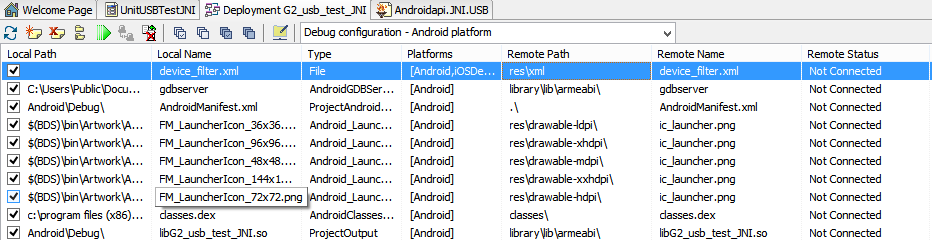
Next edit the file “AndroidManifest.template.xml” which should be in your project folder after compiling the application.
Put in
<meta-data android:name="android.hardware.usb.action.USB_DEVICE_ATTACHED"

                android:resource="@xml/device_filter" />
As a child in the “activity” element, and put
<action android:name="android.hardware.usb.action.USB_DEVICE_ATTACHED" />
As a child to the “intent-filter” element. So the dile should look something like this:
<?xml version="1.0" encoding="utf-8"?>

<!-- BEGIN_INCLUDE(manifest) -->

<manifest xmlns:android="http://schemas.android.com/apk/res/android"

        package="%package%"

        android:versionCode="%versionCode%"

        android:versionName="%versionName%">

    <!-- This is the platform API where NativeActivity was introduced. -->

    <uses-sdk android:minSdkVersion="%minSdkVersion%" />

<%uses-permission%>

    <application android:persistent="%persistent%"

        android:restoreAnyVersion="%restoreAnyVersion%"

        android:label="%label%"

        android:installLocation="%installLocation%"

        android:debuggable="%debuggable%"

        android:largeHeap="%largeHeap%"

        android:icon="%icon%"

        android:theme="%theme%">

        <!-- Our activity is a subclass of the built-in NativeActivity framework class.

             This will take care of integrating with our NDK code. -->

        <activity android:name="com.embarcadero.firemonkey.FMXNativeActivity"

                android:label="%activityLabel%"

                android:configChanges="orientation|keyboardHidden">

            <!-- Tell NativeActivity the name of our .so -->

            <meta-data android:name="android.app.lib_name"

                android:value="%libNameValue%" />

            <meta-data android:name="android.hardware.usb.action.USB_DEVICE_ATTACHED"

                android:resource="@xml/device_filter" />

            <intent-filter>

                <action android:name="android.intent.action.MAIN" />

                <category android:name="android.intent.category.LAUNCHER" />

                <action android:name="android.hardware.usb.action.USB_DEVICE_ATTACHED" />

            </intent-filter>

        </activity>

        <receiver android:name="com.embarcadero.firemonkey.notifications.FMXNotificationAlarm" />

    </application>

</manifest>

<!-- END_INCLUDE(manifest) -->
Ok. So now you should be able to deploy the application to the Android device and connect to the G2.
Delphi Android USB Interface with the G2的更多相关文章
- Delphi Android USB声明文件
自己转的比较全面的USB声明文件: unit Androidapi.JNI.USB; interface uses AndroidAPI.JNIBridge, Androidapi.JNI.JavaT ...
- Android USB Host与HID通讯 (二)
不好意思,从上一篇到现在确实比较忙,中间又外出了一段时间,虽然也上LOFTER,或者看到一些朋友QQ上加我,给我发信息询问,有些看到了有些可能没看到,偶尔回复了一两个,也不咋的详细,在此我想说,一方面 ...
- 翻译Android USB HOST API
翻译Android USB HOST API 源代码地址:http://developer.android.com/guide/topics/connectivity/usb/host.html 译者 ...
- Android USB 开发详解
Android USB 开发详解 先附上 Android USB 官方文档 Android通过两种模式支持各种 USB 外设和 Android USB 附件(实现Android附件协议的硬件):USB ...
- Android USB驱动源码分析(-)
Android USB驱动中,上层应用协议里最重要的一个文件是android/kernel/drivers/usb/gadget/android.c.这个文件实现USB的上层应用协议. 首先包含了一些 ...
- Android USB Host与HID通讯
前端时间捣鼓一个HID的硬件, 需要和android通信, 网上搜索了一圈,收获不小. 比较好的文章是: Android USB Host与HID通讯 Android Service创建US ...
- Android USB Connections Explained: MTP, PTP, and USB Mass Storage
Android USB Connections Explained: MTP, PTP, and USB Mass Storage Older Android devices support USB ...
- I.MX6 Android USB Touch eGTouchA.ini文件存放
/******************************************************************** * I.MX6 Android USB Touch eGTo ...
- Android USB Host 与 Hid 设备通信bulkTransfer()返回-1问题的原因
近期一直在做Android USB Host 与USB Hid设备(STM32FXXX)的通信,遇到了很多问题.项目源码以及所遇到的其他问题可以见本博客其他相关文章,这里重点讲一下bulkTransf ...
随机推荐
- java线程操作
目录 前言 创建多线程的方式 1继承thread抽象类 2实现Runnable接口 3实现Callable接口 匿名内部类 线程池 线程安全 同步代码块 同步方法 锁机制 线程状态 前言 进程:内存运 ...
- SQL点点滴滴_特殊用法笔记
声明: 本文为转载,感谢原作者的辛勤付出. 原博客地址为:http://www.cnblogs.com/icyJ/p/SQL_Statement.html 1.MERGE用法:关联两表,有则改,无则加 ...
- Layui - Xtree 3.0 http://acmeworker.com/BlogContent?type=1038
2018年1月11日升级 Layui - Xtree 3.0 此版本包含了前两个版本所有的功能,同时修复了一些问题,增加了一些功能,之前的版本可以直接抛弃啦!本次升级改动较多,参数也有所更改,尽量别直 ...
- December 14th 2016 Week 51st Wednesday
Everything has its time and that time must be watched. 万物皆有时,时来不可失. Everything has its time, and I r ...
- [COGS 0107][NOIP 2003] 传染病控制
107. [NOIP2003] 传染病控制 ★★★ 输入文件:epidemic.in 输出文件:epidemic.out 简单对比时间限制:1 s 内存限制:128 MB [问题背景] ...
- Xcode中模拟器慢
取消下图中框框打勾
- python_4程序设计基础
1注释 2变量和常量 3命名 4表达式 5赋值语句
- 【[HEOI2016/TJOI2016]排序】
巧妙思路题 有一个重要的思想就是把大于某一个数的数都变成\(1\),小于这个数的都变成\(0\),这个只有\(0\)和\(1\)的序列就很好处理了 由于我们只需要在最后求出一个位置上是什么数就可以了, ...
- 【BBS】BBS论坛项目各个页面的工作流程图
1论坛整体结构 2数据库结构 3登录页面 4论坛首页(显示各个板块) 5显示板块对应的内容 6文章内容页 7新增板块.发表文章.回复 8版面管理.用户管理.发帖排行
- Kali-linux控制Meterpreter
Meterpreter是Metasploit框架中的一个杀手锏,通常作为利用漏洞后的攻击载荷所使用,攻击载荷在触发漏洞后能够返回给用户一个控制通道.当使用Armitage.MSFCLI或MSFCONS ...