
C# SQLite 数据库
数据库
Oracle。Oracle的应用,主要在传统行业的数据化业务中,比如:银行、金融这样的对可用性、健壮性、安全性、实时性要求极高的业务
MS SQL Server。windows生态系统的产品,好处坏处都很分明。好处就是,高度集成化,微软也提供了整套的软件方案,基本上一套win系统装下来就齐活了。因此,不那么缺钱,但很缺IT人才的中小企业,会偏爱 MS SQL Server 。例如,自建ERP系统、商业智能、垂直领域零售商、餐饮、事业单位等等。
MySQL。MySQL基本是生于互联网,长于互联网。其应用实例也大都集中于互联网方向
SQLite介绍
SQLite,是一款轻型的数据库,是遵守ACID的关系型数据库管理系统,它包含在一个相对小的C库中。它的设计目标是嵌入式的,而且目前已经在很多嵌入式产品中使用了它,它占用资源非常的低,在嵌入式设备中,可能只需要几百K的内存就够了。
它能够支持Windows/Linux/Unix等等主流的操作系统,同时能够跟很多程序语言相结合,比如 C#、PHP、Java等,还有ODBC接口。SQLite第一个Alpha版本诞生于2000年5月。 至2015年已经有15个年头。
Windows平台使用
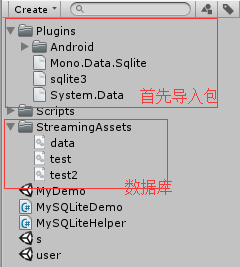
1、在Assets目录下创建Plugins目录,将Mono.Data.Sqlite.dll、System.Data.dll、sqlite3.dll三个文件放到工程Plugins目录下。
2、在Assets目录下创建StreamingAssets目录,把db放在该目录内。
3、将DbAccess.cs脚本添加到工程中
Android平台使用
1、在Assets目录下创建Plugins目录,将Mono.Data.Sqlite.dll、System.Data.dll、sqlite3.dll三个文件放到工程Plugins目录下。
2、然后在Plugins目录下建立Android目录,再将libsqlite3.so放到Android目录下。
3、在Assets目录下创建StreamingAssets目录,把db放在该目录内。 4、将DbAccess.cs脚本添加到工程中。
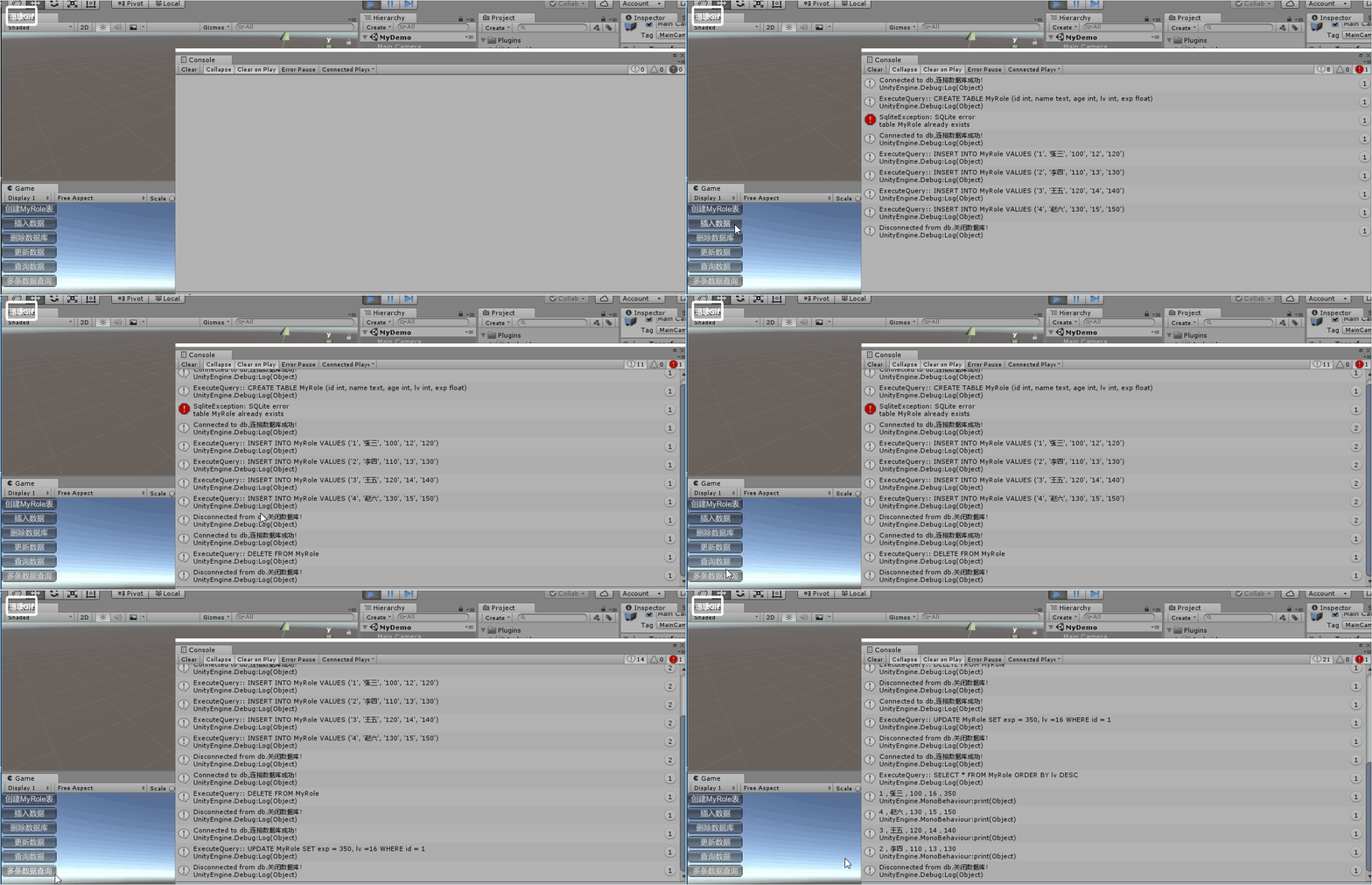
SQLite的数据库常规操作封装的通用类
 using UnityEngine;

 using System;

 using System.Collections;

 using Mono.Data.Sqlite;

 /// <summary>

 /// SQLite数据库操作类

 /// </summary>

 public class DbAccess

 {

     private SqliteConnection conn; // SQLite连接

     private SqliteCommand cmd; // SQLite命令

     private SqliteDataReader reader;

     public DbAccess (string connectionString)

     {

         OpenDB (connectionString);

     }

     public DbAccess (){ }

     /// <summary>

     /// 打开数据库

     /// </summary>

     /// <param name="connectionString"></param>

     public void OpenDB (string connectionString)

     {

         try

         {

             conn = new SqliteConnection (connectionString);

             conn.Open ();

             Debug.Log ("Connected to db,连接数据库成功!");

         }

         catch(Exception e)

         {

             string temp1 = e.ToString();

             Debug.Log(temp1);

         }

     }

     /// <summary>

     /// 关闭数据库连接

     /// </summary>

     public void CloseSqlConnection ()

     {

         if (cmd != null) { cmd.Dispose (); cmd = null; }

         if (reader != null) { reader.Dispose (); reader = null;}

         if (conn != null) {    conn.Close (); conn = null;}

         Debug.Log ("Disconnected from db.关闭数据库!");

     }

     /// <summary>

     /// 执行SQL语句

     /// </summary>

     /// <param name="sqlQuery"></param>

     /// <returns></returns>

     public SqliteDataReader ExecuteQuery ( string sqlQuery )

     {

         Debug.Log( "ExecuteQuery:: " + sqlQuery );

         cmd = conn.CreateCommand ();

         cmd.CommandText = sqlQuery;

         reader = cmd.ExecuteReader ();

         return reader;

     }

     /// <summary>

     /// 查询表中全部数据 param tableName=表名

     /// </summary>

     public SqliteDataReader ReadFullTable (string tableName)

     {

         string query = "SELECT * FROM " + tableName;

         return ExecuteQuery (query);

     }

     /// <summary>

     /// 插入数据 param tableName=表名 values=插入数据内容

     /// </summary>

     public SqliteDataReader InsertInto (string tableName, string[] values)

     {

         string query = "INSERT INTO " + tableName + " VALUES (" + values[];

         for (int i = ; i < values.Length; ++i) {

             query += ", " + values[i];

         }

         query += ")";

         return ExecuteQuery (query);

     }

     /// <summary>

     /// 更新数据 param tableName=表名 cols=更新字段 colsvalues=更新内容 selectkey=查找字段(主键) selectvalue=查找内容

     /// </summary>

     public SqliteDataReader UpdateInto (string tableName, string []cols,string []colsvalues,string selectkey,string selectvalue)

     {

         string query = "UPDATE "+tableName+" SET "+cols[]+" = "+colsvalues[];

         for (int i = ; i < colsvalues.Length; ++i) {

             query += ", " +cols[i]+" ="+ colsvalues[i];

         }

         query += " WHERE "+selectkey+" = "+selectvalue+" ";

         return ExecuteQuery (query);

     }

     /// <summary>

     /// 删除数据 param tableName=表名 cols=字段 colsvalues=内容

     /// </summary>

     public SqliteDataReader Delete(string tableName,string []cols,string []colsvalues)

     {

         string query = "DELETE FROM "+tableName + " WHERE " +cols[] +" = " + colsvalues[];

         for (int i = ; i < colsvalues.Length; ++i) {

             query += " or " +cols[i]+" = "+ colsvalues[i];

         }

         return ExecuteQuery (query);

     }

     /// <summary>

     /// 插入数据 param tableName=表名 cols=插入字段 value=插入内容

     /// </summary>

     public SqliteDataReader InsertIntoSpecific (string tableName, string[] cols, string[] values)

     {

         if (cols.Length != values.Length) {

             throw new SqliteException ("columns.Length != values.Length");

         }

         string query = "INSERT INTO " + tableName + "(" + cols[];

         for (int i = ; i < cols.Length; ++i) {

             query += ", " + cols[i];

         }

         query += ") VALUES (" + values[];

         for (int i = ; i < values.Length; ++i) {

             query += ", " + values[i];

         }

         query += ")";

         return ExecuteQuery (query);

     }

     /// <summary>

     /// 删除表中全部数据

     /// </summary>

     public SqliteDataReader DeleteContents (string tableName)

     {

         string query = "DELETE FROM " + tableName;

         return ExecuteQuery (query);

     }

     /// <summary>

     /// 创建表 param name=表名 col=字段名 colType=字段类型

     /// </summary>

     public SqliteDataReader CreateTable (string name, string[] col, string[] colType)

     {

         if (col.Length != colType.Length) {

             throw new SqliteException ("columns.Length != colType.Length");

         }

         string query = "CREATE TABLE " + name + " (" + col[] + " " + colType[];

         for (int i = ; i < col.Length; ++i) {

             query += ", " + col[i] + " " + colType[i];

         }

         query += ")";

         return ExecuteQuery (query);

     }

     /// <summary>

     /// 按条件查询数据 param tableName=表名 items=查询字段 col=查找字段 operation=运算符 values=内容

     /// </summary>

     public SqliteDataReader SelectWhere (string tableName, string[] items, string[] col, string[] operation, string[] values)

     {

         if (col.Length != operation.Length || operation.Length != values.Length) {

             throw new SqliteException ("col.Length != operation.Length != values.Length");

         }

         string query = "SELECT " + items[];

         for (int i = ; i < items.Length; ++i) {

             query += ", " + items[i];

         }

         query += " FROM " + tableName + " WHERE " + col[] + operation[] + "'" + values[] + "' ";

         for (int i = ; i < col.Length; ++i) {

             query += " AND " + col[i] + operation[i] + "'" + values[i] + "' ";

         }

         return ExecuteQuery (query);

     }

     /// <summary>

     /// 查询表

     /// </summary>

     public SqliteDataReader Select(string tableName, string col, string values)

     {

         string query = "SELECT * FROM " + tableName  + " WHERE " + col + " = " + values;

         return ExecuteQuery (query);

     }

     public SqliteDataReader Select(string tableName, string col,string operation, string values)

     {

         string query = "SELECT * FROM " + tableName  + " WHERE " + col + operation + values;

         return ExecuteQuery (query);

     }

     /// <summary>

     /// 升序查询

     /// </summary>

     public SqliteDataReader SelectOrderASC (string tableName,string col)

     {

         string query = "SELECT * FROM " + tableName  + " ORDER BY " + col + " ASC";

         return ExecuteQuery (query);

     }

     /// <summary>

     /// 降序查询

     /// </summary>

     public SqliteDataReader SelectOrderDESC (string tableName,string col)

     {

         string query = "SELECT * FROM " + tableName  + " ORDER BY " + col + " DESC";

         return ExecuteQuery (query);

     }

     /// <summary>

     /// 查询表行数

     /// </summary>

     public SqliteDataReader SelectCount(string tableName)

     {

         string query = "SELECT COUNT(*) FROM " + tableName;

         return ExecuteQuery (query);

     }

 }
DbAccess
 using System.Collections;

 using System.Collections.Generic;

 using UnityEngine;

 using Mono .Data .Sqlite;

 namespace ns

 {

     /// <summary>

     ///  打开和关闭数据库

     /// </summary>

     public class SQLiteHelper : MonoBehaviour

     {

         protected string dbName = "test2.db"; // 文件名

         private string filePath // 文件路径

         {

             get { return Application .streamingAssetsPath + "/" + dbName; }

         }

         protected DbAccess db; // dbAccess实例

         protected SqliteDataReader reader;//

         /// <summary>

         /// 打开数据库

         /// </summary>

         protected void OpenDB()

         {

             db = new DbAccess( "URI=file:" + filePath );

         }

         /// <summary>

         /// 关闭数据库

         /// </summary>

         protected void CloseDB()

         {

             if( reader != null )

             {

                 reader .Close();

                 reader = null;

             }

             db .CloseSqlConnection();

         }

         /// <summary>

         /// 对象前后添加单引号

         /// </summary>

         /// <param name="o"></param>

         /// <returns></returns>

         protected string GetStr( object o )

         {

             return "'" + o + "'";

         }

     }

 }
SQLiteHelper
 using System.Collections;

 using System.Collections.Generic;

 using UnityEngine;

 using ns;

 public class MySQLiteDemo : MySQLiteHelper

 {

     /// <summary>

     /// 创建表

     /// </summary>

     private void CreateTable()

     {

         //打开数据库

         OpenDB();

         db.CreateTable("MyRole", new string[] { "id", "name", "age", "lv", "exp" },

             new string[] { "int", "text", "int", "int", "float" });

         //关闭数据库

         CloseDB();

     }

     /// <summary>

     /// 插入数据

     /// </summary>

     private void InsertData()

     {

         //打开数据库

         OpenDB();

         //插入数据库

         db.InsertInto

             ("MyRole", new string[] { GetStr(""), GetStr("张三"), GetStr(""), GetStr(""), GetStr("") });

         db.InsertInto

             ("MyRole", new string[] { GetStr(""), GetStr("李四"), GetStr(""), GetStr(""), GetStr("") });

         db.InsertInto

             ("MyRole", new string[] { GetStr(""), GetStr("王五"), GetStr(""), GetStr(""), GetStr("") });

         db.InsertInto

             ("MyRole", new string[] { GetStr(""), GetStr("赵六"), GetStr(""), GetStr(""), GetStr("") });

         //关闭数据库

         CloseDB();

     }

     /// <summary>

     /// 删除数据库

     /// </summary>

     private void DeleteData()

     {

         //打开数据库

         OpenDB();

         // 删除数据: 多个条件直接是或的关系

         // DELETE FROM Role WHERE id = 1 or lv = 13

         //db.Delete("MyRole",

         //    new string[] { "id", "lv" },

         //    new string[] { "1", "130" }

         //    );

         db.DeleteContents("MyRole");

         //关闭数据库

         CloseDB();

     }

     /// <summary>

     /// 更新数据

     /// </summary>

     private void UpdateData()

     {

         //打开数据库

         OpenDB();

         // 更新数据: id为1数据 exp改为350 lv改为16

         // UPDATE Role SET exp = 350, lv =16 WHERE id = 1

         db.UpdateInto("MyRole",

             new string[] { "exp", "lv" }, new string[] { "", "", }, "id", "");

         //关闭数据库

         CloseDB();

     }

     // 查找数据

     private void SearchData()

     {

         OpenDB();

         // 查询 查找id为3 lv为21的数据

         // 找到 name 和 age

         // 多个条件之间是与的关系

         // SELECT name, age FROM Role WHERE id='3'  AND lv='14'

         reader = db.SelectWhere("MyRole",

             new string[] { "name", "age" },

             new string[] { "id", "lv" },

             new string[] { "=", "=" },

             new string[] { "", "" }

             );

         if (reader.HasRows)

         {

             reader.Read();

             print(reader.GetString(reader.GetOrdinal("name")));

             print(reader.GetInt32(reader.GetOrdinal("age")));

         }

         CloseDB();

     }

     /// <summary>

     /// 查找多个数据

     /// </summary>

     private void SelectData()

     {

        // 打开数据库

             OpenDB();

             //reader = db .Select( "Role" , "id" , "2" );// 查询所有id 为 2的数据

             //reader = db .Select( "Role" , "id" , ">" , "1" ); // 查询所有id>1的数据

             //reader = db .ReadFullTable("Role"); // 读取整张表

             //reader = db .SelectOrderASC( "Role" , "age" ); // age从小到大排列

             reader = db .SelectOrderDESC( "MyRole" , "lv" ); //  lv从大到小

             if ( reader.HasRows )

             {

                 while( reader .Read() )

                 {

                     string s = "";

                     s += reader .GetInt32( reader .GetOrdinal( "id" ) ) + " , " ;

                     s += reader .GetString( reader .GetOrdinal( "name" ) ) + " , ";

                     s += reader .GetInt32( reader .GetOrdinal( "age" ) ) + " , ";

                     s += reader .GetInt32( reader .GetOrdinal( "lv" ) ) + " , ";

                     s += reader .GetFloat( reader .GetOrdinal( "exp" ) );

                     print( s );

                 }

             }

             // 关闭数据库

             CloseDB();

     }

     private void OnGUI()

     {

         if (GUILayout.Button("创建MyRole表"))

         {

             CreateTable();

         }

         if (GUILayout.Button("插入数据"))

         {

             InsertData();

         }

         if (GUILayout.Button("删除数据库"))

         {

             DeleteData();

         }

         if (GUILayout.Button("更新数据"))

         {

             UpdateData();

         }

         if (GUILayout.Button("查询数据"))

         {

             SearchData();

         }

         if (GUILayout.Button("多条数据查询"))

         {

             SelectData();

         }

     }

 }
MySQLiteDemo
C# SQLite 数据库的更多相关文章
- Android之SQLite数据库篇
一.SQLite简介 Google为Andriod的较大的数据处理提供了SQLite,他在数据存储.管理.维护等各方面都相当出色,功能也非常的强大. 二.SQLite的特点 1.轻量级使用 SQLit ...
- Qt5 开发 iOS 应用之访问 SQLite 数据库
开发环境: macOS 10.12.1 Xcode 8.1 Qt 5.8 iPhone 6S+iOS 10.1.1 源代码: 我在 Qt 程序里指定了数据库的名称来创建数据库,在 Win10.An ...
- 【Win 10 应用开发】Sqlite 数据库的简单用法
如果老周没记错的话,园子里曾经有朋友写过如何在 UWP 项目中使用 Sqlite数据库的文章.目前我们都是使用第三方封装的库,将来,SDK会加入对 Sqlite 的支持. 尽管目前 UWP-RT 库中 ...
- Android之SQLite数据库使用
转载整理于:http://my.csdn.net/lmj623565791 我刚开始接触Android的时候甚至都不敢相信,Android系统竟然是内置了数据库的!好吧,是我太孤陋寡闻了.由于我之前是 ...
- 让PDF.NET支持最新的SQLite数据库
最近项目中用到了SQLite,之前项目中用的是PDF.NET+MySQL的组合,已经写了不少代码,如果能把写好的代码直接用在SQLite上就好了,PDF.NET支持大部分主流的数据库,这个当然可以,只 ...
- iOS sqlite数据库图像化查看
问题描述:在xocde上用sqlite数据库的时候,因为没有图形化界面,有些时候很难看出自己设计的数据库是否有问题,比如我刚上手sqlite数据库设计id为自增长时,很自然的用了identify(1, ...
- Android中SQLite数据库小计
2016-03-16 Android数据库支持 本文节选并翻译<Enterprise Android - Programing Android Database Applications for ...
- Android开发-之SQLite数据库
之前我们讲了如何将数据存储在文件中,那么除了这种方式呢,就是我们常见的大家都知道的将数据存储在数据库当中了. 将数据存储在数据库中的优势: 1)存储在数据库中的数据更加方便操作,比如增.删.改.查等 ...
- Java操作Sqlite数据库-jdbc连接
Java操作Sqlite数据库步骤: 1. 导入Sqlite jdbc 本文使用sqlite-jdbc-3.7.2.jar,下载地址 http://pan.baidu.com/s/1kVHAGdD 2 ...
- Android开发学习——SQLite数据库与单元测试
SQLite数据库 轻量级关系型数据库 创建数据库需要使用的api:SQLiteOpenHelper public class Myopenhelper extends SQLiteOpenHelp ...
随机推荐
- springboot 2.0 自动装配原理 以redis为例
当面试管问你springboot 和 普通spring 有什么区别? 您还在回答: 简化了配置 ,内置tomcat 等等 吗 ? 那只是皮毛, 最重要的还是自动化配置.一起来了解一下 第一步: 第二步 ...
- [译]作为一个web开发人员,哪些技术细节是在发布站点前你需要考虑到的
前日在cnblogs上看到一遍文章<每个程序员都必读的12篇文章>,其中大多数是E文的. 先译其中一篇web相关的”每个程序员必知之WEB开发”. 原文: http://programme ...
- C关系运算结果及逻辑运算结果保存
http://service.exmail.qq.com/
- django2.0模板相关设置
看到了django的模板有include标签 include 标签 {% include %} 标签允许在模板中包含其它的模板的内容. 下面这个例子都包含了 nav.html 模板: {% inclu ...
- ES6系列_12之map数据结构
1.map数据结构出现的原因? JavaScript 的对象(Object),本质上是键值对的集合(Hash 结构),但是传统上只能用字符串当作键.这给它的使用带来了很大的限制.为了能实现将对象作为键 ...
- MVC中@Html.Action的用法
MVC项目中如果有公共部分的代码就可以单独拿出来作为控件来用(比如头部和底部代码).跟ASP.NET中的ASCX实现的效果一样,但MVC比它方便的多. 想要实现该效果,需要知道@Html.Action ...
- Android Studio中由于gradle插件版本和gradle版本对应关系导致的编译失败的问题
今天在Android Studio中导入新项目,import之后编译报错,报错信息基本都是和版本相关,查询gradle版本相关知识,了解到gradle插件版本和gradle版本有相应的匹配关系,对应如 ...
- DB2 日期时间函数
db2日期时间函数 (DATE(TRIM(CHAR(DT#11Y))||'-'||TRIM(CHAR(DT#11M))||'-'||TRIM(CHAR(DT#11D))) BETWEEN DATE(' ...
- 第2章—Java内存区域与内存溢出异常
2.1 概述 总结:本章将从概念上介绍 Java 虚拟机内存的各个区域,讲解这些区域的作用.服务对象以及其中可能产生的问题. 2.2 运行时数据区域 Java 虚拟机在执行 Java 程序的过程中会把 ...
- 格式化程序尝试对消息反序列化时引发异常: 尝试对参数 http://tempuri.org/ 进行反序列化时出错: GetLzdtArticleResult。InnerException 消息是“反序列化对象 属于类型 lzdt.DTO.Dtolzdt[] 时出现错误。读取 XML 数据时,超出最大
当遇到这个错误的时候郁闷了好长时间报错是字符串长度过大可是修改了MaxStringContentLength”属性的值却不起作用最后才发现还是因为配置文件配置的问题在服务端 格式化程序尝试对消息反序列 ...