
FILE,id不一致
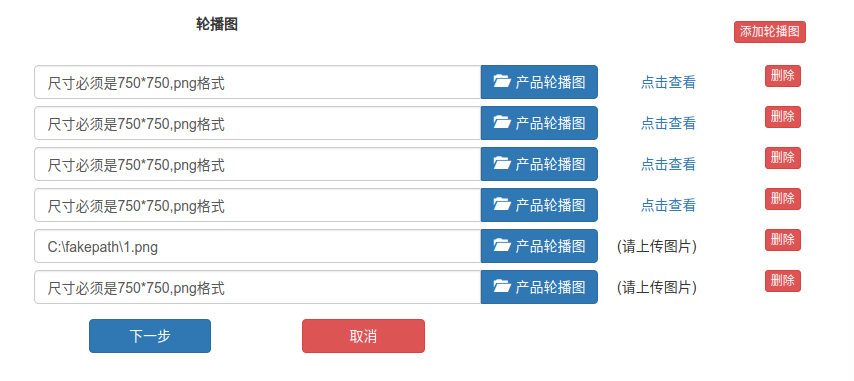
当图片全部是新增的时候,id和FILE一一对应,后台可以匹配处理。
array(1) {

  ["banner_img"] => array(5) {

    ["name"] => array(2) {

      [0] => string(5) "2.png"

      [1] => string(5) "1.png"

    }

    ["type"] => array(2) {

      [0] => string(9) "image/png"

      [1] => string(9) "image/png"

    }

    ["tmp_name"] => array(2) {

      [0] => string(14) "/tmp/phpO7u01p"

      [1] => string(14) "/tmp/phpQZJc7O"

    }

    ["error"] => array(2) {

      [0] => int(0)

      [1] => int(0)

    }

    ["size"] => array(2) {

      [0] => int(176795)

      [1] => int(150598)

    }

  }

}

array(2) {

  ["pid"] => string(1) "8"

  ["banner_id"] => array(2) {

    [0] => string(0) ""

    [1] => string(0) ""

  }

}
但是,当图片是修改的时候,有些图片并不需要重新传图,于是就无法一一对应了。比如:
array(1) {

  ["banner_img"] => array(5) {

    ["name"] => array(2) {

      [0] => string(5) "2.png"

      [1] => string(5) "2.png"

    }

    ["type"] => array(2) {

      [0] => string(9) "image/png"

      [1] => string(9) "image/png"

    }

    ["tmp_name"] => array(2) {

      [0] => string(14) "/tmp/phpbmHWr5"

      [1] => string(14) "/tmp/phphRfcX9"

    }

    ["error"] => array(2) {

      [0] => int(0)

      [1] => int(0)

    }

    ["size"] => array(2) {

      [0] => int(176795)

      [1] => int(176795)

    }

  }

}

array(3) {

  ["pid"] => string(2) "10"

  ["banner_id"] => array(4) {

    [0] => string(1) "1"

    [1] => string(1) "2"

    [2] => string(0) ""

    [3] => string(0) ""

  }

  ["banner_img"] => array(2) {

    [0] => string(0) ""

    [1] => string(0) ""

  }

}
有一种办法,就是新图单独组合到banner_img数组中。老图单独处理。
array(2) {

  ["banner_img_1"] => array(5) {

    ["name"] => string(5) "3.png"

    ["type"] => string(9) "image/png"

    ["tmp_name"] => string(14) "/tmp/phpo2sq7A"

    ["error"] => int(0)

    ["size"] => int(171795)

  }

  ["banner_img"] => array(5) {

    ["name"] => array(2) {

      [0] => string(5) "2.png"

      [1] => string(5) "2.png"

    }

    ["type"] => array(2) {

      [0] => string(9) "image/png"

      [1] => string(9) "image/png"

    }

    ["tmp_name"] => array(2) {

      [0] => string(14) "/tmp/phpbR50hb"

      [1] => string(14) "/tmp/phpPvrGsL"

    }

    ["error"] => array(2) {

      [0] => int(0)

      [1] => int(0)

    }

    ["size"] => array(2) {

      [0] => int(176795)

      [1] => int(176795)

    }

  }

}

array(3) {

  ["pid"] => string(2) "10"

  ["banner_id"] => array(4) {

    [0] => string(1) "1"

    [1] => string(1) "2"

    [2] => string(0) ""

    [3] => string(0) ""

  }

  ["banner_img_2"] => string(0) ""

}
这里id为1的修改了,id为2的图片没有变动。剩下的两个是新图,跟banner_img中的数据一一对应。
/**

 * 保存步骤二

 */

public function save_step_2() {

    // 先删除之前的Banner图

    M()->startTrans();

    $error_count = 0;

    $pid = $_POST['pid'];

    $product_banner = M('product_banner');

    $product_banner->where(['pid'=>$pid])->save(['status'=>0]);

    $temp_all_file = $_FILES;

    $temp_new_file = $_FILES['banner_img'];

    unset($_FILES);

    $temp_banner_id = $_POST['banner_id'];

    $cursor_new = 0;

    foreach ($temp_banner_id as $k=>$v) {

        // 重置$data数据

        $data = [];

        if ($v) { // 修改

            // 可能传图,也可能未传图

            if ($temp_all_file['banner_img_'.$v]) { // 传图了

                $_FILES['banner_img'] = $temp_all_file['banner_img_'.$v];

                $file = $this->upload(1,750,750,'banner_img','banner_img');

                $data['img_url'] = $file['save_name'];

                if(!$data['img_url']) {

                    $error_count ++;

                    break;

                }

            }

            $data['pid'] = $pid;

            $data['status'] = 1;

            $edit_flag = $product_banner->where(['id'=>$v])->save($data);

            if (!$edit_flag && $edit_flag !==0 ) {

                $error_count ++;

                break;

            }

        } else { // 新增,变更游标

            $file_up = array();

            $file_up['name'] = $temp_new_file['name'][$cursor_new];

            $file_up['type'] = $temp_new_file['type'][$cursor_new];

            $file_up['tmp_name'] = $temp_new_file['tmp_name'][$cursor_new];

            $file_up['error'] = $temp_new_file['error'][$cursor_new];

            $file_up['size'] = $temp_new_file['size'][$cursor_new];

            $_FILES['banner_img'] = $file_up;

            $file = $this->upload(1,750,750,'banner_img','banner_img');

            $data['img_url'] = $file['save_name'];

            if(!$data['img_url']) {

                $error_count ++;

                break;

            }

            $data['pid'] = $pid;

            $data['create_time'] = time();

            $data['status'] = 1;

            $add_flag = $product_banner->add($data);

            if (!$add_flag) {

                $error_count ++;

                break;

            }

            unset($_FILES, $file_up);

            $cursor_new ++;

        }

    }

    if($error_count > 0){

        M()->rollback();

        $this->json->setErr(10099, '操作失败');

        $this->json->Send();

    }else{

        M()->commit();

        $this->json->setErr(0, '操作成功');

        $this->json->setAttr('pid', $pid);

        $this->json->Send();

    }

}
至此,巧妙的处理了FILE与id不对应的问题。
FILE,id不一致的更多相关文章
- <input type="file" id="camera" multiple="multiple" capture="camera" accept="image/*"> 上传图片,手机调用相册和摄像头
<input type="file" id="camera" multiple="multiple" capture="ca ...
- 【翻译自mos文章】对于每个文件的 file.id and file.incarnation number,重命名文件别名
对于每个文件的 file.id and file.incarnation number,重命名文件别名 參考原文: Rename Alias of Datafile as Per file.id an ...
- <input type="file" id="fileID">文本框里的值清空方法
一般情况下,不允许通过脚本来对文件上传框赋值. 下面是一个变通的方法.就是创建一个新的input type="file" 把原来的替换掉. <!DOCTYPE html PU ...
- 关于Webdriver自动化测试时,页面数据与数据库id不一致的处理方式,需要使用鼠标事件
有时候Web页面需要通过onmouseout事件去动态的获取数据库的数据,在使用Webdriver进行自动化测试的时候,对于页面显示的数据,其在数据库可能会存在一个id或者code,但是id或者cod ...
- hadoop中集群节点ID不一致( java.io.IOException: Incompatible clusterIDs )
- JS调用activeX实现浏览本地文件夹功能 wekit内核只需要<input type="file" id="files" name="files[]" webkitdirectory/>即可,IE内核比较麻烦
研究了一天,js访问本地文件本身是不可能的,只能借助于插件.植入正题,IE仅支持ActiveX插件. function openDialog() { try { var Message = " ...
- 自定义input[type="file"]的样式
input[type="file"]的样式在各个浏览器中的表现不尽相同: 1. chrome: 2. firefox: 3. opera: 4. ie: 5. edge: 另外,当 ...
- input[tyle="file"]样式修改及上传文件名显示
默认的上传样式我们总觉得不太好看,根据需求总想改成和上下结构统一的风格…… 实现方法和思路: 1.在input元素外加a超链接标签 2.给a标签设置按钮样式 3.设置input[type='file' ...
- 前端开发:css技巧,如何设置select、radio 、 checkbox 、file这些不可直接设置的样式 。
前言: 都说程序员有三宝:人傻,钱多,死得早.博主身边的程序“猿”一大半应了这三宝,这从侧面说明了一个问题,只有理性是过不好日子的.朋友们应该把工作与生活分开,让生活变得感性,让工作变得理性,两者相提 ...
随机推荐
- Source Insight 如何将script等文件加入
点击菜单栏Options -> Document Options , 然后再弹出的对话框中找到File filter,文件过滤的设置,里面肯能有*.c;*.h 你在后面添加Makefile,注意 ...
- dell win 10笔记本关闭多媒体键,启用功能键的快捷方式
自从使用win 10之后,在使用快捷键方面就没有win 7之前来的顺手,比如F8切换投影仪,F5/F6调试等等.特地搜了下,使用Fn+Esc可以在功能键和多媒体键之间切换.
- 02: flask 使用举例
1.1 项目说明 https://github.com/rickyyangrui/Flask_web_demo1 1.项目文件结构 2.项目主文件 cssmin==0.2.0 Flask==0.1 ...
- k8s tensorflow
Online learning github source Kubeflow实战系列 Prepare 了解ksonnet初探Google之Kubeflow (采用的是0.8.0)install dep ...
- jsxyhelu的GitHub使用方法
如果只是使用Clone不能称得上是完全使用了GitHub,必须完成PullRequest,而且最好是对大型.带自动构建项目进行PR(比如OpenCV),这样才叫完全掌握GitHub的使用方法,这里分享 ...
- 前端基础小标签3 H5新标签
第二部分H5的新标签一.<!-- mark标签 1.用于显示页面中需要重点关注的内容,就像看书需要用荧光笔划重点一样 2.浏览器通常会用黄色显示m ...
- NOIP模拟题 2017.11.6
题目大意 给定一个大小为n的数组,从中选出一个子集使得这个子集中的数的和能被n整除. 假设开始我没有做出来,那么我就random_shuffle一下,然后计算前缀和,有一个能被n整除,就输出答案.于是 ...
- python第一阶段总结(1)
python3第一阶段的总结 首先申明一下,本人是看网络课程“老男孩”过来写博客的,想把自己学到的东西分享一下.同时给老男孩打个广告,其教学水平真的挺好的.仅据我个人多年的学习评价. 好,接下来是我对 ...
- 再谈 iptables 防火墙的 指令配置
手机上使用localhost为什么不能访问? 电脑上使用localhost 访问主页的原理是 电脑上有网站资源和服务器相关程序apache等的支持, 同时在 电脑的hosts文件中 有 127.0.0 ...
- SCU 4445 Right turn(dfs)题解
思路:离散化之后,直接模拟就行,标记vis开三维 代码: #include<iostream> #include<algorithm> #include<cstdio&g ...