
JDBC fetch size
A blog on java performance and optimization. On JDBC, Hibernate, caching, algorithms, profiling and anything that can make your code run faster.
Sunday, June 21, 2015
JDBC fetch size - commonly forgotten setting
Although this parameter is widely available, I discovered that a lot of projects I have visited did not configure the fetch size and thus was using its default value. Yet, the default value can result in a poor performance on some jdbc drivers.
I want to show you how much you can improve your fetching performance if you adjust the fetch size to your statements. The scale of improvement depends on the driver you use.
Oracle jdbc driver
Assume we have table with 1 million rows and for any reason we have to fetch all records into JVM. How fast you can get all data? What fetch size will Oracle use if you don’t set it explicitly?
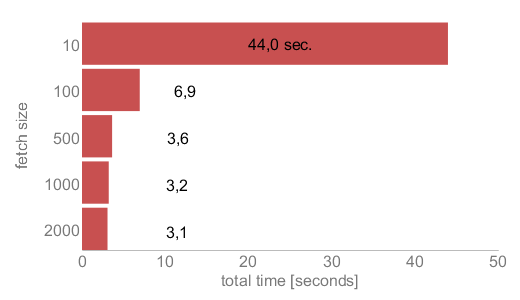 |
| Figure 1 - fetching 1M rows with different fetchSize values (local oracle database) |
Figure 1 shows fetching times for different fetch size values for Oracle database. In this example database and java application are located on the same machine. I will show later how it looks for a remote database.
Setting Fetch Size with standard JDBC calls
This is how you can set fetch size for given PreparedStatement using JDBC API:
| PreparedStatement stmt = null; | |
| ResultSet rs = null; | |
| try { | |
| stmt = conn. prepareStatement("select a, b, c from table"); | |
| stmt.setFetchSize(200); | |
| rs = stmt.executeQuery(); | |
| while (rs.next()) { | |
| ... | |
| } | |
| } |
Lets see what happens if fetchSize property is set to 10. When rs.next() is called for first time, the oracle driver fetches first 10 records from database and store them in a memory buffer. So, for next 9 calls to rs.next() records are retrieved from this buffer. After the buffer is fully read, subsequent rs.next()will force driver to fetch a new bunch of rows (10) into the buffer.
So if we want to read 10k rows with fetch size set to 10, the driver will make 1000 round trips to the database using the underlying connection. If we set the fetchSize to 500 the driver will perform only 20 round trips to our database.
Look at Figure 1. Setting fetchSize to 100 gives you a 6 times shorter fetching time then with setting fetchSize to 10. Now, you should know that the default fetchSize for the oracle driver is 10...
Two important comments:
- fetchSize can be set on each Statement or PreparedStatement or even on ResultSet. By default, ResultSet uses fetchSize of Statement from which is born. The default value for Statement or PreparedStatementis jdbc driver specific
- fetchSize is only a hint for the driver – the Oracle driver respects this setting, while other drivers may ignore it and fetch all the records at once, for instance.
Setting Fetch Size with Spring JdbcTemplate
Ad hoc JdbcTemplate instance
| JdbcTemplate jdbc = new JdbcTemplate(dataSource); | |
| jdbc.setFetchSize(200); | |
| jdbc.query("select a, b, c from table", | |
| new RowCallbackHandler() { | |
| @Override | |
| public void processRow(ResultSet rs) throws SQLException { | |
| ... | |
| } | |
| } | |
| ); |
Shared JdbcTemplate instance
| public class MyJdbcDaoImpl extends JdbcDaoSupport implements MyJdbcDao { | |
| @Override | |
| protected void initTemplateConfig() { | |
| getJdbcTemplate().setFetchSize(200); | |
| } | |
| public MyResult loadAll() { | |
| final MyResult result = new MyResult(); | |
| getJdbcTemplate().query("select a, b, c from table", | |
| new RowCallbackHandler() { | |
| @Override | |
| public void processRow(ResultSet rs) throws SQLException { | |
| ... | |
| result.add(...); | |
| } | |
| } | |
| ); | |
| } // end of loadAll | |
| } |
When implementing a DAO that extends JdbcDaoSupport every call to getJdbcTemplate() returns the same shared JdbcTemplate instance. You can mix this with ad-hoc instances. For example, override initTemplateConfig()to set the default for this DAO but use ad-hoc JdbcTemplate for selected queries.
JDBC fetch size的更多相关文章
- SQL Fetch size
JDBC performance tuning with optimal fetch size February 1, 2009 31 Comments Tuning performance usin ...
- hibernate.properties官方属性用例(可用于hibernate.cfg.xml属性参考)
######################### Query Language ######################### ## define query language constant ...
- hibernate.cfg.xml文件的配置模板和不同数据库的配置參数
(1)hibernate.cfg.xml文件的配置模板 <?xml version="1.0" encoding="UTF-8"?> <!DO ...
- Hibernate配置文件中配置各种数据库的driver、URL
hibernate.properties ######################### Query Language ######################### ## define qu ...
- Hibernate配置文件中配置各种数据库链接
hibernate.properties ###################### ### Query Language ### ###################### ## define ...
- Spark SQL笔记——技术点汇总
目录 概述 原理 组成 执行流程 性能 API 应用程序模板 通用读写方法 RDD转为DataFrame Parquet文件数据源 JSON文件数据源 Hive数据源 数据库JDBC数据源 DataF ...
- hibernate学习(一)配置,导包
框架的作用 学过javaWeb基础的已经对web层 jsp servlet ,service 层 ,dao层的jdbc .DBUtils 有了很深的了解 并编写代码实现某种功能 为了提高开发 ...
- JAVA PERSISTENCE API (JPA)
13.2.1. About JPA The Java Persistence API (JPA) is the standard for using persistence in Java proje ...
- java框架之Hibernate(1)-简介及初使用
简介 hibernate 是一个开源 ORM ( Object / Relationship Mipping ) 框架,它是对象关联关系映射的持久层框架,它对 JDBC 做了轻量级的封装,而我们 ja ...
随机推荐
- bootstrap3在IE8下导航不显示,自动识别成手机模式
想让bootstrap3兼容ie8,需要将html5shiv.js.respond.js还有bootstrap的所有css.js文件都放在本地服务器空间,不能用CDN. bootstrap所有css. ...
- 解决Ubuntu的root账号无法登录SSH问题-Permission denied, please try again.
http://www.cnblogs.com/yixius/articles/6971054.html
- 数组Array的一些方法
数组对象属性和方法的概述:1> arr.push() 将参数添加至数组的末尾,返回的是新数组的长度2> arr.unshift() 将参数添加到数组的开头,返回新数组的长度3> ar ...
- 【ARTS】01_12_左耳听风-20190128~20190203
ARTS: Algrothm: leetcode算法题目 Review: 阅读并且点评一篇英文技术文章 Tip/Techni: 学习一个技术技巧 Share: 分享一篇有观点和思考的技术文章 Algo ...
- python内置模块之collections(六)
前言 collections是Python内建的一个集合模块,提供了许多有用的集合类. 系列文章 python模块分析之random(一) python模块分析之hashlib加密(二) python ...
- UML和模式应用5:细化阶段(7)---从需求到设计迭代进化
1.前言 迭代开发中,每次迭代都会发生从以需求或分析为主要焦点到以设计和实现为主要焦点的转变 分析和面向对象的分析重点关注学习做正确的事,理解案例重要目标,规则和约束 设计工作强调正确的做事,熟练设计 ...
- Word 2017 快捷键
Ctrl + D: 呼出[字体] Ctrl + S: 进行[保存] Ctrl + F: 呼出[导航] Ctrl + D: 呼出[字体] Ctrl + B: 进行[加粗] Ctrl + G: 呼出[查找 ...
- elk系统通过nginx添加对kibana的登录认证
elk系统添加对kibana的登录认证 关于elk系统的安装配置可以参考:Centos6.5安装Logstash ELK stack 日志管理系统及使用详解 http://blog.csdn.net/ ...
- Android用户界面开发:Fragment
Android用户界面开发:Fragment 1:注意事项 3.0以前的Android 版本要使用FragmentActivity 来装载Fragment ,使用到support v4包. 3.0 ...
- 步步为营-36-ADO.Net简介
与数据库进行连接交互 方法一 #region 01连接对象 //01 连接字符串 string connstr = "server=.;uid=sa;pwd=sa;database=Demo ...