
译: 5. RabbitMQ Spring AMQP 之 Topic 主题
在上一个教程中,我们提高了消息传递的灵活 我们使用direct交换而不是使用仅能够进行虚拟广播的fanout交换,
并且获得了基于路由key 有选择地接收消息的可能性。
虽然使用direct 交换改进了我们的系统,但它仍然有局限性 - 它不能基于多个标准进行路由。
在我们的消息传递系统中,我们可能不仅要根据路由key订阅队列,还要根据生成消息的源来订阅队列.
为了在我们的日志记录系统中实现这种灵活性,我们需要了解更复杂的topic交换。
Topic Exchange
发送到topic 交换的消息不能具有任意 routing_key - 它必须是由点分隔的单词列表。单词可以是任何内容,但通常它们指定与消息相关的一些功能。一些有效的路由密钥示例:“ stock.usd.nyse ”,“ nyse.vmw ”,“ quick.orange.rabbit ”。路由密钥中可以包含任意数量的单词,最多可达255个字节。
绑定密钥也必须采用相同的形式。
topic 交换背后的逻辑 类似于direct 交换- 使用特定路由key发送的消息将被传递到与匹配绑定key绑定的所有队列。但是,绑定键有两个重要的特殊情况:
- *(星号)可以替代一个单词。
- #(hash)可以替换零个或多个单词。
在一个例子中解释这个是最容易的:
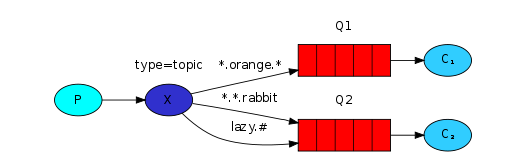
在这个例子中,我们将发送所有描述动物的消息。
消息将与包含三个单词(两个点)的路由键一起发送。路由键中的第一个单词将描述速度,第二个是颜色,第三个是物种:
<speed>.<colour>.<species>
我们创建了三个绑定
- Q1 .orange.*
- Q2 *.*.rabbit" and "lazy.#
这些绑定可以概括为:
- Q1对所有orange橙色动物感兴趣。
- Q2希望听到关于rabbit兔子的一切,以及关于lazy懒惰动物的一切。
路由密钥设置为“ quick.orange.rabbit ”的消息将传递到两个队列。
消息“ lazy.orange.elephant ”也将同时发送给他们。
另一方面,“ quick.orange.fox ”只会进入第一个队列,而“ lazy.brown.fox ”只会进入第二个队列。
“ lazy.pink.rabbit ”将仅传递到第二个队列一次,即使它匹配两个绑定。
“ quick.brown.fox ”与任何绑定都不匹配,因此它将被丢弃。
如果我们违反约定并发送带有一个或四个单词的消息,例如“ orange ”或“ quick.orange.male.rabbit”,会发生什么?好吧,这些消息将不匹配任何绑定,将丢失。
另一方面,“ lazy.orange.male.rabbit ”,即使它有四个单词,也会匹配最后一个绑定,并将被传递到第二个队列。
Topic Exchange
topic exchange 功能强大,可以像其他exchange一样。
当队列与“ # ”(哈希)绑定密钥绑定时 - 它将接收所有消息,而不管路由密钥 - 如扇出交换。
当特殊字符“ * ”(星号)和“ # ”(哈希)未在绑定中使用时,主题交换的行为就像直接交换一样
放在一起
主类
import org.springframework.boot.CommandLineRunner;

import org.springframework.boot.SpringApplication;

import org.springframework.boot.autoconfigure.SpringBootApplication;

import org.springframework.context.annotation.Bean;

import org.springframework.context.annotation.Profile;

import org.springframework.scheduling.annotation.EnableScheduling;

import com.xingyun.springamqp.config.RabbitAmqpTutorialsRunner;

@SpringBootApplication

@EnableScheduling

public class RabbitMq0x05SpringAmqpTopicSampleApplication {

    public static void main(String[] args) {

        SpringApplication.run(RabbitMq0x05SpringAmqpTopicSampleApplication.class, args);

    }

    @Profile("usage_message")

    @Bean

    public CommandLineRunner usage() {

        return new CommandLineRunner() {

            @Override

            public void run(String... arg0) throws Exception {

                System.out.println("This app uses Spring Profiles to control its behavior.\n");

                System.out.println("Sample usage: java -jar "

                        + "RabbitMQ_0x05_SpringAMQP_Topic_Sample-0.0.1-SNAPSHOT.jar "

                        + "--spring.profiles.active=topics"

                        + ",sender");

            }

        };

    }

    @Profile("!usage_message")

    @Bean

    public CommandLineRunner tutorial() {

        return new RabbitAmqpTutorialsRunner();

    }

}
Tut5Config.java
import org.springframework.amqp.core.*;

import org.springframework.context.annotation.Bean;

import org.springframework.context.annotation.Configuration;

import org.springframework.context.annotation.Profile;

import com.xingyun.springamqp.business.Tut5Receiver;

import com.xingyun.springamqp.business.Tut5Sender;

@Profile({"tut5","topics"})

@Configuration

public class Tut5Config {

    @Bean

    public TopicExchange topic() {

        return new TopicExchange("tut.topic");

    }

    @Profile("receiver")

    private static class ReceiverConfig {

        @Bean

        public Tut5Receiver receiver() {

            return new Tut5Receiver();

        }

        @Bean

        public Queue autoDeleteQueue1() {

            return new AnonymousQueue();

        }

        @Bean

        public Queue autoDeleteQueue2() {

            return new AnonymousQueue();

        }

        @Bean

        public Binding binding1a(TopicExchange topic,

            Queue autoDeleteQueue1) {

            return BindingBuilder.bind(autoDeleteQueue1)

                .to(topic)

                .with("*.orange.*");

        }

        @Bean

        public Binding binding1b(TopicExchange topic,

            Queue autoDeleteQueue1) {

            return BindingBuilder.bind(autoDeleteQueue1)

                .to(topic)

                .with("*.*.rabbit");

        }

        @Bean

        public Binding binding2a(TopicExchange topic,

            Queue autoDeleteQueue2) {

            return BindingBuilder.bind(autoDeleteQueue2)

                .to(topic)

                .with("lazy.#");

        }

    }

    @Profile("sender")

    @Bean

    public Tut5Sender sender() {

        return new Tut5Sender();

    }

}
RabbitAmqpTutorialsRunner.java
import org.springframework.beans.factory.annotation.Autowired;

import org.springframework.beans.factory.annotation.Value;

import org.springframework.boot.CommandLineRunner;

import org.springframework.context.ConfigurableApplicationContext;

public class RabbitAmqpTutorialsRunner implements CommandLineRunner {

    /**

     * application.properties文件中配置tutorial.client.duration=10000 需要

     * */

    @Value("${tutorial.client.duration:0}")

    private int duration;

    @Autowired

    private ConfigurableApplicationContext ctx;

    @Override

    public void run(String... args) throws Exception {

        // TODO Auto-generated method stub

        System.out.println("Ready ... running for " + duration + "ms");

        Thread.sleep(duration);

        ctx.close();

    }

}
Tut5Sender.java
import org.springframework.amqp.core.TopicExchange;

import org.springframework.amqp.rabbit.core.RabbitTemplate;

import org.springframework.beans.factory.annotation.Autowired;

import org.springframework.scheduling.annotation.Scheduled;

public class Tut5Sender {

    @Autowired

    private RabbitTemplate template;

    @Autowired

    private TopicExchange topic;

    private int index;

    private int count;

    private final String[] keys = {"quick.orange.rabbit",

            "lazy.orange.elephant", "quick.orange.fox",

            "lazy.brown.fox", "lazy.pink.rabbit", "quick.brown.fox"};

    @Scheduled(fixedDelay = 1000, initialDelay = 500)

    public void send() {

        StringBuilder builder = new StringBuilder("Hello to ");

        if (++this.index == keys.length) {

            this.index = 0;

        }

        String key = keys[this.index];

        builder.append(key).append(' ');

        builder.append(Integer.toString(++this.count));

        String message = builder.toString();

        template.convertAndSend(topic.getName(), key, message);

        System.out.println(" [x] Sent '" + message + "'");

    }

}
Tut5Receiver.java
import org.springframework.amqp.rabbit.annotation.RabbitListener;

import org.springframework.util.StopWatch;

public class Tut5Receiver {

    @RabbitListener(queues = "#{autoDeleteQueue1.name}")

    public void receive1(String in) throws InterruptedException {

        receive(in, 1);

    }

    @RabbitListener(queues = "#{autoDeleteQueue2.name}")

    public void receive2(String in) throws InterruptedException {

        receive(in, 2);

    }

    public void receive(String in, int receiver) throws

        InterruptedException {

        StopWatch watch = new StopWatch();

        watch.start();

        System.out.println("instance " + receiver + " [x] Received '"

            + in + "'");

        doWork(in);

        watch.stop();

        System.out.println("instance " + receiver + " [x] Done in "

            + watch.getTotalTimeSeconds() + "s");

    }

    private void doWork(String in) throws InterruptedException {

        for (char ch : in.toCharArray()) {

            if (ch == '.') {

                Thread.sleep(1000);

            }

        }

    }

}
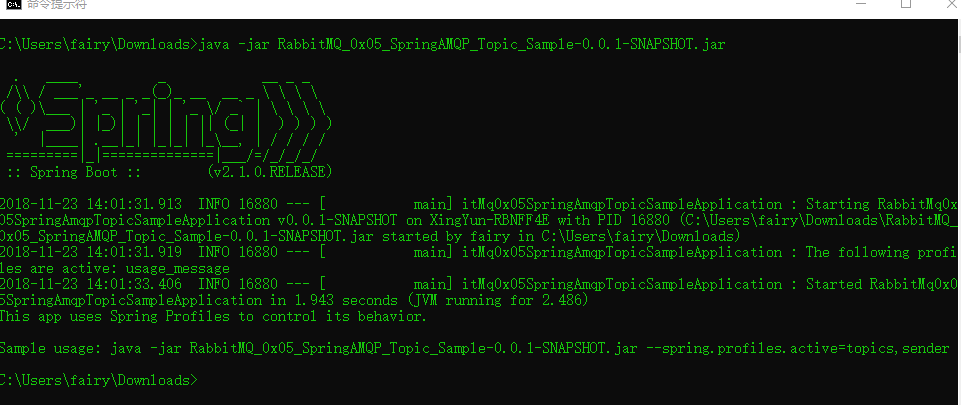
查看用法
java -jar RabbitMQ_0x05_SpringAMQP_Topic_Sample-0.0.1-SNAPSHOT.jar
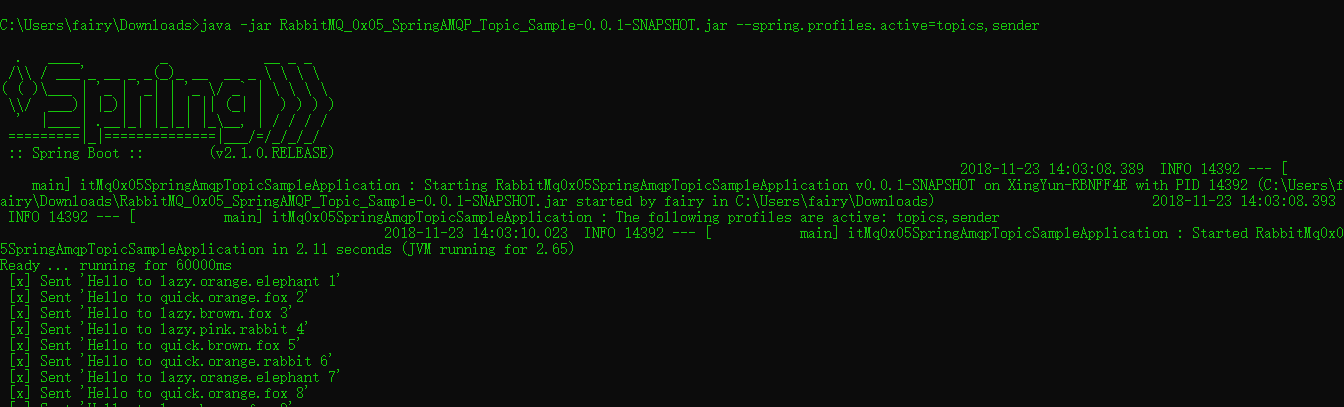
启动生产者
java -jar RabbitMQ_0x05_SpringAMQP_Topic_Sample-0.0.1-SNAPSHOT.jar --spring.profiles.active=topics,sender
启动消费者
java -jar RabbitMQ_0x05_SpringAMQP_Topic_Sample-0.0.1-SNAPSHOT.jar --spring.profiles.active=topics,receiver

译: 5. RabbitMQ Spring AMQP 之 Topic 主题的更多相关文章
- 译: 1. RabbitMQ Spring AMQP 之 Hello World
本文是译文,原文请访问:http://www.rabbitmq.com/tutorials/tutorial-one-spring-amqp.html RabbitMQ 是一个Brocker (消息队 ...
- 译: 3. RabbitMQ Spring AMQP 之 Publish/Subscribe 发布和订阅
在第一篇教程中,我们展示了如何使用start.spring.io来利用Spring Initializr创建一个具有RabbitMQ starter dependency的项目来创建spring-am ...
- 译: 2. RabbitMQ Spring AMQP 之 Work Queues
在上一篇博文中,我们写了程序来发送和接受消息从一个队列中. 在这篇博文中我们将创建一个工作队列,用于在多个工作人员之间分配耗时的任务. Work Queues 工作队列(又称:任务队列)背后的主要思想 ...
- 译: 6. RabbitMQ Spring AMQP 之 RPC
Remote procedure call (RPC) 在第二篇教程中,我们学习了如何使用工作队列在多个工作人员之间分配耗时的任务. 但是如果我们需要在远程计算机上运行一个函数并等待结果呢?嗯,这是一 ...
- 译: 4. RabbitMQ Spring AMQP 之 Routing 路由
在上一个教程中,我们构建了一个简单的fanout(扇出)交换.我们能够向许多接收者广播消息. 在本教程中,我们将为其添加一个功能 - 我们将只能订阅一部分消息.例如,我们将只能将消息指向感兴趣的特定颜 ...
- (八)RabbitMQ消息队列-通过Topic主题模式分发消息
原文:(八)RabbitMQ消息队列-通过Topic主题模式分发消息 前两章我们讲了RabbitMQ的direct模式和fanout模式,本章介绍topic主题模式的应用.如果对direct模式下通过 ...
- 译:5.RabbitMQ Java Client 之 Topics (主题)
在 上篇博文 译:4.RabbitMQ 之Routing(路由) 中,我们改进了日志系统. 我们使用的是direct(直接交换),而不是使用只能进行虚拟广播的 fanout(扇出交换) ,并且有可能选 ...
- 深入剖析 RabbitMQ —— Spring 框架下实现 AMQP 高级消息队列协议
前言 消息队列在现今数据量超大,并发量超高的系统中是十分常用的.本文将会对现时最常用到的几款消息队列框架 ActiveMQ.RabbitMQ.Kafka 进行分析对比.详细介绍 RabbitMQ 在 ...
- 消息中间件——RabbitMQ(九)RabbitMQ整合Spring AMQP实战!(全)
前言 1. AMQP 核心组件 RabbitAdmin SpringAMQP声明 RabbitTemplate SimpleMessageListenerContainer MessageListen ...
随机推荐
- 【Java】 剑指offer(2) 不修改数组找出重复的数字
本文参考自<剑指offer>一书,代码采用Java语言. 更多:<剑指Offer>Java实现合集 题目 在一个长度为n+1的数组里的所有数字都在1到n的范围内,所以数组中至少 ...
- (转)HIBERNATE与 MYBATIS的对比
第一方面:开发速度的对比 就开发速度而言,Hibernate的真正掌握要比Mybatis来得难些.Mybatis框架相对简单很容易上手,但也相对简陋些.个人觉得要用好Mybatis还是首先要先理解好H ...
- 029.Docker Compose部署Zabbix实战
一 前期规划 1.1 Zabbix架构图 1.2 其他规划 组件 类型 版本 备注 Zabbix Web zabbix-web-apache-mysql镜像 wordpress:latest 也可采用 ...
- js数据结构之栈和队列的详细实现方法
队列 队列中我们主要实现两种: 1. 常规队列 2. 优先队列(实际应用中的排队加急情况等) 常规队列的实现方法如下: // 常规队列 function Queue () { this.queue = ...
- BZOJ.1468.Tree(点分治)
BZOJ1468 POJ1741 题意: 计算树上距离<=K的点对数 我们知道树上一条路径要么经过根节点,要么在同一棵子树中. 于是对一个点x我们可以这样统计: 计算出所有点到它的距离dep[] ...
- mac下搭建node+koa2项目
1.安装koa sudo npm install koa-generator -g (必须加上 sudo ,否则会报没有权限的错误) 提示输入密码: koa2 node001 npm i 启动:no ...
- ORACLE 内置函数之 GREATEST 和 LEAST(转)
Oracle比较一列的最大值或者最小值,我们会不假思索地用MAX和MIN函数,但是对于比较一行的最大值或最小值呢?是不是日常用的少,很多人都不知道有ORACLE也有内置函数实现这个功能:COALESC ...
- API判断本机安装的Revit版本信息
start [Transaction(TransactionMode.Manual)] [Regeneration(RegenerationOption.Manual)] public class c ...
- .Net Core邮件发送之MailKit
一 .在.Net Core中MailKit中提供了邮件的基础封装 它支持跨平台,并且支持 IMAP, POP3, SMTP 等协议 Nuget命令: Install-Package MailKit 官 ...
- linux设置预留端口号,防止监听端口被占用 ip_local_reserved_ports
1. 背景 linux服务器启动时,会对指定的端口进行监听bind,如果同一个机器上这个端口已经被使用,则监听失败,程序无法启动. linux客户端连接服务器accept时,系统会分配本地临时端口用于 ...