
golang学习笔记5 用bee工具创建项目 bee工具简介
golang学习笔记5 用bee工具创建项目 bee工具简介
Bee 工具的使用 - beego: 简约 & 强大并存的 Go 应用框架
https://beego.me/docs/install/bee.md
bee 工具简介
bee 工具是一个为了协助快速开发 beego 项目而创建的项目,通过 bee 您可以很容易的进行 beego 项目的创建、热编译、开发、测试、和部署。
bee 工具的安装
您可以通过如下的方式安装 bee 工具:
go get github.com/beego/bee
使用数据库的需要先安装插件,执行下面命令:
go get github.com/Go-SQL-Driver/MySQL
执行后会在 $GOPATH/pkg 里面生成对应的文件
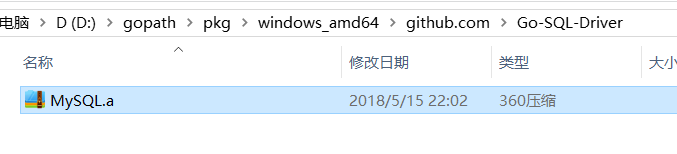
安装完之后,bee 可执行文件默认存放在 $GOPATH/bin 里面,所以您需要把 $GOPATH/bin 添加到您的环境变量中,才可以进行下一步。
如何添加环境变量,请看上一篇笔记:http://www.cnblogs.com/zdz8207/p/golang-learn-3.html
如果你本机设置了 GOBIN,那么上面的命令就会安装到 GOBIN 下,请添加 GOBIN 到你的环境变量中
bee 工具命令详解
我们在命令行输入 bee,可以看到如下的信息:
Bee is a tool for managing beego framework.

Usage:

    bee command [arguments]

The commands are:

    new         create an application base on beego framework

    run         run the app which can hot compile

    pack        compress an beego project

    api         create an api application base on beego framework

    bale        packs non-Go files to Go source files

    version     show the bee & beego version

    generate    source code generator

    migrate     run database migrations
new 命令
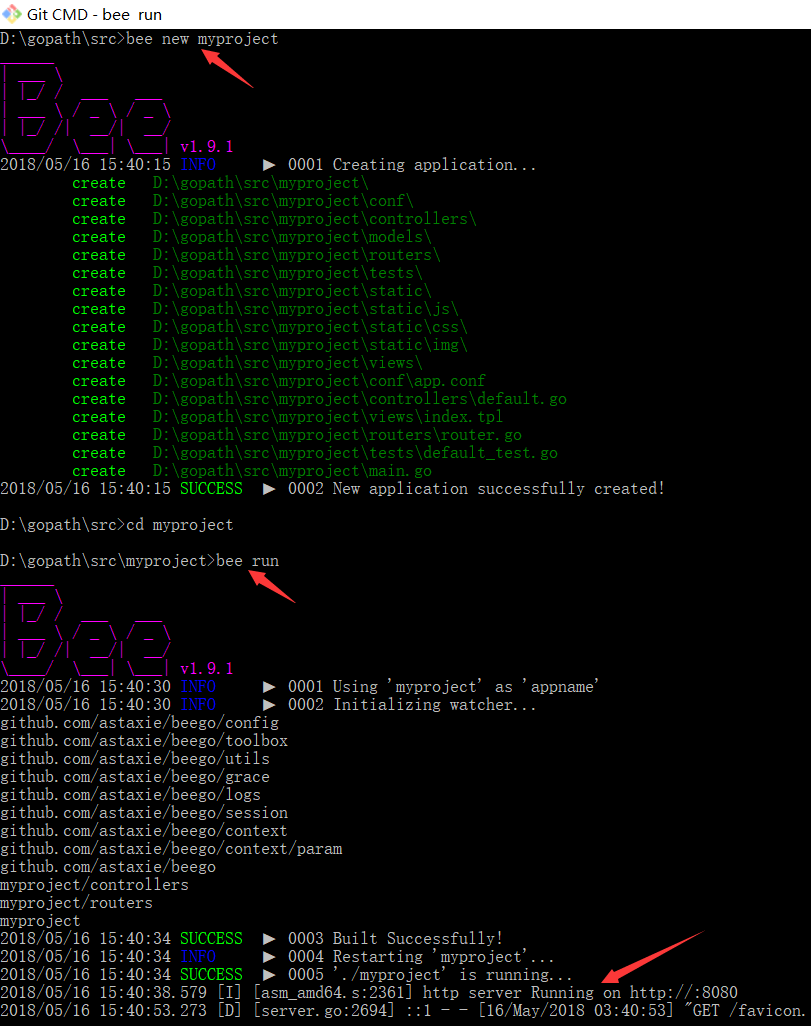
new 命令是新建一个 Web 项目,我们在命令行下执行 bee new <项目名> 就可以创建一个新的项目。但是注意该命令必须在 $GOPATH/src 下执行。最后会在 $GOPATH/src 相应目录下生成如下目录结构的项目:
bee new myproject

[INFO] Creating application...

/gopath/src/myproject/

/gopath/src/myproject/conf/

/gopath/src/myproject/controllers/

/gopath/src/myproject/models/

/gopath/src/myproject/static/

/gopath/src/myproject/static/js/

/gopath/src/myproject/static/css/

/gopath/src/myproject/static/img/

/gopath/src/myproject/views/

/gopath/src/myproject/conf/app.conf

/gopath/src/myproject/controllers/default.go

/gopath/src/myproject/views/index.tpl

/gopath/src/myproject/main.go

13-11-25 09:50:39 [SUCC] New application successfully created!
myproject
├── conf
│ └── app.conf
├── controllers
│ └── default.go
├── main.go
├── models
├── routers
│ └── router.go
├── static
│ ├── css
│ ├── img
│ └── js
├── tests
│ └── default_test.go
└── views
└── index.tpl
8 directories, 4 files
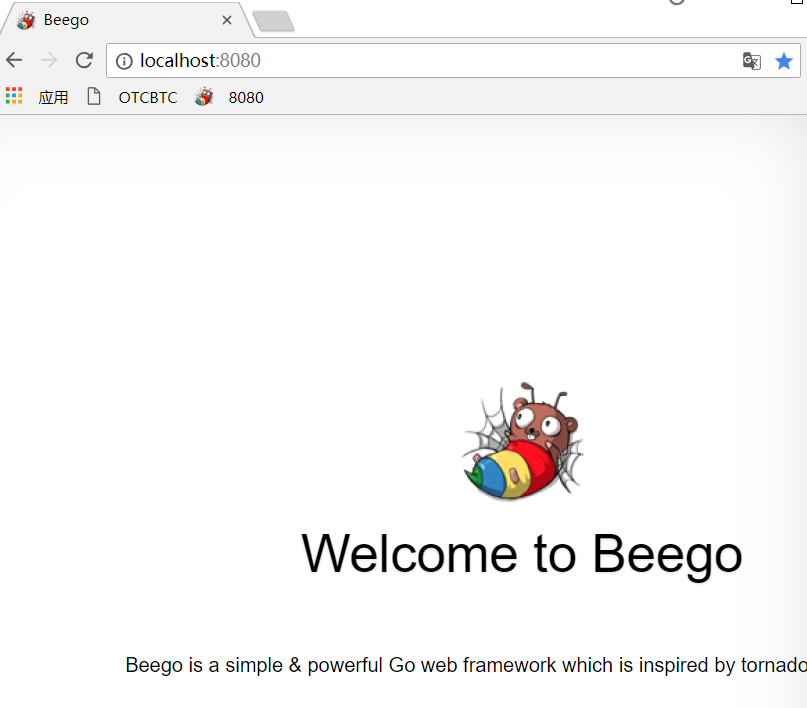
打开浏览器就可以看到效果 http://localhost:8080
api 命令
上面的 new 命令是用来新建 Web 项目,不过很多用户使用 beego 来开发 API 应用。所以这个 api 命令就是用来创建 API 应用的,执行命令之后如下所示:
bee api apiproject

create app folder: /gopath/src/apiproject

create conf: /gopath/src/apiproject/conf

create controllers: /gopath/src/apiproject/controllers

create models: /gopath/src/apiproject/models

create tests: /gopath/src/apiproject/tests

create conf app.conf: /gopath/src/apiproject/conf/app.conf

create controllers default.go: /gopath/src/apiproject/controllers/default.go

create tests default.go: /gopath/src/apiproject/tests/default_test.go

create models object.go: /gopath/src/apiproject/models/object.go

create main.go: /gopath/src/apiproject/main.go
这个项目的目录结构如下:
apiproject

├── conf

│   └── app.conf

├── controllers

│   └── object.go

│   └── user.go

├── docs

│   └── doc.go

├── main.go

├── models

│   └── object.go

│   └── user.go

├── routers

│   └── router.go

└── tests

    └── default_test.go
从上面的目录我们可以看到和 Web 项目相比,少了 static 和 views 目录,多了一个 test 模块,用来做单元测试的。
同时,该命令还支持一些自定义参数自动连接数据库创建相关 model 和 controller:bee api [appname] [-tables=""] [-driver=mysql] [-conn="root:<password>@tcp(127.0.0.1:3306)/test"]
如果 conn 参数为空则创建一个示例项目,否则将基于链接信息链接数据库创建项目。
使用数据库的需要先安装插件,执行下面命令:
go get github.com/Go-SQL-Driver/MySQL
否则会报错如下:
cannot find package "github.com/go-sql-driver/mysql" in any of:
run 命令
我们在开发 Go 项目的时候最大的问题是经常需要自己手动去编译再运行,bee run 命令是监控 beego 的项目,通过 fsnotify监控文件系统。但是注意该命令必须在 $GOPATH/src/appname 下执行。
这样我们在开发过程中就可以实时的看到项目修改之后的效果:
bee run
13-11-25 09:53:04 [INFO] Uses 'myproject' as 'appname'
13-11-25 09:53:04 [INFO] Initializing watcher...
13-11-25 09:53:04 [TRAC] Directory(/gopath/src/myproject/controllers)
13-11-25 09:53:04 [TRAC] Directory(/gopath/src/myproject/models)
13-11-25 09:53:04 [TRAC] Directory(/gopath/src/myproject)
13-11-25 09:53:04 [INFO] Start building...
13-11-25 09:53:16 [SUCC] Build was successful
13-11-25 09:53:16 [INFO] Restarting myproject ...
13-11-25 09:53:16 [INFO] ./myproject is running...
如果我们修改了Controller下面的default.go文件,我们就可以看到命令行输出:
13-11-25 10:11:20 [EVEN] "/gopath/src/myproject/controllers/default.go": DELETE|MODIFY

13-11-25 10:11:20 [INFO] Start building...

13-11-25 10:11:20 [SKIP] "/gopath/src/myproject/controllers/default.go": CREATE

13-11-25 10:11:23 [SKIP] "/gopath/src/myproject/controllers/default.go": MODIFY

13-11-25 10:11:23 [SUCC] Build was successful

13-11-25 10:11:23 [INFO] Restarting myproject ...

13-11-25 10:11:23 [INFO] ./myproject is running...
刷新浏览器我们看到新的修改内容已经输出。
pack 命令
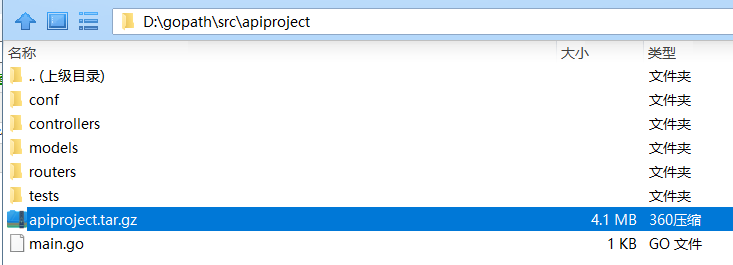
pack 目录用来发布应用的时候打包,会把项目打包成 zip 包,这样我们部署的时候直接把打包之后的项目上传,解压就可以部署了:
bee pack

app path: /gopath/src/apiproject

GOOS darwin GOARCH amd64

build apiproject

build success

exclude prefix:

exclude suffix: .go:.DS_Store:.tmp

file write to `/gopath/src/apiproject/apiproject.tar.gz`
我们可以看到目录下有如下的压缩文件:
rwxr-xr-x  1 astaxie  staff  8995376 11 25 22:46 apiproject

-rw-r--r--  1 astaxie  staff  2240288 11 25 22:58 apiproject.tar.gz

drwxr-xr-x  3 astaxie  staff      102 11 25 22:31 conf

drwxr-xr-x  3 astaxie  staff      102 11 25 22:31 controllers

-rw-r--r--  1 astaxie  staff      509 11 25 22:31 main.go

drwxr-xr-x  3 astaxie  staff      102 11 25 22:31 models

drwxr-xr-x  3 astaxie  staff      102 11 25 22:31 tests
bale 命令
这个命令目前仅限内部使用,具体实现方案未完善,主要用来压缩所有的静态文件变成一个变量申明文件,全部编译到二进制文件里面,用户发布的时候携带静态文件,包括 js、css、img 和 views。最后在启动运行时进行非覆盖式的自解压。
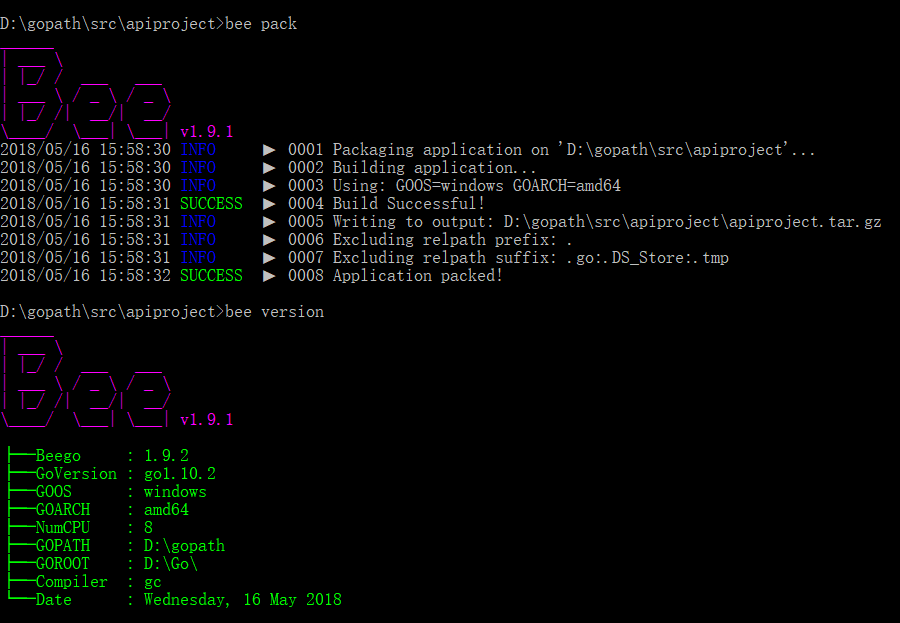
version 命令
这个命令是动态获取 bee、beego 和 Go 的版本,这样一旦用户出现错误,可以通过该命令来查看当前的版本
$ bee version

bee   :1.2.2

beego :1.4.2

Go    :go version go1.3.3 darwin/amd64
generate 命令
这个命令是用来自动化的生成代码的,包含了从数据库一键生成 model,还包含了 scaffold 的,通过这个命令,让大家开发代码不再慢
bee generate scaffold [scaffoldname] [-fields=""] [-driver=mysql] [-conn="root:@tcp(127.0.0.1:3306)/test"]

    The generate scaffold command will do a number of things for you.

    -fields: a list of table fields. Format: field:type, ...

    -driver: [mysql | postgres | sqlite], the default is mysql

    -conn:   the connection string used by the driver, the default is root:@tcp(127.0.0.1:3306)/test

    example: bee generate scaffold post -fields="title:string,body:text"

bee generate model [modelname] [-fields=""]

    generate RESTful model based on fields

    -fields: a list of table fields. Format: field:type, ...

bee generate controller [controllerfile]

    generate RESTful controllers

bee generate view [viewpath]

    generate CRUD view in viewpath

bee generate migration [migrationfile] [-fields=""]

    generate migration file for making database schema update

    -fields: a list of table fields. Format: field:type, ...

bee generate docs

    generate swagger doc file

bee generate test [routerfile]

    generate testcase

bee generate appcode [-tables=""] [-driver=mysql] [-conn="root:@tcp(127.0.0.1:3306)/test"] [-level=3]

    generate appcode based on an existing database

    -tables: a list of table names separated by ',', default is empty, indicating all tables

    -driver: [mysql | postgres | sqlite], the default is mysql

    -conn:   the connection string used by the driver.

             default for mysql:    root:@tcp(127.0.0.1:3306)/test

             default for postgres: postgres://postgres:postgres@127.0.0.1:5432/postgres

    -level:  [1 | 2 | 3], 1 = models; 2 = models,controllers; 3 = models,controllers,router
migrate 命令
这个命令是应用的数据库迁移命令,主要是用来每次应用升级,降级的SQL管理。
bee migrate [-driver=mysql] [-conn="root:@tcp(127.0.0.1:3306)/test"]

    run all outstanding migrations

    -driver: [mysql | postgresql | sqlite], the default is mysql

    -conn:   the connection string used by the driver, the default is root:@tcp(127.0.0.1:3306)/test

bee migrate rollback [-driver=mysql] [-conn="root:@tcp(127.0.0.1:3306)/test"]

    rollback the last migration operation

    -driver: [mysql | postgresql | sqlite], the default is mysql

    -conn:   the connection string used by the driver, the default is root:@tcp(127.0.0.1:3306)/test

bee migrate reset [-driver=mysql] [-conn="root:@tcp(127.0.0.1:3306)/test"]

    rollback all migrations

    -driver: [mysql | postgresql | sqlite], the default is mysql

    -conn:   the connection string used by the driver, the default is root:@tcp(127.0.0.1:3306)/test

bee migrate refresh [-driver=mysql] [-conn="root:@tcp(127.0.0.1:3306)/test"]

    rollback all migrations and run them all again

    -driver: [mysql | postgresql | sqlite], the default is mysql

    -conn:   the connection string used by the driver, the default is root:@tcp(127.0.0.1:3306)/test
bee 工具配置文件
您可能已经注意到,在 bee 工具的源码目录下有一个 bee.json 文件,这个文件是针对 bee 工具的一些行为进行配置。该功能还未完全开发完成,不过其中的一些选项已经可以使用:
"version": 0:配置文件版本,用于对比是否发生不兼容的配置格式版本。"go_install": false:如果您的包均使用完整的导入路径(例如:github.com/user/repo/subpkg),则可以启用该选项来进行go install操作,加快构建操作。"watch_ext": []:用于监控其它类型的文件(默认只监控后缀为.go的文件)。"dir_structure":{}:如果您的目录名与默认的 MVC 架构的不同,则可以使用该选项进行修改。"cmd_args": []:如果您需要在每次启动时加入启动参数,则可以使用该选项。"envs": []:如果您需要在每次启动时设置临时环境变量参数,则可以使用该选项。
---------------------------

golang学习笔记5 用bee工具创建项目 bee工具简介的更多相关文章
- go语言,golang学习笔记1 官网下载安装,中文社区,开发工具LiteIDE
go语言,golang学习笔记1 官网下载安装,中文社区,开发工具LiteIDE Go语言是谷歌2009发布的专门针对多处理器系统应用程序的编程进行了优化,使用Go编译的程序可以媲美C或C++代码的速 ...
- golang学习笔记11 golang要用jetbrain的golang这个IDE工具开发才好
golang学习笔记11 golang要用jetbrain的golang这个IDE工具开发才好 jetbrain家的全套ide都很好用,一定要dark背景风格才装B 从File-->s ...
- golang学习笔记8 beego参数配置 打包linux命令
golang学习笔记8 beego参数配置 打包linux命令 参数配置 - beego: 简约 & 强大并存的 Go 应用框架https://beego.me/docs/mvc/contro ...
- go语言,golang学习笔记4 用beego跑一个web应用
go语言,golang学习笔记4 用beego跑一个web应用 首页 - beego: 简约 & 强大并存的 Go 应用框架https://beego.me/ 更新的命令是加个 -u 参数,g ...
- go语言,golang学习笔记2 web框架选择
go语言,golang学习笔记2 web框架选择 用什么go web框架比较好呢?能不能推荐个中文资料多的web框架呢? beego框架用的人最多,中文资料最多 首页 - beego: 简约 & ...
- golang学习笔记19 用Golang实现以太坊代币转账
golang学习笔记19 用Golang实现以太坊代币转账 在以太坊区块链中,我们称代币为Token,是以太坊区块链中每个人都可以任意发行的数字资产.并且它必须是遵循erc20标准的,至于erc20标 ...
- golang学习笔记7 使用beego swagger 实现API自动化文档
golang学习笔记7 使用beego swagger 实现API自动化文档 API 自动化文档 - beego: 简约 & 强大并存的 Go 应用框架https://beego.me/doc ...
- golang学习笔记6 beego项目路由设置
golang学习笔记5 beego项目路由设置 前面我们已经创建了 beego 项目,而且我们也看到它已经运行起来了,那么是如何运行起来的呢?让我们从入口文件先分析起来吧: package main ...
- Android学习笔记——Activity的启动和创建
http://www.cnblogs.com/bastard/archive/2012/04/07/2436262.html Android Activity学习笔记——Activity的启动和创建 ...
随机推荐
- centos mysql 实战 第一节课 安全加固 mysql安装
centos mysql 实战 第一节课 安全加固 mysql安装 percona名字的由来=consultation 顾问+performance 性能=per con a mysql ...
- 使用SQL Server 的CDC功能实现数据变更捕获
USE t; GO --开启某个数据库的CDC功能 exec sys.sp_cdc_enable_db GO --is_cdc_enabled栏位为1代表开启CDC功能了 SELECT is_cdc_ ...
- 【Java】-NO.17.EBook.4.Java.1.014-【疯狂Java讲义第3版 李刚】- Annotation
1.0.0 Summary Tittle:[Java]-NO.17.EBook.4.Java.1.014-[疯狂Java讲义第3版 李刚]- Annotation Style:EBook Serie ...
- selenium python3
安装pip3 install selenium 查看版本pip3 show selenium 安装后还是提示找不到相应的模块 Mac安装PyCharm后,将已有工程导入,之前使用Mac终端执行脚本时正 ...
- mac-禅道环境
开机不能访问,换成IP地址就好了
- [LeetCode] 405. Convert a Number to Hexadecimal_Easy tag: Bit Manipulation
Given an integer, write an algorithm to convert it to hexadecimal. For negative integer, two’s compl ...
- golang配置
配置使用yaml,使用了github上一个configor的库.理由如下: 1. 支持多种格式 2. ORM,自动给变量赋值,不用写太多的代码 3. 但是他支持shell env配置,我怕与运行的环境 ...
- numpy中np.c_和np.r_
np.r_:按列连接两个矩阵,就是把两矩阵上下相加,要求列数相等,类似于pandas中的concat() np.c_:按行连接两个矩阵,就是把两矩阵左右相加,要求行数相等,类似于pandas中的mer ...
- leetcode34. Find First and Last Position of Element in Sorted Array
二分查找不只是查找,还可以根据需求添加条件进行查找,比如这个题,左端点的条件就是边界点或者小于target,右端点的条件就是!=size()或者大于.根据这个找到查找的条件
- mx:Label (标签)
0. <mx:Label x="139.5" y="55" text="Hello,World!" width="125&q ...