
自定义UIProgressView
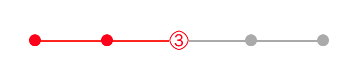
自定义CustomporgressView
#import <UIKit/UIKit.h>

@interface CustomporgressView : UIView

@property(nonatomic,assign)int step;

//allCount一共几个节点  step当前节点

-(instancetype)initWithFrame:(CGRect)frame withCount:(int)allCount withCurrentStep:(int)step;

@end
#import "CustomporgressView.h"

#define TintColor [UIColor redColor]

#define TrackTintColor [UIColor lightGrayColor]

@interface CustomporgressView()

//进度条

@property(nonatomic,strong)UIProgressView *progressView;

//当前指示器

@property(nonatomic,strong)UILabel *indicatorLabel;

//圆点数组

@property(nonatomic,strong)NSMutableArray *mCircleArr;

@end

@implementation CustomporgressView

-(instancetype)initWithFrame:(CGRect)frame withCount:(int)allCount withCurrentStep:(int)step{

    self = [super initWithFrame:frame];

    if(self){

        self.progressView = [[UIProgressView alloc]initWithFrame:CGRectMake(0, 0, frame.size.width*0.8, 0)];

        self.progressView.center = self.center;

        self.progressView.progressTintColor = TintColor;

        self.progressView.trackTintColor = TrackTintColor;

        [self addSubview:self.progressView];

        self.mCircleArr = [NSMutableArray array];

        float width = self.progressView.frame.size.width/(allCount-1);

        for(int i=0;i<allCount;i++){

            UIView *circleView = [[UIView alloc]initWithFrame:CGRectMake(0, 0, 12, 12)];

            circleView.center = CGPointMake(i * width,0);

            circleView.clipsToBounds = YES;

            circleView.layer.cornerRadius = 6.0f;

            [self.progressView addSubview:circleView];

            [self.mCircleArr addObject:circleView];

        }

        [self.progressView addSubview:self.indicatorLabel];

        self.step = step;

    }

    return self;

}

-(UILabel *)indicatorLabel{

    if(!_indicatorLabel){

        _indicatorLabel = [[UILabel alloc]initWithFrame:CGRectMake(0, 0, 20, 20)];

        _indicatorLabel.textAlignment = NSTextAlignmentCenter;

        _indicatorLabel.textColor = TintColor;

        _indicatorLabel.layer.borderWidth = 1.0f;

        _indicatorLabel.layer.cornerRadius = 12;

         _indicatorLabel.layer.borderColor = TintColor.CGColor;

        _indicatorLabel.backgroundColor = [UIColor whiteColor];

    }

    return _indicatorLabel;

}

-(void)setStep:(int)step{

    //超过数组边界

    if(step >= self.mCircleArr.count){

        return;

    }

    _step = step;

    for(int i=0;i<self.mCircleArr.count;i++){

        UIView *circleView = self.mCircleArr[i];

        if(i < step){

            circleView.backgroundColor = TintColor;

        }else{

            circleView.backgroundColor = TrackTintColor;

        }

    }

    float width = self.progressView.frame.size.width/(self.mCircleArr.count-1);

    self.indicatorLabel.center = CGPointMake(width * step, 0);

    [ self.progressView setProgress:step*1.0/(self.mCircleArr.count-1)];

    _indicatorLabel.text = [NSString stringWithFormat:@"%d",step+1];

}

@end
使用:
 CustomporgressView *customProgress = [[CustomporgressView alloc]initWithFrame:CGRectMake(0, 0, self.view.bounds.size.width-10, 50) withCount:5 withCurrentStep:2];

[view addSubview:customProgress];
自定义UIProgressView的更多相关文章
- Xamarin UIProgressView自定义
Progress.ProgressImage = UIImage.FromFile ("progress.png"); Progress.TrackImage = UIImage. ...
- UIProgressView 详解
自定义progressView 包括背景图片和进度条的图片以及进度条的高度. //进度条 UIProgressView *aProgressView = [[UIProgressView allo ...
- 关于Unity3D自定义编辑器的学习
被人物编辑器折腾了一个月,最终还是交了点成品上去(还要很多优化都还么做). 刚接手这项工作时觉得没概念,没想法,不知道.后来就去看<<Unity5.X从入门到精通>>中有关于 ...
- 一起学微软Power BI系列-使用技巧(5)自定义PowerBI时间日期表
1.日期函数表作用 经常使用Excel或者PowerBI,Power Pivot做报表,时间日期是一个重要的纬度,加上做一些钻取,时间日期函数表不可避免.所以今天就给大家分享一个自定义的做日期表的方法 ...
- JavaScript自定义浏览器滚动条兼容IE、 火狐和chrome
今天为大家分享一下我自己制作的浏览器滚动条,我们知道用css来自定义滚动条也是挺好的方式,css虽然能够改变chrome浏览器的滚动条样式可以自定义,css也能够改变IE浏览器滚动条的颜色.但是css ...
- ASP.NET Aries 入门开发教程8:树型列表及自定义右键菜单
前言: 前面几篇重点都在讲普通列表的相关操作. 本篇主要讲树型列表的操作. 框架在设计时,已经把树型列表和普通列表全面统一了操作,用法几乎是一致的. 下面介绍一些差距化的内容: 1:树型列表绑定: v ...
- ASP.NET Aries 入门开发教程5:自定义列表页工具栏区
前言: 抓紧时间,继续写教程,因为发现用户期待的内容,都在业务处理那一块. 不得不继续勤劳了. 这节主要介绍工具栏区的玩法. 工具栏的默认介绍: 工具栏默认包括5个按钮,根据不同的权限决定显示: 添加 ...
- UWP中实现自定义标题栏
UWP中实现自定义标题栏 0x00 起因 在UWP开发中,有时候我们希望实现自定义标题栏,例如在标题栏中加入搜索框.按钮之类的控件.搜了下资料居然在一个日文网站找到了一篇介绍这个主题的文章: http ...
- JavaScript 自定义对象
在Js中,除了Array.Date.Number等内置对象外,开发者可以通过Js代码创建自己的对象. 目录 1. 对象特性:描述对象的特性 2. 创建对象方式:对象直接量.new 构造函数.Objec ...
随机推荐
- [UI] 01 - CSS
前言 一.认识 From: http://www.runoob.com/css/css-tutorial.html CSS 指层叠样式表 (Cascading Style Sheets) 解决内容与表 ...
- Elasticsearch数据迁移工具elasticdump工具
1. 工具安装 wget https://nodejs.org/dist/v8.11.2/node-v8.11.2-linux-x64.tar.xz tar xf node-v8.11.2-linux ...
- POJ 1661 Help Jimmy(DP/最短路)
Help Jimmy Time Limit: 1000MS Memory Limit: 10000K Total Submissions: 14980 Accepted: 4993 Descripti ...
- 【黑金原创教程】【FPGA那些事儿-驱动篇I 】实验四:按键模块③ — 单击与双击
实验四:按键模块③ - 单击与双击 实验三我们创建了"点击"还有"长点击"等有效按键的多功能按键模块.在此,实验四同样也是创建多功能按键模块,不过却有不同的有效 ...
- 轮滑基础(一)(前摔,葫芦步,推步,A字转弯,弓步转弯)
轮滑新手入门推荐? [柚子陪你学轮滑轮滑教学]第一集 轮滑安全 1,站: 站立:脚可以成v字,或者平行,手放膝盖或者前伸.平行站立 膝盖相距一拳头左右,两腿间距略小于肩宽.膝盖略弯,腰下压,抬头挺胸 ...
- WordPlayer
using System; using System.Collections.Generic; using System.Linq; using System.Text; using System.D ...
- ACM-ICPC 2018 沈阳赛区网络预赛 I. Lattice's basics in digital electronics 阅读题加模拟题
题意:https://nanti.jisuanke.com/t/31450 题解:题目很长的模拟,有点uva的感觉 分成四步 part1 16进制转为二进制string 用bitset的to_stri ...
- 使用hive分析nginx访问日志方法
以下案例是使用hive分析nginx的访问日志案例,其中字段分隔通过正则表达式匹配,具体步骤如下: 日志格式: 192.168.5.139 - - [08/Jun/2017:17:09:12 +080 ...
- Xcode 9,真机测试,App installation failed
真机测试:能够build成功,但是 报错App installation failed A valid provisioning profile for this executable was not ...
- DateTimePicker用法
将DateTimePicker的Format属性中加入日期格式设成 'yyyy-MM-dd HH:mm',注意大小写 , 将kind设置为dtkTime即可,可以在每次Form onShow时将Dat ...