
spring boot整合spring security自定义登录跳转地址
说明
在博客用户登录后我想跳转到各自用户的博客首页,我们知道这个地址是动态的。
例如: http://localhost:8080/blog/zhangsan,
每个用户地址不一样。这时候我就用到了自定义登录成功处理器,当然还有失败处理器,大家可以研究研究。
实现效果
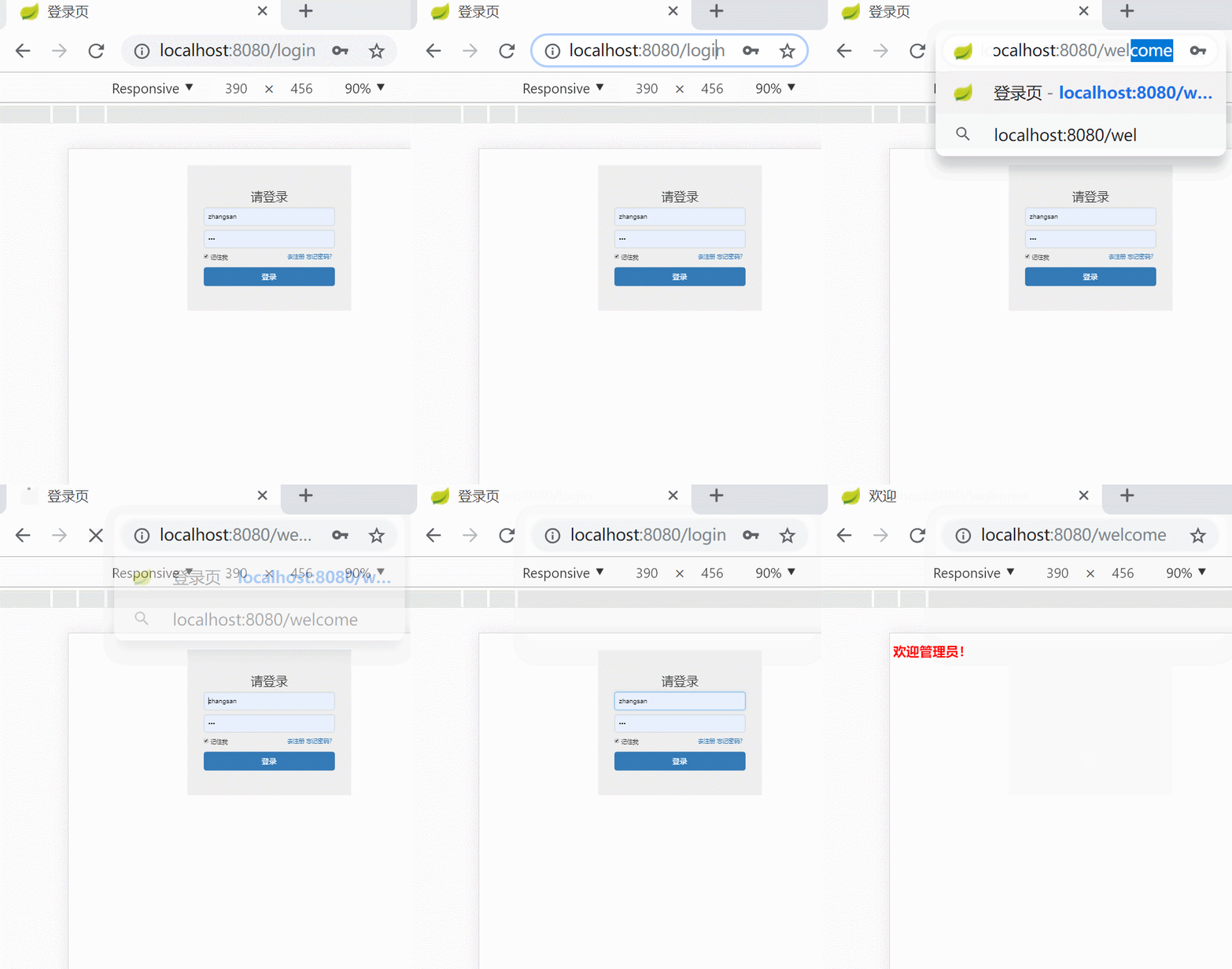
1.访问受保护资源
访问:localhost:8080/welcome后跳转到登录页,登录成功后跳转到welcome
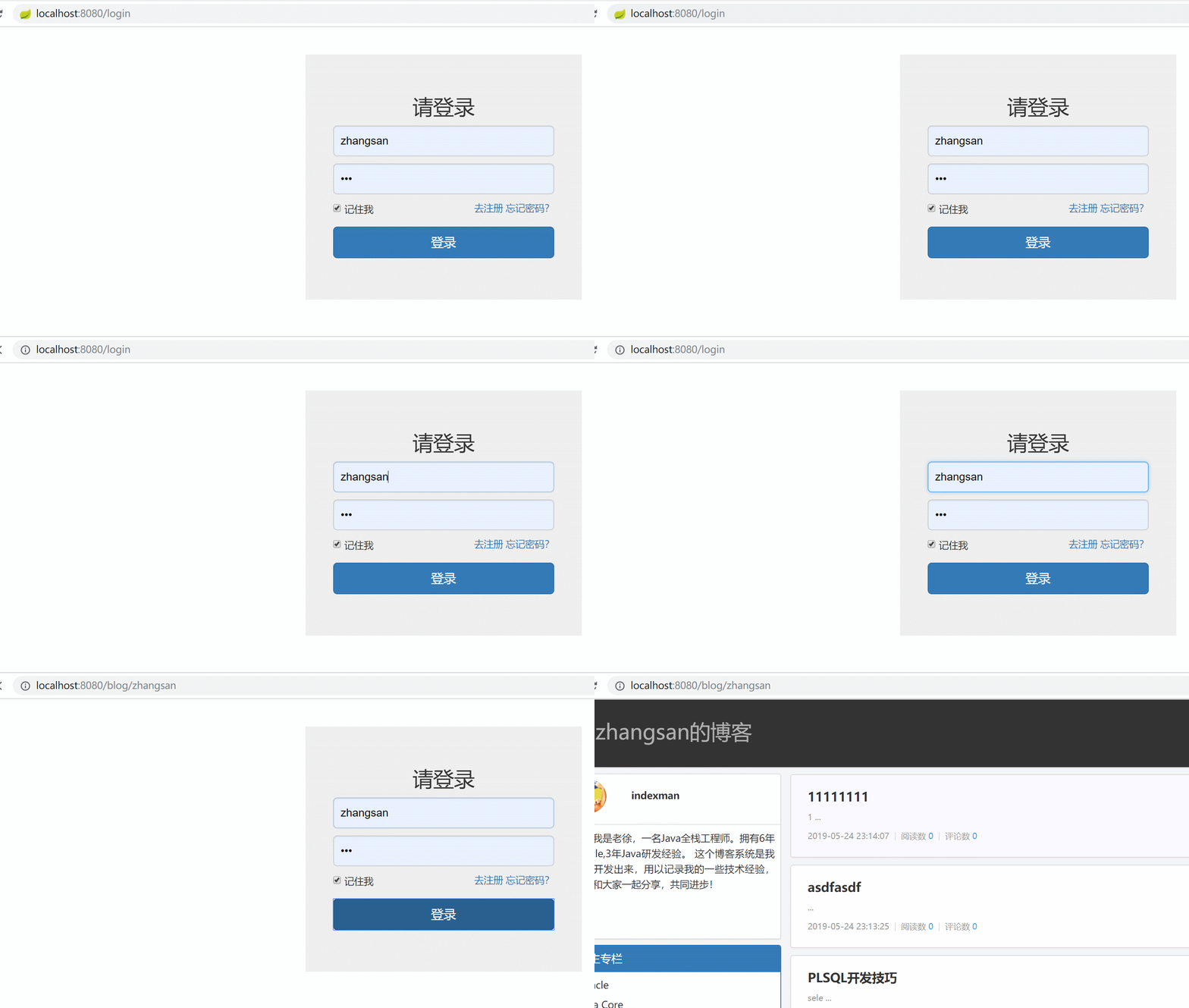
2.直接登录
跳转到用户自己的博客首页
实现步骤
1.编写自定义登录成功处理器
package com.laoxu.easyblog.config;

import com.laoxu.easyblog.common.SecurityUtil;

import org.springframework.security.core.Authentication;

import org.springframework.security.web.authentication.SavedRequestAwareAuthenticationSuccessHandler;

import org.springframework.security.web.savedrequest.HttpSessionRequestCache;

import org.springframework.security.web.savedrequest.RequestCache;

import org.springframework.security.web.savedrequest.SavedRequest;

import org.springframework.stereotype.Component;

import javax.servlet.ServletException;

import javax.servlet.http.HttpServletRequest;

import javax.servlet.http.HttpServletResponse;

import java.io.IOException;

/**

 * @Description: 自定义登录成功处理类

 * @Author laoxu

 * @Date 2019/5/25 23:32

 **/

@Component

public class MyAuthenctiationSuccessHandler extends SavedRequestAwareAuthenticationSuccessHandler {

    @Override

    public void onAuthenticationSuccess(HttpServletRequest request, HttpServletResponse response, Authentication authentication) throws ServletException, IOException {

        response.setContentType("application/json;charset=utf-8");

        RequestCache cache = new HttpSessionRequestCache();

        SavedRequest savedRequest = cache.getRequest(request, response);

        // 如果来源请求为空则跳转到用户博客首页

        String url = "";

        if((savedRequest==null)){

            url = "/blog/"+ SecurityUtil.getLoginUser();

        }else{

            url = savedRequest.getRedirectUrl();

        }

        System.out.println(url);

        response.sendRedirect(url);

    }

}
2.添加spring security配置
package com.laoxu.easyblog.config;

import com.laoxu.easyblog.common.MyPasswordEncoder;

import com.laoxu.easyblog.entity.User;

import com.laoxu.easyblog.service.MyUserService;

import org.springframework.beans.factory.annotation.Autowired;

import org.springframework.context.annotation.Bean;

import org.springframework.context.annotation.Configuration;

import org.springframework.security.config.annotation.authentication.builders.AuthenticationManagerBuilder;

import org.springframework.security.config.annotation.web.builders.HttpSecurity;

import org.springframework.security.config.annotation.web.builders.WebSecurity;

import org.springframework.security.config.annotation.web.configuration.EnableWebSecurity;

import org.springframework.security.config.annotation.web.configuration.WebSecurityConfigurerAdapter;

import org.springframework.security.crypto.password.PasswordEncoder;

import org.springframework.security.web.authentication.rememberme.JdbcTokenRepositoryImpl;

import org.springframework.security.web.authentication.rememberme.PersistentTokenRepository;

import javax.annotation.Resource;

import javax.sql.DataSource;

/**

 * Spring Security配置

 *

 * @author laoxu

 * @create 2019-5-24

 **/

@EnableWebSecurity

public class WebSecurityConfig extends WebSecurityConfigurerAdapter {

    @Autowired

    MyAuthenctiationSuccessHandler myAuthenctiationSuccessHandler;

    @Resource

    private DataSource dataSource;

    @Resource(name = "myUserService")

    private MyUserService<User> userService;

    @Autowired

    public void configureGlobal(AuthenticationManagerBuilder auth) throws Exception {

        auth.userDetailsService(userService).passwordEncoder(new MyPasswordEncoder());

    }

    @Override

    protected void configure(HttpSecurity http) throws Exception {

        http.authorizeRequests()

                .antMatchers("/css/**", "/js/**", "/fonts/**", "/images/**").permitAll()

                .antMatchers("/welcome").hasRole("ADMIN")

                .and().formLogin().loginPage("/login").permitAll().successHandler(myAuthenctiationSuccessHandler)

                .and().logout().permitAll()

                .and().headers().frameOptions().disable()

        ;

        //开启记住我功能

}
spring boot整合spring security自定义登录跳转地址的更多相关文章
- Spring Boot 整合Spring Data JPA
Spring Boot整合Spring Data JPA 1)加入依赖 <dependency> <groupId>org.springframework.boot</g ...
- Spring boot 整合spring Data JPA+Spring Security+Thymeleaf框架(上)
近期上班太忙所以耽搁了给大家分享实战springboot 框架的使用. 以下是spring boot 整合多个框架的使用. 首先是准备工作要做好. 第一 导入框架所需的包,我们用的事maven 进行 ...
- Spring Boot整合Spring Security自定义登录实战
本文主要介绍在Spring Boot中整合Spring Security,对于Spring Boot配置及使用不做过多介绍,还不了解的同学可以先学习下Spring Boot. 本demo所用Sprin ...
- Spring Boot 整合 Spring Security,用户登录慢
场景 Spring Boot + Spring Security搭建一个Web项目. 临时用了inMemoryAuthentication. @EnableWebSecurity public cla ...
- Spring Boot整合Spring Security总结
一.创建Spring Boot项目 引入Thymeleaf和Web模块以及Spring Security模块方便进行测试,先在pom文件中将 spring-boot-starter-security ...
- Spring Boot整合Spring Security
Spring Boot对于该家族的框架支持良好,但是当中本人作为小白配置还是有一点点的小问题,这里分享一下.这个项目是使用之前发布的Spring Boot会员管理系统重新改装,将之前filter登录验 ...
- Spring Boot整合Spring Batch
引言 Spring Batch是处理大量数据操作的一个框架,主要用来读取大量数据,然后进行一定的处理后输出指定的形式.比如我们可以将csv文件中的数据(数据量几百万甚至几千万都是没问题的)批处理插入保 ...
- Spring Boot整合Spring Session实战
传统java web应用session都是由应用服务器(如tomcat)保存在内存中,这对应但节点应用来说没问题:但对于应用集群来说会造成各节点之间的session无法共享,一个节点挂掉后,其他节点接 ...
- Spring Boot 整合Spring Security 和Swagger2 遇到的问题小结
How to configure Spring Security to allow Swagger URL to be accessed without authentication @Configu ...
- Spring Boot 整合Spring Data以及rabbitmq,thymeleaf,向qq邮箱发送信息
首先得将自己的qq开启qq邮箱的POP3/SMTP服务 说明: p,e为路由key. 用户系统完成登录的时候,将{手机号-时间-IP}保存到队列Phone-queue中,msg-sys系统获得消息打印 ...
随机推荐
- [转帖]Kafka故障之磁盘打满
https://www.jianshu.com/p/095e820361ae 问:磁盘打满扩容后能正常重启吗?答:不一定 要看文件格式是否损坏(log.index等).如果损坏会报错:index fi ...
- [转帖]使用 TiUP 部署运维 TiDB 线上集群
https://docs.pingcap.com/zh/tidb/stable/tiup-cluster 本文重在介绍如何使用 TiUP 的 cluster 组件,如果需要线上部署的完整步骤,可参考使 ...
- [转帖]如何利用wrarp测试oss性能?
https://zhuanlan.zhihu.com/p/529735003 前言 我们利用mino与ceph rgw搭建好的oss经过多层网络转发,传输速度必定有所折损,这个时候我们使用wrap ...
- [转帖]LSM-Tree:从入门到放弃——入门:基本概念、操作和Trade-Off分析
https://zhuanlan.zhihu.com/p/428267241 LSM-Tree,全程为日志结构合并树,有趣的是,这个数据结构实际上重点在于日志结构合并,和 tree 本身的关系并不是特 ...
- [转帖]ansible小结(七)常用模块
ansible小结(七)常用模块 http://www.361way.com/ansible-modules/4415.html 在上一篇中介绍了commands部分模块,本篇承接上篇介绍下常用的 ...
- [转帖]Python基础之判断和循环(三)
https://www.jianshu.com/p/5a7552821c63 一.判断 关于判断,跟字面意思一样,就是判断某一个时刻应不应该做某件事: 语法: if 判断条件: 执行语句-- else ...
- [转帖]使用SkyWalking监控nginx (以openresty为例)
https://www.cnblogs.com/hahaha111122222/p/15829737.html 安装使用SkyWalking先看这篇文章,地址:https://www.cnblogs. ...
- ESXi查看底层存储磁盘厂商型号的方式与方法
ESXi查看底层存储磁盘厂商型号的方式与方法 背景 公司一台过保的服务器出现了磁盘告警 Vendor不太靠谱. 过保的机器就不管了 不买他们的服务器也不说一下是啥硬盘. 想自己替换,需要先获取磁盘的型 ...
- 【字符串,哈希】【Yandex】Yandex7736
2023.6.30 Problem Link 定义一个串 \(S\) 是好的,当且仅当 \(S\) 可以不断消去相邻两个相同字符直至消空.给定一个长为 \(n\) 的字符串 \(s\),求有多少个有序 ...
- echarts设置暂无数据
场景描述 我们在项目中,很多时候都会使用echarts进行数据展示. 当没有数据的时候,echarts的展示就会特别的难看. 这个时候我们就会优化界面的显示,在echarts中展示暂无数据. 有很多中 ...