
在 Linux 和 Windows 下源码安装 Perl
Perl 是一种功能丰富的计算机程序语言,运行在超过 100 种计算机平台上,适用广泛,从大型机到便携设备,从快速原型创建到大规模可扩展开发。在生物信息分析领域,Perl 主要是做数据预处理、文本处理和格式转换、对算法效率要求不高的分析软件开发,系统管理和 pipeline 搭建等工作。这里对 Linux(主要是 CentOS)、Windows 下 Perl 的安装做一个备忘。
一、CentOS 7 下安装 Perl
1. 源码包下载
在官方网站下载新版本的源码包:http://www.perl.org/get.html,我下载的是 perl-5.26.1.tar.gz。
2. 解压,设置源码
$ tar zvxf perl-5.26.1.tar.gz
$ cd perl-5.26.1
$ ./Configure --help
Usage: Configure [-dehrsEKOSV] [-f config.sh] [-D symbol] [-D symbol=value]
                 [-U symbol] [-U symbol=] [-A command:symbol...]
  -d : use defaults for all answers.
  -e : go on without questioning past the production of config.sh.
  -f : specify an alternate default configuration file.
  -h : print this help message and exit (with an error status).
  -r : reuse C symbols value if possible (skips costly nm extraction).
  -s : silent mode, only echoes questions and essential information.
  -D : define symbol to have some value:
         -D symbol         symbol gets the value 'define'
         -D symbol=value   symbol gets the value 'value'
       common used examples (see INSTALL for more info):
         -Duse64bitint            use 64bit integers
         -Duse64bitall            use 64bit integers and pointers
         -Dusethreads             use thread support
         -Dinc_version_list=none  do not include older perl trees in @INC
         -DEBUGGING=none          DEBUGGING options
         -Dcc=gcc                 choose your compiler
         -Dprefix=/opt/perl5      choose your destination
  -E : stop at the end of questions, after having produced config.sh.
  -K : do not use unless you know what you are doing.
  -O : ignored for backward compatibility
  -S : perform variable substitutions on all .SH files (can mix with -f)
  -U : undefine symbol:
         -U symbol    symbol gets the value 'undef'
         -U symbol=   symbol gets completely empty
       e.g.:  -Uversiononly
  -A : manipulate symbol after the platform specific hints have been applied:
         -A append:symbol=value   append value to symbol
         -A symbol=value          like append:, but with a separating space
         -A define:symbol=value   define symbol to have value
         -A clear:symbol          define symbol to be ''
         -A define:symbol         define symbol to be 'define'
         -A eval:symbol=value     define symbol to be eval of value
         -A prepend:symbol=value  prepend value to symbol
         -A undef:symbol          define symbol to be 'undef'
         -A undef:symbol=         define symbol to be ''
       e.g.:  -A prepend:libswanted='cl pthread '
              -A ccflags=-DSOME_MACRO
  -V : print version number and exit (with a zero status).

# 设置源码
$ ./Configure -des -Dprefix=/usr/local/software/Perl-5.26 -Dusethreads -Uversiononly
3. 编译安装
$ make
......
make[1]: *** [IO.o] Error 1
make[1]: Leaving directory `/users/rmi1/build/perl-5.12.0/dist/IO'
Unsuccessful make(dist/IO): code=512 at make_ext.pl line 449.
make: *** [lib/auto/IO/IO.so] Error 2
如果在 make 编译过程中出现如上报错,请参考 Make error when compiling Perl 5.12.1 (RHEL 5.5) 执行下面操作:
$ make clean
$ unset C_INCLUDE_PATH
$ ./Configure -des -Dprefix=/usr/local/software/Perl-5.26 -Dusethreads -Uversiononly
$ make
继续验证编译,执行安装:
$ make test
$ make install   # 命令完成后,基本安装就完成了
4. 调整环境变量
在 ~/.bashrc 中把 Perl 添加到 PATH 中,然后 source ~/.bashrc 刷新。
export PATH="/usr/local/software/Perl-5.26/bin:$PATH"
5. 安装完成
$ perl -version

This is perl 5, version 26, subversion 1 (v5.26.1) built for x86_64-linux-thread

Copyright 1987-2017, Larry Wall

Perl may be copied only under the terms of either the Artistic License or the
GNU General Public License, which may be found in the Perl 5 source kit.

Complete documentation for Perl, including FAQ lists, should be found on
this system using "man perl" or "perldoc perl".  If you have access to the
Internet, point your browser at http://www.perl.org/, the Perl Home Page.
查看 Perl 配置汇总信息:
$ perl -V    # 该命令会把对应 perl 配置、模块路径所有信息汇总打印出来
Summary of my perl5 (revision 5 version 26 subversion 0) configuration:

  Platform:
    osname=linux
    osvers=2.6.32-696.10.1.el6.x86_64
......

Built under linux
  Compiled at Sep 17 2017 16:35:49
  @INC:
    /usr/local/software/Perl-5.26/lib/perl5/site_perl/5.26.1/x86_64-linux
    /usr/local/software/Perl-5.26/lib/perl5/site_perl/5.26.1
    /usr/local/software/Perl-5.26/lib/perl5/5.26.1/x86_64-linux
    /usr/local/software/Perl-5.26/lib/perl5/5.26.1
二、Windows 7 下安装 Perl
在 Windows 下的
Perl 安装,我们推荐使用 ActivePerl,安装步骤如下。
ActivePerl:
https://www.activestate.com/products/activeperl/
2.1 安装包下载
在这里我们下载 64-bit 的 Perl-5.26.3。
2.2 安装与设置
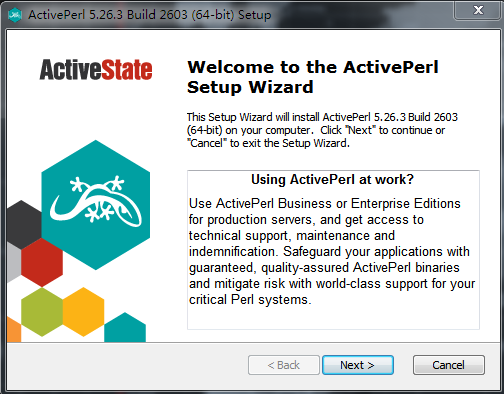
ActivePerl-5.26.3.2603-MSWin32-x64-a95bce075.exe 安装包下载完后,我们直接点击进行安装。
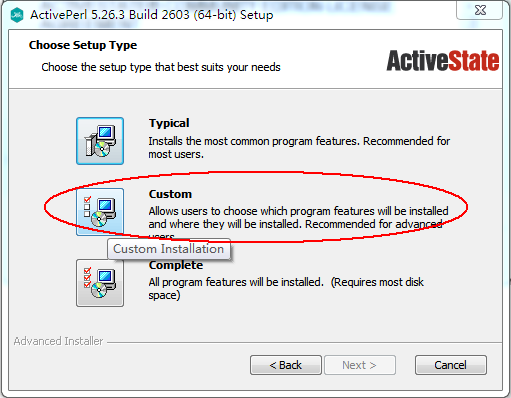
选择 "Custom" 自定义安装:
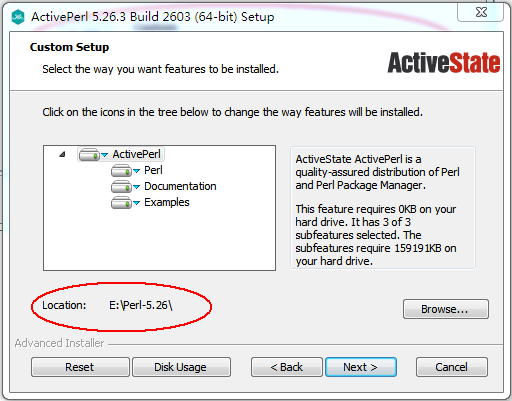
自定义安装路径:
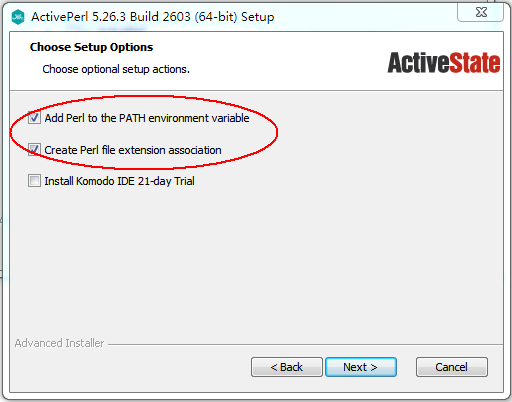
把 Perl 添加到系统环境变量:
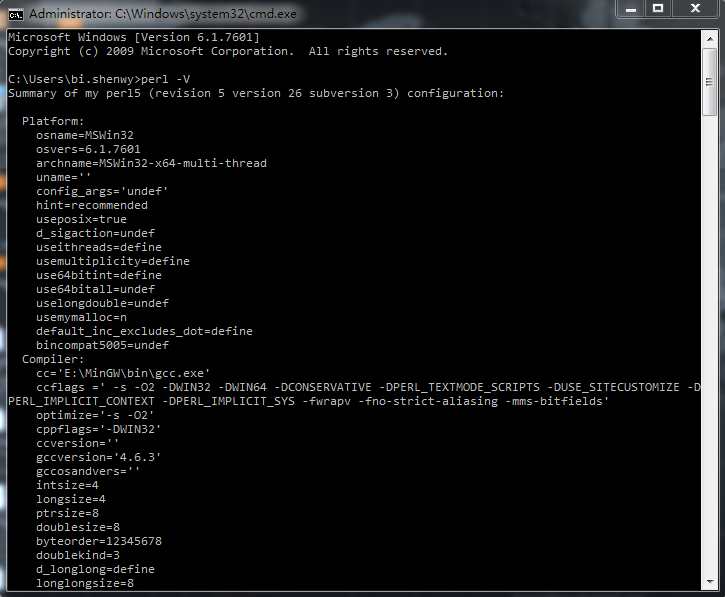
Perl 安装完成后,我们在 DOC 命令行输入
perl -V
,可以看到详细的相关信息:
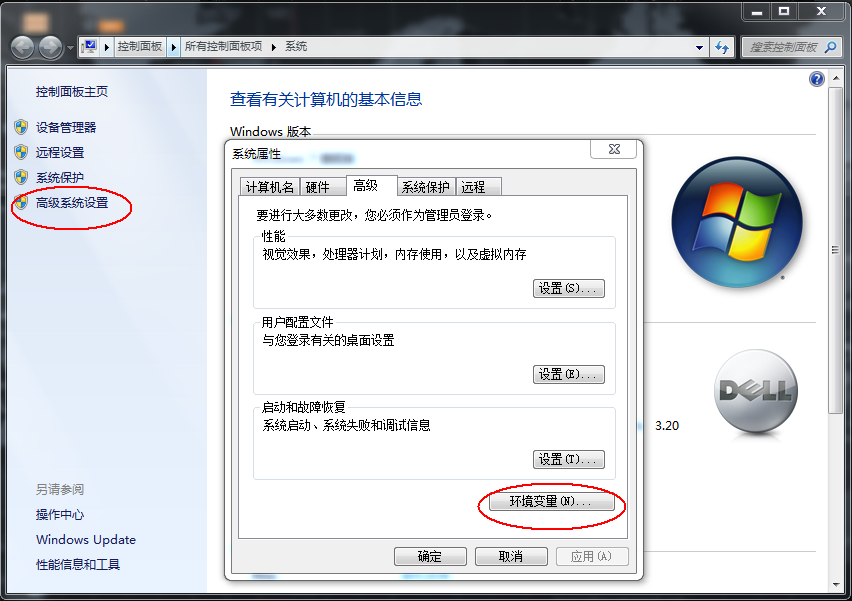
如果我们在安装过程中没有勾选把 Perl 添加到系统环境变量,DOC 中直接执行
perl -V
会出现
"'perl' is not recognized as an internal or external command"
提示,这时候我们需要手动把 Perl 添加到 Windows 的系统环境变量中就可以了。
2.3 配置 cpan
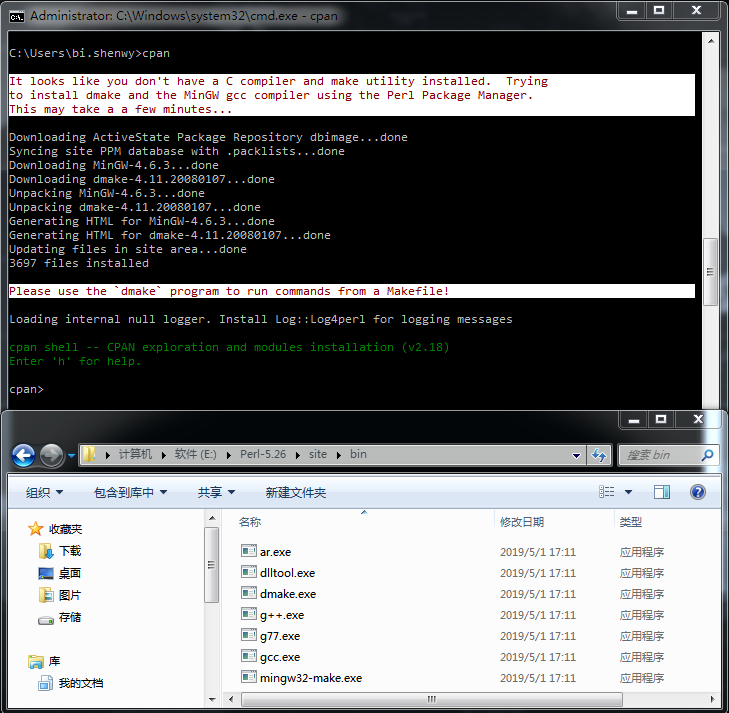
为了更好对 Perl 进行扩展,方便以后的模块安装,我们最好配置一下 cpan。ActivePerl 有个好处就是在初始化 cpan 的时候会自动把 dmake、gcc、g++、mingw32-make 等 windows 常用的编译工具一起安装到
"$Dprefix/site/bin"
目录下,免去了我们手动安装这些编译器的各种麻烦。
2.4 安装完成
到这里,windows 下的 ActivePerl(perl-5.26)就安装完成了!
往期精彩:

 戳原文,更有料!
本文分享自微信公众号 - 生信科技爱好者(bioitee)。
如有侵权,请联系 support@oschina.cn 删除。
本文参与“OSC源创计划”,欢迎正在阅读的你也加入,一起分享。
在 Linux 和 Windows 下源码安装 Perl的更多相关文章
- windows下源码安装调试postgresql
环境:windows 10 postgresql版本:postgresql-9.6.5 使用工具:vs2017社区版 辅助工具:perl.diff.flex.bison 相关工具下载地址: perl下 ...
- CentOS 6.3下源码安装LAMP(Linux+Apache+Mysql+Php)环境【转载】
本文转载自 园友David_Tang的博客,如有侵权请联系本人及时删除,原文地址: http://www.cnblogs.com/mchina/archive/2012/11/28/2778779.h ...
- Linux平台下源码安装mysql多实例数据库
Linux平台下源码安装mysql多实例数据库[root@linux-node1 ~]# netstat -tlunp | grep 330tcp6 0 0 :::3306 :::* LISTEN 6 ...
- linux下源码安装netcat
linux下源码安装netcat http://blog.chinaunix.net/uid-20783755-id-4211230.html 1,下载netcat源码,netcat-0.7.1-13 ...
- CentOS 7下源码安装MySQL 5.7
网上说linux安装mysql服务分两种安装方法: ①源码安装,优点是安装包比较小,只有几十M左右,缺点是安装依赖的库多,安装编译时间长,安装步骤复杂容易出错: ②使用官方编译好的二进制文件安装,优点 ...
- lnux下源码安装MySQL 5.6
nux下源码安装MySQL 5.6 说明:本文是我自己测试的MySQL5.6源码安装,经本人亲自实践,完全可用,另在5.6之前的版本也是可以按照本文源码安装的.我是在两台linux下一台安装5.5,另 ...
- nginx在Centos7.5下源码安装和配置
安装nginx 安装nginx依赖包 yum install -y pcre-devel zlib-devel openssl-devel wget gcc tree vim 进入目录/root/se ...
- centos 6x系统下源码安装mysql操作记录
在运维工作中经常部署各种运维环境,涉及mysql数据库的安装也是时常需要的.mysql数据库安装可以选择yum在线安装,但是这种安装的mysql一般是系统自带的,版本方面可能跟需求不太匹配.可以通过源 ...
- CentOS下源码安装Apache2.4+PHP5.4+MySQL5.5
一.准备(把所有的源文件放在‘/home/yuanjun’目录下) apr http://mirror.bjtu.edu.cn/apache/apr/apr-1.4.6.tar.gz apr-util ...
- 在ConoHa上Centos7环境下源码安装部署LNMP
本文记录了从源码,在Centos 7上手动部署LNMP环境的过程,为了方便以后对nginx和mariadb进行升级,这里采用yum的方式进行安装. 1.建立运行网站和数据库的用户和组 groupadd ...
随机推荐
- Prometheus Operator 与 kube-prometheus 之一-简介
简介 Prometheus Operator Prometheus Operator: 在 Kubernetes 上管理 Prometheus 集群.该项目的目的是简化和自动化基于 Prometheu ...
- Ubuntu桌面顶端没有网络图标
1 问题描述 刚装完新的linux系统后发现桌面顶部没有出现网络连接图标,网络无法进行连接配置. 2 解决方案 打开终端执行命令 nmcli network on或者sudo nmcli networ ...
- VW
<!DOCTYPE html> <html lang="en"> <head> <meta charset="UTF-8&quo ...
- scp上传文件No such file or directory 问题
问题描述 window使用scp复制文件到linux时报 No such file or directory 错误 解决办法 本地复制到Linux,win环境必须用绝对路径 上传成功
- Java设计模式 —— 工厂模式
3 简单工厂模式 3.1 创建型模式 Creational Pattern 关注对象的创建过程,对类的实例化过程进行了抽象,将软件模块中对象的创建和对象的使用分离,对用户隐藏了类的实例的创建细节.创建 ...
- docker 配置 Mysql主从集群
docker 配置Mysql集群 Docker version 20.10.17, build 100c701 MySQL Image version: 8.0.32 Docker container ...
- 让SQL起飞(优化)
最近博主看完了<SQL进阶教程>这本书,看完后给博主打开了SQL世界的新大门,对于 SQL 的理解不在局限于以前的常规用法.借用其他读者的评论, ❝ 读完醍醐灌顶,对SQL做到了知其然更能 ...
- 基础算法(排序 & 查找)
快速排序.归并排序.整数二分查找.浮点数二分查找 快速排序 主要思想是分治: 确定分界点 调整范围 递归处理左右两段 代码: #include <iostream> using names ...
- Albert理论详解:用矩阵分解与跨层参数共享减少参数量
1.介绍 Albert是Bert的一个变种,它在Bert的基础上减少了参数量,使整个模型更加的"轻量化",同时也保持了Bert的性能,但值得注意的是,Albert虽然显著地减少了参 ...
- C# 根据窗口句柄获取窗口截图
本章介绍如何通过句柄,截取指定窗口内容,以及截取失败的场景 一.根据窗口句柄获取窗口截图 先创建一个测试窗口程序A,显示如下: 同时我们把此窗口的句柄显示到一个文本输入框内. 1 TestBox.Te ...