
Elasticsearch6.4.3安装
Linux内存一定要1g以上!
首先要有jdk环境 要求1.8版本以上 elasticsearch是Java写的
将上传的 elasticSearch安装包解压
cd /home/elasticsearch/elasticsearch-6.4.3/config
1、 修改elasticsearch.yml
network.host: 192.168.91.7
http.port:9200 #这是HTTP协议外部通信的端口号 9300内部通信端口号
如果此时启动,会报错 root不能启动的哦 不能通过root账号启动 这是属于自身的安全策略,解决方案,非root就可以了哈哈
因为安全问题elasticsearch 不让用root用户直接运行,所以要创建新用户
首先创建个分组: groupadd esUsers
useradd esUser01 -g esUsers -p 123
chown -R esUser01:esUsers elasticsearch-6.4.3
su esUser01 #切换登录用户
【参考:
第一步:liunx创建新用户 adduser esUsers 然后给创建的用户加密码 passwd XXX 输入两次密码。
第二步:切换刚才创建的用户 su esUsers 然后执行elasticsearch 会显示Permission denied 权限不足。
第三步:给新建的XXX赋权限,chmod 777 * 这个不行,因为这个用户本身就没有权限,肯定自己不能给自己付权限。所以要用root用户登录付权限。
第四步:root给esUser赋权限,chown -R XXX /你的elasticsearch安装目录。
然后执行成功。】
这样启动仍然是会报错的
ERROR: [4] bootstrap checks failed
[1]: max file descriptors [4096] for elasticsearch process is too low, increase to at least [65536]
[2]: max number of threads [1024] for user [esUser01] is too low, increase to at least [4096]
[3]: max virtual memory areas vm.max_map_count [65530] is too low, increase to at least [262144]
[4]: system call filters failed to install; check the logs and fix your configuration or disable system call filters at your own risk
[2019-01-21T00:53:47,296][INFO ][o.e.n.Node ] [qKdHOzq] stopping ...
[2019-01-21T00:53:47,329][INFO ][o.e.n.Node ] [qKdHOzq] stopped
[2019-01-21T00:53:47,330][INFO ][o.e.n.Node ] [qKdHOzq] closing ...
[2019-01-21T00:53:47,355][INFO ][o.e.n.Node ] [qKdHOzq] closed
[2019-01-21T00:53:47,361][INFO ][o.e.x.m.j.p.NativeController] Native controller process has stopped - no new native processes can be started
解决方案:
用root权限去做!
vi /etc/sysctl.conf
添加: vm.max_map_count=655360 然后保存
然后 cd /etc
输入: sysctl -p
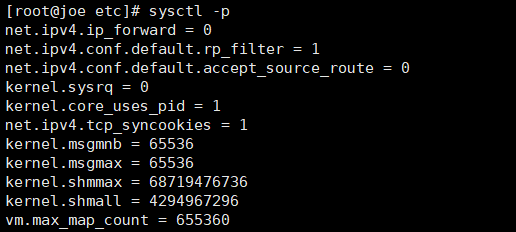
继续启动,继续报错:
ERROR: [3] bootstrap checks failed
[1]: max file descriptors [4096] for elasticsearch process is too low, increase to at least [65536]
[2]: max number of threads [1024] for user [esUser01] is too low, increase to at least [4096]
[3]: system call filters failed to install; check the logs and fix your configuration or disable system call filters at your own risk
[2019-01-21T01:03:48,953][INFO ][o.e.n.Node ] [qKdHOzq] stopping ...
[2019-01-21T01:03:48,988][INFO ][o.e.n.Node ] [qKdHOzq] stopped
[2019-01-21T01:03:48,988][INFO ][o.e.n.Node ] [qKdHOzq] closing ...
[2019-01-21T01:03:49,010][INFO ][o.e.n.Node ] [qKdHOzq] closed
[2019-01-21T01:03:49,017][INFO ][o.e.x.m.j.p.NativeController] Native controller process has stopped - no new native processes can be started
解决方案:继续用root去修改
vi /etc/security/limits.conf
加入:
* soft nofile 65536
* hard nofile 131072
* soft nproc 2048
* hard nproc 4096
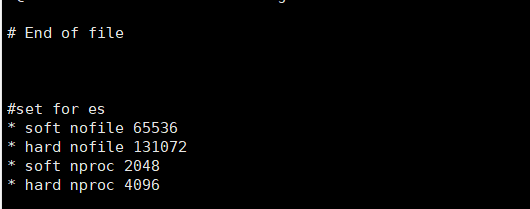
必须重启! 重启才可以生效
继续报错!
[1]: max number of threads [1024] for user [esUser01] is too low, increase to at least [4096]
解决:root下
vi /etc/security/limits.d/90-nproc.conf
在操作时候竟然出现了错误:
Exception in thread "main" 2019-01-21 00:46:41,393 main ERROR No Log4j 2 configuration file found. Using default configuration (logging only errors to the console), or user programmatically provided configurations. Set system property 'log4j2.debug' to show Log4j 2 internal initialization logging. See https://logging.apache.org/log4j/2.x/manual/configuration.html for instructions on how to configure Log4j 2
ElasticsearchParseException[malformed, expected end of settings but encountered additional content starting at line number: [59], column number: [1]]; nested: MarkedYAMLException[expected '<document start>', but found BlockMappingStart
in 'reader', line 59, column 1:
http.port: 9200
^
at [Source: sun.nio.ch.ChannelInputStream@5fbe4146; line: 59, column: 1]]; nested: ParserException[expected '<document start>', but found BlockMappingStart
in 'reader', line 59, column 1:
http.port: 9200
^
];
at org.elasticsearch.common.settings.Settings.fromXContent(Settings.java:685)
at org.elasticsearch.common.settings.Settings.access$500(Settings.java:84)
at org.elasticsearch.common.settings.Settings$Builder.loadFromStream(Settings.java:1188)
at org.elasticsearch.common.settings.Settings$Builder.loadFromPath(Settings.java:1165)
at org.elasticsearch.node.InternalSettingsPreparer.prepareEnvironment(InternalSettingsPreparer.java:100)
at org.elasticsearch.cli.EnvironmentAwareCommand.createEnv(EnvironmentAwareCommand.java:95)
at org.elasticsearch.cli.EnvironmentAwareCommand.execute(EnvironmentAwareCommand.java:86)
at org.elasticsearch.cli.Command.mainWithoutErrorHandling(Command.java:124)
at org.elasticsearch.cli.Command.main(Command.java:90)
at org.elasticsearch.bootstrap.Elasticsearch.main(Elasticsearch.java:93)
at org.elasticsearch.bootstrap.Elasticsearch.main(Elasticsearch.java:86)
Caused by: com.fasterxml.jackson.dataformat.yaml.snakeyaml.error.MarkedYAMLException: expected '<document start>', but found BlockMappingStart
in 'reader', line 59, column 1:
http.port: 9200
^
这个错误竟然是空格造成的! 醉了 这种格式 很让人不开心啊
解决方案:

启动,继续报错!!
system call filters failed to install; check the logs and fix your configuration or disable system call filters at your own risk
分析和解决:
出现错误的原因:是因为centos6.x操作系统不支持SecComp,而elasticsearch 5.5.2默认bootstrap.system_call_filter为true进行检测,所以导致检测失败,失败后直接导致ES不能启动。
在elasticsearch.yml中添加配置项:bootstrap.system_call_filter为false:
bootstrap.system_call_filter: false
此时可以完美解决了!
启动成功!

关闭防火墙后访问:
http://192.168.91.7:9200/
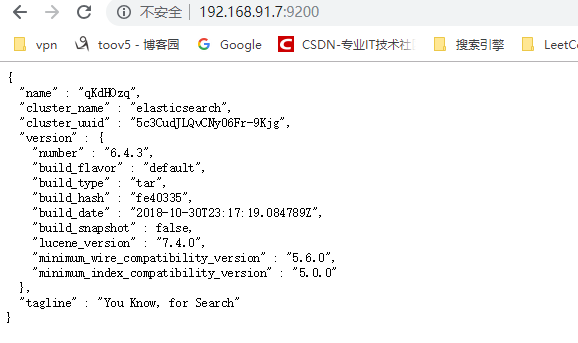
9200端口可以提供Restful api接口 进行增删改查操作
下面安装可视化界面: Kibana
Kibana是一个开源的分析和可视化平台,设计用于和Elasticsearch一起工作。
你用Kibana来搜索,查看,并和存储在Elasticsearch索引中的数据进行交互。
你可以轻松地执行高级数据分析,并且以各种图标、表格和地图的形式可视化数据。
Kibana使得理解大量数据变得很容易。它简单的、基于浏览器的界面使你能够快速创建和共享动态仪表板,实时显示Elasticsearch查询的变化。
解压安装包后修改配置文件:
vim config/kibana.yml
# 将默认配置改成如下:
server.port: 5601
server.host: "192.168.91.7"
elasticsearch.url: "http:// 192.168.91.7:9200" # 如果是集群 写集群地址
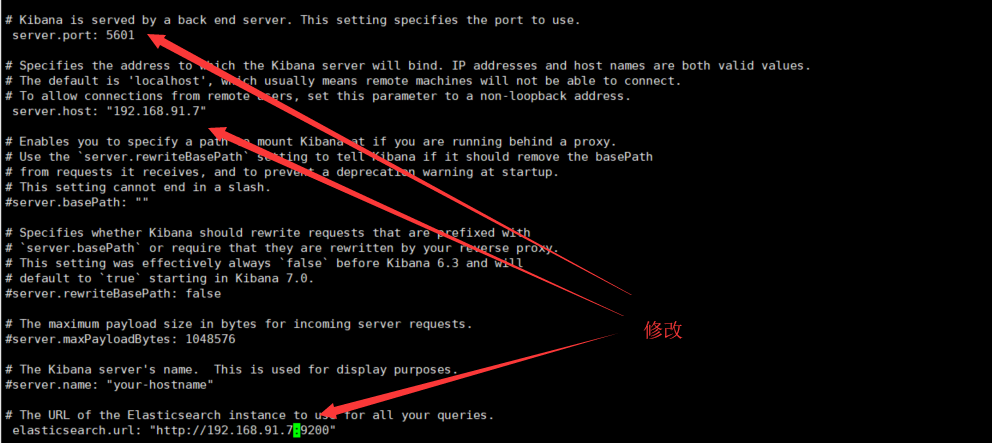
(自己的ip端口号 和 读取的 es的ip端口号)
启动Kibana
./bin/kibana
http://192.168.91.7:5601/app/kibana

1.查找ES进程
ps -ef | grep elastic
2.杀掉ES进程
kill -9 2382(进程号)
3.重启ES
sh elasticsearch -d
Elasticsearch6.4.3安装的更多相关文章
- elasticsearch-6.0.1安装
elasticsearch-6.0.1安装 0. 介绍: ElasticSearch是一个基于Lucene的搜索服务器.它提供了一个分布式多用户能力的全文搜索引擎:是目前全文搜索引擎的首选. ...
- (新)elasticsearch6.0版本安装head插件
ES6.0版本安装head插件 1.1 前言 不知道是我电脑问题还是最近的开源软件都比较**,mysql和elasticsearch新版本变动都比较大. elasticsearch6.0貌似已经不支持 ...
- ElasticSearch6学习(1)-安装Elasticsearch
安装准备: 安装Elasticsearch唯一的要求是安装Java8,包括对应的Jdk.其他java9/java10没尝试,考虑兼容问题.我这里只用了java8 安装java8可以参考我之前写的一篇文 ...
- elasticsearch6.6.0安装配置及elasticsearch-head插件安装
一.最小化安装centos7.6 cat /etc/redhat-release 二.配置网络,可以上外网 三.安装常用命令工具,修改系统时区,校对系统时间,关闭selinux,关闭firewalld ...
- elasticsearch6.0版本安装head插件
ES6.0版本安装head插件 1.1 前言 不知道是我电脑问题还是最近的开源软件都比较**,mysql和elasticsearch新版本变动都比较大. elasticsearch6.0貌似已经不支持 ...
- ES之一:Elasticsearch6.4 windows安装 head插件ik分词插件安装
准备安装目标:1.Elasticsearch6.42.head插件3.ik分词插件 第一步:安装Elasticsearch6.4 下载方式:1.官网下载 https://www.elastic.co/ ...
- (转)elasticsearch6.0版本安装head插件
1.1 前言 不知道是我电脑问题还是最近的开源软件都比较**,mysql和elasticsearch新版本变动都比较大. elasticsearch6.0貌似已经不支持命令行安装head插件了,反正我 ...
- ElasticSearch6.2.3安装Head插件
1.环境 Linux centos7 elasticsearch-head的zip包,github网址如下:https://github.com/mobz/elasticsearch-head nod ...
- elasticsearch6 学习之安装
安装环境:centos6.5 64位 jdk1.8 elasticsearch6.1.1 一.启动 [root@localhost bin]# ./elasticsearch - ...
随机推荐
- Laravel 的中大型专案架构
好文:http://oomusou.io/laravel/laravel-architecture/
- SSH后台管理系统,实现查询+分页
一个搜索框,然后会获取大量信息,将信息进行分页,每一页显示固定条数. mysql中使用“like”和“%%”进行模糊匹配,用“limit”进行分页. 1.首先创建一个页面信息的实体类,代码如下: im ...
- windows下 兼容Python2和Python3
windows下同时安装了python2和python3时,都可以配置环境变量,如果在命令行里输入python命令,windows会去环境变量里寻找Python的安装位置,如果先找到pytoon2的, ...
- hdu 5185(DP)
不错的一道dp题目,一开始想了一种N*N的dp,后面就一直想怎么优化,然后就一直都在坑中了. 这题题解还是看早了,应该再多想会的,多换种表示状态的方法再想想. dp[i][j]=dp[i-j][j]+ ...
- 通知url必须为直接可访问的url,不能携带参数 异步接收微信支付结果通知的回调地址 不能携带参数。 回调地址后是否可以加自定义参数 同步回调地址 异步回调地址 return_url和notify_url的区别
[微信支付]微信小程序支付开发者文档 https://pay.weixin.qq.com/wiki/doc/api/wxa/wxa_api.php?chapter=9_7 通知url必须为直接可访问的 ...
- <2013 06 24> 关于Zigbee项目_Munik_TUM_eCar
(本月)6月4号到德国慕尼黑,参与TUM大学的一个电动车项目组,预计时间3个月. 我的任务是参与wireless的研究,主要就是用无线链接取代有线链接(汽车线缆很多很讨厌). 使用的是TI MP430 ...
- Wireshark网络分析工具(二)
一.TCP三次握手过称 1. 第一次握手的数据包 客户端发送一个TCP,标志位为SYN,序列号为0, 代表客户端请求建立连接. 如下图: 2. 第二次握手的数据包 服务器发回确认包, 标志位为 SYN ...
- Linux Centos使用脚本安装Docker
1.使用sudo或root权限登录Centos. 2.确保yum包更新到最新. sudo yum update 3.执行Docker安装脚本 # 执行这个脚本会添加docker.repo源并安装Doc ...
- Android系统移植与调试之------->如何修改Android的默认语言、默认时区
修改device/other/TBDG1073/ system.prop文件 1.设置默认语言 找到device/other/TBDG1073/ system.prop文件,修改属性ro.produc ...
- 斯坦福大学Andrew Ng - 机器学习笔记(4) -- 机器学习算法的选择与评估
大概用了一个月,Andrew Ng老师的机器学习视频断断续续看完了,以下是个人学习笔记,入门级别,权当总结.笔记难免有遗漏和误解,欢迎讨论. 鸣谢:中国海洋大学黄海广博士提供课程视频和个人笔记,在此深 ...