
CentOS71611部署Django
web.conf
<VirtualHost *:>

WSGIScriptAlias / /var/www/datacn/datacn/wsgi.py

Alias /static/ /var/www/datacn/static/

ServerName 192.168.1.49

#ServerName example.com

#ServerAlias www.example.com

<Directory /var/www/datacn/static>

    Options Indexes  FollowSymLinks

    AllowOverride None

    Require all granted

</Directory>

<Directory /var/www/datacn/>

    Require all granted

</Directory>

ErrorLog   /etc/httpd/logs/datacn.error.log

LogLevel warn

</VirtualHost>
升级pip
因为python3.5自带pip,setuptools
/usr/python3./bin/pip3 install --upgrade pip

ln -s /usr/python3./bin/pip3 /usr/bin/pip3
参考:http://www.cnblogs.com/edward2013/p/5289056.html
参考:http://www.cnblogs.com/starof/p/4685132.html
centos下安装pip时失败:
[root@wfm ~]# yum -y install pip
Loaded plugins: fastestmirror, refresh-packagekit, security
Loading mirror speeds from cached hostfile
* base: mirrors.tuna.tsinghua.edu.cn
* extras: mirrors.tuna.tsinghua.edu.cn
* updates: mirrors.tuna.tsinghua.edu.cn
Setting up Install Process
No package pip available.
Error: Nothing to do
解决方法:
需要先安装扩展源EPEL。
EPEL(http://fedoraproject.org/wiki/EPEL) 是由 Fedora 社区打造,为 RHEL 及衍生发行版如 CentOS、Scientific Linux 等提供高质量软件包的项目。
首先安装epel扩展源:
sudo yum -y install epel-release

然后再安装pip
~]# sudo yum -y install python-pip
Loaded plugins: fastestmirror, refresh-packagekit, security
Loading mirror speeds from cached hostfile
epel/metalink | 4.9 kB 00:00
* base: mirrors.tuna.tsinghua.edu.cn
* epel: mirrors.neusoft.edu.cn
* extras: mirrors.tuna.tsinghua.edu.cn
* updates: mirrors.tuna.tsinghua.edu.cn
epel | 4.3 kB 00:00
epel/primary_db | 5.8 MB 00:07
Setting up Install Process
Resolving Dependencies
--> Running transaction check
---> Package python-pip.noarch 0:7.1.0-1.el6 will be installed
--> Processing Dependency: python-setuptools for package: python-pip-7.1.0-1.el6.noarch
--> Running transaction check
---> Package python-setuptools.noarch 0:0.6.10-3.el6 will be installed
--> Finished Dependency Resolution
Dependencies Resolved
================================================================
Package Arch Version Repository
Size
================================================================
Installing:
python-pip noarch 7.1.0-1.el6 epel 1.5 M
Installing for dependencies:
python-setuptools noarch 0.6.10-3.el6 base 336 k
Transaction Summary
================================================================
Install 2 Package(s)
Total download size: 1.9 M
Installed size: 8.1 M
Downloading Packages:
(1/2): python-pip-7.1.0-1.el6.noarch.rpm | 1.5 MB 00:01
(2/2): python-setuptools-0.6.10-3.el6.no | 336 kB 00:00
----------------------------------------------------------------
Total 755 kB/s | 1.9 MB 00:02
warning: rpmts_HdrFromFdno: Header V3 RSA/SHA256 Signature, key ID 0608b895: NOKEY
Retrieving key from file:///etc/pki/rpm-gpg/RPM-GPG-KEY-EPEL-6
Importing GPG key 0x0608B895:
Userid : EPEL (6) <epel@fedoraproject.org>
Package: epel-release-6-8.noarch (@extras)
From : /etc/pki/rpm-gpg/RPM-GPG-KEY-EPEL-6
Running rpm_check_debug
Running Transaction Test
Transaction Test Succeeded
Running Transaction
Installing : python-setuptools-0.6.10-3.el6.noarch 1/2
Installing : python-pip-7.1.0-1.el6.noarch 2/2
Verifying : python-pip-7.1.0-1.el6.noarch 1/2
Verifying : python-setuptools-0.6.10-3.el6.noarch 2/2
Installed:
python-pip.noarch 0:7.1.0-1.el6
Dependency Installed:
python-setuptools.noarch 0:0.6.10-3.el6
Complete!
OK 成功!
pip install --upgrade pip
[root@bogon httpd]# pip install django

Collecting django

  Downloading Django-1.11.-py2.py3-none-any.whl (.9MB)

    % |████████████████████████████████| .0MB 116kB/s

Collecting pytz (from django)

  Downloading pytz-2017.2-py2.py3-none-any.whl (484kB)

    % |████████████████████████████████| 491kB 191kB/s

Installing collected packages: pytz, django

Successfully installed django-1.11. pytz-2017.2

You are using pip version 8.1., however version 9.0. is available.

You should consider upgrading via the 'pip install --upgrade pip' command.

[root@bogon httpd]# pip install --upgrade pip

Collecting pip

  Downloading pip-9.0.-py2.py3-none-any.whl (.3MB)

    % |████████████████████████████████| .3MB 462kB/s

Installing collected packages: pip

  Found existing installation: pip 8.1.

    Uninstalling pip-8.1.:

      Successfully uninstalled pip-8.1.

Successfully installed pip-9.0.
一、安装httpd服务
apache在centos7中是Apache HTTP server。如下对httpd的解释就是Apache HTTP Server。所以想安装apache其实是要安装httpd。
httpd.x86_64 : Apache HTTP Server
安装:
# yum install httpd
设置httpd服务开机启动
[root@yl-web httpd]# /sbin/chkconfig httpd on

Note: Forwarding request to 'systemctl enable httpd.service'.

ln -s '/usr/lib/systemd/system/httpd.service' '/etc/systemd/system/multi-user.target.wants/httpd.service'
启动httpd服务
[root@yl-web httpd]# /sbin/service httpd start

Redirecting to /bin/systemctl start  httpd.service
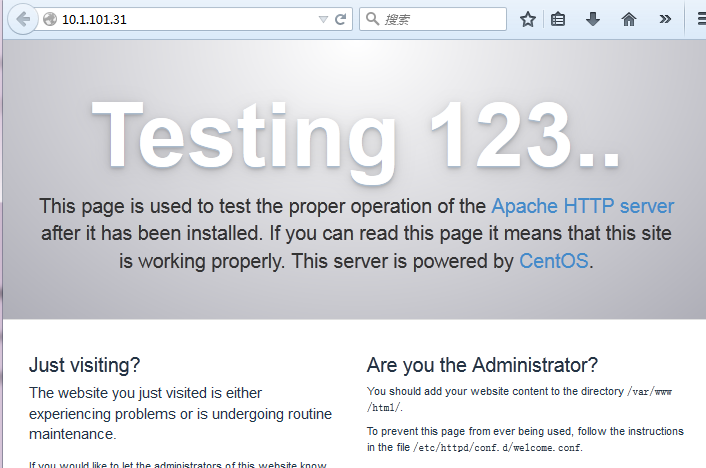
访问ip验证一下,成功!
二、配置
httpd默认的配置文件目录为
[root@yl-web httpd]# cd /etc/httpd/

[root@yl-web httpd]# ls

conf  conf.d  conf.modules.d  logs  modules  run
主配置文件是/etc/httpd/conf/httpd.conf。
配置存储在的/etc/httpd/conf.d/目录。
1、主配置文件
看一下主配置文件httpd.conf里有用的配置项

#服务器根目录
ServerRoot "/etc/httpd"

#端口
#Listen 12.34.56.78:80

Listen 80

#域名+端口来标识服务器,没有域名用ip也可以
#ServerName www.example.com:80

#不许访问根目录
<Directory />

    AllowOverride none

    Require all denied

</Directory>

# 文档目录
DocumentRoot "/var/www/html"

# 对 /var/www目录访问限制
<Directory "/var/www">

    AllowOverride None

    # Allow open access:

    Require all granted

</Directory>

# 对/var/www/html目录访问限制

<Directory "/var/www/html">

   Options Indexes FollowSymLinks

   AllowOverride None

   Require all granted

</Directory>

# 默认编码
AddDefaultCharset UTF-8

#EnableMMAP off

EnableSendfile on

# include进来其它配置文件

IncludeOptional conf.d/*.conf
2、下载配置mod_wsgi
安装mod_wsgi前先进行apache的apxs扩展
http-devel 是为了apxs,yum后你可以whereis apxs去寻找他,然后后边编译使用。
# yum install -y httpd-devel
下载
[root@yl-web collectedstatic]# yum install mod_wsgi
在httpd.conf中增加下面配置:
LoadModule wsgi_module modules/mod_wsgi.so
该配置用来连接django.wsgi,使工程被apache加载。
配置django wsgi
在项目目录下新建wsgi,里面新建django.wsgi,内容如下
import os

import sys

import django.core.handlers.wsgi

from django.conf import settings

# Add this file path to sys.path in order to import settings

sys.path.insert(0, os.path.join(os.path.dirname(os.path.realpath(__file__)), '..'))

os.environ['DJANGO_SETTINGS_MODULE'] = 'lxyproject.settings'

sys.stdout = sys.stderr

DEBUG = True

application = django.core.handlers.wsgi.WSGIHandler()
配置wsgi时,
- 必须配置项目路径到系统路径中,因为要通过项目路径找到settings.py配置文件。也就是sys.path.insert(0, os.path.join(os.path.dirname(os.path.realpath(__file__)), '..'))。
- DJANGO_SETTINGS_MODULE必须指向项目的settings.py文件。
修改了wsgi的配置后必须重启httpd服务。
3、配置django项目虚拟主机
在/etc/httpd/conf.d中添加配置文件lxyproject.conf,内容如下
<VirtualHost *:80>

WSGIScriptAlias / /srv/lxyproject/wsgi/django.wsgi

Alias /static/ /srv/lxyproject/collectedstatic/

ServerName 10.1.101.31

#ServerName example.com

#ServerAlias www.example.com

<Directory /srv/lxyproject/collectedstatic>

    Options Indexes  FollowSymLinks

    AllowOverride None

    Require all granted

</Directory>

<Directory /srv/lxyproject/wsgi/>

    Require all granted

</Directory>

ErrorLog   /etc/httpd/logs/lxyproject.error.log

LogLevel warn

</VirtualHost>
其中
WSGIScriptAlias 直接告诉apache,这个虚拟主机中,请求/就交给WSGI处理,也就是项目中配置的django.wsgi会指明。
Alias 说明访问/static/直接从DocumentRoot中获取,而无需经过WSGI处理。
现在就可以通过apache服务器配置的IP访问django项目了。
django安装mysqlclient组件遇到的问题:
centos7 解决 Python.h:没有那个文件或目录 错误的方法
sudo yum install python-devel
/usr/python3./bin/pip3 install --upgrade pip

ln -s /usr/python3./bin/pip3 /usr/bin/pip3

/usr/python3./lib/python3./site-packages

ln -s /usr/python3./lib/python3./site-packages/django/bin/django-admin.py    /usr/bin/django-admin.py

ln -s /usr/python3./bin/python3. /usr/bin/python

ln -s /usr/python3./bin/pip3 /usr/bin/pip3
安装mysqlclient报错:
Command "python setup.py egg_info" failed with error code 1 in /tmp/pip-build-ue65k1mc/mysqlclient/
yum install mysql-devel
CentOS71611部署Django的更多相关文章
- mac osx 上面部署Django项目 apache+mysql+mod_wsgi
1.安装Xcode command line tools 首先,编译mysql和Homebrew需要用到Xcode command line tools,所以首先安装command line tool ...
- Ubuntu上通过nginx部署Django笔记
Django的部署可以有很多方式,采用nginx+uwsgi的方式是其中比较常见的一种方式.今天在Ubuntu上使用Nginx部署Django服务,虽然不是第一次搞这个了,但是发现还是跳进了好多坑,g ...
- Apache2.4部署django出现403 Forbidden错误解决办法
前言:Apache2.4部署django出现403 Forbidden错误最好要结合apache中的错误日志来观察出现何种错误导致出现403错误 下午百度了一下午没找到解决办法,试了n种方法,简直坑爹 ...
- 五步教你实现使用Nginx+uWSGI+Django方法部署Django程序
Django的部署可以有很多方式,采用nginx+uwsgi的方式是其中比较常见的一种方式. 在这种方式中,我们的通常做法是,将nginx作为服务器最前端,它将接收WEB的所有请求,统一管理请求.ng ...
- Ubuntu16.04 apache2 wsgi 部署django
在Ubuntu16.04上部署django其实还算简单直观,最重要的问题就是路径设置正确,并且保证版本统一,这个测试是在 Apache/2.4.18 (Ubuntu) apt-get install ...
- 通过Nginx部署Django(基于ubuntu)
Django的部署可以有很多方式,采用nginx+uwsgi的方式是其中比较常见的一种方式. 在这种方式中,我们的通常做法是,将nginx作为服务器最前端,它将接收WEB的所有请求,统一管理请求.ng ...
- apache部署django记录
在ubuntu下通过apache部署django 首先需要下载python,django,apache以及wsgi模块 python基本已经自带,我用的是2.7,不是的话可以重新装一个 下载djang ...
- Docker 使用指南 (六)—— 使用 Docker 部署 Django 容器栈
版权声明:本文由田飞雨原创文章,转载请注明出处: 文章原文链接:https://www.qcloud.com/community/article/98 来源:腾云阁 https://www.qclou ...
- Windows下Apache部署Django过程记录
Win7/Apache/Python2.7/Django1.9部署Web 环境: Windows7 Apache httpd-2.4.16-win64-VC14 Python2.7.11 Djan ...
随机推荐
- [转]C#开发微信公众平台-就这么简单
本文转自:http://www.it165.net/pro/html/201403/11102.html 写在前面 服务号和订阅号 URL配置 创建菜单 查询.删除菜单 接受消息 发送消息(图文.菜单 ...
- leetcode216
public class Solution { public IList<IList<int>> CombinationSum3(int k, int n) { , , , , ...
- java core 正则 "\\PL+"的意义
java core第十版中的第一章中出现了一个正则"\\PL+",根据注释(Split into words:noletters are delimiters)提示,这个正则的意思 ...
- Unable to find required classes (javax.activation.DataHandler and javax.mail.internet.MimeMultipart)
在接触WebService时值得收藏的一篇文章: 在调试Axis1.4访问WebService服务时,出现以下错误: Unable to find required classes (javax.ac ...
- Java多线程-新特征-信号量Semaphore
简介信号量(Semaphore),有时被称为信号灯,是在多线程环境下使用的一种设施, 它负责协调各个线程, 以保证它们能够正确.合理的使用公共资源. 概念Semaphore分为单值和多值两种,前者只能 ...
- 思考ASP.NET网站静态化的利与弊
最近在思考网站要不要进行静态化的问题,在网上收集和整理了有关静态化利与弊的资料,于是写下此博文分享到网络上.由于本人是一名asp.net开发人员,所以本文的观点可能无法涉及到全部方面,但是比较注重于使 ...
- http头部信息解析
HTTP 头部解释 1. Accept:告诉WEB服务器自己接受什么介质类型,*/* 表示任何类型,type/* 表示该类型下的所有子类型,type/sub-type. 2. Accept-Chars ...
- 【bzoj2186】[Sdoi2008]沙拉公主的困惑
2186: [Sdoi2008]沙拉公主的困惑 Time Limit: 10 Sec Memory Limit: 259 MBSubmit: 3303 Solved: 1129[Submit][S ...
- XHProf安装使用笔记
编译安装 获取源代码包root@sourcjoy>wget http://pecl.php.net/get/xhprof-0.9.2.tgz解压root@sourcjoy>tar zxf ...
- 第十三课 Actionlib(2)
上节课讲到了客户端,这节课讲解一下服务器 1.创建服务器源文件touch fibonacciserver.cpp 2.编写源文件 3.修改CMakeLists.txt 4.编译之catkin_make ...