
基于Bootstrap的jQuery开关按钮组合
Bootstrap是一款由Twitter推出的开源前端开发包,功能非常强大。今天我们要分享的这款jQuery开关按钮组合就是基于Bootstrap框架的,看了按钮的主题样式,也都是Bootstrap的样式风格,比较清新和简单。这款jQuery开关按钮可以满足你不同的应用需求,包括样式、大小等。
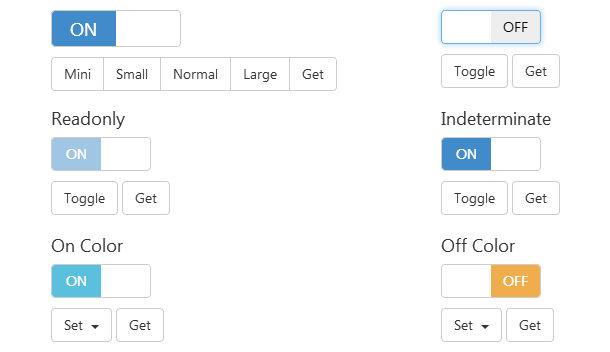
实现的代码。
html代码:
<div class="container">
<div class="row">
<div class="col-sm-6 col-lg-4">
<h2 class="h4">State</h2>
<p>
<input id="switch-state" type="checkbox" checked>
</p>
<div class="btn-group">
<button type="button" data-switch-toggle="state" class="btn btn-default">Toggle</button>
<button type="button" data-switch-set="state" data-switch-value="true" class="btn btn-default">Set true</button>
<button type="button" data-switch-set="state" data-switch-value="false" class="btn btn-default">Set false</button>
<button type="button" data-switch-get="state" class="btn btn-default">Get</button>
</div>
</div>
<div class="col-sm-6 col-lg-4">
<h2 class="h4">Size</h2>
<p>
<input id="switch-size" type="checkbox" checked data-size="mini">
</p>
<div class="btn-group">
<button type="button" data-switch-set="size" data-switch-value="mini" class="btn btn-default">Mini</button>
<button type="button" data-switch-set="size" data-switch-value="small" class="btn btn-default">Small</button>
<button type="button" data-switch-set="size" data-switch-value="normal" class="btn btn-default">Normal</button>
<button type="button" data-switch-set="size" data-switch-value="large" class="btn btn-default">Large</button>
<button type="button" data-switch-get="size" class="btn btn-default">Get</button>
</div>
</div>
<div class="col-sm-6 col-lg-4">
<h2 class="h4">Animate</h2>
<p>
<input id="switch-animate" type="checkbox" checked>
</p>
<p>
<button type="button" data-switch-toggle="animate" class="btn btn-default">Toggle</button>
<button type="button" data-switch-get="animate" class="btn btn-default">Get</button>
</p>
</div>
<div class="col-sm-6 col-lg-4">
<h2 class="h4">Disabled</h2>
<p>
<input id="switch-disabled" type="checkbox" checked disabled>
</p>
<p>
<button type="button" data-switch-toggle="disabled" class="btn btn-default">Toggle</button>
<button type="button" data-switch-get="disabled" class="btn btn-default">Get</button>
</p>
</div>
<div class="col-sm-6 col-lg-4">
<h2 class="h4">Readonly</h2>
<p>
<input id="switch-readonly" type="checkbox" checked readonly>
</p>
<p>
<button type="button" data-switch-toggle="readonly" class="btn btn-default">Toggle</button>
<button type="button" data-switch-get="readonly" class="btn btn-default">Get</button>
</p>
</div>
<div class="col-sm-6 col-lg-4">
<h2 class="h4">Indeterminate</h2>
<p>
<input id="switch-indeterminate" type="checkbox" checked data-indeterminate="true">
</p>
<p>
<button type="button" data-switch-toggle="indeterminate" class="btn btn-default">Toggle</button>
<button type="button" data-switch-get="indeterminate" class="btn btn-default">Get</button>
</p>
</div>
<div class="col-sm-6 col-lg-4">
<h2 class="h4">Inverse</h2>
<p>
<input id="switch-inverse" type="checkbox" checked data-inverse="true">
</p>
<p>
<button type="button" data-switch-toggle="inverse" class="btn btn-default">Toggle</button>
<button type="button" data-switch-get="inverse" class="btn btn-default">Get</button>
</p>
</div>
<div class="col-sm-6 col-lg-4">
<h2 class="h4">On Color</h2>
<p>
<input id="switch-onColor" type="checkbox" checked data-on-color="info">
</p>
<p class="btn-group">
<div class="btn-group">
<button type="button" data-toggle="dropdown" class="btn btn-default dropdown-toggle">Set <span class="caret"></span></button>
<div role="menu" class="dropdown-menu">
<li><a data-switch-set="onColor" data-switch-value="primary">Primary</a></li>
<li><a data-switch-set="onColor" data-switch-value="info">Info</a></li>
<li><a data-switch-set="onColor" data-switch-value="success">Success</a></li>
<li><a data-switch-set="onColor" data-switch-value="warning">Warning</a></li>
<li><a data-switch-set="onColor" data-switch-value="default">Default</a></li>
</div>
</div>
<button type="button" data-switch-get="onColor" class="btn btn-default">Get</button>
</p>
</div>
<div class="col-sm-6 col-lg-4">
<h2 class="h4">Off Color</h2>
<p>
<input id="switch-offColor" type="checkbox" data-off-color="warning">
</p>
<p class="btn-group">
<div class="btn-group">
<button type="button" data-toggle="dropdown" class="btn btn-default dropdown-toggle">Set <span class="caret"></span></button>
<div role="menu" class="dropdown-menu">
<li><a data-switch-set="offColor" data-switch-value="primary">Primary</a></li>
<li><a data-switch-set="offColor" data-switch-value="info">Info</a></li>
<li><a data-switch-set="offColor" data-switch-value="success">Success</a></li>
<li><a data-switch-set="offColor" data-switch-value="warning">Warning</a></li>
<li><a data-switch-set="offColor" data-switch-value="default">Default</a></li>
</div>
</div>
<button type="button" data-switch-get="offColor" class="btn btn-default">Get</button>
</p>
</div>
<div class="col-sm-6 col-lg-4">
<h2 class="h4">On Text</h2>
<p>
<input id="switch-onText" type="checkbox" checked data-on-text="Yes">
</p>
<div class="row">
<div class="col-sm-6">
<input type="text" data-switch-set-value="onText" value="Yes" class="form-control">
</div>
</div>
</div>
<div class="col-sm-6 col-lg-4">
<h2 class="h4">Off Text</h2>
<p>
<input id="switch-offText" type="checkbox" data-off-text="No">
</p>
<div class="row">
<div class="col-sm-6">
<input type="text" data-switch-set-value="offText" value="No" class="form-control">
</div>
</div>
</div>
<div class="col-sm-6 col-lg-4">
<h2 class="h4">Label Text</h2>
<p>
<input id="switch-labelText" type="checkbox" data-label-text="Label">
</p>
<div class="row">
<div class="col-sm-6">
<input type="text" data-switch-set-value="labelText" class="form-control">
</div>
</div>
</div>
<div class="col-sm-6 col-lg-4">
<h2 class="h4">Handle Width</h2>
<p>
<input id="switch-handleWidth" type="checkbox" data-handle-width="100">
</p>
<div class="row">
<div class="col-sm-6">
<input type="number" data-switch-set-value="handleWidth" value="100" class="form-control">
</div>
</div>
</div>
<div class="col-sm-6 col-lg-4">
<h2 class="h4">Label Width</h2>
<p>
<input id="switch-labelWidth" type="checkbox" data-label-width="100">
</p>
<div class="row">
<div class="col-sm-6">
<input type="number" data-switch-set-value="labelWidth" value="100" class="form-control">
</div>
</div>
</div>
<div class="col-sm-6 col-lg-4">
<h2 class="h4">Create | Destroy</h2>
<p>
<input id="switch-create-destroy" type="checkbox" checked data-switch-no-init>
</p>
<div class="row">
<div class="col-sm-6">
<button type="button" data-switch-create-destroy data-destroy-text="Destroy" class="btn btn-default">Create</button>
</div>
</div>
</div>
</div><br><br>
<div class="text-center">
<h2 class="h4">Radio All Off</h2>
<div class="row">
<div class="col-sm-6">
<h3 class="h5">Disabled</h3>
<input type="radio" name="radio1" checked class="switch-radio1">
<input type="radio" name="radio1" class="switch-radio1">
<input type="radio" name="radio1" class="switch-radio1">
</div>
<div class="col-sm-6">
<h3 class="h5">Enabled</h3>
<input type="radio" name="radio2" checked data-radio-all-off="true" class="switch-radio2">
<input type="radio" name="radio2" data-radio-all-off="true" class="switch-radio2">
<input type="radio" name="radio2" data-radio-all-off="true" class="switch-radio2">
</div>
</div><br>
<div style="text-align:center;clear:both;">
<script src="/gg_bd_ad_720x90-2.js" type="text/javascript"></script>
<script src="/follow.js" type="text/javascript"></script>
</div>
<hr>
<h2 class="h4">在模态窗口中显示</h2>
<button data-toggle="modal" data-target="#modal-switch" class="btn btn-default">Open Modal</button>
<div id="modal-switch" tabindex="-1" role="dialog" aria-labelledby="modal-switch-label" class="modal fade">
<div class="modal-dialog">
<div class="modal-content">
<div class="modal-header">
<button type="button" data-dismiss="modal" class="close"><span aria-hidden="true">×</span><span class="sr-only">Close</span></button>
<div id="modal-switch-label" class="modal-title">Title</div>
</div>
<div class="modal-body">
<input id="switch-modal" type="checkbox" checked>
</div>
</div>
</div>
</div>
</div>
</div>
via:http://www.w2bc.com/Article/20900
基于Bootstrap的jQuery开关按钮组合的更多相关文章
- 基于Bootstrap的jQuery开关按钮插件
按钮 下载 使用方法 首先要在页面中引入依赖文件: jquery.Bootstrap.Bootstrap Switch CSS和Bootstrap Switch JS.这里用的是bootstr ...
- 基于Bootstrap的JQuery TreeView树形控件,数据支持json字符串、list集合(MVC5)<二>
上篇博客给大家介绍了基于Bootstrap的JQuery TreeView树形控件,数据支持json字符串.list集合(MVC5)<一>, 其中的两种方式都显得有些冗余.接着上篇博客继续 ...
- 基于bootstrap的jQuery多级列表树插件 treeview
http://www.cnblogs.com/mfc-itblog/p/5233453.html http://www.htmleaf.com/jQuery/Menu-Navigation/20150 ...
- 基于bootstrap的jQuery多级列表树插件
简要教程 bootstrap-treeview是一款效果非常酷的基于bootstrap的jQuery多级列表树插件.该jQuery插件基于Twitter Bootstrap,以简单和优雅的方式来显示一 ...
- 基于Bootstrap使用jQuery实现输入框组input-group的添加与删除-改进版
上一次说到了基于Bootstrap使用jQuery实现输入框组input-group的添加与删除 ,初始状态下只有一个输入框组,可以通过点击输入框组的右侧“+”(或自定义的文字)可以在原输入框组的下面 ...
- Bootstrap 基于Bootstrap和JQuery实现动态打开和关闭tab页
基于Bootstrap和JQuery实现动态打开和关闭tab页 by:授客 QQ:1033553122 1. 测试环境 JQuery-3.2.1.min.j Bootstrap-3.3.7-d ...
- 基于Bootstrap、Jquery的自适应导航栏
css代码: .kch_nav{width: 100%; position: fixed;z-index: 999;top:0;left: 0;right: 0;height: 69px;backgr ...
- 弹出框一 之 基于bootstrap和jquery的自定义弹出框
(function ($) { window.Ewin = function () { var html = '<div id="[Id]" class="moda ...
- 基于Bootstrap的jQuery登录表单
在线演示 本地下载
随机推荐
- pku3277 City Horizon
http://poj.org/problem?id=3277 线段树,离散化,成段更新 #include <stdio.h> #include <stdlib.h> #defi ...
- U盘分区信息清除
diskpart select disk 1 clean 清除选中(优U)盘的所有信息;
- 60分钟内从零起步驾驭Hive实战学习笔记
本博文的主要内容是: 1. Hive本质解析 2. Hive安装实战 3. 使用Hive操作搜索引擎数据实战 SparkSQL前身是Shark,Shark强烈依赖于Hive.Spark原来没有做SQL ...
- SCP和SFTP(转)
原文:http://www.cnblogs.com/wang_yb/p/3819441.html 不管SCP还是SFTP,都是SSH的功能之一.都是使用SSH协议来传输文件的. 不用说文件内容,就是登 ...
- Struts – Wildcards example
Struts wildcards can helps to reduce the repetition in your struts-config.xml file, as long as your ...
- centos 安装redis php
$ wget http://download.redis.io/releases/redis-3.0.7.tar.gz $ tar xzf redis-3.0.7.tar.gz $ cd redis- ...
- linux 课后作业
第一章 第一单元 : 安装linux 系统:已完成 第二单元: 略 第三单元: 1) 要求以root用户登录系统,右击桌面打开终端,查看当前登陆Linux系统所使用的用户名2) 查看哪些用户在系统上工 ...
- DMOZ介绍以及如何提交
转载自 http://www.cnblogs.com/freespider/archive/2009/12/28/1633818.html Dmoz介绍及怎么提交? 1.Dmoz目录简介: Dmoz是 ...
- HDU3535AreYouBusy(分组背包)
http://acm.hdu.edu.cn/showproblem.php?pid=3535 分组背包,每一组加了以下三个限制 0 stands for the sets that should ch ...
- Map排序——按key排序,按value排序
注:转载请注明原文地址:http://www.cnblogs.com/ygj0930/p/5959279.html 上一篇博文谈到了集合类的自定义排序方式,那么进一步扩展开来,与集合同等重要的Map有 ...