
弹出框一 之 基于bootstrap和jquery的自定义弹出框
(function ($) {

    window.Ewin = function () {

        var html = '<div id="[Id]" class="modal fade" role="dialog" aria-labelledby="modalLabel">' +

                   '<div class="modal-dialog modal-sm">' +

                     '<div class="modal-content">' +

                       '<div class="modal-header">' +

                         '<button type="button" class="close" data-dismiss="modal"><span aria-hidden="true">×</span><span class="sr-only">Close</span></button>' +

                         '<h4 class="modal-title" id="modalLabel">[Title]</h4>' +

                       '</div>' +

                       '<div class="modal-body">' +

                       '<p>[Message]</p>' +

                       '</div>' +

                        '<div class="modal-footer">' +

        '<button type="button" class="btn btn-default cancel" data-dismiss="modal">[BtnCancel]</button>' +

        '<button type="button" class="btn btn-primary ok" data-dismiss="modal">[BtnOk]</button>' +

      '</div>' +

                     '</div>' +

                   '</div>' +

                 '</div>';

        var dialogdHtml = '<div id="[Id]" class="modal fade" role="dialog" aria-labelledby="modalLabel">' +

                   '<div class="modal-dialog">' +

                     '<div class="modal-content">' +

                       '<div class="modal-header">' +

                         '<button type="button" class="close" data-dismiss="modal"><span aria-hidden="true">×</span><span class="sr-only">Close</span></button>' +

                         '<h4 class="modal-title" id="modalLabel">[Title]</h4>' +

                       '</div>' +

                       '<div class="modal-body">' +

                       '</div>' +

                     '</div>' +

                   '</div>' +

                 '</div>';

        var reg = new RegExp("\\[([^\\[\\]]*?)\\]", 'igm');

        var generateId = function () {

            var date = new Date();

            return 'mdl' + date.valueOf();

        }

        var init = function (options) {

            options = $.extend({}, {

                title: "操作提示",

                message: "提示内容",

                btnok: "确定",

                btncl: "取消",

                width: 200,

                auto: false

            }, options || {});

            var modalId = generateId();

            var content = html.replace(reg, function (node, key) {

                return {

                    Id: modalId,

                    Title: options.title,

                    Message: options.message,

                    BtnOk: options.btnok,

                    BtnCancel: options.btncl

                }[key];

            });

            $('body').append(content);

            $('#' + modalId).modal({

                width: options.width,

                backdrop: 'static'

            });

            $('#' + modalId).on('hide.bs.modal', function (e) {

                $('body').find('#' + modalId).remove();

            });

            return modalId;

        }

        return {

            alert: function (options) {

                if (typeof options == 'string') {

                    options = {

                        message: options

                    };

                }

                var id = init(options);

                var modal = $('#' + id);

                modal.find('.ok').removeClass('btn-success').addClass('btn-primary');

                modal.find('.cancel').hide();

                return {

                    id: id,

                    on: function (callback) {

                        if (callback && callback instanceof Function) {

                            modal.find('.ok').click(function () { callback(true); });

                        }

                    },

                    hide: function (callback) {

                        if (callback && callback instanceof Function) {

                            modal.on('hide.bs.modal', function (e) {

                                callback(e);

                            });

                        }

                    }

                };

            },

            confirm: function (options) {

                var id = init(options);

                var modal = $('#' + id);

                modal.find('.ok').removeClass('btn-primary').addClass('btn-success');

                modal.find('.cancel').show();

                return {

                    id: id,

                    on: function (callback) {

                        if (callback && callback instanceof Function) {

                            modal.find('.ok').click(function () { callback(true); });

                            modal.find('.cancel').click(function () { callback(false); });

                        }

                    },

                    hide: function (callback) {

                        if (callback && callback instanceof Function) {

                            modal.on('hide.bs.modal', function (e) {

                                callback(e);

                            });

                        }

                    }

                };

            },

            dialog: function (options) {

                options = $.extend({}, {

                    title: 'title',

                    url: '',

                    width: 800,

                    height: 550,

                    onReady: function () { },

                    onShown: function (e) { }

                }, options || {});

                var modalId = generateId();

                var content = dialogdHtml.replace(reg, function (node, key) {

                    return {

                        Id: modalId,

                        Title: options.title

                    }[key];

                });

                $('body').append(content);

                var target = $('#' + modalId);

                target.find('.modal-body').load(options.url);

                if (options.onReady())

                    options.onReady.call(target);

                target.modal();

                target.on('shown.bs.modal', function (e) {

                    if (options.onReady(e))

                        options.onReady.call(target, e);

                });

                target.on('hide.bs.modal', function (e) {

                    $('body').find(target).remove();

                });

            }

        }

    }();

})(jQuery);
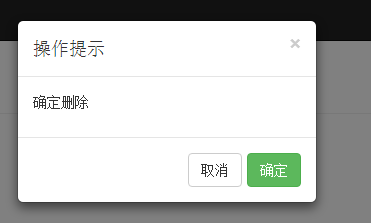
使用例子
   $(function () {

        // Ewin.alert("哈哈哈哈");

        Ewin.confirm({message:"确定删除"}).on(function (e) {

            console.log(e);

        });

    })
弹出框一 之 基于bootstrap和jquery的自定义弹出框的更多相关文章
- 基于bootstrap的jQuery多级列表树插件 treeview
http://www.cnblogs.com/mfc-itblog/p/5233453.html http://www.htmleaf.com/jQuery/Menu-Navigation/20150 ...
- 基于bootstrap的jQuery多级列表树插件
简要教程 bootstrap-treeview是一款效果非常酷的基于bootstrap的jQuery多级列表树插件.该jQuery插件基于Twitter Bootstrap,以简单和优雅的方式来显示一 ...
- 基于Bootstrap使用jQuery实现输入框组input-group的添加与删除-改进版
上一次说到了基于Bootstrap使用jQuery实现输入框组input-group的添加与删除 ,初始状态下只有一个输入框组,可以通过点击输入框组的右侧“+”(或自定义的文字)可以在原输入框组的下面 ...
- 基于Bootstrap的JQuery TreeView树形控件,数据支持json字符串、list集合(MVC5)<二>
上篇博客给大家介绍了基于Bootstrap的JQuery TreeView树形控件,数据支持json字符串.list集合(MVC5)<一>, 其中的两种方式都显得有些冗余.接着上篇博客继续 ...
- Bootstrap 基于Bootstrap和JQuery实现动态打开和关闭tab页
基于Bootstrap和JQuery实现动态打开和关闭tab页 by:授客 QQ:1033553122 1. 测试环境 JQuery-3.2.1.min.j Bootstrap-3.3.7-d ...
- 基于Bootstrap的jQuery开关按钮组合
Bootstrap是一款由Twitter推出的开源前端开发包,功能非常强大.今天我们要分享的这款jQuery开关按钮组合就是基于Bootstrap框架的,看了按钮的主题样式,也都是Bootstrap的 ...
- jquery实现自定义弹出框
<!DOCTYPE html> <html lang="en"> <head> <meta charset="UTF-8&quo ...
- 基于bootstrap selectpicker ,实现select下拉框模糊查询功能
1.html代码块 需要引入bootstrap的css js jquery bootstrap.css bootstrap-select.min.css jquery-1.11.3.min.js bo ...
- 基于Bootstrap、Jquery的自适应导航栏
css代码: .kch_nav{width: 100%; position: fixed;z-index: 999;top:0;left: 0;right: 0;height: 69px;backgr ...
随机推荐
- BeautifulSoup_python3
1.错误排除 bsObj = BeautifulSoup(html.read()) 报错: UserWarning: No parser was explicitly specified, so I' ...
- oracle 常用sql
-- 在sql中只有别名时用的是双引号select employee_id,last_name,12*salary as yearSalary from employees; select last_ ...
- bzoj3295: [Cqoi2011]动态逆序对(cdq分治)
#include <iostream> #include <cstdio> #include <cstring> #include <cmath> #i ...
- JDK里面的JRE是什么
就是相当于dotnet的虚拟机,dotnet的运行时环境. JRE(Java Runtime Environment,Java运行环境),运行JAVA程序所必须的环境的集合,包含JVM标准实现及Jav ...
- 安装Mysql提示1045错误解决方法
MySQL安装提示一下错误 The security settings could not be applied to the database because the connection has ...
- windows核心编程读后感(待续)
自从大一读那本超厚的C程序设计以后,从来没有像这样慢慢地读一本书了.windows核心这本书足足看了2个多星期.一张张慢慢看,做笔记.感觉学到了很多基础的知识,关于内核方面的没有啥可以做实验的,都在看 ...
- 帝国cms实现会员注册之后根据所在会员组转向的方法
帝国cms要实现会员注册之后根据所在会员组转向的能能,就需要修改/e/member/class/member_registerfun.php文件找到第175行,修改成如下代码: //审核 if($ch ...
- Codeforces Intel Code Challenge Final Round (Div. 1 + Div. 2, Combined) B. Batch Sort(暴力)
传送门 Description You are given a table consisting of n rows and m columns. Numbers in each row form a ...
- 获取URL的code的参数的值
1.获取URL的code的参数的值 需求说明:现在有URL为http://www.bdqn.cn/index.php?code=sdR4,请使用字符串对象的属性和方法来获取code的值,并把其指都转化 ...
- 【突发问题】昨天更新了OS X EI Capitan 出现了Cocoapods的 pod :command not found
然后我百度:http://www.jianshu.com/p/6ff1903c3f11 果真,我想想然后执行了作者说的第一步,删除本地Cocoapods文件,然后发现我执行不了接下来的几个步骤了.所以 ...