
helios架构详解(一)服务器端架构
看了“菜鸟耕地”的”.NET开源高性能Socket通信中间件Helios介绍及演示“,觉得这个东西不错。但是由于没有网络编程知识,所以高性能部分我就讲不出来了,主要是想根据开源代码跟大家分享下Helios的架构。
源代码下载地址:https://github.com/helios-io/helios
首先我们献上服务器端结构图:
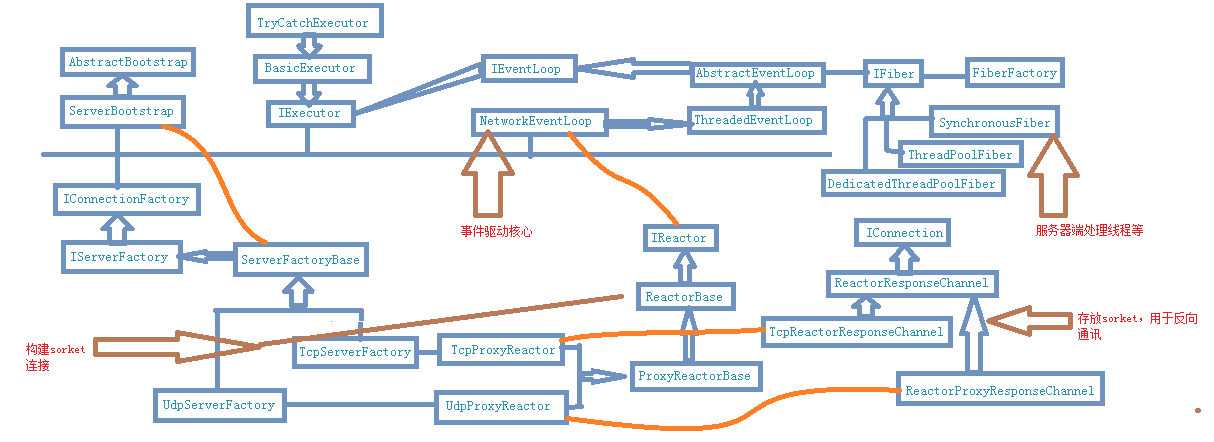
这样的一个大图片,估计很多地方都挺迷糊的,我们就详细的讲解下期中的逻辑。
ServerBootstrap类
该类是服务器端的核心类,服务器端提供服务的就是ServerBootstrap对象(实际上是它的子类,并且子类是由这个对象创建的)。
创建代码时我们会使用代码
 var serverFactory =

                new ServerBootstrap()

                    .SetTransport(TransportType.Tcp)

                    .Build();
- 该类有三个核心属性:IExecutor 、IServerFactory(IConnectionFactory)、NetworkEventLoop。
    public class ServerBootstrap : AbstractBootstrap

    {

        protected IExecutor InternalExecutor { get; set; }

        protected NetworkEventLoop EventLoop

        {

            get

            {

                return EventLoopFactory.CreateNetworkEventLoop(Workers, InternalExecutor);

            }

        }

        protected override IConnectionFactory BuildInternal()

        {

            switch (Type)

            {

                case TransportType.Tcp:

                    return new TcpServerFactory(this);

                case TransportType.Udp:

                    return new UdpServerFactory(this);

                default:

                    throw new InvalidOperationException("This shouldn't happen");

            }

        }

        public new IServerFactory Build()

        {

            return (IServerFactory) BuildInternal();

        }

    }
核心属性和方法
- 另外一个有特点的地方就是链式编程(可能借鉴于jquery),设置对象都返回个this指针。
    public class ServerBootstrap : AbstractBootstrap

    {

       public ServerBootstrap WorkersShareFiber(bool shareFiber)

        {

            UseSharedFiber = shareFiber;

            SetOption("proxiesShareFiber", UseSharedFiber);

            return this;

        }

        public new ServerBootstrap SetTransport(TransportType type)

        {

            base.SetTransport(type);

            return this;

        }

        public ServerBootstrap WorkerThreads(int workerThreadCount)

        {

            if (workerThreadCount < ) throw new ArgumentException("Can't be below 1", "workerThreadCount");

            Workers = workerThreadCount;

            return this;

        }

        public ServerBootstrap BufferSize(int bufferSize)

        {

            if (bufferSize < ) throw new ArgumentException("Can't be below 1024", "bufferSize");

            BufferBytes = bufferSize;

            return this;

        }

        public ServerBootstrap WorkersAreProxies(bool useProxies)

        {

            UseProxies = useProxies;

            return this;

        }

        public ServerBootstrap Executor(IExecutor executor)

        {

            if (executor == null) throw new ArgumentNullException("executor");

            InternalExecutor = executor;

            return this;

        }

        public new ServerBootstrap SetConfig(IConnectionConfig config)

        {

            base.SetConfig(config);

            return this;

        }

        public new ServerBootstrap SetDecoder(IMessageDecoder decoder)

        {

            base.SetDecoder(decoder);

            return this;

        }

        public new ServerBootstrap SetEncoder(IMessageEncoder encoder)

        {

            base.SetEncoder(encoder);

            return this;

        }

        public new ServerBootstrap SetAllocator(IByteBufAllocator allocator)

        {

            base.SetAllocator(allocator);

            return this;

        }

        public new ServerBootstrap OnConnect(ConnectionEstablishedCallback connectionEstablishedCallback)

        {

            base.OnConnect(connectionEstablishedCallback);

            return this;

        }

        public new ServerBootstrap OnDisconnect(ConnectionTerminatedCallback connectionTerminatedCallback)

        {

            base.OnDisconnect(connectionTerminatedCallback);

            return this;

        }

        public new ServerBootstrap OnReceive(ReceivedDataCallback receivedDataCallback)

        {

            base.OnReceive(receivedDataCallback);

            return this;

        }

        public new ServerBootstrap OnError(ExceptionCallback exceptionCallback)

        {

            base.OnError(exceptionCallback);

            return this;

        }

        public new ServerBootstrap SetOption(string optionKey, object optionValue)

        {

            base.SetOption(optionKey, optionValue);

            return this;

        }

}
链式编程
我们调用最后,肯定是使用build方法,而build方法实际上调用的是BuildInternal内部方法,而该这又是一个工厂模式(和后满ServerFactory组成抽象工厂??),会返回TcpServerFactory或者UdpServerFactory。
TcpServerFactory和UdpServerFactory
这俩个类其实没有什么核心代码,但是你网上追溯父类的时候你会发现TcpServerFactory(UdpServerFactory)=>ServerFactoryBase => ServerBootstrap。它们依旧是ServerBootstrap对象。不过不同的地方就是,他们除了爹还有了一个妈妈ServerFactoryBase =>IServerFactory =>IConnectionFactory。
我们看下ServerFactoryBase 源码:
    public abstract class ServerFactoryBase : ServerBootstrap, IServerFactory

    {

        protected ServerFactoryBase(ServerBootstrap other)

            : base(other)

        {

        }

        protected abstract ReactorBase NewReactorInternal(INode listenAddress);

        public IReactor NewReactor(INode listenAddress)

        {

            var reactor = NewReactorInternal(listenAddress);

            reactor.Configure(Config);

            if (ReceivedData != null)

                reactor.OnReceive += (ReceivedDataCallback)ReceivedData.Clone();

            if (ConnectionEstablishedCallback != null)

                reactor.OnConnection += (ConnectionEstablishedCallback)ConnectionEstablishedCallback.Clone();

            if (ConnectionTerminatedCallback != null)

                reactor.OnDisconnection += (ConnectionTerminatedCallback)ConnectionTerminatedCallback.Clone();

            if (ExceptionCallback != null)

                reactor.OnError += (ExceptionCallback) ExceptionCallback.Clone();

            return reactor;

        }

        public IConnection NewConnection()

        {

            return NewConnection(Node.Any());

        }

        public IConnection NewConnection(INode localEndpoint)

        {

            var reactor = (ReactorBase)NewReactor(localEndpoint);

            return reactor.ConnectionAdapter;

        }

        public IConnection NewConnection(INode localEndpoint, INode remoteEndpoint)

        {

            return NewConnection(localEndpoint);

        }

    }
发现它们母亲(IConnectionFactory)要做的事都是通过IReactor来完成的。而它们(TcpServerFactory和UdpServerFactory)只是找到合适的IReactor对象而已,另一方面我们也可以看出真正负责网络连接的就是IReactor对象。它就是保证底层通讯的逻辑。
    public sealed class TcpServerFactory : ServerFactoryBase

    {

        public TcpServerFactory(ServerBootstrap other)

            : base(other)

        {

        }

        protected override ReactorBase NewReactorInternal(INode listenAddress)

        {

            if (UseProxies)

                return new TcpProxyReactor(listenAddress.Host, listenAddress.Port, EventLoop, Encoder, Decoder,

                    Allocator, BufferBytes);

            else

                throw new NotImplementedException("Have not implemented non-TCP proxies");

        }

    }
TcpServerFactory
    public sealed class UdpServerFactory : ServerFactoryBase

    {

        public UdpServerFactory(ServerBootstrap other) : base(other)

        {

        }

        protected override ReactorBase NewReactorInternal(INode listenAddress)

        {

            return new UdpProxyReactor(listenAddress.Host, listenAddress.Port, EventLoop, Encoder, Decoder, Allocator, BufferBytes);

        }

    }
UdpServerFactory
IReactor们
这里包含TcpServerFactory内部使用的TcpProxyReactor、UdpServerFactory使用的UdpProxyReactor,以及他们的基类ProxyReactorBase、ReactorBase。他们之间的关系为:
- TcpProxyReactor => ProxyReactorBase => ReactorBase =>IReactor
- UdpProxyReactor => ProxyReactorBase => ReactorBase =>IReactor
- ReactorConnectionAdapter =>IConnection(适配器模式,内部封装IReactor)
*严格说ReactorConnectionAdapter 不算是IReactor,它只是适配器模式,使得IReactor对象能够和IConnection对象模式适配
虽然类不是很多,但估计helios的高效可能核心就和这部分有关系。但是我不太了解通讯相关内容,只能从构建的方式大致的讲下,有兴趣的人可以自己深入研究。
- ReactorBase :定义了基本操作、事件。对于接收,发送提供默认操作
- ProxyReactorBase :增加了ReactorResponseChannel对象,重载接收方法(ReceivedData,调用的是ReactorResponseChannel的OnReceive)
- TcpProxyReactor :重载StartInternal方法,使用TcpReactorResponseChannel进行数据接收
- UdpProxyReactor :重载StartInternal方法,使用ReactorProxyResponseChannel进行数据接收
ReactorResponseChannel们
此处包含三个类ReactorResponseChannel、TcpReactorResponseChannel、ReactorProxyResponseChannel。
- ReactorResponseChannel 基类,定义基础操作。主要是Send方法
- TcpReactorResponseChannel,TCP协议下的ReactorResponseChannel实现。
- ReactorProxyResponseChannel,ReactorResponseChannel的代理,实际上就是把ReactorResponseChannel虚方法变成空方法而已。
ReactorResponseChannel中OnReceive方法调用的是”NetworkEventLoop.Receive(data, this);“,将数据发送到EventLoop(消息队列)中。
EventLoop(消息队列)
消息队列一共有三个层次继承,分别是:NetworkEventLoop、ThreadedEventLoop、AbstractEventLoop
继承关系为:NetworkEventLoop=> ThreadedEventLoop=> AbstractEventLoop。
- AbstractEventLoop:内部使用IFiber对象,进行消息处理。所有的处理方法最终走的都是IFiber对象(实际上IFiber中维护一个列表,之后由IFiber对象决定如何处理)
- ThreadedEventLoop:构造函数构建自己的IFiber对象(默认使用的是:DedicatedThreadPoolFiber)
- NetworkEventLoop:将网络事件、数据接收事件用IFiber对象处理
IFiber们
IFiber的作用不是处理接收的数据,而是在乎用什么样的方式处理数据,比如起几个线程,同步还是异步的处理。IFiber对象有好几个,但是实际上真正用的只有1个(DedicatedThreadPoolFiber),但是不妨碍我们去看看这些对象。
- DedicatedThreadPoolFiber使用hebios自己的线程池技术(DedicatedThreadPool),底层通过线程池来处理数据。
- SynchronousFiber同步处理,当一个操作进入消息队列的时候立即处理
- ThreadPoolFiber使用线程池技术,底层通过线程池来处理数据
- SharedFiber共享Fiber,当NetworkEventLoop.clone()的时候,只是简单的将NetworkEventLoop的IFiber对象传递过来,以达到多个NetworkEventLoop共享IFiber的目的
最后的处理类:BasicExecutor/TryCatchExecutor
在IFiber里面,我们会默认构造BasicExecutor对象(TryCatchExecutor继承自BasicExecutor,可以catch住异常),这个类会最终处理服务器端的数据请求。
总结:服务器端处理数据的顺序为:创建ServerBootstrap对象,构建出它的子类(IConnectionFactory),之后分别进行网络通讯(IReactor),通讯管道(ReactorResponseChannel)对数据接收发送管理,之后数据进入消息队列(EventLoop),服务器端决定处理数据的线程技术(IFiber),最终将数据处理(BasicExecutor)
*这不是真实的接送逻辑,而是我们沿着源代码求索逻辑的顺序。
helios架构详解(一)服务器端架构的更多相关文章
- NopCommerce源码架构详解--初识高性能的开源商城系统cms
很多人都说通过阅读.学习大神们高质量的代码是提高自己技术能力最快的方式之一.我觉得通过阅读NopCommerce的源码,可以从中学习很多企业系统.软件开发的规范和一些新的技术.技巧,可以快速地提高我们 ...
- 领域驱动设计(Domain Driven Design)参考架构详解
摘要 本文将介绍领域驱动设计(Domain Driven Design)的官方参考架构,该架构分成了Interfaces.Applications和Domain三层以及包含各类基础设施的Infrast ...
- WeChatAPI 开源系统架构详解
WeChatAPI 开源系统架构详解 如果使用WeChatAPI,它扮演着什么样的角色? 从图中我们可以看到主要分为3个部分: 1.业务系统 2.WeChatAPI: WeChatWebAPI,主要是 ...
- hdfs文件系统架构详解
hdfs文件系统架构详解 官方hdfs分布式介绍 NameNode *Namenode负责文件系统的namespace以及客户端文件访问 *NameNode负责文件元数据操作,DataNode负责文件 ...
- NopCommerce源码架构详解
NopCommerce源码架构详解--初识高性能的开源商城系统cms 很多人都说通过阅读.学习大神们高质量的代码是提高自己技术能力最快的方式之一.我觉得通过阅读NopCommerce的源码,可以从 ...
- RESTful 架构详解
RESTful 架构详解 分类 编程技术 1. 什么是REST REST全称是Representational State Transfer,中文意思是表述(编者注:通常译为表征)性状态转移. 它首次 ...
- Nop--NopCommerce源码架构详解专题目录
最近在研究外国优秀的ASP.NET mvc电子商务网站系统NopCommerce源码架构.这个系统无论是代码组织结构.思想及分层都值得我们学习.对于没有一定开发经验的人要完全搞懂这个源码还是有一定的难 ...
- Zookeeper系列二:分布式架构详解、分布式技术详解、分布式事务
一.分布式架构详解 1.分布式发展历程 1.1 单点集中式 特点:App.DB.FileServer都部署在一台机器上.并且访问请求量较少 1.2 应用服务和数据服务拆分 特点:App.DB.Fi ...
- [转载]领域驱动设计(Domain Driven Design)参考架构详解
摘要 本文将介绍领域驱动设计(Domain Driven Design)的官方参考架构,该架构分成了Interfaces.Applications和Domain三层以及包含各类基础设施的Infrast ...
- 【菜鸟】RESTful 架构详解
RESTful 架构详解 分类 编程技术 1. 什么是REST REST全称是Representational State Transfer,中文意思是表述(编者注:通常译为表征)性状态转移. 它首次 ...
随机推荐
- iOS开发之再探多线程编程:Grand Central Dispatch详解
Swift3.0相关代码已在github上更新.之前关于iOS开发多线程的内容发布过一篇博客,其中介绍了NSThread.操作队列以及GCD,介绍的不够深入.今天就以GCD为主题来全面的总结一下GCD ...
- zookeeper源码分析之五服务端(集群leader)处理请求流程
leader的实现类为LeaderZooKeeperServer,它间接继承自标准ZookeeperServer.它规定了请求到达leader时需要经历的路径: PrepRequestProcesso ...
- ADO.NET编程之美----数据访问方式(面向连接与面向无连接)
最近,在学习ADO.NET时,其中提到了数据访问方式:面向连接与面向无连接.于是,百度了一下,发现并没有很好的资料,然而,在学校图书馆中发现一本好书(<ASP.NET MVC5 网站开发之美&g ...
- Ajax部分
Ajax的概念 AJAX即"Asynchronous Javascript And XML"(异步JavaScript和XML),是一种用于创建快速动态网页的技术. 动态网页:是指 ...
- Android使用静默安装时碰见的问题
升级时碰见的异常 private void installPackage(String appName,final File apk) { if (!apk.exists()) { setHasNew ...
- Android之使用文件进行IPC
一.文件进行IPC介绍 共享文件也是一种不错的进程间通信方式,两个进程通过读/写同一个文件来交换数据.在Windows上,一个文件如果被加了排斥锁将会导致其他线程无法对其进行访问,包括读写,而由于An ...
- 如何使用dos命令打开当前用户、当前日期、当前时间以及当前用户加当前时间?
1.dos命令安装mysqld --stall.启动net start mysql.进入MySQL数据库mysql -uroot -p后,输入select user();当前用户 select cur ...
- mono for android 用ISharedPreferences 进行状态保持 会话保持 应用程序首选项保存
由于项目需要 要保持用户登录状态 要进行状态保持 用途就好像asp.net的session一样 登录的时候进行保存 ISharedPreferences shared = GetSharedPrefe ...
- 一步步学习javascript基础篇(7):BOM和DOM
一.什么是BOM.什么是DOM BOM即浏览器对象模型,主要用了访问一些和网页无关的浏览器功能.如:window.location.navigator.screen.history等对象. DOM即文 ...
- ValueInjecter----最好用的OOM(以微信消息转对象举例)
使用数据实体的好处我这里就不多说了,但大家享受这些好处的时候,难免也对那些琐碎的赋值代码感到厌烦,基于此,我认为掌握一个oom的使用,还是很有必要的. 这种类型的工具有很多,比如automapper, ...