
C#学习笔记(第1周作业)
受队友诱惑,去听了李强的C#公选课,第二天就完成作业了。
作业要求:
1. 小学生加法程序;
2. 能自由设置难度;
3. 对结果进行统计。
第一次写C#程序,遇到不少困难,和队友讨论,百度谷歌一齐上。
让同学帮忙测试,找出十多处Bug,一一修改。
本来挺好看的代码,被我改成一坨屎了都。T-T
上图:



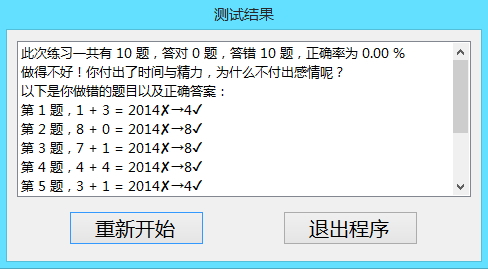
下载地址:
 using System;

 using System.Collections.Generic;

 using System.ComponentModel;

 using System.Data;

 using System.Drawing;

 using System.Linq;

 using System.Text;

 using System.Windows.Forms;

 namespace AdditionGame

 {

     public partial class Setting : Form

     {

         public Setting()

         {

             InitializeComponent();

         }

         private void Form1_Load(object sender, EventArgs e)

         {

             textBox1.Text = "";

             textBox2.Text = "";

             textBox1.Focus();

         }

         private void button1_Click(object sender, EventArgs e)

         {

             textBox1.Text = "";

             textBox2.Text = "";

             textBox1.Focus();

         }

         private void Form1_Activated(object sender, EventArgs e)

         {

             textBox1.Text = "";

             textBox2.Text = "";

             textBox1.Focus();

         }

         private void button2_Click(object sender, EventArgs e)

         {

             if (textBox1.Text == "" || textBox2.Text == "")

             {

                 Error f7 = new Error(this);

                 f7.Show();

                 this.Hide();

             }

             else

             {

                 bool Flag = true;

                 string Str1 = Convert.ToString(textBox1.Text);

                 if (Str1.Length > )

                     Flag = false;

                 else

                     for (int i = ; i < Str1.Length; ++i)

                         if (Str1[i] < '' || Str1[i] > '')

                         {

                             Flag = false;

                             break;

                         }

                 string Str2 = Convert.ToString(textBox2.Text);

                 if (Str2.Length > )

                     Flag = false;

                 else

                     for (int i = ; i < Str2.Length; ++i)

                         if (Str2[i] < '' || Str2[i] > '')

                         {

                             Flag = false;

                             break;

                         }

                 if (Flag)

                 {

                     ClassCommon.Scope = Convert.ToInt32(textBox1.Text);

                     ClassCommon.Total = Convert.ToInt32(textBox2.Text);

                     if (ClassCommon.Scope ==  || ClassCommon.Total == )

                     {

                         Error f5 = new Error(this);

                         f5.Show();

                         this.Hide();

                     }

                     else

                     {

                         Playing f2 = new Playing(this);

                         f2.Show();

                         this.Hide();

                     }

                 }

                 else

                 {

                     Error f6 = new Error(this);

                     f6.Show();

                     this.Hide();

                 }

             }

         }

         private void button3_Click(object sender, EventArgs e)

         {

             this.Close();

         }

         private void button4_Click(object sender, EventArgs e)

         {

             About f3 = new About(this);

             f3.Show();

             this.Hide();

         }

     }

 }
Playing.cs
 using System;

 using System.Collections.Generic;

 using System.ComponentModel;

 using System.Data;

 using System.Drawing;

 using System.Linq;

 using System.Text;

 using System.Windows.Forms;

 namespace AdditionGame

 {

     public partial class Playing : Form

     {

         Form f1 = new Setting();

         public Playing(Setting firstForm)

         {

             InitializeComponent();

             f1 = firstForm;

         }

         private void Get_Random_Addend()

         {

             Random seed = new Random();

             Random Addend = new Random(seed.Next());

             for (int i = ; i < ClassCommon.Total; ++i)

             {

                 ClassCommon.F[i].Addend1 = Addend.Next(ClassCommon.Scope);

                 ClassCommon.F[i].Addend2 = Addend.Next(ClassCommon.Scope - ClassCommon.F[i].Addend1);

             }

         }

         private void Put_Random_Addend()

         {

             textBox1.Text = Convert.ToString(ClassCommon.F[ClassCommon.Count].Addend1);

             textBox2.Text = Convert.ToString(ClassCommon.F[ClassCommon.Count].Addend2);

             ++ClassCommon.Count;

             textBox3.Focus();

         }

         private void Form2_Load(object sender, EventArgs e)

         {

             progressBar1.Minimum = ;

             progressBar1.Maximum = ClassCommon.Total*;

             progressBar1.Value = ;

             for (int i = ; i < ClassCommon.Total; ++i)

                 ClassCommon.F[i].Ans = -;

             ClassCommon.Count = ;

             Get_Random_Addend();

             Put_Random_Addend();

             progressBar1.Value += ;

             if (ClassCommon.F[ClassCommon.Count - ].Ans != -)

                 textBox3.Text = Convert.ToString(ClassCommon.F[ClassCommon.Count - ].Ans);

             else

                 textBox3.Text = "";

             textBox3.Focus();

         }

         private void button3_Click(object sender, EventArgs e)

         {

             this.Close();

             f1.Show();

         }

         private void button4_Click(object sender, EventArgs e)

         {

             this.Close();

             f1.Close();

         }

         private void Form2_Activated(object sender, EventArgs e)

         {

             textBox3.Focus();

             button1.Enabled = false;

             this.Text = "第" + Convert.ToString(ClassCommon.Count) + "题";

             if (ClassCommon.Count == ClassCommon.Total)

                 button2.Text = "完成";

             else

                 button2.Text = "下一题";

         }

         private void button2_Click(object sender, EventArgs e)

         {

             if (textBox3.Text != "" && textBox3.TextLength < )

             {

                 if (ClassCommon.Count == ClassCommon.Total)

                 {

                     ClassCommon.F[ClassCommon.Count - ].Ans = Convert.ToInt32(textBox3.Text);

                     Result f4 = new Result(this.f1);

                     this.Close();

                     f4.Show();

                 }

                 else

                 {

                     button1.Enabled = true;

                     ClassCommon.F[ClassCommon.Count - ].Ans = Convert.ToInt32(textBox3.Text);

                     Put_Random_Addend();

                     progressBar1.Value += ;

                 }

             }

             if (ClassCommon.F[ClassCommon.Count - ].Ans != -)

                 textBox3.Text = Convert.ToString(ClassCommon.F[ClassCommon.Count - ].Ans);

             else

                 textBox3.Text = "";

             this.Text = "第" + Convert.ToString(ClassCommon.Count) + "题";

             if (ClassCommon.Count == ClassCommon.Total)

                 button2.Text = "完成";

             else

                 button2.Text = "下一题";

             textBox3.Focus();

         }

         private void button1_Click(object sender, EventArgs e)

         {

             ClassCommon.Count -= ;

             if (ClassCommon.Count == )

                 button1.Enabled = false;

             Put_Random_Addend();

             progressBar1.Value -= ;

             if (ClassCommon.F[ClassCommon.Count - ].Ans != -)

                 textBox3.Text = Convert.ToString(ClassCommon.F[ClassCommon.Count - ].Ans);

             else

                 textBox3.Text = "";

             if (ClassCommon.Count == ClassCommon.Total)

                 button2.Text = "完成";

             else

                 button2.Text = "下一题";

             this.Text = "第" + Convert.ToString(ClassCommon.Count) + "题";

             textBox3.Focus();

         }

     }

 }
Error.cs
 using System;

 using System.Collections.Generic;

 using System.ComponentModel;

 using System.Data;

 using System.Drawing;

 using System.Linq;

 using System.Text;

 using System.Windows.Forms;

 namespace AdditionGame

 {

     public partial class Error : Form

     {

         Form f1 = new Setting();

         public Error(Form firstForm)

         {

             InitializeComponent();

             f1 = firstForm;

         }

         private void Error_Load(object sender, EventArgs e)

         {

             button4.Focus();

         }

         private void button4_Click(object sender, EventArgs e)

         {

             this.Close();

             f1.Show();

         }

         private void button3_Click(object sender, EventArgs e)

         {

             this.Close();

             f1.Close();

         }

     }

 }
Result.cs
 using System;

 using System.Collections.Generic;

 using System.ComponentModel;

 using System.Data;

 using System.Drawing;

 using System.Linq;

 using System.Text;

 using System.Windows.Forms;

 namespace AdditionGame

 {

     public partial class Result : Form

     {

         Form f1 = new Setting();

         public Result(Form firstForm)

         {

             InitializeComponent();

             this.f1 = firstForm;

         }

         private void button3_Click(object sender, EventArgs e)

         {

             this.Close();

             f1.Close();

         }

         private void Result_Load(object sender, EventArgs e)

         {

             ClassCommon.Right = ;

             ClassCommon.Wrong = ;

             ClassCommon.Rate = 0.0;

             for (int i = ; i < ClassCommon.Total; ++i)

                 if (ClassCommon.F[i].Addend1 + ClassCommon.F[i].Addend2 == ClassCommon.F[i].Ans)

                     ++ClassCommon.Right;

                 else

                     ++ClassCommon.Wrong;

             ClassCommon.Rate = Convert.ToDouble(ClassCommon.Right) / Convert.ToDouble(ClassCommon.Total) * 100.0;

             string Str3 = String.Format("{0:F}", ClassCommon.Rate);

             listBox1.Items.Add("此次练习一共有 " + Convert.ToString(ClassCommon.Total) + " 题,答对 " + Convert.ToString(ClassCommon.Right) + " 题,答错 " + Convert.ToString(ClassCommon.Wrong) + " 题,正确率为 " + Str3 + " %");

             if (ClassCommon.Right == ClassCommon.Total)

                 listBox1.Items.Add("干得漂亮,你全做对了!优秀是一种习惯,希望你继续保持。");

             else

                 if (ClassCommon.Rate >= 80.0)

                     listBox1.Items.Add("你真棒,快看看哪些题目做错了!期待你更上一层楼。");

             else

                 if (ClassCommon.Rate >= 60.0)

                     listBox1.Items.Add("做得一般,还需要付出更大的努力才行哦!");

             else

                 listBox1.Items.Add("做得不好!你付出了时间与精力,为什么不付出感情呢?");

             if (ClassCommon.Right != ClassCommon.Total)

             {

                 listBox1.Items.Add("以下是你做错的题目以及正确答案:");

                 for (int i = ; i < ClassCommon.Total; ++i)

                     if (ClassCommon.F[i].Addend1 + ClassCommon.F[i].Addend2 != ClassCommon.F[i].Ans)

                         listBox1.Items.Add("第 " + Convert.ToString(i + ) + " 题," + Convert.ToString(ClassCommon.F[i].Addend1) + " + " + Convert.ToString(ClassCommon.F[i].Addend2) + " = " + Convert.ToString(ClassCommon.F[i].Ans) + "✘→" + Convert.ToString(ClassCommon.F[i].Addend1 + ClassCommon.F[i].Addend2) + "✔");

             }

             button4.Focus();

         }

         private void button4_Click(object sender, EventArgs e)

         {

             this.Close();

             f1.Show();

         }

         private void Result_Activated(object sender, EventArgs e)

         {

             button4.Focus();

         }

         private void listBox1_SelectedIndexChanged(object sender, EventArgs e)

         {

         }

     }

 }
About.cs
 using System;

 using System.Collections.Generic;

 using System.ComponentModel;

 using System.Data;

 using System.Drawing;

 using System.Linq;

 using System.Text;

 using System.Windows.Forms;

 namespace AdditionGame

 {

     public partial class About : Form

     {

         Form f1 = new Setting();

         public About(Setting firstForm)

         {

             InitializeComponent();

             f1 = firstForm;

         }

         private void About_Load(object sender, EventArgs e)

         {

             button4.Focus();

         }

         private void button3_Click(object sender, EventArgs e)

         {

             f1.Close();

             this.Close();

         }

         private void button4_Click(object sender, EventArgs e)

         {

             this.Close();

             f1.Show();

         }

         private void linkLabel1_LinkClicked(object sender, LinkLabelLinkClickedEventArgs e)

         {

             System.Diagnostics.Process.Start("http://www.cnblogs.com/haipzm/");

         }

         private void linkLabel2_LinkClicked(object sender, LinkLabelLinkClickedEventArgs e)

         {

             System.Diagnostics.Process.Start("haipzm@gmail.com");

         }

     }

 }
ClassCommon.cs
 using System;

 using System.Collections.Generic;

 using System.Linq;

 using System.Text;

 namespace AdditionGame

 {

     public struct Data

     {

         public int Addend1;

         public int Addend2;

         public int Ans;

     }

     class ClassCommon

     {

         public static int MaxTotal = ;

         public static Data[] F = new Data[MaxTotal];

         public static int Count = ;

         public static double Rate = 0.0;

         public static int Right = ;

         public static int Wrong = ;

         public static int Total = ;

         public static int Scope = ;

     }

 }
C#学习笔记(第1周作业)的更多相关文章
- 红帽学习笔记[RHCSA] 第二周
目录 红帽学习笔记[RHCSA]第二周 环境 第七课[网络配置相关] 在Vmware中添加网卡 将网卡添加到虚拟机上 关于网卡命名规则 配置网络 网络配置命令总结 更改hostname 关于SSH的一 ...
- 20145230《java学习笔记》第九周学习总结
20145230 <Java程序设计>第9周学习总结 教材学习内容 JDBC JDBC简介 JDBC是用于执行SQL的解决方案,开发人员使用JDBC的标准接口,数据库厂商则对接口进行操作, ...
- 从零开始,SpreadJS 新人学习笔记(第二周)
Hello,大家好,我是Fiona.经过上周的学习,我已经初步了解了SpreadJS的目录结构,以及如何创建Spread项目到我的工程目录中.>>还不知如何开始学习SpreadJS的同学, ...
- 红帽学习笔记[RHCSA] 第一周
目录 红帽学习笔记[RHCSA] 环境 第一课 关于Shell 命令的基础知识 在终端中敲命令的快捷键 本次课程涉及的命令 第二课 常用的目录结构与用途 本次课程涉及到的命令 第三课 关于Linux的 ...
- 201521123103 《Java学习笔记》第二周学习笔记
一.本周学习总结 1.学习了数据类型的使用:整数类型.浮点类型. boolean类型.数组等以及类型的转换,最重要的是学会了import引用包: 2.学习了string类对象的拼接.字符串池.枚举类型 ...
- 201521123047 《Java学习笔记》第二周学习总结
1. 本周学习总结 -知道并了解到浮点数的误差关系,懂得运java.math.BigDecimal来进行浮点数的精确计算 -对于"="与"=="的区分 -字符串 ...
- Week03-Java学习笔记第三次作业
Week03-面向对象入门 1.本周学习总结 初学面向对象,会学习到很多碎片化的概念与知识.尝试学会使用思维导图将这些碎片化的概念.知识点组织起来.请使用工具画出本周学习到的知识点及知识点之间的联系. ...
- 201521123103 《Java学习笔记》 第九周学习总结
一.本周学习总结 1.以你喜欢的方式(思维导图或其他)归纳总结异常相关内容. 二.书面作业 本次PTA作业题集异常 1.常用异常 题目5-1 1.1 截图你的提交结果(出现学号) 1.2 自己以前编写 ...
- Python学习笔记第八周
目录: 一.基础概念 1.动态导入模块 2.断言机制 3.SocketServer 二.作业 FTP服务器 三.单独注明 1.类中装饰器 2.进度条 一.基础概念 1.动态导入模块 有时在编程过程中, ...
- Python学习笔记第六周
目录 一.基础概念 面向对象编程 1.面向对象的几个核心特点 1.class类 2.object对象 3.encapsulation封装 4.inheritance继承 5.polymorphism多 ...
随机推荐
- Javascript禁止子元素继承父元素的事件
3种方法1.在父元素事件的function中加if(event.target==this){ }2.子元素事件function最后加event.stopPropgation():// 阻止事件冒泡3. ...
- stm32f107vc在IAR环境下,引用库函数的工程文件的配置方法
stm32做开发很方便的一个原因是大家可以稍稍放松对于硬件寄存器等的设置,因为stm32有了非常丰富和实用的库函数,外设文件等等,所以我们在使用的时候可以更加关注程序开发的过程和逻辑关系.但是,在开发 ...
- QString,QByteArray和QBitArray之间的转换
1:QBitArray2QString :也可以转化为整型, 测试程序: 测试输出结果是否和移位结果相同: [cpp] view plaincopyprint? QBitArray x; int ...
- C++ Qt 访问权限总结
总结:C++的访问修饰符的作用是以类为单位,而不是以对象为单位. 通俗的讲,同类的对象间可以“互相访问”对方的数据成员,只不过访问途径不是直接访问. 步骤是:通过一个对象调用其public成员函数,此 ...
- Q_INVOKABLE与invokeMethod用法全解
在Qt/Qt Quick宏浅议一文中,我们将介绍Qt中经常使用的几个宏: Q_OBJECT, SIGNAL与SLOT, Q_SIGNALS 与 Q_SLOTS, Q_EMIT ,Q_INVOKABLE ...
- WPF 之 设置Dialog的父窗体
1.如果弹出窗体(如ChildWindow),调用Show方法,并且设置了其Owner属性: ClassRootWindow { void Foo() { ChildWindow cw = newCh ...
- 1.7.3 Relevance-相关性
1. 相关性 相关性是一个查询响应满足用户搜索信息的一个度(程度). 查询响应的相关性主要依赖于上下文的查询.单个搜索应用程序可以通过用户的不同需求和期望被用来在不同的上下文.例如,气候数据的搜索引擎 ...
- HF Code Designer 代码生成器
最近忙于项目和平台开发好久没写博客了,今天把最近的一个项目总结和大家分项一下. 在平台开发的过程中,代码生成器是必不可少的,Net领域的代码生成器比较多,以前用动软的,最早的那个版本还是开源,自己写了 ...
- Java快速入门
Java 是什么? Java 的特点: 面向对象 平台无关(跨平台): 简单 安全 体系结构 - 中性 可移植 健壮 多线程 解释型 高性能 分布式 动态 Java环境设置: Java SE可免费提供 ...
- (一)u-boot2013.01.01 for TQ210:《Uboot简介》
一直想写一个s5pv210硬件平台的u-boot的移植文档,但一直都忙着没时间写.先写一些u-boot的脚本分析吧,包括makefile,mkconfig,config.mk,主要侧重于语法句意的分析 ...