
Android Fragment学习(一)
说明
Fragment是在Android3.0(即API 11)才出现的,如果在之前的版本要使用,需要添加support库。
Fragment可以认为是Actvity模块化的组件,可以很方便地被添加,删除,替换到Activity的视图结构中。通过FragmentTransaction来执行这些操作。
Fragment还有个重要的特点是:拥有自己的生命周期,受Activity直接影响。
例子
MainActivity直接继承了FragmentActivity(support库中的)。
因为API 11之前的Activity无法获取到FragmentManager。在FragmentActivity中可以使用getSupportFragmentManager()。
如果使用的是API 11以上的,可直接从Activity.getFragmentManager()获得,即无需继承FragmentActivity了。
向Activity添加Fragment的方式:
1.Activity布局文件中使用<Fragment>属性;
2.代码中,通过FragmentTransaction可以添加、删除、替换Fragment。
下面的例子,是在代码中添加Fragment。
 package com.dann.fragmentdemo;

 import android.os.Bundle;

 import android.support.v4.app.Fragment;

 import android.support.v4.app.FragmentActivity;

 import android.support.v4.app.FragmentManager;

 import android.support.v4.app.FragmentTransaction;

 import android.view.LayoutInflater;

 import android.view.View;

 import android.view.ViewGroup;

 public class MainActivity extends FragmentActivity {

     @Override

     protected void onCreate(Bundle savedInstanceState) {

         super.onCreate(savedInstanceState);

         setContentView(R.layout.activity_main);// Activity的布局

         Fragment fragment = new MyFragement();

         FragmentManager fragmentManager = getSupportFragmentManager();

         FragmentTransaction transaction = fragmentManager.beginTransaction();// 打开事务

         transaction.add(R.id.fragment_container, fragment);// 向View容器添加Fragment。两个参数:容器(ViewGroup)的标识,添加的fragment

         transaction.commit();// 提交事务

     }

     /**

      * 如果Fragment是有界面的(可以没),就需要继承onCreateView()方法,返回表示Fragment界面的View

      *

      */

     public static class MyFragement extends Fragment {

         @Override

         public View onCreateView(LayoutInflater inflater, ViewGroup container,

                 Bundle savedInstanceState) {

             ViewGroup root = (ViewGroup) inflater.inflate(

                     R.layout.fragment_layout, null);

             return root;

         }

     }

 }
layout_main.xml
根View是LinearLayout,背景色为红色;两个子View,分别是LinearLayout和FrameLayout,大小相同,其中的FrameLayout是提供Fragment存放的容器。
 <LinearLayout xmlns:android="http://schemas.android.com/apk/res/android"

     xmlns:tools="http://schemas.android.com/tools"

     android:layout_width="match_parent"

     android:layout_height="match_parent"

     android:background="#FF0000"

     android:orientation="vertical" >

     <LinearLayout

         android:id="@+id/lin_main"

         android:layout_width="match_parent"

         android:layout_height="wrap_content"

         android:layout_weight="1"

         android:orientation="vertical" />

     <FrameLayout

         android:id="@+id/fragment_container"

         android:layout_width="match_parent"

         android:layout_height="wrap_content"

         android:layout_weight="1" >

     </FrameLayout>

 </LinearLayout>
fragment_layout.xml
根View是LinearLayout,背景色为蓝色。有一个TextView,一个Button。
 <?xml version="1.0" encoding="utf-8"?>

 <LinearLayout xmlns:android="http://schemas.android.com/apk/res/android"

     android:layout_width="match_parent"

     android:layout_height="match_parent"

     android:background="#0000FF"

     android:orientation="vertical" >

     <TextView

         android:layout_width="wrap_content"

         android:layout_height="wrap_content"

         android:text="@string/txt_fragment" />

     <Button

         android:layout_width="wrap_content"

         android:layout_height="wrap_content"

         android:text="@string/btn_fragment" />

 </LinearLayout>
执行结果:
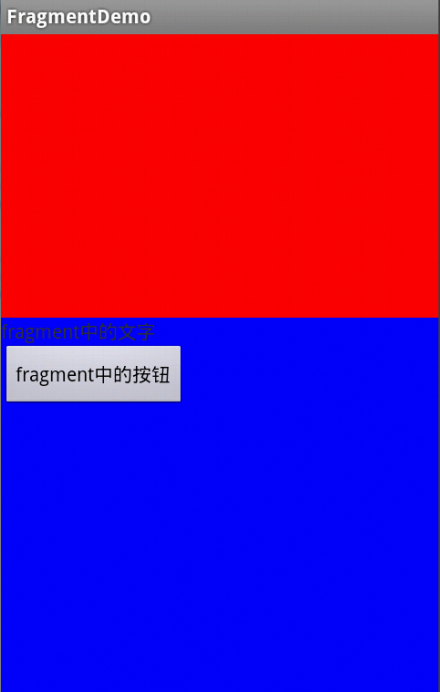
可以看到,我自定义的MyFragment添加到了Activity布局中的FrameLayout里(蓝色部分)。因为FrameLayout本来应该是红色的,但Fragment添加进去后,背景色与Fragment一致(即蓝色)。
代码:http://yunpan.cn/QnLn2LzKA8aEd (访问密码:bd8c)
Android Fragment学习(一)的更多相关文章
- Android Fragment学习笔记(二)----Fragment界面添加和管理
Fragment界面添加 了解过fragment的生命周期等简单知识,于是去看官方文档来了解更多相关内容,要添加fragment到我们的UI界面中,给出了两种常用的方法,第一个是在activity的布 ...
- 33.Android之Fragment学习
Fragment Android是在Android 3.0 (API level 11)开始引入Fragment的. 可以把Fragment想成Activity中的模块,这个模块有自己的布局,有自己的 ...
- Android之Fragment学习笔记①
Android Fragment完全解析,关于碎片你所需知道的一切 一. 什么是FragmentFragment(碎片)就是小型的Activity,它是在Android3.0时出现的.Fragment ...
- android fragment 博客 学习记录
转载请标明出处:http://blog.csdn.net/lmj623565791/article/details/37992017 上篇博客中已经介绍了Fragment产生原因,以及一些基本的用法和 ...
- Android Fragment应用实战
现在Fragment的应用真的是越来越广泛了,之前Android在3.0版本加入Fragment的时候,主要是为了解决Android Pad屏幕比较大,空间不能充分利用的问题,但现在即使只是在手机上, ...
- Android Fragment应用实战,使用碎片向ActivityGroup说再见
转载请注明出处:http://blog.csdn.net/guolin_blog/article/details/13171191 现在Fragment的应用真的是越来越广泛了,之前Android在3 ...
- 【转】基于Android Fragment功能的例子
原文网址:http://blog.csdn.net/eyu8874521/article/details/8252216 通过最近空闲时候对Fragment的学习,尝试着写了一个小Demo,将在开发的 ...
- Android WiFiDirect 学习(二)——Service Discovery
Service Discovery 简介 在Android WifiDirect学习(一 )中,简单介绍了如何使用WifiDirect进行搜索——连接——传输. 这样会有一个问题,那就是你会搜索到到附 ...
- 我的Android 4 学习系列之创建用户基本界面
目录 使用视图和布局 理解Fragment 优化布局 创建分辨率无关的用户界面 扩展.分组.创建和使用视图 使用适配器将数据绑定到视图 使用视图和布局 1. Android UI 几个基本概念 视图: ...
随机推荐
- 查看某一个点是否在某个多边形内 使用ST_Contains函数
查看某一个点是否在某个多边形内 使用ST_Contains函数 --LINESTRING ( 121.312350 30.971457 , 121.156783 31.092221 , 121.35 ...
- [转载]C#设置开机启动
原理就是在注册表启动项里添加一项.路径:SOFTWARE\Microsoft\Windows\CurrentVersion\Run或者直接:运行->regedit找到这个路径添加一项. usin ...
- 【更新链接】U盘启动制作工具(UDTOOL) v3.0.2014.0427
[校验值] 文件: UDTOOLV3_Setup.exe大小: 525 MB版本: 3.0.2014.0427时间: 2014年4月27日MD5: 2E5187B7D9081E8A69B4DC45C8 ...
- hdu 4558 剑侠情缘
思路:dp[i][j][k]表示在点(i,j)处能量的差值为k的方案数 转移的时候把差值取相反数就实现轮流了 代码如下: #include<iostream> #include<st ...
- ???????????? no permissions
1.一手鞋地址 google http://developer.android.com/tools/device.html 我处理的方法如下: 我的问题: android的版卡 在Ubuntu12.0 ...
- cocos2dx addchild坐标问题
a.addchild(b); 会把a->getBoundingBox矩形的左下角坐标点和b的锚点贴合在一起. ----- 其他引擎默认不是这样的,所以再跨平台导数据的时候,要注意这些细微的差别 ...
- 删除appcompat_v7会出很多错误
创建工程的时候会出现appcompat_v7这个文件夹 手贱删除后,发现出错了 说明test项目是依赖于appcompat_v7包的,所以这个appcompat_v7包是不能被删除的. appcomp ...
- yii2的安装
yii2也是依赖于composer, 就像laravel, 所以先安装composer, 如果安装不上composer可以看laravel安装的文章. 安装好composer之后安装一个插件 comp ...
- c# 可访问性级别
使用访问修饰符 public.protected.internal 或 private 可以为成员指定以下声明的访问级别之一. 声明的可访问性 含义 public 访问不受限制. protecte ...
- Android EditView 阻止软键盘自动弹出
最近再做一个查询内的小应用,界面最上面是一个EditText查询框,进行Activity后,总会弹起软键盘.这样就挡住了查询框下面的其他查询条件 控件,感觉很不友好.所以现在要做的就是在进入Activ ...