
Hadoop生态圈-Flume的组件之拦截器与选择器
Hadoop生态圈-Flume的组件之拦截器与选择器
作者:尹正杰
版权声明:原创作品,谢绝转载!否则将追究法律责任。
本篇博客只是配置的是Flume主流的Interceptors,想要了解更详细的配置信息请参考官网:http://flume.apache.org/FlumeUserGuide.html#flume-interceptors。
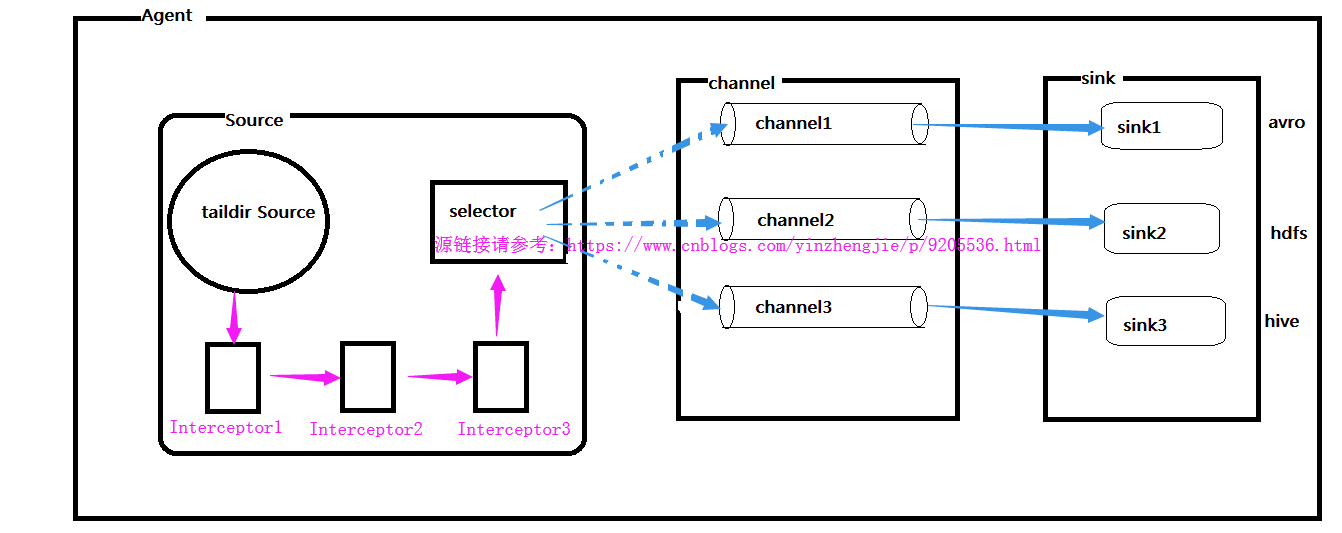
想必大家都知道Flume的组件有Source,channel和sink。其实在Flume还有一些更深层的东西,比如你知道soucre是如何将数据传送给channel的吗?那你有知道channel又是如何将数据发送给sink的吗?对于一个Agent来说,它只能有一个source,但是它可以有多个channel和sink,如下图:
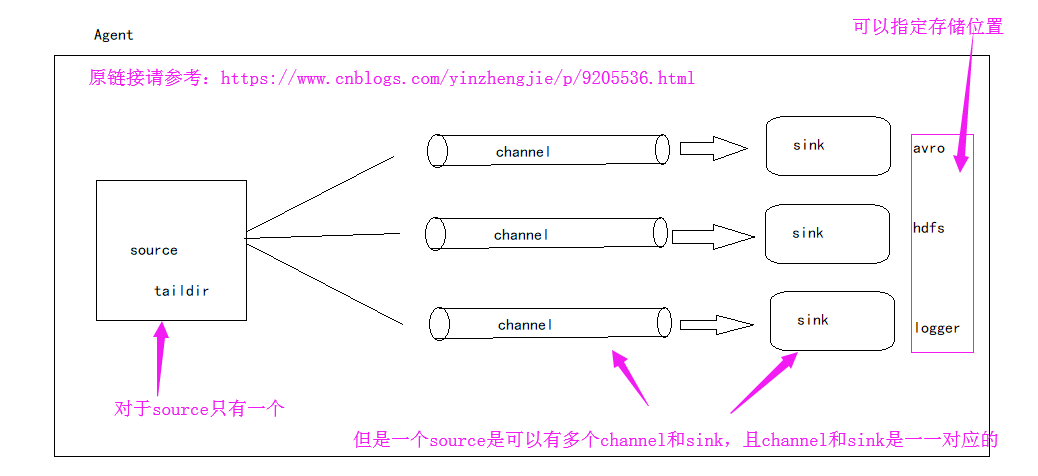
接下来就跟着我一起了了解一下更深层次的知识吧。接下来我们就一起探讨一下source是如何将数据发送到channel中的,以及sink是处理数据的。
一.Source端源码查看
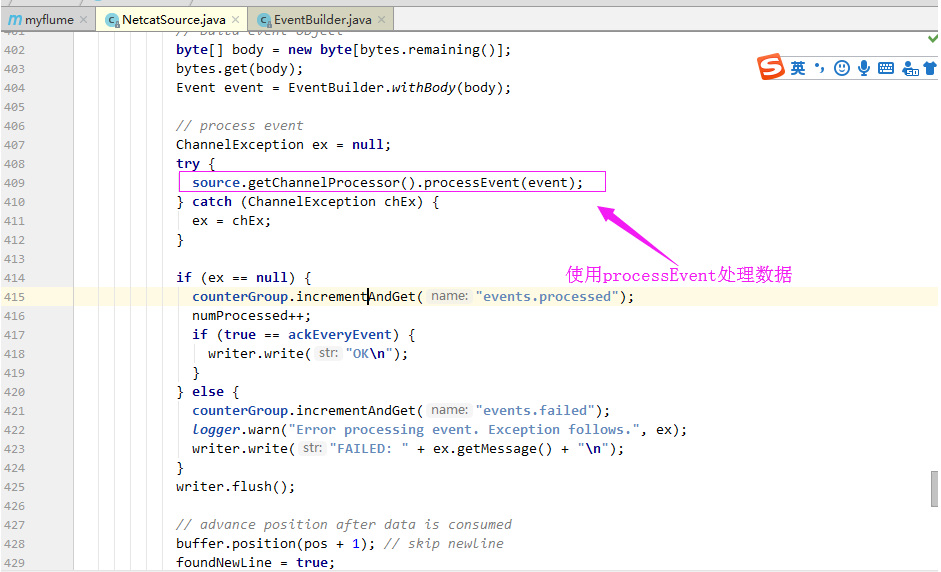
1>.获取一行数据,使用其构建Event

2>.使用processEvent处理数据
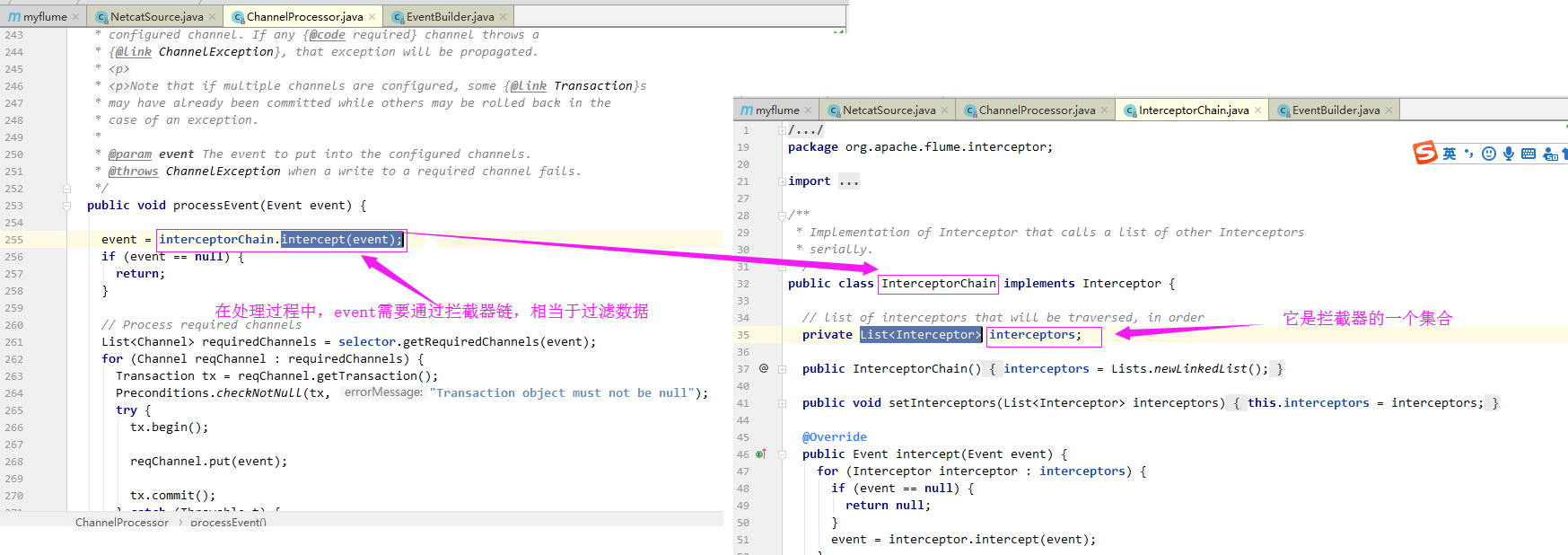
3>.在处理过程中,event需要通过拦截器链,相当于过滤数据
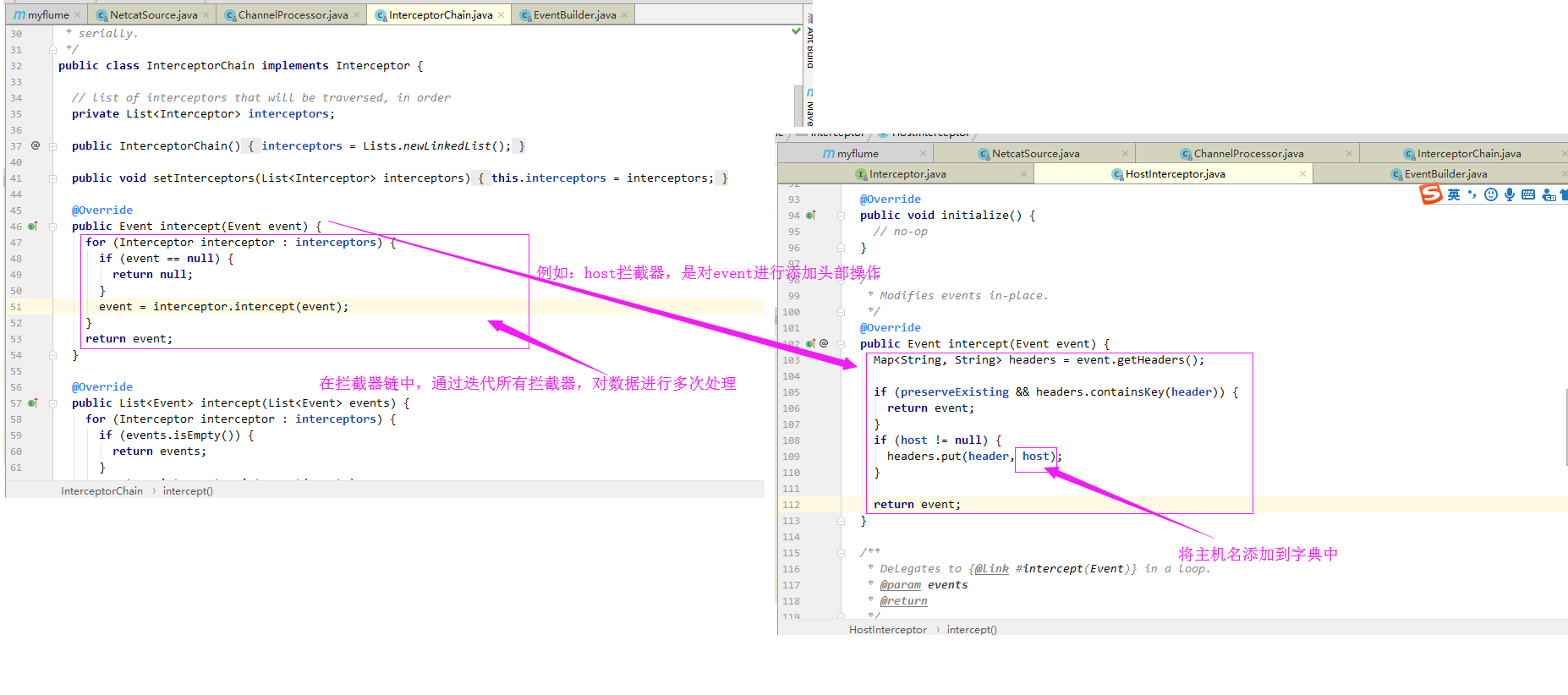
4>.在拦截器链中,通过迭代所有拦截器,对数据进行多次处理(例如:host拦截器,是对event进行添加头部操作)
5>.通过拦截器处理后的event,再次进入到通道挑选器
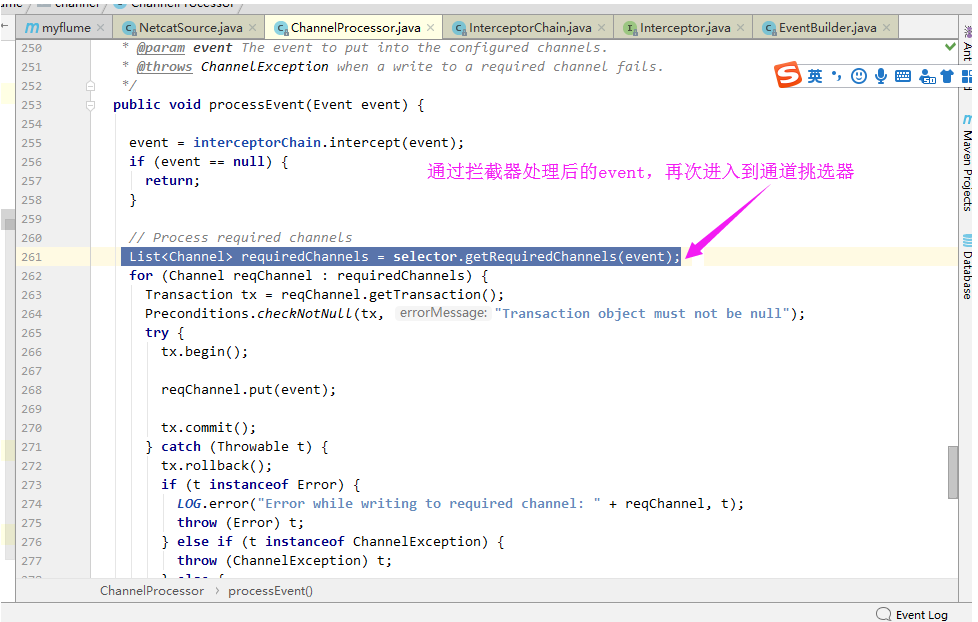
6>.迭代所有channel,将数据放进channel中

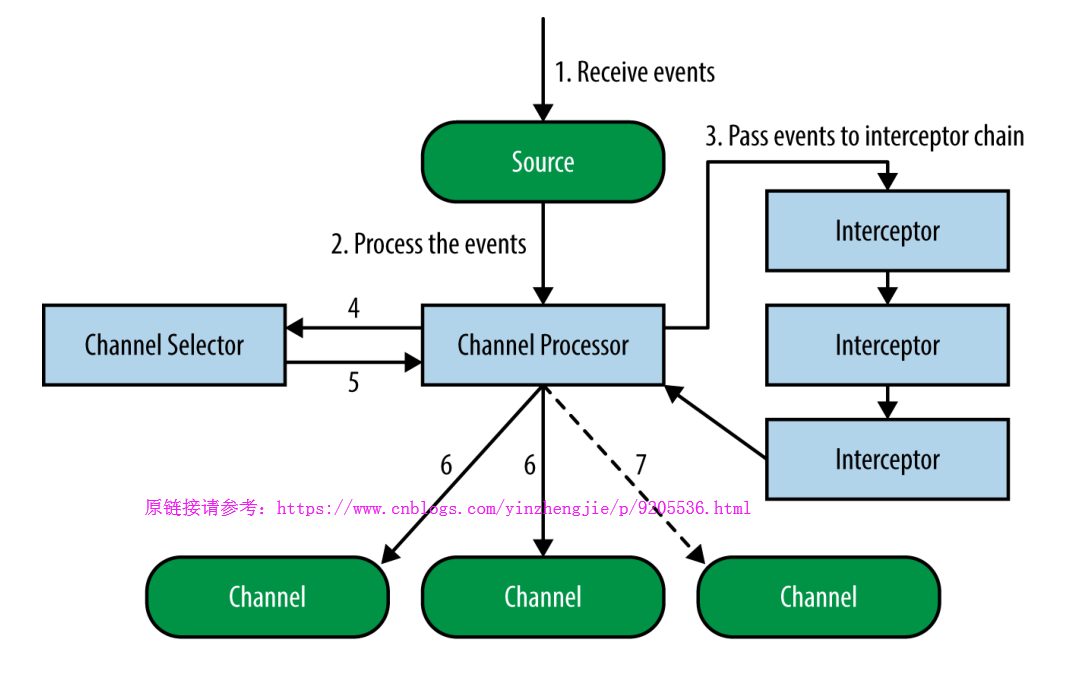
通过上面的源码解析,看下面这张图应该就不是什么难事了吧:
这个时候,你是否绝对第一张图画得并不自信呢?这个时候我们可以把第一张图的Source端流程画得更详细一点,如下:
二.拦截器(Interceptors)
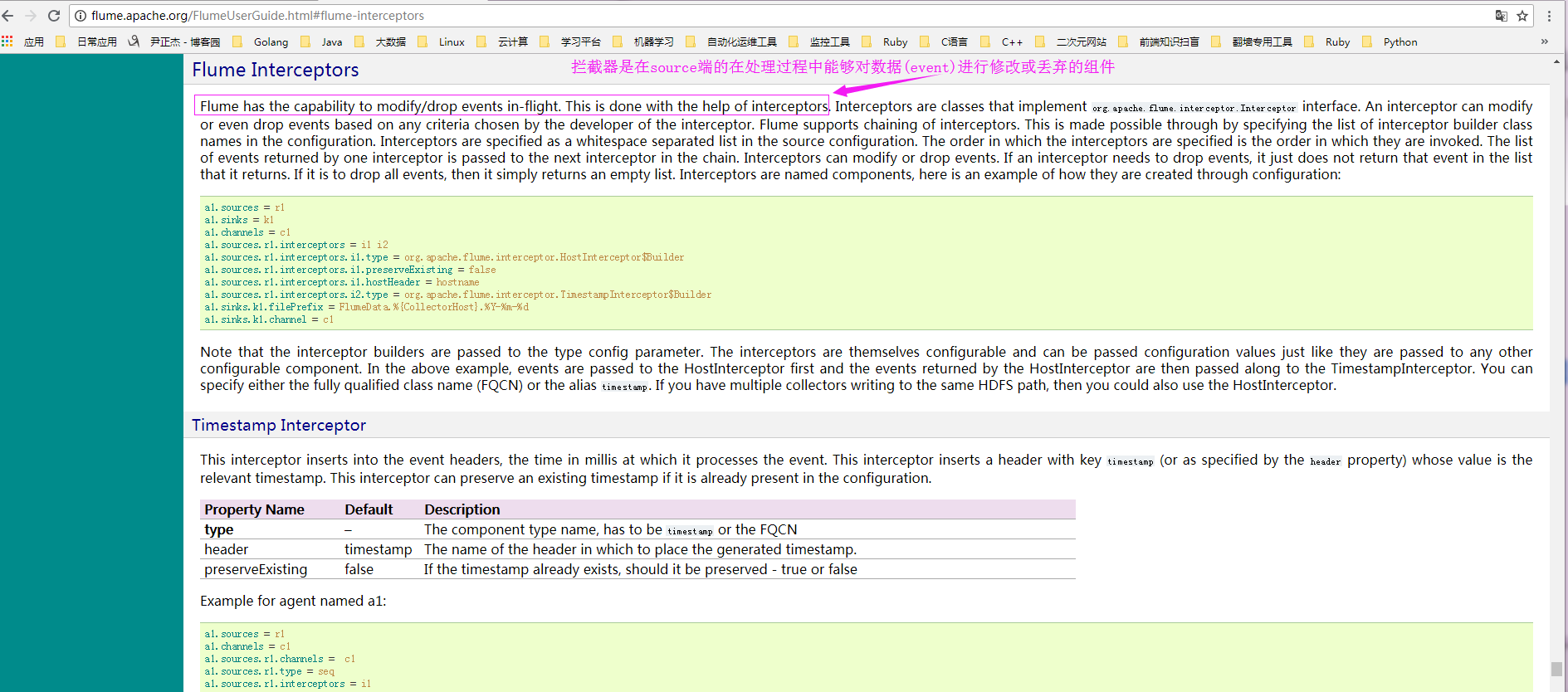
1>.Interceptors 功能
答:拦截器是在source端的在处理过程中能够对数据(event)进行修改或丢弃的组件。
2>.官方文档
3>.host interceptor(将发送的event添加主机名的header)配置案例
a>.实际配置参数:
[yinzhengjie@s101 ~]$ more /soft/flume/conf/yinzhengjie_hostInterceptor.conf

# Name the components on this agent

a1.sources = r1

a1.sinks = k1

a1.channels = c1

# Describe/configure the source

a1.sources.r1.type = netcat

a1.sources.r1.bind = localhost

a1.sources.r1.port =

# 指定添加拦截器

a1.sources.r1.interceptors = i1

a1.sources.r1.interceptors.i1.type = org.apache.flume.interceptor.HostInterceptor$Builder

a1.sources.r1.interceptors.i1.preserveExisting = false

# 指定header的key

a1.sources.r1.interceptors.i1.hostHeader = hostname

# 指定header的value为主机ip

a1.sources.r1.interceptors.i1.useIP = true

# Describe the sink

a1.sinks.k1.type = logger

# Use a channel which buffers events in memory

a1.channels.c1.type = memory

a1.channels.c1.capacity =

a1.channels.c1.transactionCapacity =

# Bind the source and sink to the channel

a1.sources.r1.channels = c1

a1.sinks.k1.channel = c1

[yinzhengjie@s101 ~]$
b>启动agent进程:
c>.source端产生数据(启动nc):
d>.检查sink端数据(检查定义好的目录"/home/yinzhengjie/log2")
4>.static interceptor(静态拦截器,手动指定key-value)配置案例
a>.实际配置参数:
[yinzhengjie@s101 ~]$ more /soft/flume/conf/yinzhengjie_staticInterceptor.conf

# Name the components on this agent

a1.sources = r1

a1.sinks = k1

a1.channels = c1

# Describe/configure the source

a1.sources.r1.type = netcat

a1.sources.r1.bind = localhost

a1.sources.r1.port =

# 指定添加拦截器

a1.sources.r1.interceptors = i1

a1.sources.r1.interceptors.i1.type = static

a1.sources.r1.interceptors.i1.key = name

a1.sources.r1.interceptors.i1.value = yinzhengjie

# Describe the sink

a1.sinks.k1.type = logger

# Use a channel which buffers events in memory

a1.channels.c1.type = memory

a1.channels.c1.capacity =

a1.channels.c1.transactionCapacity =

# Bind the source and sink to the channel

a1.sources.r1.channels = c1

a1.sinks.k1.channel = c1

[yinzhengjie@s101 ~]$
b>启动agent进程:
c>.source端产生数据(启动nc):
d>.检查sink端数据(检查定义好的目录"/home/yinzhengjie/log2")
5>.timestamp interceptor(将发送的event添加时间戳的header)配置案例
a>.实际配置参数:
[yinzhengjie@s101 ~]$ more /soft/flume/conf/yinzhengjie_timestampInterceptor.conf

# Name the components on this agent

a1.sources = r1

a1.sinks = k1

a1.channels = c1

# Describe/configure the source

a1.sources.r1.type = netcat

a1.sources.r1.bind = localhost

a1.sources.r1.port =

# 指定添加拦截器

a1.sources.r1.interceptors = i1

a1.sources.r1.interceptors.i1.type = timestamp

# Describe the sink

a1.sinks.k1.type = logger

# Use a channel which buffers events in memory

a1.channels.c1.type = memory

a1.channels.c1.capacity =

a1.channels.c1.transactionCapacity =

# Bind the source and sink to the channel

a1.sources.r1.channels = c1

a1.sinks.k1.channel = c1

[yinzhengjie@s101 ~]$
b>启动agent进程:
c>.source端产生数据(启动nc):
d>.检查sink端数据(检查定义好的目录"/home/yinzhengjie/log2")
6>.interceptor chain(连接器链)配置案例
a>.实际配置参数:
[yinzhengjie@s101 ~]$ more /soft/flume/conf/yinzhengjie_chainInterceptor.conf

# Name the components on this agent

a1.sources = r1

a1.sinks = k1

a1.channels = c1

# Describe/configure the source

a1.sources.r1.type = netcat

a1.sources.r1.bind = localhost

a1.sources.r1.port =

# 指定添加拦截器

a1.sources.r1.interceptors = i1 i2 i3

a1.sources.r1.interceptors.i1.type = org.apache.flume.interceptor.HostInterceptor$Builder

a1.sources.r1.interceptors.i1.preserveExisting = false

# 指定header的key

a1.sources.r1.interceptors.i1.hostHeader = hostname

# 指定header的value为主机ip

a1.sources.r1.interceptors.i1.useIP = true

# 添加i2拦截器

a1.sources.r1.interceptors.i2.type = timestamp

# 添加i3拦截器

a1.sources.r1.interceptors.i3.type = remove_header

a1.sources.r1.interceptors.i3.withName = timestamp

# Describe the sink

a1.sinks.k1.type = logger

# Use a channel which buffers events in memory

a1.channels.c1.type = memory

a1.channels.c1.capacity =

a1.channels.c1.transactionCapacity =

# Bind the source and sink to the channel

a1.sources.r1.channels = c1

a1.sinks.k1.channel = c1

[yinzhengjie@s101 ~]$
b>启动agent进程:
c>.source端产生数据(启动nc):
d>.检查sink端数据(检查定义好的目录"/home/yinzhengjie/log2")
Hadoop生态圈-Flume的组件之拦截器与选择器的更多相关文章
- Hadoop生态圈-Flume的组件之自定义拦截器(interceptor)
Hadoop生态圈-Flume的组件之自定义拦截器(interceptor) 作者:尹正杰 版权声明:原创作品,谢绝转载!否则将追究法律责任. 本篇博客只是举例了一个自定义拦截器的方法,测试字节传输速 ...
- Hadoop生态圈-Flume的组件之自定义Sink
Hadoop生态圈-Flume的组件之自定义Sink 作者:尹正杰 版权声明:原创作品,谢绝转载!否则将追究法律责任. 本篇博客主要介绍sink相关的API使用两个小案例,想要了解更多关于API的小技 ...
- Hadoop生态圈-Flume的组件之sink处理器
Hadoop生态圈-Flume的组件之sink处理器 作者:尹正杰 版权声明:原创作品,谢绝转载!否则将追究法律责任. 一. 二.
- Hadoop生态圈-Flume的主流source源配置
Hadoop生态圈-Flume的主流source源配置 作者:尹正杰 版权声明:原创作品,谢绝转载!否则将追究法律责任. 本篇博客只是配置的是Flume主流的Source,想要了解更详细的配置信息请参 ...
- Hadoop生态圈-flume日志收集工具完全分布式部署
Hadoop生态圈-flume日志收集工具完全分布式部署 作者:尹正杰 版权声明:原创作品,谢绝转载!否则将追究法律责任. 目前为止,Hadoop的一个主流应用就是对于大规模web日志的分析和处理 ...
- 基于ambari搭建hadoop生态圈大数据组件
Ambari介绍1Apache Ambari是一种基于Web的工具,支持Apache Hadoop集群的供应.管理和监控.Ambari已支持大多数Hadoop组件,包括HDFS.MapReduce.H ...
- Hadoop生态圈-Flume的主流Channel源配置
Hadoop生态圈-Flume的主流Channel源配置 作者:尹正杰 版权声明:原创作品,谢绝转载!否则将追究法律责任. 一. 二. 三.
- Hadoop生态圈-Flume的主流Sinks源配置
Hadoop生态圈-Flume的主流Sinks源配置 作者:尹正杰 版权声明:原创作品,谢绝转载!否则将追究法律责任. 本篇博客只是配置的是Flume主流的Sinks,想要了解更详细的配置信息请参考官 ...
- Flume 拦截器(interceptor)详解
flume 拦截器(interceptor)1.flume拦截器介绍拦截器是简单的插件式组件,设置在source和channel之间.source接收到的事件event,在写入channel之前,拦截 ...
随机推荐
- vs编译器好多下划波浪线但不报错
解决办法:项目属性->c/c++->常规->附加包含目录->$(ProjectDir): $(ProjectDir) 项目的目录(定义形式:驱动器 + 路径):包括尾部的反斜杠 ...
- R绘图 第十篇:绘制文本、注释和主题(ggplot2)
使用ggplot2包绘制时,为了更直观地向用户显示报表的内容和外观,需要使用geom_text()函数添加文本说明,使用annotate()添加注释,并通过theme()来调整非数据的外观. 一,文本 ...
- C#杂乱知识汇总
:first-child{margin-top:0!important}.markdown-body>:last-child{margin-bottom:0!important}.markdow ...
- c语言数字图像处理(三):仿射变换
仿射变换及坐标变换公式 几何变换改进图像中像素间的空间关系.这些变换通常称为橡皮模变换,因为它们可看成是在一块橡皮模上印刷一幅图像,然后根据预定的一组规则拉伸该薄膜.在数字图像处理中,几何变换由两个基 ...
- WebStorm安装
用到的链接: WebStorm官网:https://www.jetbrains.com/webstorm 破解补丁与注册码网址:http://idea.lanyus.com/ 有条件的朋友请购买正版. ...
- pyinstaller将python编写的打卡程序打包成exe
编写了一个简易的定时提醒下班打卡程序,python代码如下: #coding:utf-8 import time import datetime from tkMessageBox import * ...
- Ubuntu命令行运行C程序和C++程序
首先Ctrl + T 打开一个终端,cd到你建立C/C++文件的目录下. 下面以建立 helloc.c 和 hellocpp.cpp 进行演示 vim helloc.c 按 i 进入插入操作,然后写C ...
- 接上 操作系统java项目设计图纸 一步一步在进化
- 项目复审——Beta阶段
排名原则还是基于这个组到底自己做了多少东西,又借鉴了多少东西,不过其他组的具体情况我也不一定说的清楚,所以只是通过大家的码云和一些了解来评判的.当然,是否发布也是一个重要指标.顺便感叹一句,现在的云平 ...
- linux下php环境的装配以及php storm的链接
linux下php环境的装配以及php storm的链接 本次安装在deepin系统下完成 一.安装LAMP组合 Linux+Apache+Mysql+php 直接命令 sudo apt-get in ...