
Flume 拦截器(interceptor)详解
flume 拦截器(interceptor)
1、flume拦截器介绍
拦截器是简单的插件式组件,设置在source和channel之间。source接收到的事件event,在写入channel之前,拦截器都可以进行转换或者删除这些事件。每个拦截器只处理同一个source接收到的事件。可以自定义拦截器。
2、flume内置的拦截器
2.1 时间戳拦截器
flume中一个最经常使用的拦截器 ,该拦截器的作用是将时间戳插入到flume的事件报头中。如果不使用任何拦截器,flume接受到的只有message。时间戳拦截器的配置:
|
参数 |
默认值 |
描述 |
|
type |
timestamp |
类型名称timestamp,也可以使用类名的全路径org.apache.flume.interceptor.TimestampInterceptor$Builder |
|
preserveExisting |
false |
如果设置为true,若事件中报头已经存在,不会替换时间戳报头的值 |
参数 默认值 描述
type timestamp 类型名称timestamp,也可以使用类名的全路径org.apache.flume.interceptor.TimestampInterceptor$Builder
preserveExisting false 如果设置为true,若事件中报头已经存在,不会替换时间戳报头的值
source连接到时间戳拦截器的配置:
a1.sources.r1.interceptors=i1
a1.sources.r1.interceptors.i1.type=timestamp a1.sources.r1.interceptors.i1.preserveExisting=false
2.2 主机拦截器
主机拦截器插入服务器的ip地址或者主机名,agent将这些内容插入到事件的报头中。事件报头中的key使用hostHeader配置,默认是host。主机拦截器的配置:
|
参数 |
默认值 |
描述 |
|
type |
host |
类型名称host,也可以使用类名的全路径org.apache.flume.interceptor.HostInterceptor$Builder |
|
hostHeader |
host |
事件头的key |
|
useIP |
true |
如果设置为false,host键插入主机名 |
|
preserveExisting |
false |
如果设置为true,若事件中报头已经存在,不会替换时间戳报头的值 |
参数 默认值 描述
type host 类型名称host,也可以使用类名的全路径org.apache.flume.interceptor.HostInterceptor$Builder
hostHeader host 事件头的key
useIP true 如果设置为false,host键插入主机名
preserveExisting false 如果设置为true,若事件中报头已经存在,不会替换时间戳报头的值
source连接到主机拦截器的配置:
a1.sources.r1.interceptors=i2
a1.sources.r1.interceptors.i2.type=host
a1.sources.r1.interceptors.i2.useIP=false
a1.sources.r1.interceptors.i2.preserveExisting=false
2.3 静态拦截器
静态拦截器的作用是将k/v插入到事件的报头中。配置如下
|
参数 |
默认值 |
描述 |
|
type |
static |
类型名称static,也可以使用类全路径名称org.apache.flume.interceptor.StaticInterceptor$Builder |
|
key |
key |
事件头的key |
|
value |
value |
key对应的value值 |
|
preserveExisting |
true |
如果设置为true,若事件中报头已经存在该key,不会替换value的值 |
参数 默认值 描述
type static 类型名称static,也可以使用类全路径名称org.apache.flume.interceptor.StaticInterceptor$Builder
key key 事件头的key
value value key对应的value值
preserveExisting true 如果设置为true,若事件中报头已经存在该key,不会替换value的值
source连接到静态拦截器的配置:
a1.sources.r1.interceptors = static
a1.sources.r1.interceptors.static.type=static
a1.sources.r1.interceptors.static.key=logs
a1.sources.r1.interceptors.static.value=logFlume
a1.sources.r1.interceptors.static.preserveExisting=false
2.4 正则过滤拦截器
在日志采集的时候,可能有一些数据是我们不需要的,这样添加过滤拦截器,可以过滤掉不需要的日志,也可以根据需要收集满足正则条件的日志。配置如下
|
参数 |
默认值 |
描述 |
|
type |
REGEX_FILTER |
类型名称REGEX_FILTER,也可以使用类全路径名称org.apache.flume.interceptor.RegexFilteringInterceptor$Builder |
|
regex |
.* |
匹配除“\n”之外的任何个字符 |
|
excludeEvents |
false |
默认收集匹配到的事件。如果为true,则会删除匹配到的event,收集未匹配到的 |
参数 默认值 描述
type REGEX_FILTER 类型名称REGEX_FILTER,也可以使用类全路径名称org.apache.flume.interceptor.RegexFilteringInterceptor$Builder
regex .* 匹配除“\n”之外的任何个字符
excludeEvents false 默认收集匹配到的事件。如果为true,则会删除匹配到的event,收集未匹配到的
source连接到正则过滤拦截器的配置:
a1.sources.r1.interceptors=i4
a1.sources.r1.interceptors.i4.type=REGEX_FILTER a1.sources.r1.interceptors.i4.regex=(rm)|(kill) a1.sources.r1.interceptors.i4.excludeEvents=false
这样配置的拦截器就只会接收日志消息中带有rm 或者kill的日志。
测试案例:
test_regex.conf
# 定义这个agent中各组件的名字
a1.sources = r1
a1.sinks = k1
a1.channels = c1
# 描述和配置source组件:r1
a1.sources.r1.type = netcat
a1.sources.r1.bind = hadoop-001
a1.sources.r1.port = 44444
a1.sources.r1.interceptors=i4
a1.sources.r1.interceptors.i4.type=REGEX_FILTER
#保留内容中出现hadoop或者是spark的字符串的记录
a1.sources.r1.interceptors.i4.regex=(hadoop)|(spark)
a1.sources.r1.interceptors.i4.excludeEvents=false
# 描述和配置sink组件:k1
a1.sinks.k1.type = logger
# 描述和配置channel组件,此处使用是内存缓存的方式
a1.channels.c1.type = memory
a1.channels.c1.capacity = 1000
a1.channels.c1.transactionCapacity = 100
# 描述和配置source channel sink之间的连接关系
a1.sources.r1.channels = c1
a1.sinks.k1.channel = c1
输入以下指令:
bin/flume-ng agent --conf conf --conf-file conf/test_regex.conf --name a1 -Dflume.root.logger=INFO,console
发送数据测试:
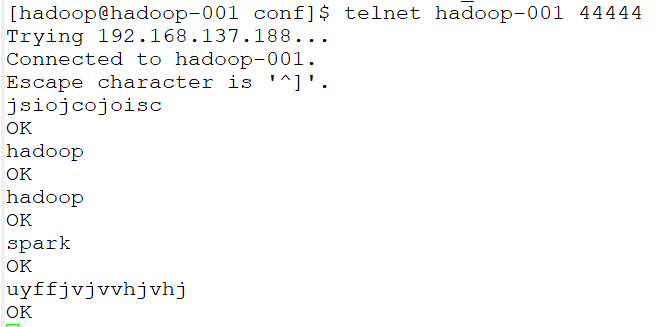
打印到控制台信息:
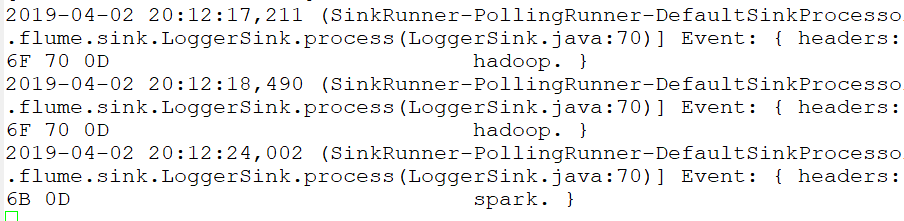
只接受到存在hadoop或者spark的记录,验证成功!
Flume 拦截器(interceptor)详解的更多相关文章
- mybatis Interceptor拦截器代码详解
mybatis官方定义:MyBatis 是一款优秀的持久层框架,它支持定制化 SQL.存储过程以及高级映射.MyBatis 避免了几乎所有的 JDBC 代码和手动设置参数以及获取结果集.MyBatis ...
- springboot拦截器HandlerInterceptor详解
Web开发中,我们除了使用 Filter 来过滤请web求外,还可以使用Spring提供的HandlerInterceptor(拦截器). HandlerInterceptor 的功能跟过滤器类似,但 ...
- 拦截器 应用详解--SpringMVC
在实际项目中,拦截器的使用是非常普遍的,例如在购物网站中通过拦截器可以拦截未登录的用户,禁止其购买商品,或者使用它来验证已登录用户是否有相应的操作权限等,Spring MVC提供了拦截器功能,通过配置 ...
- Spring 注解拦截器使用详解
Spring mvc拦截器 平时用到的拦截器通常都是xml的配置方式.今天就特地研究了一下注解方式的拦截器. 配置Spring环境这里就不做详细介绍.本文主要介绍在Spring下,基于注解方式的拦截器 ...
- axios 源码解析(下) 拦截器的详解
axios的除了初始化配置外,其它有用的应该就是拦截器了,拦截器分为请求拦截器和响应拦截器两种: 请求拦截器 ;在请求发送前进行一些操作,例如在每个请求体里加上token,统一做了处理如果以后要 ...
- 大数据学习——flume拦截器
flume 拦截器(interceptor)1.flume拦截器介绍拦截器是简单的插件式组件,设置在source和channel之间.source接收到的事件event,在写入channel之前,拦截 ...
- Kafka详解与总结(七)-Kafka producer拦截器(interceptor)
1. 拦截器原理 Producer拦截器(interceptor)是在Kafka 0.10版本被引入的,主要用于实现clients端的定制化控制逻辑. 对于producer而言,interceptor ...
- struts2拦截器interceptor的三种配置方法
1.struts2拦截器interceptor的三种配置方法 方法1. 普通配置法 <struts> <package name="struts2" extend ...
- # Okhttp解析—Interceptor详解
Okhttp解析-Interceptor详解 Interceptor可以说是okhttp的精髓之一,Okhttp重写请求/响应.重试.缓存响应等操作,基本都是在各个Interceptor中完成的,上篇 ...
随机推荐
- mysql常见查询练习题
#建学生信息表student create table student ( sno varchar(20) not null primary key, sname varchar(20) not nu ...
- Day29作业及默写
作业: 1\ 默写 黏包协议 2\ 上传大文件(文件\视频\图片) 3\ 和你的同桌调通 从你的计算机上传一个视频到你同桌的电脑上 4\ 进阶 : 带上登录 Server #Server #!/usr ...
- Golang福利爬虫
没事的时候跑两把,穷人专用. package main import ( "bytes" "fmt" "github.com/PuerkitoBio/ ...
- 3--Python入门--Python数据集合类型--元组
在基础数据类型的基础上,Python有6中数据集合的类型: 列表list,最常用的数据类型,以[]为标识 元组tuple,和list很相似,但是不能二次赋值,用()标识 集合set,和list类似,但 ...
- extjs技术
转载:http://www.cnblogs.com/willick/p/3168809.html 转载 :http://www.cnblogs.com/youring2/archive/2013/08 ...
- Spring Boot 揭秘与实战(七) 实用技术篇 - 异步任务
文章目录 1. Spring Boot 集成异步任务 2. 单发服务模式 3. 请求应答模式 4. 源代码 Spring 对异步任务具有很好的支持.这篇文章,我们透过 Spring Boot 来讲解下 ...
- [转]SSH反向连接及Autossh
http://www.cnblogs.com/eshizhan/archive/2012/07/16/2592902.html SSH反向连接及Autossh 0.接触Linux恐怕对SSH再熟悉不过 ...
- flask连接mysql数据库
from flask import Flask from flask_sqlalchemy import SQLAlchemy import pymysql pymysql.install_as_My ...
- SyntaxError: Non-UTF-8 code starting with '\xe5' in file ***.py on line 105, but no encoding declared; see http://python.org/dev/peps/pep-0263/ for
用charles抓包时, 对抓到的html,放到pycharm中解析, 结果报错: SyntaxError: Non-UTF-8 code starting with '\xe5' in file * ...
- sudo: sorry, you must have a tty to run sudo
使用ssh进行无密访问,并发送执行命令的时候遇到了如题的错误 执行命令ssh user@host "sudo rm /data/test,txt" sudo: sorry, you ...