
python实战之原生爬虫(爬取熊猫主播排行榜)
"""

this is a module,多行注释

"""

import re

from urllib import request

# BeautifulSoup:解析数据结构 推荐库 Scrapy:爬虫框架

#爬虫,反爬虫,反反爬虫

#ip 封

#代理ip库

class Spider():

    url='https://www.panda.tv/cate/lol'

    root_pattern='<div class="video-info">([\s\S]*?)</div>'

    name_pattern='</i>([\s\S]*?)</span>'

    number_pattern='<span class="video-number">([\s\S]*?)</span>'

    def __fetch_content(self):

        r=request.urlopen(Spider.url)

        htmls=r.read()

        htmls=str(htmls,encoding='utf-8')

        return htmls

        a=1

    def __analysis(self,htmls):

        root_html=re.findall(Spider.root_pattern,htmls)

        anchors=[]

        for html in root_html:

            name=re.findall(Spider.name_pattern,html)

            number=re.findall(Spider.number_pattern,html)

            anchor={'name':name,'number':number}

            anchors.append(anchor)

        return anchors

    def __refine(self,achors):

        l=lambda anchor:{'name':anchor['name'][0].strip(),'number':anchor['number'][0]}

        return map(l,achors)

    def __sort(self,anchors):

        anchors=sorted(anchors,key=self.__sord_seed,reverse=True)

        return anchors

    def __show(self,anchors):

        for rank in range(0,len(anchors)):

            print('rank '+str(rank+1)+':'+anchors[rank]['name']

            +'    '+anchors[rank]['number']

            )

    def __sord_seed(self,anchor):

        r=re.findall('\d*',anchor['number'])

        number= float(r[0])

        if '万' in anchor['number']:

            number*=10000

        return number

    def go(self):

        htmls=self.__fetch_content()

        anchors=self.__analysis(htmls)

        anchors=list(self.__refine(anchors))

        anchors=self.__sort(anchors)

        self.__show(anchors)

splider=Spider()

splider.go()
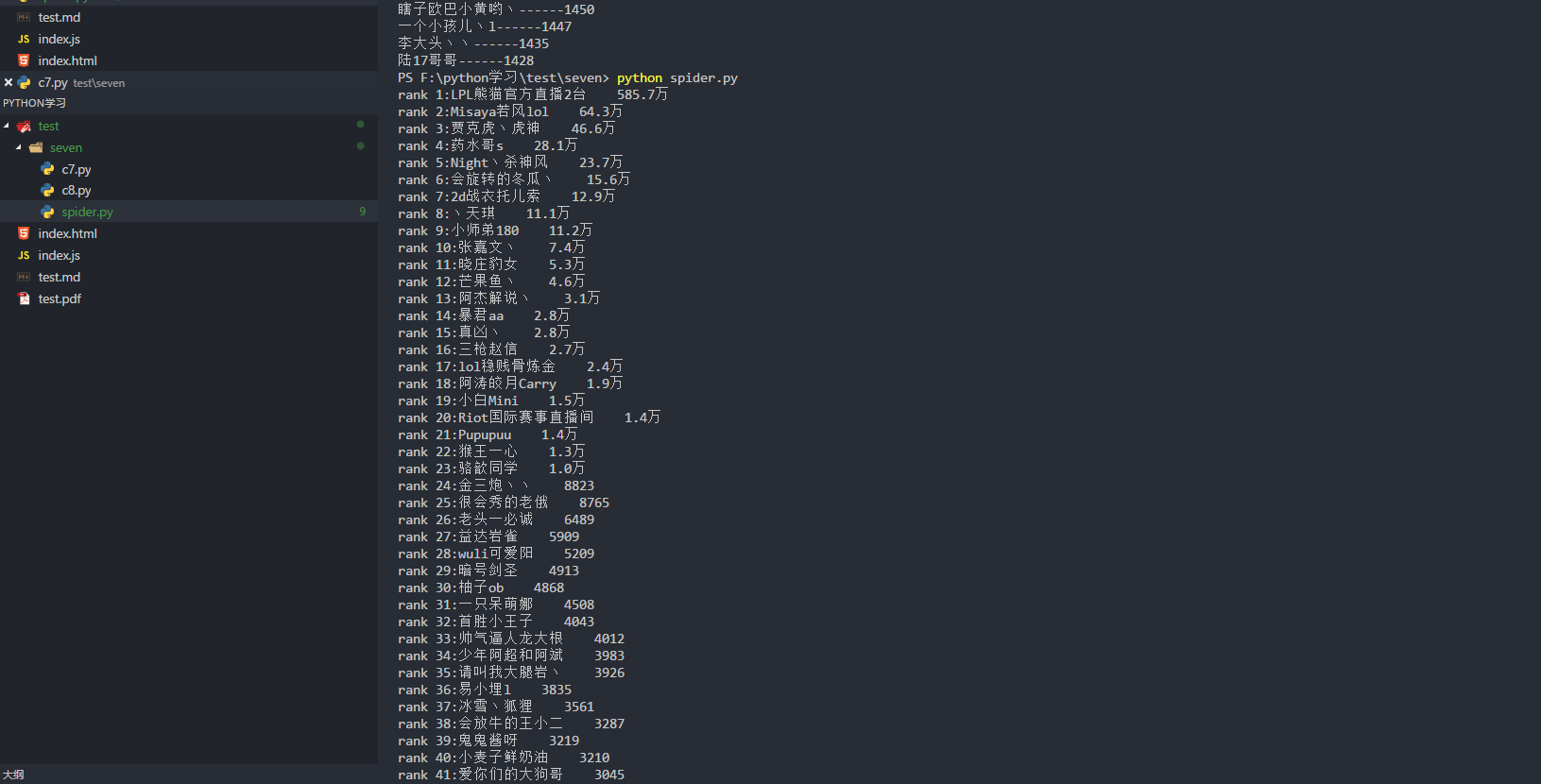
python实战之原生爬虫(爬取熊猫主播排行榜)的更多相关文章
- 『Scrapy』爬取斗鱼主播头像
分析目标 爬取的是斗鱼主播头像,示范使用的URL似乎是个移动接口(下文有提到),理由是网页主页属于动态页面,爬取难度陡升,当然爬取斗鱼主播头像这么恶趣味的事也不是我的兴趣...... 目标URL如下, ...
- 【Python数据分析】简单爬虫 爬取知乎神回复
看知乎的时候发现了一个 “如何正确地吐槽” 收藏夹,里面的一些神回复实在很搞笑,但是一页一页地看又有点麻烦,而且每次都要打开网页,于是想如果全部爬下来到一个文件里面,是不是看起来很爽,并且随时可以看到 ...
- python实战项目 — 使用bs4 爬取猫眼电影热榜(存入本地txt、以及存储数据库列表)
案例一: 重点: 1. 使用bs4 爬取 2. 数据写入本地 txt from bs4 import BeautifulSoup import requests url = "http:// ...
- 爬虫之selenium爬取斗鱼主播图片
这是我GitHub上简单的selenium介绍与简单使用:https://github.com/bwyt/spider/tree/master/selenium%E5%9F%BA%E7%A1%80 & ...
- selenium,webdriver爬取斗鱼主播信息 实操
from selenium import webdriver import time from bs4 import BeautifulSoup class douyuSelenium(): #初始化 ...
- 如何利用Python网络爬虫爬取微信朋友圈动态--附代码(下)
前天给大家分享了如何利用Python网络爬虫爬取微信朋友圈数据的上篇(理论篇),今天给大家分享一下代码实现(实战篇),接着上篇往下继续深入. 一.代码实现 1.修改Scrapy项目中的items.py ...
- 如何用Python网络爬虫爬取网易云音乐歌曲
今天小编带大家一起来利用Python爬取网易云音乐,分分钟将网站上的音乐down到本地. 跟着小编运行过代码的筒子们将网易云歌词抓取下来已经不再话下了,在抓取歌词的时候在函数中传入了歌手ID和歌曲名两 ...
- Python爬虫 - 爬取百度html代码前200行
Python爬虫 - 爬取百度html代码前200行 - 改进版, 增加了对字符串的.strip()处理 源代码如下: # 改进版, 增加了 .strip()方法的使用 # coding=utf-8 ...
- python爬虫爬取京东、淘宝、苏宁上华为P20购买评论
爬虫爬取京东.淘宝.苏宁上华为P20购买评论 1.使用软件 Anaconda3 2.代码截图 三个网站代码大同小异,因此只展示一个 3.结果(部分) 京东 淘宝 苏宁 4.分析 这三个网站上的评论数据 ...
随机推荐
- 关于C++内联函数
关于C++内联函数有以下实验: 有三段测试代码 1.手动展开内联函数. 2.非内联函数. 3.inline标记的内联函数.(函数只有一行代码,以确保函数被内联) 测试三种情况: VS工程在Releas ...
- dubbo的spi机制
SPI SPI是一种扩展机制,在java中SPI机制被广泛应用,比如Spring中的SpringServletContainerInitializer 使得容器启动的时候SpringServletCo ...
- 删除或添加最大化、最小化按钮 - 回复 "Tommy the CAT" 的问题
本例效果图: 代码文件: unit Unit1; interface uses Windows, Messages, SysUtils, Variants, Classes, Graphics, ...
- sql问题--case-when
1. 有表如下,请使用查询语句得出相应结果 id job createdate 1 开发 2018-06-19 2 运维 2018-06-20 3 开发 2018-06-19 4 开发 2018-06 ...
- 【题解】 [SDOI2009] Elaxia的路线(最短路+拓扑排序)
懒得复制,戳我戳我 Solution: 题目大概意思就是找两条最短路后,找出最长公共部分 我们就只用以四个点为源点开始走\(SPFA\),然后我们就只用遍历每条边然后建立一个新的拓扑图,然后随便搞一下 ...
- 背包问题的优化(洛谷1776 宝物筛选_NOI导刊)
背包型dp,但是没有看清数据范围差点认为是水题了,(然后诡异的拿了20分)标解是:2进制优化,比较简单把每一类物品看做若干个相互独立的物品,放在一个另外的数组里,然后全局跑一边01就可以.主要思想是: ...
- Oracle数据库--PL/SQL存储过程和函数的建立和调用
1.存储过程建立的格式: create or replace procedure My_Procedure is begin --执行部分(函数内容); end; / 例子:(以hr表为例) crea ...
- 使用 Nginx 和 Gunicorn 部署 Django 博客(转)
原文:http://zmrenwu.com/post/20/ http://www.siar.me/post/9/ 针对很多朋友反映按照教程的做法始终只能看到 Nginx 欢迎页面的问题,Tian ...
- Java基础-SSM之mybatis多对多关联
Java基础-SSM之mybatis多对多关联 作者:尹正杰 版权声明:原创作品,谢绝转载!否则将追究法律责任. 一.准备测试环境(创建数据库表) 1>.创建teas,stus,links表 u ...
- json字符串转java对象
今天遇到一个问题,前端ajax获取到一个javaBean对象,好多方法发ajax请求需要把这个对象再传到后端,后端再根据这个对象进行操作(之前计划传递id,但发现传递id的话,后端多个方法都需要根据i ...