
NGINX+Lua模块编译安装
NGINX+Lua 环境配置
一、环境装备
[root@web01 ~]# cat /etc/redhat-release

CentOS Linux release 7.7.1908 (Core)

YUM下载安装相关依赖环境

[root@web01 ~]# yum install gcc gcc-c++ prce prce-devel \

> autoconf make automake  \

> openssl-devel openssl zlib-devel zlib \

> httpd-tools gperftools -y

创建下载目录

[root@web01 ~]# cd /opt/;mkdir download

下载相关软件

v2.1-20210510.tar.gz      #不要下载官网的,要去下载openresty的优化版本 后面会说出现的坑

lua-nginx-module-0.10.20.tar.gz  # 0.10.16 以后都需要3,4两个包

lua-resty-core-0.1.22.tar.gz [必须]

lua-resty-lrucache-0.10.tar.gz [必须]

nginx-1.17.5.tar.gz

ngx_devel_kit-0.3.1.tar.gz

对应下载的网站:https://github.com/openresty

luajit: wget --no-check-certificate https://github.com/openresty/luajit2/archive/refs/tags/v2.1-20210510.tar.gz

lua-nginx-module:wget --no-check-certificate https://github.com/openresty/lua-nginx-module/archive/refs/tags/v0.10.20.tar.gz

lua-resty-core:wget --no-check-certificate https://github.com/openresty/lua-resty-core/archive/refs/tags/v0.1.22.tar.gz

lua-resty-lrucache:wget --no-check-certificate https://github.com/openresty/lua-resty-lrucache/archive/refs/tags/v0.11.tar.gz

nginx-1.17.5:wget --no-check-certificate http://nginx.org/download/nginx-1.17.5.tar.gz

ngx_devel_kit-0.3.1:wget --no-check-certificate https://github.com/vision5/ngx_devel_kit/archive/refs/tags/v0.3.1.tar.gz
二、解压安装相应的软件
[root@web01 /opt/download]# ls *.tar.gz | xargs -n1 tar xzvf

[root@web01 /opt/download]# cd luajit2-2.1-20210510

make install  PREFIX=/usr/local/LuaJIT

添加环境变量

export LUAJIT_LIB=/usr/local/LuaJIT/lib

export LUAJIT_INC=/usr/local/LuaJIT/include/luajit-2.1

[root@web01 /opt/download]# tail -3f /etc/profile

#Lua

export LUAJIT_LIB=/usr/local/LuaJIT/lib

export LUAJIT_INC=/usr/local/LuaJIT/include/luajit-2.1

安装Lua核心库

lua-resty-core-0.1.21.tar.gz [必须]

lua-resty-lrucache-0.11.tar.gz [必须]

安装在同一个目录下

cd lua-resty-core-0.1.22

make install PREFIX=/usr/local/lua_core

cd ../lua-resty-lrucache-0.11

make install PREFIX=/usr/local/lua_core

编译安装NGINX

[root@web01 /opt/download]# cd nginx-1.17.2/

 ./configure --prefix=/etc/nginx \

 --sbin-path=/usr/sbin/nginx \

 --modules-path=/usr/lib64/nginx/modules \

 --conf-path=/etc/nginx/nginx.conf \

 --error-log-path=/var/log/nginx/error.log \

 --http-log-path=/var/log/nginx/access.log \

 --http-client-body-temp-path=/var/lib/nginx/tmp/client_body \

 --http-proxy-temp-path=/var/lib/nginx/tmp/proxy \

 --http-fastcgi-temp-path=/var/lib/nginx/tmp/fastcgi \

 --http-uwsgi-temp-path=/var/lib/nginx/tmp/uwsgi \

 --http-scgi-temp-path=/var/lib/nginx/tmp/scgi \

 --pid-path=/run/nginx.pid \

 --lock-path=/run/lock/subsys/nginx \

 --user=nginx --group=nginx \

 --with-compat --with-debug --with-file-aio \

 --with-google_perftools_module \

 --with-http_addition_module \

 --with-http_auth_request_module \

 --with-http_dav_module \

 --with-http_degradation_module \

 --with-http_flv_module \

 --with-http_gunzip_module \

 --with-http_geoip_module \

 --with-http_gzip_static_module \

 --with-http_image_filter_module=dynamic \

 --with-http_mp4_module \

 --with-http_perl_module=dynamic \

 --with-http_random_index_module \

 --with-http_realip_module \

 --with-http_secure_link_module \

 --with-http_slice_module \

 --with-http_ssl_module \

 --with-http_stub_status_module \

 --with-http_sub_module \

 --with-http_v2_module --with-http_xslt_module=dynamic \

 --with-mail=dynamic --with-mail_ssl_module \

 --with-pcre --with-pcre-jit \

 --with-stream=dynamic --with-stream_ssl_module \

 --with-stream_ssl_preread_module --with-threads \

 --with-cc-opt='-O2 -g -pipe -Wall -Wp,-D_FORTIFY_SOURCE=2 -fexceptions -fstack-protector-strong --param=ssp-buffer-size=4 -grecord-gcc-switches -specs=/usr/lib/rpm/redhat/redhat-hardened-cc1 -m64 -mtune=generic' \

 --with-ld-opt='-Wl,-z,relro -specs=/usr/lib/rpm/redhat/redhat-hardened-ld -Wl,-E' \

 --add-module=/opt/download/ngx_devel_kit-0.3.1 \

 --add-module=/opt/download/lua-nginx-module-0.10.20

加载lua库,加入到ld.so.conf文件

[root@web01 ~]# cat  /etc/ld.so.conf.d/libc.conf

/usr/local/lib

/usr/local/LuaJIT/lib

[root@web01 ~]#  ldconfig

测试Lua环境
主配置文件添加如下:nginx.conf

添加在http模块下

# 指定lua模块路径,多个之间";"分隔,其中";;"表示默认搜索路径,默认到nginx的根目录下找

lua_package_path "/usr/local/Lua_core/lib/lua/?.lua;;";

#指定server配置文件目录

include /etc/nginx/conf.d/*.conf;

server配置如下

[root@web01 /etc/nginx/conf.d]# cat test_lua.conf

server {

    listen       80;

    server_name 10.4.7.8 www.server1.com;

    location /lua {

        set $test "hello,world";

        content_by_lua '

            ngx.header.content_type="text/plain"

            ngx.say(ngx.var.test)';

    }

}

上面都是经过安装的一些坑之后安装完成的,下面是安装过程中出现的坑
坑一:
nginx: [alert] detected a LuaJIT version which is not OpenResty's; many optimizations will be disabled and performance will be compromised (see https://github.com/openresty/luajit2 for OpenResty's LuaJIT or, even better, consider using the OpenResty releases from https://openresty.org/en/download.html)

# 让我不要用这个luajit版本,可以用openresty提供的luajit优化版本,或者干脆直接用openresty

卸载luajit官网版本,下载openresty提供的luajit优化版本
坑二:
nginx: [alert] failed to load the 'resty.core' module (https://github.com/openresty/lua-resty-core); ensure you are using an OpenResty release from https://openresty.org/en/download.html (reason: module 'resty.core' not found:

        no field package.preload['resty.core']

        no file '../lua-resty-core/lib/resty/core.lua'

        no file '../lua-resty-lrucache/lib/resty/core.lua'

        no file './resty/core.lua'

        no file '/usr/local/LuaJIT/share/luajit-2.0.5/resty/core.lua'

        no file '/usr/local/share/lua/5.1/resty/core.lua'

        no file '/usr/local/share/lua/5.1/resty/core/init.lua'

        no file '/usr/local/LuaJIT/share/lua/5.1/resty/core.lua'

        no file '/usr/local/LuaJIT/share/lua/5.1/resty/core/init.lua'

        no file './resty/core.so'

        no file '/usr/local/lib/lua/5.1/resty/core.so'

        no file '/usr/local/LuaJIT/lib/lua/5.1/resty/core.so'

        no file '/usr/local/lib/lua/5.1/loadall.so'

        no file './resty.so'

        no file '/usr/local/lib/lua/5.1/resty.so'

        no file '/usr/local/LuaJIT/lib/lua/5.1/resty.so'

        no file '/usr/local/lib/lua/5.1/loadall.so') in /etc/nginx/nginx.conf:117

网上查找的结果是说

这个问题到git上面看了 ,https://github.com/openresty/lua-nginx-module/issues/1509

就是在nginx.conf 中的 http{}模块中加入下面这行代码:lua_load_resty_core off;但是检查的时候发现这命令已经废弃
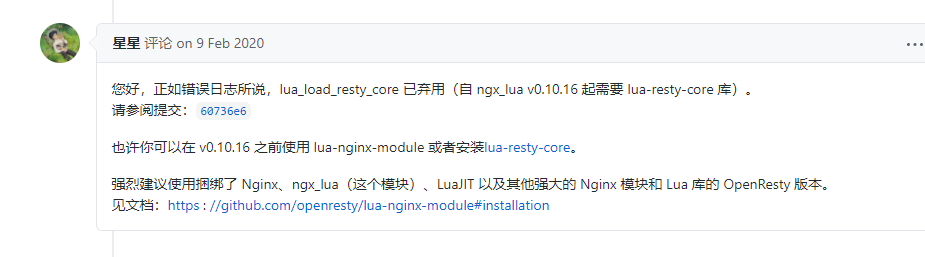
按照上面说安装lua-resty-core和依赖文件lua-resty-lrucache解决问题
lua-resty-core-0.1.22.tar.gz

lua-resty-lrucache-0.10.tar.gz
NGINX+Lua模块编译安装的更多相关文章
- mac下Nginx+lua模块编译安装
Nginx的nb之处就不说了,lua也是一个小巧的脚本语言,由标准C编写而成,几乎可以运行在所有的平台上,也非常强大,其他特性请自行度娘.nginx_lua_module是由淘宝的工程师清无(王晓哲) ...
- luajit+nginx+上传模块+lua模块编译安装
git clone https://github.com/fdintino/nginx-upload-module.git git clone https://github.com/openresty ...
- Nginx 第三方模块的安装以及一致性哈希算法的使用
Nginx 第三方模块的安装以及一致性哈希算法的使用 第三方模块安装方法总结: 以ngx_http_php_memcache_standard_balancer-master为例 1:解压 到 pat ...
- 【重要】Nginx模块Lua-Nginx-Module学习笔记(三)Nginx + Lua + Redis 已安装成功(非openresty 方式安装)
源码地址:https://github.com/Tinywan/Lua-Nginx-Redis 一. 目标 使用Redis做分布式缓存:使用lua API来访问redis缓存:使用nginx向客户端提 ...
- Nginx 之一:编译安装nginx 1.8.1 及配置
一:基介绍 官网地址www.nginx.org,nginx是由1994年毕业于俄罗斯国立莫斯科鲍曼科技大学的同学为俄罗斯rambler.ru公司开发的,开发工作最早从2002年开始,第一次公开发布时间 ...
- Nginx服务及编译安装
第1章 Nginx 1.1 nginx的概念 Nginx("engine x")是一个开源的.支持高性能.高并发的WWW服务和代理服务软件,具有高开发(特别是静态资源),占用系统资 ...
- Nginx实践01-ngnix编译安装-测试
1.下载nginx安装包 下载地址:http://nginx.org/en/download.html(里面有nginx各个版本) 解压到指定目录: 解压出来的目录简单介绍: src:软件的所有源代码 ...
- Nginx源码编译安装选项
[Nginx源码编译过程] make是用来编译的,它从Makefile中读取指令,然后编译. make install是用来安装的,它也从Makefile中读取指令,安装到指定的位置. configu ...
- nginx源码编译安装(详解)
nginx编译安装 安装步骤: 官网下载合适的版本,建议选择稳定版本. 官网地址:https://nginx.org wget https://nginx.org/download/nginx-1.2 ...
- nginx配合zabbix编译安装时web下一步跳转问题
很多时候编译安装的时候把zabbix的php包拷贝到web所在目录之后(本文为nginx所在html目录),网页打开http:/localhost/zabbix却进不去下图: 或者是点了下一步没反应, ...
随机推荐
- 【msys2】更新镜像源
更新镜像源 镜像源的地址如:D:\msys64\etc\pacman.d 从下面选择镜像源剪切到Primary中第一行: 如下图,目录底下的所有都需要更改: 之后需要强制更新一下列表,https:// ...
- 多线程问题sleep与wait
涉及到的三个方法:wait():一旦执行此方法,当前线程就进入阻塞状态,并释放同步监视器notify():一旦执行此方法,就会唤醒被wait的一个线程.如果有多个线程被wait,就唤醒优先级高:not ...
- 日志服务化&可视化&统计化
概述: ELK是Elasticsearch(简称es).Logstash.Kibana的简称,这三者是核心套件,但并非全部. Filebeat 日志采集工具 Logstash数据处理引擎 ela ...
- 基于Axi4_lite的UART串口Verilog代码实现
UART是通用异步收发传输器(Universal Asynchronous Receiver/Transmitter),通常称作UART,是一种异步收发传输器,是设备间进行异步通信的关键模块.UART ...
- C#判断窗体是否打开,并获取聚焦、未打开则新建一个子窗体
在桌面程序开发会遇到的情况,托盘功能或者是小功能弹窗问题: 现有一个主窗体有子窗体 子窗体每个都可以新建其他窗体问题:新建子窗体时怎么判断子窗体是否打开?若子窗体打开则置顶获取焦点.若未打开则新建一个 ...
- mmdetection3d安装
conda create -n openmmlab python=3.7 -y conda activate openmmlab pip install torch==1.8.1+cu101 torc ...
- onnxruntime源码解析之C接口实现
onnxruntime的C接口,位置为include/onnxruntime/core/session/onnxruntime_c_api.h. 上述文件包含了C函数的声明,对应的实现在onnxrun ...
- 为什么要有jvm,jvm的作用?
jvm的两个作用:第一.运行并管理java源码文件所生成的Class文件.第二.在不同的操作系统上安装不同的jvm,从而去实现跨平台的一个保障. 一般情况下,即使不熟悉jvm的运行机制,也不影响业务代 ...
- 記錄一下oracle数据库系统的comment數據字典(轉載)
一.comment是oracle数据库系统的关键字,所以不能用来命名表明或字段名 二.comment关键字用于对表,字段添加注释,有利于用户对表结构以及数据库对象含义的理解. 三.用户可以通过数据字典 ...
- 删除v-for方法生成的组件的方法
一.思路 在vue:data中的数据对象添加布尔类型的属性,用来表明其是否被渲染,如果需要删除组件,就把这个属性设置为false: 在计算属性vue:computed中,根据该布尔属性过滤,生成一个新 ...