
I finally made sense of front end build tools. You can, too.
来源于:https://medium.freecodecamp.com/making-sense-of-front-end-build-tools-3a1b3a87043b#.nvnd2vsd8
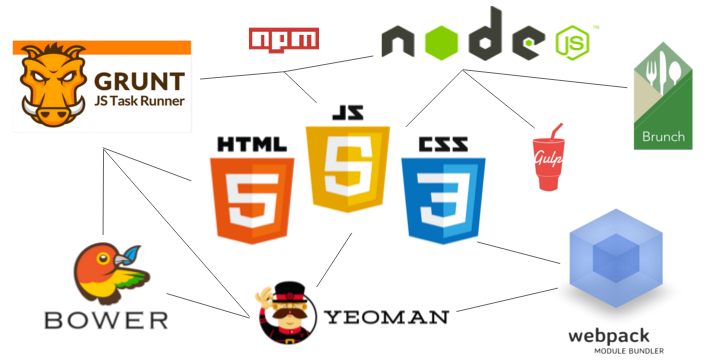
Front end build tools can be confusing even to experienced developers like me. The solution is to understand how they work — and work together — on a conceptual level.
This article presents my opinionated approach to making sense of front end build tools. Instead of diving into code, I’ll walk you through my mental model of how these tools work and what they accomplish.
Don’t be intimidated by the state of the art
Node, NPM, Grunt, Gulp, Bower, Webpack, Browserify, Yeoman, Brunch… there are so many front-end build tools out there that it can seem impossible to keep up.
The key is not being intimidating. All of these projects are designed to make your life easier.
To understand the what, why, and how of these tools, you just need to grasp a few concepts.
Concept #1 — The core dichotomy of build tools is “installing vs. doing”
Build tools do two things:
- Install things
- Do things
The first question to ask yourself when confronting a new build tool is: “Is this tool intended to install things for me, or do things for me?”
“Installing” tools like npm, Bower, and Yeoman can install pretty much anything. They can install front-end libraries like Angular.js or React.js. They can install servers for your dev environment. They can install testing libraries. They even help you install other front end build tools.
In short, they install most any code-related things you can think of.
The “doing” tools like Grunt, Webpack, Require.js, Brunch, and Gulp are much more complicated. The goal of the “doing” tools is to automate all the menial and error prone tasks in web development. The things they do are sometimes called “tasks.”
To do these “tasks” they often use their own ecosystem of packages and plugins. Each tool writes tasks in different ways. These tools also don’t all do the same thing. Some “doing” tools try to handle any task you throw at it (Grunt, Gulp, etc). Others focus on one thing, such as handling Javascript dependencies (Browserify, Require.js, etc).
Sometimes you end up using several of these tools in the same project.
Here’s a short list of “tasks” I’ve automated with these “doing” tools:
- Replacing a string of text in a file
- Creating folders and moving files into those folders
- Running my unit tests with a single command
- Refreshing my browser when I save a file
- Combining all my JavaScript files into one, and all my CSS files into one
- Minifying my concatenated JavaScript and CSS files
- Modifying the placement of <script> tags on an html page
Once you understand that tools install stuff or do stuff, categorizing them becomes much easier:
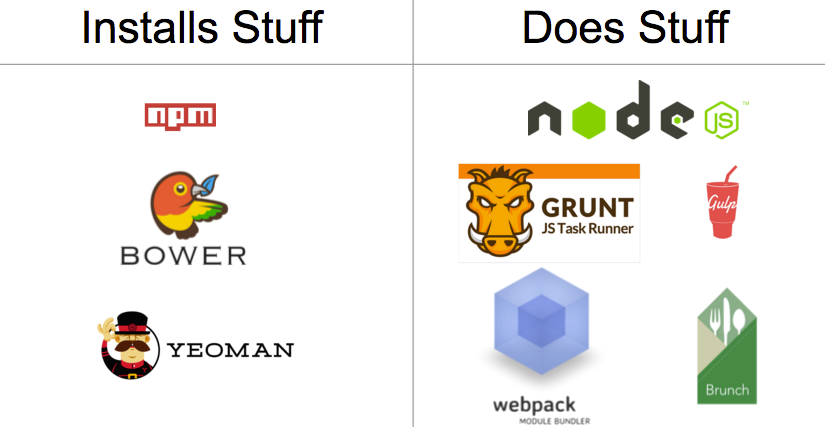
Build tools sorted by whether they primarily install things or do things
Concept #2 — The grandparent of all build tools is Node and npm
Node and npm install and run all these build tools, so there is always a trace of them in your project. Because of this, many developers try to use these two tools as much as possible before they resort to installing an additional tool.
Node and NPM fall into our “build” and “do” dichotomy. Node is the “do” tool, and npm is the “install” tool.
npm can install libraries like Angular.js or React.js. It can also install a server to run your app locally for development. It can even install tools to do things like minify your code.
Node, on the other hand, “does” things for you, like run JavaScript files, servers, and so much more.
If you need a place to start learning, start with Node+npm, and stay there for a while. When your project gets large enough, you’ll reach the limits of what Node and npm can automate for you. At that point you can organically incorporate another build tool.
Concept #3 — A build is just a production ready version of your app
Developers often break JavaScript and CSS out into separate files. Separate files let you focus on writing more modular chunks of code that do one single thing. Files that do one thing decrease your cognitive load. (If you think separate files are more confusing than one large file, try working in a 5000 line file, and you will quickly change your mind
I finally made sense of front end build tools. You can, too.的更多相关文章
- VS报错:The build tools for v140 (Platform Toolset = 'v140') cannot be found
VS低版本打开高版本常会出现的错: The build tools for v140 (Platform Toolset = 'v140') cannot be found. To build usi ...
- 开发错误记录3:问题 Error:failed to find Build Tools revision 23.0.2
今天导入swiperefreshlayoutdemo 问题 Error:failed to find Build Tools revision 23.0.2 修改build.gradle 里面设置,其 ...
- SDK Build Tools revision (19.0.3) is too low for project Min
SDK Build Tools revision (19.0.3) is too low for project Min(转) 如果你正在使用Android Studio工具进行开发,且将 ...
- 关于SVN下载代码和Android Studio里面导入别人代码build tools不一致问题总结
项目build tools的sdk我没有 网络问题没法下载. 解决问题 方法 1.下载对应的SDK.需要VPN,或者FQ 2.将bulid.gradle的内容用下面的内容替换 // Top-level ...
- Gradle sync failed: failed to find Build Tools revision 21.1.2
从github上下载了一个开源项目到Android Studio 出现以下问题: 下午2:56:05 Gradle sync started下午3:00:11 Gradle sync failed: ...
- using 1.7 requires using android build tools version 19 or later
这意思大概是adt用了1.7,abt(android build tools)就要用19或更高,可是abt在哪设置呢,原来是在sdk manager中 之前我已安装的最高的abt是17,然后~~~,F ...
- Error:The SDK Build Tools revision (19.0.3) is too low for project ':app'. Minimum required is 19.1.
今天更新了一下AndroidStudio, 结果编译程序时报错, 错误如下: Error:The SDK Build Tools revision (19.0.3) is too low for pr ...
- building 'twisted.test.raiser' extension error: Microsoft Visual C++ 14.0 is required. Get it with "Microsoft Visual C++ Build Tools": http://landinghub.visualstudio.com/visual-cpp-build-tools
Error msg: building 'twisted.test.raiser' extension error: Microsoft Visual C++ 14.0 is required. Ge ...
- Android sdk platform,sdk tools,sdk Build tools,sdk platform tools 的关系
1. sdk platform 简单理解为系统版本 最新级别: 28:Android 9 27:Android 8.1 26:Android 8.0 25:Android 7.1 24:Android ...
随机推荐
- 『SharePoint』Content Editor Webpart不能添加引用_layouts下面的文件
好久没写了,最近没怎么学到新东西,倒是犯了一个很常见的错误,那就是试图在content editor webpart中添加位于_layouts下面的一个txt文件,虽然这个txt中只是几行简单的htm ...
- 转载 Android 多线程处理之多线程用法大集合
handler.post(r)其实这样并不会新起线程,只是执行的runnable里的run()方法,却没有执行start()方法,所以runnable走的还是UI线程. 1.如果像这样,是可以操作ui ...
- android常犯错误记录
错误:Error:Error: Found item Attr/border_width more than one time 这个容易,属性相同了,按照提示查询一下找出来删了就行了,注意大小写很容易 ...
- hotCity 小程序城市选择器, 城市数据库可自己导出
hotCity 城市选择器, 城市数据库可自己导出 后台数据API 由HotApp小程序统计提供并维护,如果需要导出并部署在公司的生产环境,最后有SQL导出下载地址 开源地址 https://gith ...
- Xcode8开发iOS10推送通知过程
iOS10发布后,简书优先开发增加了iOS10的新通知.本文分享整个feature的开发过程遇到的问题. 1.工程配置 Xcode8发生了很大的变化,直接打开原来的工程编译运行,这个时候是获取不到Pu ...
- IOS 图片上传处理 图片压缩 图片处理
- (void)initActionSheet { UIActionSheet *actionSheet = [[UIActionSheet alloc] initWithTitle:nil dele ...
- Red Hat Enterprise Server 6.0 安装Sendmail相关包
由于需要在Linux服务器(Red Hat Enterprise Linux Server release 6.0)上配置邮件服务,需要安装Sendmail包,一般Sendmail的安装有两种方式:R ...
- JVM之方法区
基本特性: 线程共享区域,存储被JVM加载的类信息.常量.静态变量.即时编译器编译的代码等 堆的逻辑部分,不限定方法去内的内存位置和编译代码的管理策略,不限定实现垃圾回收 容量可不定也可动态扩展,不 ...
- Function.prototype.call 和 Function.prototype.apply 的区别
call和apply函数是function函数的基本属性,都可以用于更改函数对象和传递参数,是前端工程师常用的函数.具体使用方法请参考以下案列: 例如: 申明函数: var fn = function ...
- Linux find命令的用法实践
一.find命令简介 Linux下find命令在目录结构中搜索文件,并执行指定的操作.Linux下find命令提供了相当多的查找条件,功能很强大.由于find具有强大的功能,所以它的选项也很多,其中大 ...