
部署redis-cluster
1、环境准备
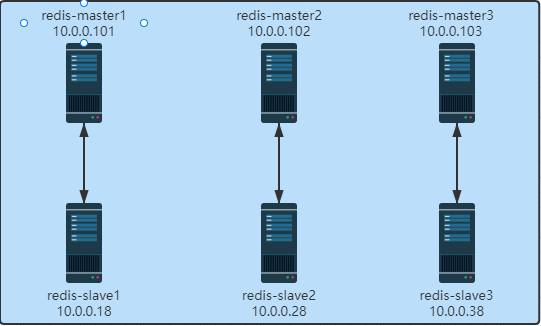
☆ 每个Redis 节点采用相同的相同的Redis版本、相同的密码、硬件配置
☆ 所有Redis服务器必须没有任何数据
#所有主从节点执行:

 [root@ubuntu2004 ~]#bash install_redis.sh

 #脚本参考:https://blog.51cto.com/dayu/5805274
2、启用 redis cluster 配置
#所有主从节点执行:

 #每个节点修改redis配置,必须开启cluster功能的参数

 [root@master-1 ~]#vim /apps/redis/etc/redis.conf

 bind 0.0.0.0

 masterauth 123456       #建议配置,否则后期的master和slave主从复制无法成功,还需再配置

 requirepass 123456

 cluster-enabled yes     #取消此行注释,必须开启集群,开启后 redis 进程会有cluster标识

 cluster-config-file nodes-6379.conf     #取消此行注释,此为集群状态数据文件,记录主从关系及slot范围信息,由redis cluster 集群自动创建和维护

 cluster-require-full-coverage no        #默认值为yes,设为no可以防止一个节点不可用导致整个cluster不可用
#验证当前Redis服务状态:
[root@master-1 ~]#ss -ntl
State Recv-Q Send-Q Local Address:Port Peer Address:Port Process
LISTEN 0 511 0.0.0.0:6379 0.0.0.0:*
LISTEN 0 4096 127.0.0.53%lo:53 0.0.0.0:*
LISTEN 0 128 0.0.0.0:22 0.0.0.0:*
LISTEN 0 511 0.0.0.0:16379 0.0.0.0:*
LISTEN 0 511 [::1]:6379 [::]:*
LISTEN 0 128 [::]:22 [::]:*
LISTEN 0 511 [::1]:16379 [::]:*
#开启了16379的cluster的端口,实际的端口=redis port + 100003、创建集群
#10.0.0.101:

 [root@master-1 ~]#redis-cli -a 123456 --cluster create 10.0.0.101:6379 10.0.0.102:6379 10.0.0.103:6379 10.0.0.18:6379 10.0.0.28:6379 10.0.0.38:6379 --cluster-replicas 1

 #命令redis-cli的选项 --cluster-replicas 1 表示每个master对应一个slave节点
4、验证集群
#查看主从状态

 [root@master-1 ~]#redis-cli -a 123456 -c info replication

 Warning: Using a password with '-a' or '-u' option on the command line interface may not be safe.

 # Replication

 role:master

 connected_slaves:1

 slave0:ip=10.0.0.28,port=6379,state=online,offset=602,lag=0

 ......

 #查看对应关系

 [root@master-1 ~]#redis-cli -a 123456 cluster nodes

 Warning: Using a password with '-a' or '-u' option on the command line interface may not be safe.

 c58b6d30550a3d6d682d2a4f7563efabf470bd82 10.0.0.38:6379@16379 slave 139317befd252551e1135b27d32ce557133ec71a 0 1667098745948 2 connected

 ......

 #验证集群状态

 [root@master-1 ~]#redis-cli -a 123456 cluster info

 Warning: Using a password with '-a' or '-u' option on the command line interface may not be safe.

 cluster_state:ok

 cluster_slots_assigned:16384

 cluster_slots_ok:16384

 cluster_slots_pfail:0

 cluster_slots_fail:0

 cluster_known_nodes:6         #节点数

 cluster_size:3                #三个集群

 ......

 #查看任意节点的集群状态

 [root@slave-1 ~]#redis-cli -a 123456 --cluster info 10.0.0.38:6379

 Warning: Using a password with '-a' or '-u' option on the command line interface may not be safe.

 10.0.0.102:6379 (139317be...) -> 0 keys | 5462 slots | 1 slaves.

 10.0.0.101:6379 (98df8874...) -> 0 keys | 5461 slots | 1 slaves.

 10.0.0.103:6379 (8d72bbb5...) -> 0 keys | 5461 slots | 1 slaves.

 [OK] 0 keys in 3 masters.

 0.00 keys per slot on average.

 [root@slave-1 ~]#redis-cli -a 123456 --cluster check 10.0.0.38:6379
5、测试写入数据
[root@master-1 ~]#redis-cli -a 123456 -h 10.0.0.102 set k1 wang

 Warning: Using a password with '-a' or '-u' option on the command line interface may not be safe.

 (error) MOVED 12706 10.0.0.103:6379             #槽位不在当前node所以无法写入

 [root@master-1 ~]#redis-cli -a 123456 -h 10.0.0.103 set k1 wang

 Warning: Using a password with '-a' or '-u' option on the command line interface may not be safe.

 OK

 [root@slave-1 ~]#redis-cli -a 123456 -h 10.0.0.103 get k1

 Warning: Using a password with '-a' or '-u' option on the command line interface may not be safe.

 "wang"

 [root@master-1 ~]#redis-cli -a 123456 -h 10.0.0.103 get k1

 Warning: Using a password with '-a' or '-u' option on the command line interface may not be safe.

 "wang"

 #使用选项-c 以集群模式连接

 [root@master-1 ~]#redis-cli -c -h 10.0.0.18 -a 123456 --no-auth-warning

 10.0.0.18:6379> cluster keyslot test

 (integer) 6918

 10.0.0.18:6379> set test mylove

 -> Redirected to slot [6918] located at 10.0.0.102:6379

 OK

 10.0.0.102:6379> get test

 "mylove"

 10.0.0.102:6379> exit

 [root@master-1 ~]#redis-cli -h 10.0.0.102 -a 123456 --no-auth-warning get test

 "mylove"
部署redis-cluster的更多相关文章
- 部署Redis Cluster 6.0 集群并开启密码认证 和 Redis-cluster-proxy负载
部署Redis Cluster集群并开启密码认证 如果只想简单的搭建Redis Cluster,不需要设置密码和公网访问,可以参考官方文档. 节点介绍 Cluster模式推荐最少有6个节点,本次实验搭 ...
- K8S部署Redis Cluster集群
kubernetes部署单节点redis: https://www.cnblogs.com/zisefeizhu/p/14282299.html Redis 介绍 • Redis代表REmote DI ...
- K8S部署Redis Cluster集群(三主三从模式) - 部署笔记
一.Redis 介绍 Redis代表REmote DIctionary Server是一种开源的内存中数据存储,通常用作数据库,缓存或消息代理.它可以存储和操作高级数据类型,例如列表,地图,集合和排序 ...
- 在 K8S 中快速部署 Redis Cluster & Redisinsight
Redis Cluster 部署 使用 Bitnami helm chart 在 K8S redis 命名空间中一键部署 Redis cluster . helm repo add bitnami h ...
- 如何用docker部署redis cluster
前言 由于本人是个docker控,不喜欢安装各种环境,而且安装redis-trib也有点繁琐,索性用docker来做redis cluster. 本文用的是伪集群,真正的集群放到不同的机器即可.端口是 ...
- 手把手教你部署 Redis Cluster
环境准备 阿里云申请3台ECS,如下: 序号 内网IP OS A 172.16.190.78 CentOS 7.6 B 172.16.242.36 CentOS 7.6 C 172.16.190.77 ...
- 第七章· Redis Cluster 核心技术
Redis Cluster 分布式集群 Redis Cluster 安装部署 Redis Cluster 集群管理操作(核心)
- window下使用Redis Cluster部署Redis集群
日常的项目很多时候都需要用到缓存.redis算是一个比较好的选择.一般情况下做一个主从就可以满足一些比较小的项目需要.在一些并发量比较大的项目可能就需要用到集群了,redis在Windows下做集群可 ...
- Redis Cluster部署、管理和测试
背景: Redis 3.0之后支持了Cluster,大大增强了Redis水平扩展的能力.Redis Cluster是Redis官方的集群实现方案,在此之前已经有第三方Redis集群解决方案,如Twen ...
- Redis Cluster的搭建与部署,实现redis的分布式方案
前言 上篇Redis Sentinel安装与部署,实现redis的高可用实现了redis的高可用,针对的主要是master宕机的情况,我们发现所有节点的数据都是一样的,那么一旦数据量过大,redi也会 ...
随机推荐
- Java 解析Tiff深入研究
最近在读取客户发过来的tiff文件是,底层竟然报错了,错误:bandOffsets.length is wrong! 没办法,因为错误消息出现在tiff的read中,因此就对 底层序中tiff读取 ...
- 配置Windows server dhcp与AD域对接并使用Win1创的用户登录Win2
创建两台windows_server_2012 创建步骤链接(https://www.cnblogs.com/zhengyan6/p/16338084.html) 注意:所有虚拟机都要在同意网段 配置 ...
- Enable_hint_table 使用
KingbaseES enable_hint_table 可以看成类似 oracle outline 工具,可以在不修改SQL 的情况下,通过hint 改变SQL 的执行计划. 一.启用enable_ ...
- 基于 vite 创建 vue3 全家桶项目(vite + vue3 + tsx + pinia)
vite 最近非常火,它是 vue 作者尤大神发布前端构建工具,底层基于 Rollup,无论是启动速度还是热加载速度都非常快.vite 随 vue3 正式版一起发布,刚开始的时候与 vue 绑定在一起 ...
- 在Windows Server 2019上安装edge浏览器
在Windows 2016和2019的正式版本中是不带Edge浏览器的.有些工具.网站也不支持IE浏览器了.对于偶尔需要在服务器上访问这些站点的管理员来说有些不方便.不过可以通过安装三方浏览器或者Ed ...
- 通过vNode实现给列表字段打标签
问题 如何给列表数据打标签?类似下面这种样子 思路 数模转化(对接口请求回来的数据进行过滤标记,返回新的数据) 渲染新的数据模型 实现 1.过滤数据,需要打标签的采用jsx写法 业务数据的处理我封装在 ...
- Ceph 存储集群第一部分:配置和部署
内容来源于官方,经过个人实践操作整理,官方地址:http://docs.ceph.org.cn/rados/ 所有 Ceph 部署都始于 Ceph 存储集群. 基于 RADOS 的 Ceph 对象存储 ...
- 关于kibana启动时有几个warning警告信息的解决办法
启动kibana时会有几个warning信息,具体如下: 针对xpack这几个相关的,在kibana.yml文件中新增如下三个配置即可: # 注意:参数值至少32位,否则启动会报错提示 xpack.e ...
- MySQL之pt-query-digest分析慢查询日志的详情介绍
一.简介 pt-query-digest是用于分析mysql慢查询的一个工具,它可以分析binlog.General log.slowlog,也可以通过SHOWPROCESSLIST或者通过tcpdu ...
- 密码学奇妙之旅、01 CFB密文反馈模式、AES标准、Golang代码
CFB密文反馈模式 CFB密文反馈模式属于分组密码模式中的一种.加密与解密使用同一结构,加密步骤生成用于异或的密钥流. 其弥补了ECB电子密码本模式的不足(明文中的重复排列会反映在密文中,通过删除替换 ...