
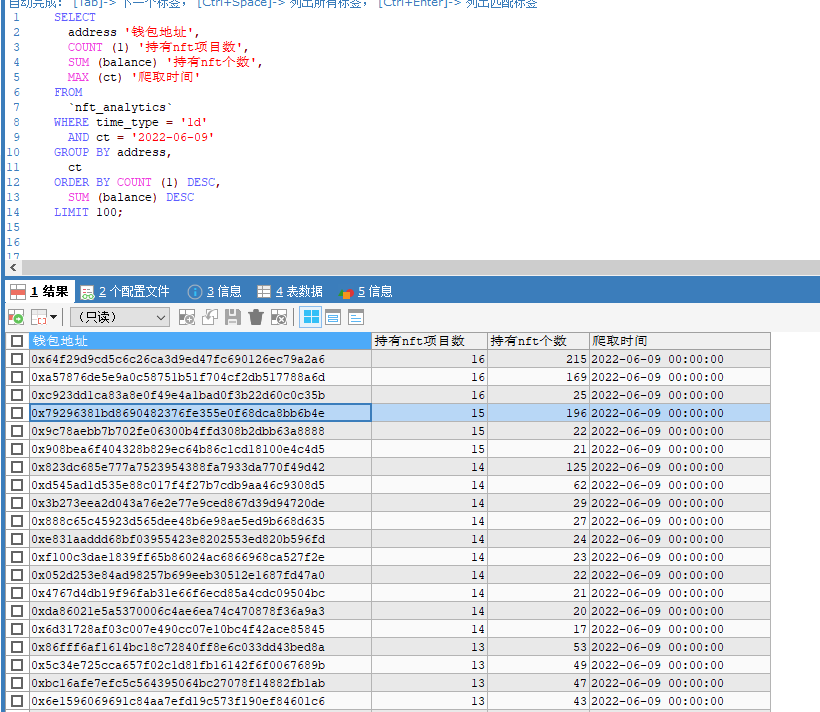
爬取白鲸nft排名前25项目,持有nft大户地址数据。
https://moby.gg/rankings?tab=Market
SELECT

address '钱包地址',

COUNT (1) '持有nft项目数',

SUM (balance) '持有nft个数',

MAX (ct) '爬取时间'

FROM

`nft_analytics`

WHERE time_type = '1d'

AND ct = '2022-06-09'

GROUP BY address,

ct

ORDER BY COUNT (1) DESC,

SUM (balance) DESC

LIMIT 100;
#coding=utf-8

import requests

import time

import json

import math

import datetime

from requests.packages.urllib3 import disable_warnings

data_12h = ''

from  selenium_chrome.MySqlUtils import getMysql

disable_warnings()

def spider_nft(time_type):

    '''

    12h 1d 3d

    :param time_type:

    :return:

    '''

    time_12h = f'https://moby-api.onrender.com/market/rank/{time_type}'

    time_12h_resp = requests.get(time_12h,timeout=600,verify=False)

    mysql = getMysql()

    if(time_12h_resp.status_code == 200 and time_12h_resp.reason == 'OK'):

        nft_address_list = json.loads(time_12h_resp.text)['data']

        for nft_obj in nft_address_list:

            try:

                nft_address = nft_obj['contract']['address']

                holder_url = f'https://ethplorer.io/service/service.php?data={nft_address}&page=tab=tab-holders%26pageSize=500%26holders=1&showTx=all'

                holder_resp = requests.get(holder_url,timeout=60,verify=False)

                if(holder_resp.status_code == 200):

                    time.sleep(5)

                    resp_data = json.loads(holder_resp.text)

                    total =  resp_data['pager']['holders']['total']

                    holder1 = resp_data['holders']

                    '''

                    id                bigint(20)    (NULL)           NO      PRI     (NULL)   auto_increment  select,insert,update,references

                    name              varchar(500)  utf8_general_ci  YES             (NULL)                   select,insert,update,references

                    address           varchar(500)  utf8_general_ci  YES             (NULL)                   select,insert,update,references

                    balance           varchar(500)  utf8_general_ci  YES             (NULL)                   select,insert,update,references

                    contract_address  varchar(500)  utf8_general_ci  YES             (NULL)                   select,insert,update,references

                    owner             varchar(500)  utf8_general_ci  YES             (NULL)                   select,insert,update,references

                    time_type         varchar(100)  utf8_general_ci  YES             (NULL)                   select,insert,update,references

                    ct                datetime      (NULL)           YES             (NULL)                   select,insert,update,references

                    '''

                    name = resp_data['token']['name']

                    contract_address = resp_data['token']['address']

                    owner = resp_data['token']['owner']

                    time_type = time_type

                    ct = datetime.datetime.now().strftime('%Y-%m-%d')

                    num = math.ceil(total/500)

                    for n in range(2,num+1):

                        holder_url = f'https://ethplorer.io/service/service.php?data={nft_address}&page=tab=tab-holders%26pageSize=500%26holders={n}&showTx=all'

                        holder_resp = requests.get(holder_url,timeout=60,verify=False)

                        if (holder_resp.status_code == 200):

                            holder1 +=  json.loads(holder_resp.text)['holders']

                        time.sleep(5)

                    for h in holder1:

                        address = h['address']

                        balance = h['balance']

                        insert_sql = f'insert into nft_analytics (name,address,balance,contract_address,owner,time_type,ct)  values ("'+name+'","'+address+'",'+str(balance)+',"'+contract_address+'","'+owner+'","'+time_type+'","'+ct+'")'

                        print(insert_sql)

                        mysql.execute_db(insert_sql)

            except BaseException as e:

                print(e)

if __name__ == '__main__':

    spider_nft('1d')
import pymysql

class MysqlDb():

    def __init__(self, host, port, user, passwd, db):

        # 建立数据库连接

        self.conn = pymysql.connect(

            host=host,

            port=port,

            user=user,

            passwd=passwd,

            db=db

        )

        # 通过 cursor() 创建游标对象,并让查询结果以字典格式输出

        self.cur = self.conn.cursor(cursor=pymysql.cursors.DictCursor)

    def __del__(self): # 对象资源被释放时触发,在对象即将被删除时的最后操作

        # 关闭游标

        self.cur.close()

        # 关闭数据库连接

        self.conn.close()

    def select_db(self, sql):

        """查询"""

        # 使用 execute() 执行sql

        self.cur.execute(sql)

        # 使用 fetchall() 获取查询结果

        data = self.cur.fetchall()

        return data

    def execute_db(self, sql):

        """更新/插入/删除"""

        try:

            # 使用 execute() 执行sql

            self.cur.execute(sql)

            # 提交事务

            self.conn.commit()

        except Exception as e:

            print("操作出现错误:{}".format(e))

            # 回滚所有更改

            self.conn.rollback()

def getMysql():

    try:

        db = MysqlDb("127.0.0.1", 3306, "root", "root", "coin_project")

    except BaseException as e:

        print('初始化mysql失败:'+e)

    return db


if __name__ == '__main__':

    db = getMysql()
/*表: nft_analytics*/----------------------

/*列信息*/-----------
自增id id
nft名称 name
地址 address
持有nft数量 balance
nft合约地址 contract_address
nft合约创建地址 owner
时间类型 time_type
创建时间 ct

Field             Type          Collation        Null    Key     Default  Extra           Privileges                       Comment

----------------  ------------  ---------------  ------  ------  -------  --------------  -------------------------------  ---------

id                bigint(20)    (NULL)           NO      PRI     (NULL)   auto_increment  select,insert,update,references

name              varchar(500)  utf8_general_ci  YES             (NULL)                   select,insert,update,references

address           varchar(500)  utf8_general_ci  YES             (NULL)                   select,insert,update,references

balance           int(255)      (NULL)           YES             (NULL)                   select,insert,update,references

contract_address  varchar(500)  utf8_general_ci  YES             (NULL)                   select,insert,update,references

owner             varchar(500)  utf8_general_ci  YES             (NULL)                   select,insert,update,references

time_type         varchar(100)  utf8_general_ci  YES             (NULL)                   select,insert,update,references

ct                datetime      (NULL)           YES             (NULL)                   select,insert,update,references

/*索引信息*/--------------

Table          Non_unique  Key_name  Seq_in_index  Column_name  Collation  Cardinality  Sub_part  Packed  Null    Index_type  Comment  Index_comment

-------------  ----------  --------  ------------  -----------  ---------  -----------  --------  ------  ------  ----------  -------  ---------------

nft_analytics           0  PRIMARY              1  id           A               230789    (NULL)  (NULL)          BTREE

/*DDL 信息*/------------

CREATE TABLE `nft_analytics` (

  `id` bigint(20) NOT NULL AUTO_INCREMENT,

  `name` varchar(500) DEFAULT NULL,

  `address` varchar(500) DEFAULT NULL,

  `balance` int(255) DEFAULT NULL,

  `contract_address` varchar(500) DEFAULT NULL,

  `owner` varchar(500) DEFAULT NULL,

  `time_type` varchar(100) DEFAULT NULL,

  `ct` datetime DEFAULT NULL,

  PRIMARY KEY (`id`)

) ENGINE=InnoDB AUTO_INCREMENT=241992 DEFAULT CHARSET=utf8
爬取白鲸nft排名前25项目,持有nft大户地址数据。的更多相关文章
- Python爬虫【三】利用requests和正则抓取猫眼电影网上排名前100的电影
#利用requests和正则抓取猫眼电影网上排名前100的电影 import requests from requests.exceptions import RequestException imp ...
- Python爬取酷狗飙升榜前十首(100)首,写入CSV文件
酷狗飙升榜,写入CSV文件 爬取酷狗音乐飙升榜的前十首歌名.歌手.时间,是一个很好的爬取网页内容的例子,对爬虫不熟悉的读者可以根据这个例子熟悉爬虫是如何爬取网页内容的. 需要用到的库:requests ...
- Python的scrapy之爬取豆瓣影评和排名
基于scrapy框架的爬影评 爬虫主程序: import scrapy from ..items import DoubanmovieItem class MoviespiderSpider(scra ...
- 使用正则表达式和urllib模块爬取最好大学排名信息
题目 使用urllib模块编程实现爬取网站的大学排名. (网址:http://www.zuihaodaxue.cn/zuihaodaxuepaiming2016.html) (1)获取网站页面,分析代 ...
- Python爬虫练习:爬取800多所大学学校排名、星级等
前言 国内大学最新排名,北大反超,浙大仅第四,中科大跌至第八 时隔五年,"双一流"大学即将迎来首次大考,这也是继改变高校评断标准之后,第一次即将以官方对外发布,自然是引来了许多人的 ...
- R语言爬虫:使用R语言爬取豆瓣电影数据
豆瓣排名前25电影及评价爬取 url <-'http://movie.douban.com/top250?format=text' # 获取网页原代码,以行的形式存放在web 变量中 web & ...
- 正则表达式和豆瓣Top250的爬取练习
datawhale任务2-爬取豆瓣top250 正则表达式 豆瓣250页面分析 完整代码 参考资料 正则表达式 正则表达式的功能用于实现字符串的特定模式精确检索或替换操作. 常用匹配模式 常用修饰符 ...
- python3 爬虫---爬取豆瓣电影TOP250
第一次爬取的网站就是豆瓣电影 Top 250,网址是:https://movie.douban.com/top250?start=0&filter= 分析网址'?'符号后的参数,第一个参数's ...
- scrapy爬虫框架教程(二)-- 爬取豆瓣电影TOP250
scrapy爬虫框架教程(二)-- 爬取豆瓣电影TOP250 前言 经过上一篇教程我们已经大致了解了Scrapy的基本情况,并写了一个简单的小demo.这次我会以爬取豆瓣电影TOP250为例进一步为大 ...
- 复仇者联盟3热映,我用python爬取影评告诉你它都在讲什么
Python(发音:英[?pa?θ?n],美[?pa?θɑ:n]),是一种面向对象.直译式电脑编程语言,也是一种功能强大的通用型语言,已经具有近二十年的发展历史,成熟且稳定.它包含了一组完善而且容易理 ...
随机推荐
- vscode开发vue3+ts环境搭建
一.开发环境准备 1.nvm 2.vscode 3.node 4.chome 5.git 6.npm install -g yarn tyarn 7.tyarn global add commitiz ...
- WDA学习(27):RoadMap使用
1.20 UI Element:RoadMap使用 本实例测试创建RoadMap; 运行结果: 点击2,Input显示输入航班Id 点击3,根据input输入,查询航班信息 1.创建Component ...
- 每次 git 都需要输入用户名和密码的解决办法
git config --global credential.helper store git pull /git push (第一次输入,下次就不用再次输入数据)
- Qt控件installEventFilter后不显示了
原因是在eventFilter函数内return true了,就不会在执行paint事件了,将return true改为return false即可.
- 关于MounRiver编译器配置的若干问题
目录 一.在工程中单独设置预编译宏 二.将变量存放到指定RAM地址 三.串口打印浮点数 四.添加64位数据处理 五.使用math数学库 六.关闭仿真时自动清dataflash功能 七.配置printf ...
- SpringBoot 启动报循环依赖问题
问题现象 Caused by: org.springframework.beans.factory.BeanCurrentlyInCreationException: Error creating b ...
- Jenkins提供了哪些功能
我的这篇文章仅仅是简单的根据上文,介绍Jenkins提供了哪些功能.具体大家还是要自己学习啦~ 官网首页就提供了windows版本的Jenkins安装包.我们可以下载一个用于学习.安装后自动打开htt ...
- OS-lab2
OS-lab2 启动之后,我们的操作系统要能运行,需要一个载体,就是内存.内存的访问不是直接的,而是通过MMU完成.在完成MMU之前,我们先看看一些需要用到的宏定义和函数. include pmap. ...
- gradle的配置
第一次接触公司的JAVA项目,使用了gradle,于是乎到网上搜索一番,终于弄明白了是个什么东东,由于之前也没有接触过maven和ant,所以对这个东西还是很陌生.好了,废话不多说,开始我的环境搭建. ...
- 为开源项目贡献代码-pycharm使用git-登录注册功能分析-判断手机号存在接口-多种方式登录接口-腾讯云短信申请
目录 为开源项目贡献代码-pycharm使用git-登录注册功能分析-判断手机号存在接口-多种方式登录接口-腾讯云短信申请 git内容大回顾 今日内容概要 今日内容详细 1 为开源项目贡献代码 2 p ...