
WPF中Popup控件的使用
一、Popup控件的主要属性
Popup表示具有内容的弹出窗口,其主要属性为:
- Child:获取或设置 Popup控件的内容。
- IsOpen:获取或设置一个值,该值指示Popup 是否可见
- Placement:获取或设置 Popup 控件打开时的控件方向,并指定Popup 控件在与屏幕边界重叠时的控件行为
- PlacementTarget:获取或设置当打开 Popup 控件时该控件相对于其放置的元素。
- PopupAnimation:获取或设置Popup 控件的打开和关闭动画。
- StaysOpen:获取或设置一个值,该值指示当 Popup 控件焦点不再对准时,是否关闭该控件。
Popup主要事件为:
Opened:当IsOpen 属性更改为
true时发生。private void PopupOpening(object sender, EventArgs e)
{
//Code to execute when Popup opens
}
Closed:当IsOpen 属性更改为
false时发生。private void PopupClosing(object sender, EventArgs e)
{
//Code to execute when Popup closes
}
二、Popup控件使用
我们使用Popup实现一个功能:当文本框获取到焦点时,弹出下拉框,里面选择水果种类,具体效果如下图所示:
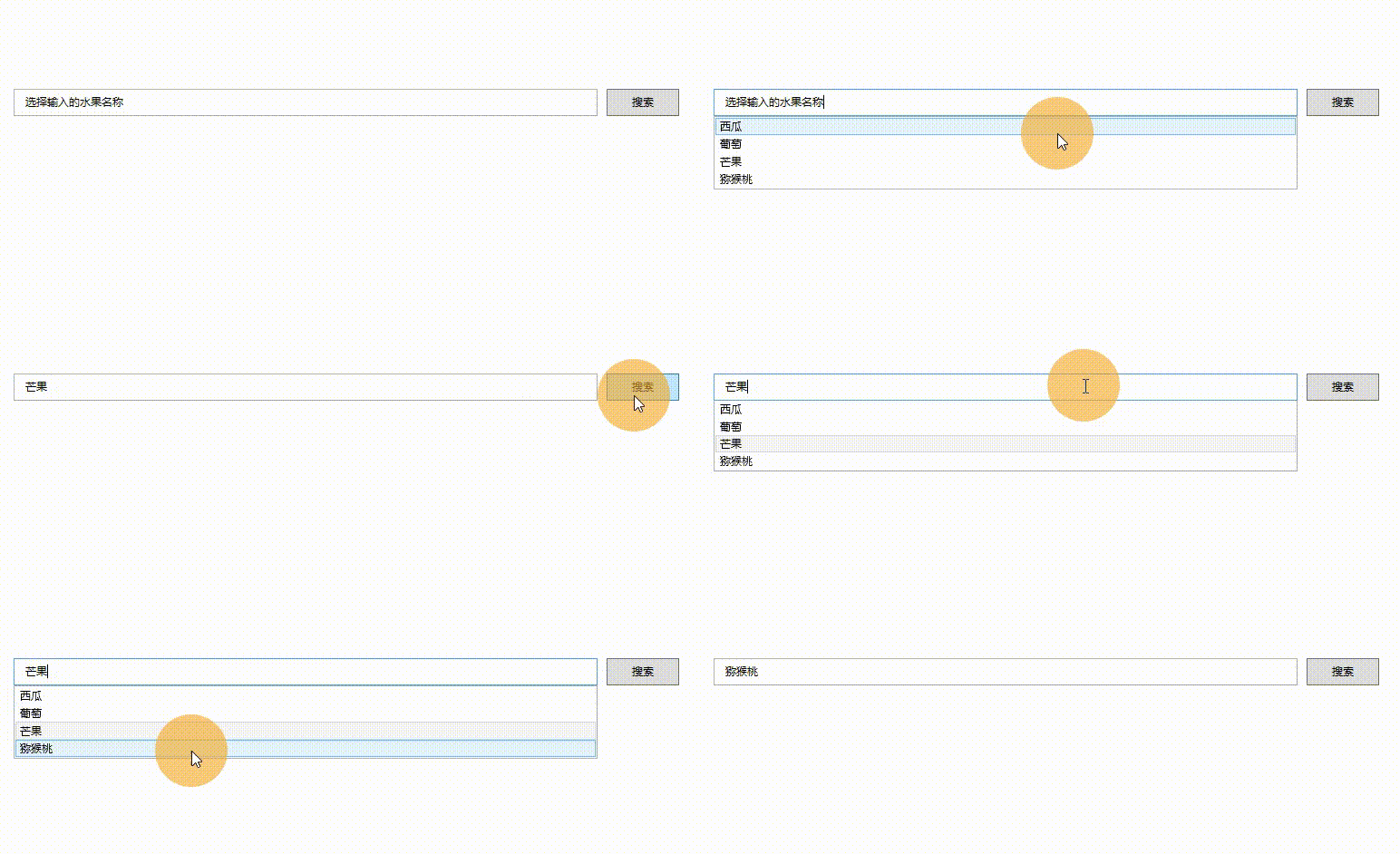
相关的界面代码为:
  <Window.Resources>

        <x:Array x:Key="MyArray" Type="system1:String">

            <system1:String>西瓜</system1:String>

            <system1:String>葡萄</system1:String>

            <system1:String>芒果</system1:String>

            <system1:String>猕猴桃</system1:String>

        </x:Array>

    </Window.Resources>

    <Grid Margin="20">

        <Grid.ColumnDefinitions>

            <ColumnDefinition Width="*"></ColumnDefinition>

            <ColumnDefinition Width="100"></ColumnDefinition>

        </Grid.ColumnDefinitions>

        <TextBox Grid.Column="0"  Height="30" BorderThickness="1"

                 VerticalContentAlignment="Center"

                 Padding="10,0"

                 x:Name="TestTextBox"

                 ToolTip="{StaticResource MyArray}">

        </TextBox>

        <Button Grid.Column="1" Content="搜索" Margin="10,0" Height="30" Click="ButtonBase_OnClick"></Button>

        <Popup Grid.Column="0"

               AllowsTransparency="True"

               PopupAnimation="Slide"

               PlacementTarget="{Binding ElementName=TestTextBox}"

               Placement="Bottom"

               Width="{Binding ElementName=TestTextBox, Path=ActualWidth}"

               IsOpen="{Binding ElementName=TestTextBox, Path=IsKeyboardFocused, Mode=OneWay}">

            <ListBox ItemsSource="{Binding ElementName=TestTextBox, Path=ToolTip}"

                     SelectedItem="{Binding ElementName=TestTextBox, Path=Text, Mode=OneWayToSource}"></ListBox>

        </Popup>

    </Grid>
为了,让Popup控件能够跟随目标控件移动,需要增加一个工具类,具体如下所示:
 public class PopupHelper

    {

        /// <summary>

        /// 附加属性:跟随放置控件而移动

        /// </summary>

        public static readonly DependencyProperty PopupPlacementTargetProperty = DependencyProperty.RegisterAttached("PopupPlacementTarget", typeof(DependencyObject), typeof(PopupHelper), new PropertyMetadata(null, OnPopupPlacementTargetChanged));

        public static DependencyObject GetPopupPlacementTarget(DependencyObject obj)

        {

            return (DependencyObject)obj.GetValue(PopupPlacementTargetProperty);

        }

        public static void SetPopupPlacementTarget(DependencyObject obj, DependencyObject value)

        {

            obj.SetValue(PopupPlacementTargetProperty, value);

        }

        private static void OnPopupPlacementTargetChanged(DependencyObject d, DependencyPropertyChangedEventArgs e)

        {

            if (d is System.Windows.Controls.Primitives.Popup pop && e.NewValue is DependencyObject placementTarget)

            {

                var window = Window.GetWindow(placementTarget);

                if (window != null)

                {

                    window.LocationChanged += delegate

                    {

                        var mi = typeof(System.Windows.Controls.Primitives.Popup).GetMethod("UpdatePosition", System.Reflection.BindingFlags.NonPublic | System.Reflection.BindingFlags.Instance);

                        mi?.Invoke(pop, null);

                    };

                }

            }

        }

    }
该附加属性的使用如下所示:
<Popup local:PopupHelper.PopupPlacementTarget="{Binding ElementName=TestTextBox}"></Popup>
WPF中Popup控件的使用的更多相关文章
- WPF中Popup控件在Win7以及Win10等中的对齐点方式不一样的解决方案 - 简书
原文:WPF中Popup控件在Win7以及Win10等中的对齐点方式不一样的解决方案 - 简书 最近项目中使用弹出控件Popup,发现弹出框的对齐方式在不同的系统中存在不同(Popup在win10上是 ...
- 关于WPF中Popup控件的小记
在wpf开发中,常需要在鼠标位置处弹出一个“提示框”(在此就以“提示框”代替吧),通过“提示框”进行信息提示或者数据操作,如果仅仅是提示作用,使用ToolTip控件已经足够,但是有些是需要在弹出的框中 ...
- WPF中Ribbon控件的使用
这篇博客将分享如何在WPF程序中使用Ribbon控件.Ribbon可以很大的提高软件的便捷性. 上面截图使Outlook 2010的界面,在Home标签页中,将所属的Menu都平铺的布局,非常容易的可 ...
- wpf中dropdownButton控件下拉居中。。。
设置模版中popup控件的HorizontalOffset属性来控制居中. 还是对popup控件不熟,折腾了一会.
- WPF中查找控件的扩展类
在wpf中查找控件要用到VisualTreeHelper类,但这个类并没有按照名字查找控件的方法,于是搜索网络,整理出下面这个类,感觉用起来很是方便. 贴出来,供大家参考. /// <summa ...
- WPF中Image控件的Source属性
原文:WPF中Image控件的Source属性 imgBook 是一个Image控件,在后台代码中我想给它指定Source的属性.我先如下方式进行: Uri uri = new Uri(strImag ...
- WPF中PasswordBox控件的Password属性的数据绑定
原文:WPF中PasswordBox控件的Password属性的数据绑定 英文原文:http://www.wpftutorial.net/PasswordBox.html 中文原文:http://bl ...
- 浅谈WPF中对控件的位图特效(WPF Bitmap Effects)
原文:浅谈WPF中对控件的位图特效(WPF Bitmap Effects) -------------------------------------------------------------- ...
- 示例:WPF中Slider控件封装的缓冲播放进度条控件
原文:示例:WPF中Slider控件封装的缓冲播放进度条控件 一.目的:模仿播放器播放进度条,支持缓冲任务功能 二.进度: 实现类似播放器中带缓存的播放样式(播放区域.缓冲区域.全部区域等样式) 实现 ...
随机推荐
- nfs客户端的一次处理
为什么要说这个呢,由于节点环境不一致,导致在重建pod时,我们暂且叫该pod为 cxpod,cxpod所在宿主机出现了问题现象如下:一.cxpod始终处于创建中 ContainerCreating [ ...
- linux磁盘分区fdisk命令操作(实践)
写这篇的目的,还是要把整个过程完整的记录下来,特别是小细节的地方,通常很多情况是一知半解,平时不实践操作只凭看是没有用的,所以做这个行业就是要多动手,多学习,多思考慢慢你的思路也会打开.练就自己的学习 ...
- 制作Unity中的单位血条
本文章用于记录Unity的学习过程,如有疑问,欢迎交流. 1.血条的显示 在Unity场景中创建空物体,然后新建两个Image(图片),当然只用一个也行,一个作为填充来显示血量,一个作为血条的外框. ...
- jni有关知识点总结
一.c/c++语言: 1.关于动态链接库的搜索问题: LIBRARY_PATH is used by gcc before compilation to search for directories ...
- 为vscode开发一款svn右键菜单扩展
在我平时的工作中会经常用到svn blame这个命令,但是vscode现有的svn扩展普遍都不能自定义右键菜单. 所以我产生一个想法:自己动手为vscode开发一款svn的扩展来定制右键菜单,本文记录 ...
- 2021.08.03 BZOJ 疯狂的馒头(并查集)
2021.08.03 BZOJ 疯狂的馒头(并查集) 疯狂的馒头 - 题目 - 黑暗爆炸OJ (darkbzoj.tk) 重点: 1.并查集的神奇运用 2.离线化 题意: 给一个长为n的序列,进行m次 ...
- 深度剖析text-align家族
大家好,我是半夏,一个刚刚开始写文的沙雕程序员.如果喜欢我的文章,可以关注 点赞 加我微信:frontendpicker,一起学习交流前端,成为更优秀的工程师-关注公众号:搞前端的半夏,了解更多前端知 ...
- 运行npm install命令的时候会发生什么?
摘要:我们日常在下载第三方依赖的时候,都会用到一个命令npm install,那么你知道,在运行这个命令的时候都会发生什么吗? 本文分享自华为云社区<运行npm install命令的时候会发生什 ...
- RAID5加热备盘
RAID 5加热备盘 RAID 10磁盘阵列中最多允许50%的硬盘设备发生故障,但是存在这样一种极端情况,即同一RAID 1磁盘阵列中的硬盘设备若全部损坏,也会导致数据丢失.换句话说,在RAID 10 ...
- react实战系列 —— 我的仪表盘(bizcharts、antd、moment)
其他章节请看: react实战 系列 My Dashboard 上一篇我们在 spug 项目中模仿"任务计划"模块实现一个类似的一级导航页面("My任务计划") ...