
SpringCloud Stream消息驱动
简单搭建,没有技术含量,Demo可用
1、介绍
①产生原因
RabbitMQ、RocketMQ、Kafka、ActiveMQ
在一个项目中,可能存在多种不同的MQ,在不同的MQ中,切换维护开发都很麻烦。
如果你会RabbitMQ,不会Kafka,要换MQ,还要重头学??
有没有技术,能够不再关注MQ细节,让我们使用一种适配绑定的版本,自动在MQ内切换:
有,SpringCloud Stream
②简介
SpringCloud Stream是一个构建消息驱动微服务的框架
官方文档:Spring Cloud Stream
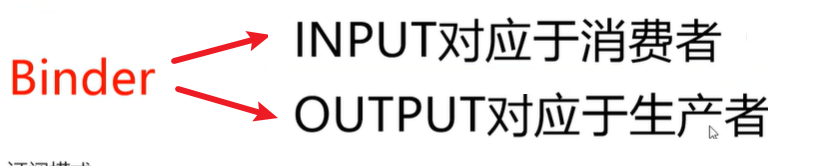
应用程序通过inputs和outputs来和SpringCloud Stream的binder对象交互。
我们通过配置来binding(绑定),binder对象负责和消息中间件交互。
我们只需要和Spring Cloud Stream交互就能使用MQ了
就类似于JDBC能够操作Mysql,Orcal等不同数据库
通过Spring Integration来连接消息代理中间件,以实现消息事件驱动
SpringCloud Stream为一些中间件产品提供了个性化的自动化配置实现,引用了发布-订阅、消费组、分区三个核心概念。
③支持MQ
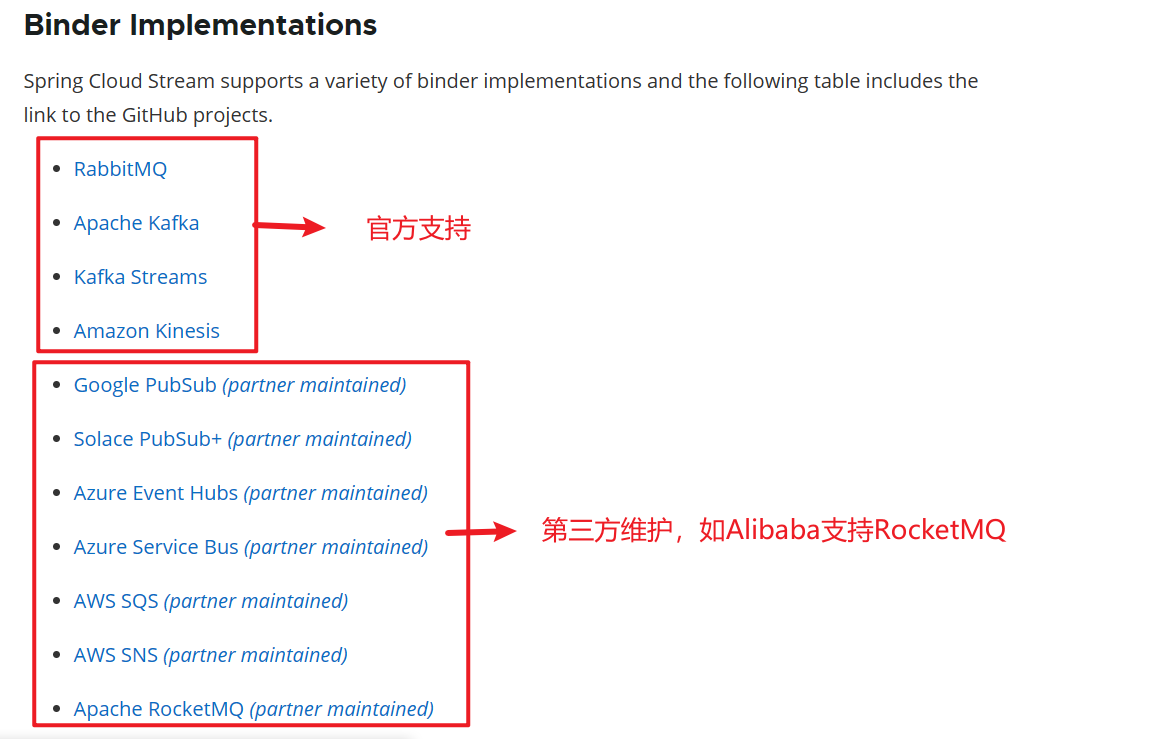
④设计思路
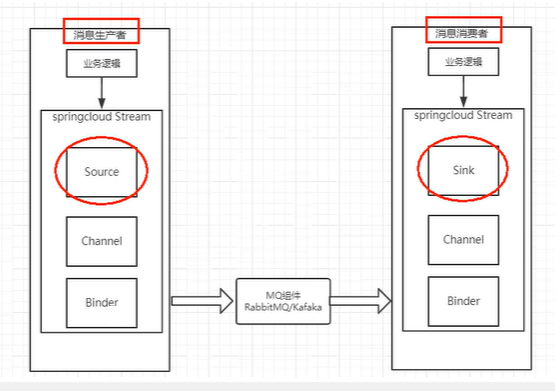
在没有绑定器这个概念的情况下,我们的SpringBoot应用要直接和MQ进行交互
通过定义绑定器作为中间层,我们能够完美实现应用程序和消息中间件细节之间的隔离。
通过向应用程序暴露统一的Channel通道,使应用程序不需要考虑各种不同的消息中间件实现。
通过定义绑定器Binder作为中间层,实现应用程序和消息中间件细节间的隔离
通过定义绑定器Binder作为中间层,实现应用程序和消息中间件之间的隔离
⑤注解简介
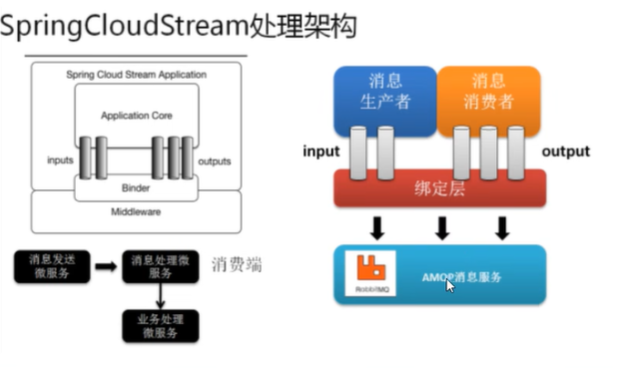
| 组成 | 说明 |
|---|---|
| Middleware | 中间件,只支持RabbitMQ和Kafka |
| Binder | Binder是应用和消息中间件之间的封装,通过Binder可以方便的连接中间件,可以动态改变消息类型(Kafka的topic,RabbitMq的exchange),可以通过配置文件实现 |
| @Input | 注解表示输入通道,通过输入通道收到的消息进入ApplicationCore |
| @Output | 注解标识输出通道,发布的消息通过该通道离开ApplicationCore |
| @StreamListener | 监听队列,用于消费者的队列的消息接收 |
| @EnableBinding | 指信道channel和exchange绑定在一起 |
2、QuickStart
①Provider搭建
新建cloud-stream-rabbitmq-provider8801,生产者
pom.xml:
<dependencies>

    <!--stream rabbit -->

    <dependency>

        <groupId>org.springframework.cloud</groupId>

        <artifactId>spring-cloud-starter-stream-rabbit</artifactId>

    </dependency>

    <!--eureka client-->

    <dependency>

        <groupId>org.springframework.cloud</groupId>

        <artifactId>spring-cloud-starter-netflix-eureka-client</artifactId>

    </dependency>

    <dependency>

        <groupId>org.springframework.boot</groupId>

        <artifactId>spring-boot-starter-web</artifactId>

    </dependency>

    <!--监控-->

    <dependency>

        <groupId>org.springframework.boot</groupId>

        <artifactId>spring-boot-starter-actuator</artifactId>

    </dependency>

    <!--热部署-->

    <dependency>

        <groupId>org.springframework.boot</groupId>

        <artifactId>spring-boot-devtools</artifactId>

        <scope>runtime</scope>

        <optional>true</optional>

    </dependency>

    <dependency>

        <groupId>org.projectlombok</groupId>

        <artifactId>lombok</artifactId>

        <optional>true</optional>

    </dependency>

    <dependency>

        <groupId>org.springframework.boot</groupId>

        <artifactId>spring-boot-starter-test</artifactId>

        <scope>test</scope>

    </dependency>

</dependencies>
yml:
server:

  port: 8801

spring:

  application:

    name: cloud-stream-provider

  rabbitmq:

    host: 101.43.244.40

    port: 5672

    username: guest

    password: guest

  cloud:

    stream:

      binders:

        defaultRabbit:

          type: rabbit

      bindings: #服务的整合处理

        output: #这个名字是一个通道的名称

          destination: studyExchange #表示要使用的Exchange名称定义

          content-type: application/json #设置消息类型,本次为json,本文要设置为“text/plain”

          binder: defaultRabbit #设置要绑定的消息服务的具体设置(爆红不影响使用,位置没错)

eureka:

  client:

    service-url:

      defaultZone: http://localhost:7001/eureka

  instance:

    lease-renewal-interval-in-seconds: 2 #设置心跳的时间间隔(默认是30S)

    lease-expiration-duration-in-seconds: 5 #如果超过5S间隔就注销节点 默认是90s

    instance-id: send-8801.com #在信息列表时显示主机名称

    prefer-ip-address: true #访问的路径变为IP地址
启动类:
@SpringBootApplication

public class StreamMQMain8801 {

    public static void main(String[] args) {

        SpringApplication.run(StreamMQMain8801.class, args);

    }

}
业务类:
新建service.IMessageProvider接口
public interface IMessageProvider {

    public String send();

}
@EnableBinding(Source.class)    //定义消息的推送管道(Source是spring的)

public class IMessageProviderImpl implements IMessageProvider {

    @Resource

    private MessageChannel output;  //消息发送管道

    @Override

    public String send() {

        String serial = UUID.randomUUID().toString();

        output.send(MessageBuilder.withPayload(serial).build());     //MessageBuilder是spring的integration.support.MessageBuilder

        System.out.println("*******serial: " + serial);

        return null;

    }

}
新建controller.SendMessageController
@RestController

public class SendMessageController {

    @Resource

    private IMessageProvider iMessageProvider;

    @GetMapping("/sendMessage")

    public String sendMessage(){

        return iMessageProvider.send();

    }

}
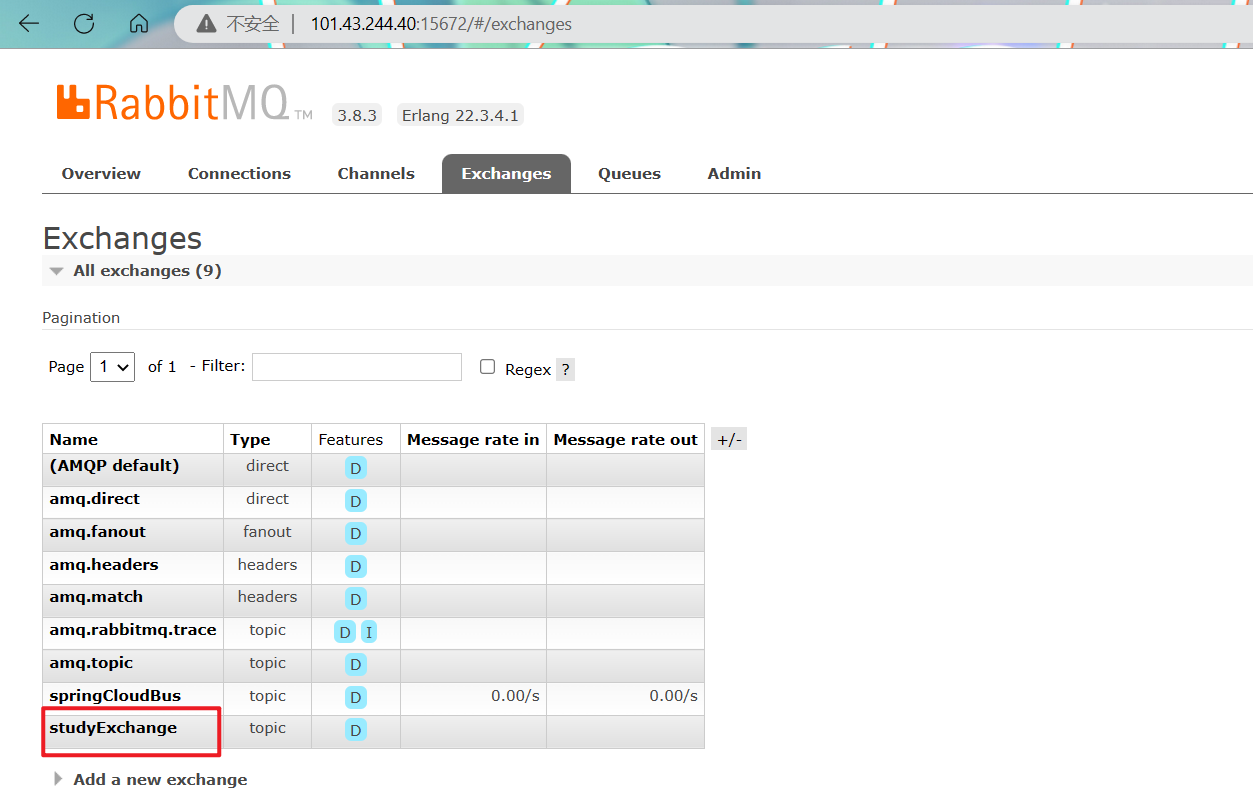
启动Eureka注册中心,Provider8801,查看MQ控制台面板,Exchange成功创建:
向Provider接口发送请求:
http://localhost:8801/sendMessage
控制台成功打印

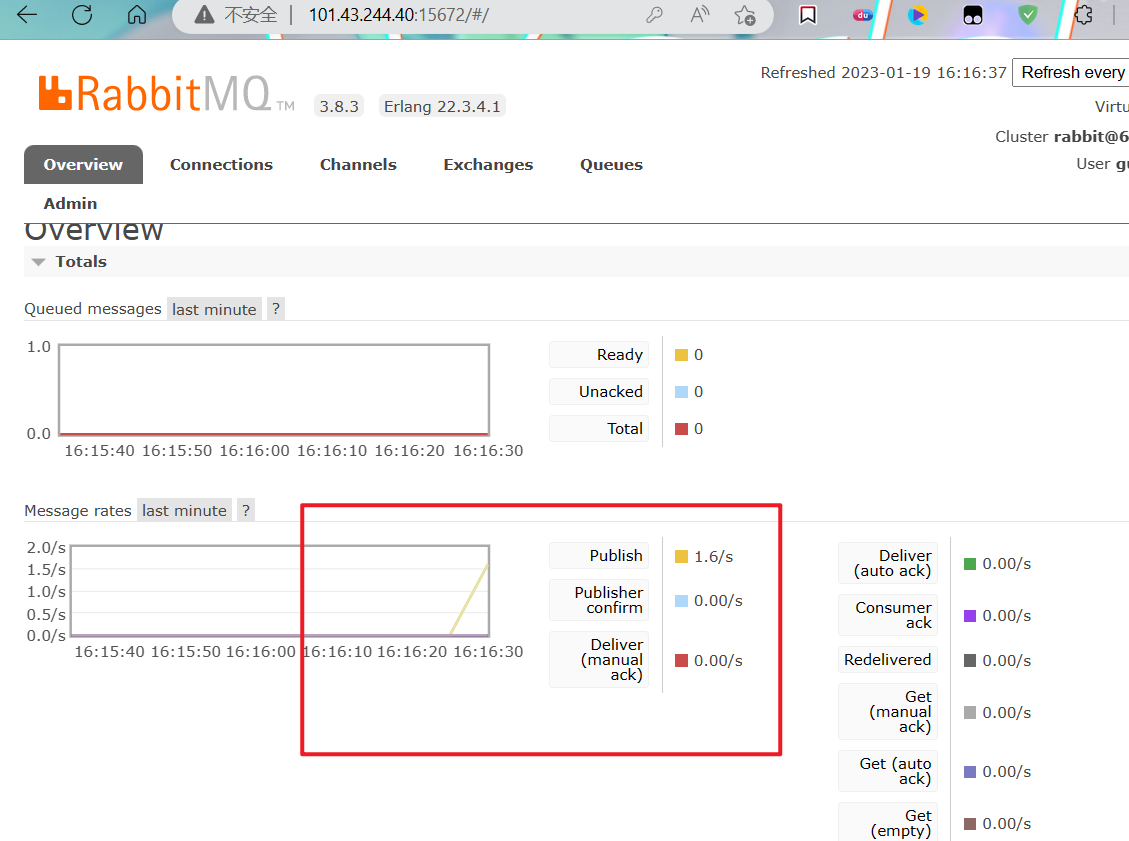
查看RabbitMQ控制台,能够看到发送的消息:
②Consumer搭建
新建模块cloud-stream-rabbitmq-consumer8802
pom.xml:
<dependencies>

    <!--stream rabbit -->

    <dependency>

        <groupId>org.springframework.cloud</groupId>

        <artifactId>spring-cloud-starter-stream-rabbit</artifactId>

    </dependency>

    <!--eureka client-->

    <dependency>

        <groupId>org.springframework.cloud</groupId>

        <artifactId>spring-cloud-starter-netflix-eureka-client</artifactId>

    </dependency>

    <dependency>

        <groupId>org.springframework.boot</groupId>

        <artifactId>spring-boot-starter-web</artifactId>

    </dependency>

    <!--监控-->

    <dependency>

        <groupId>org.springframework.boot</groupId>

        <artifactId>spring-boot-starter-actuator</artifactId>

    </dependency>

    <!--热部署-->

    <dependency>

        <groupId>org.springframework.boot</groupId>

        <artifactId>spring-boot-devtools</artifactId>

        <scope>runtime</scope>

        <optional>true</optional>

    </dependency>

    <dependency>

        <groupId>org.projectlombok</groupId>

        <artifactId>lombok</artifactId>

        <optional>true</optional>

    </dependency>

    <dependency>

        <groupId>org.springframework.boot</groupId>

        <artifactId>spring-boot-starter-test</artifactId>

        <scope>test</scope>

    </dependency>

</dependencies>
yml.xml:
server:

  port: 8802

spring:

  application:

    name: cloud-stream-consumer

  rabbitmq:

    host: 101.43.244.40

    port: 5672

    username: guest

    password: guest

  cloud:

    stream:

      binders:

        defaultRabbit:

          type: rabbit

      bindings: #服务的整合处理

        input: #这个名字是一个通道的名称

          destination: studyExchange #表示要使用的Exchange名称定义

          content-type: application/json #设置消息类型,本次为json,本文要设置为“text/plain”

          binder: defaultRabbit #设置要绑定的消息服务的具体设置(爆红不影响使用,位置没错)

eureka:

  client:

    service-url:

      defaultZone: http://localhost:7001/eureka

  instance:

    lease-renewal-interval-in-seconds: 2 #设置心跳的时间间隔(默认是30S)

    lease-expiration-duration-in-seconds: 5 #如果超过5S间隔就注销节点 默认是90s

    instance-id: receive-8802.com #在信息列表时显示主机名称

    prefer-ip-address: true #访问的路径变为IP地址
启动类:
@SpringBootApplication

public class StreamMQMain8802 {

    public static void main(String[] args) {

        SpringApplication.run(StreamMQMain8802.class, args);

    }

}
Controller:
@EnableBinding(Sink.class)

@Controller

public class ReceiveMessageListenerController {

    @Value("${server.port}")

    private String serverPort;

    @StreamListener(Sink.INPUT) //监听

    public void input(Message<String> message){

        System.out.println("消费者1号------>收到的消息:" + message.getPayload() + "\t port:" + serverPort);

    }

}
③测试
启动Eureka7001,Provider8801,Consumer8802
向8801发送请求:
http://localhost:8801/sendMessage
8802接收请求:

关于之前8801发送的消息,为什么8802没有接收到呢?
因为在8802启动之前,StudyExchange被创建出,但是没有binding队列,所以消息发送的Exchange就丢失了。
这些丢失的消息,在Consuemr启动,binding队列到Exchange后,不会被接收到
3、分组消费
①项目搭建
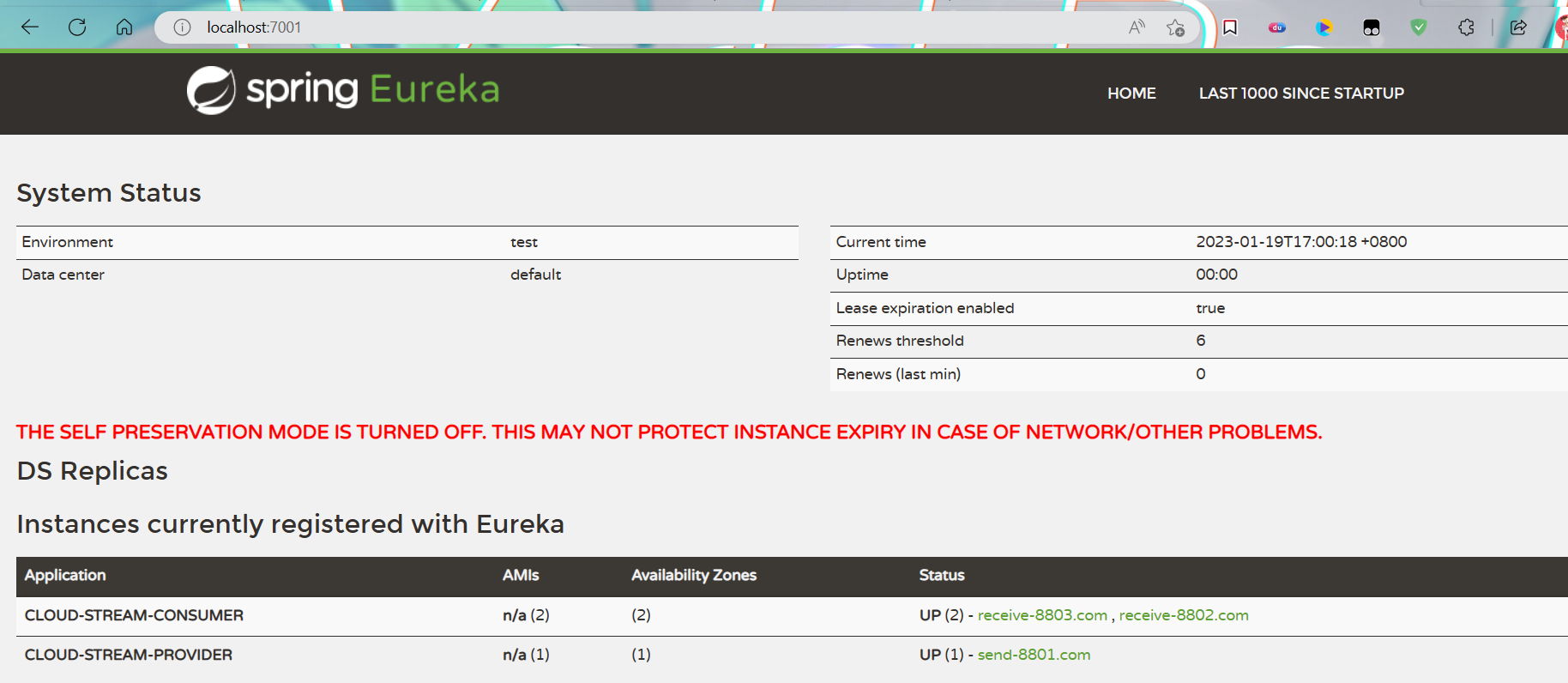
拷贝Consumer8802,新建Consumer8803子模块
启动:
②重复消费问题
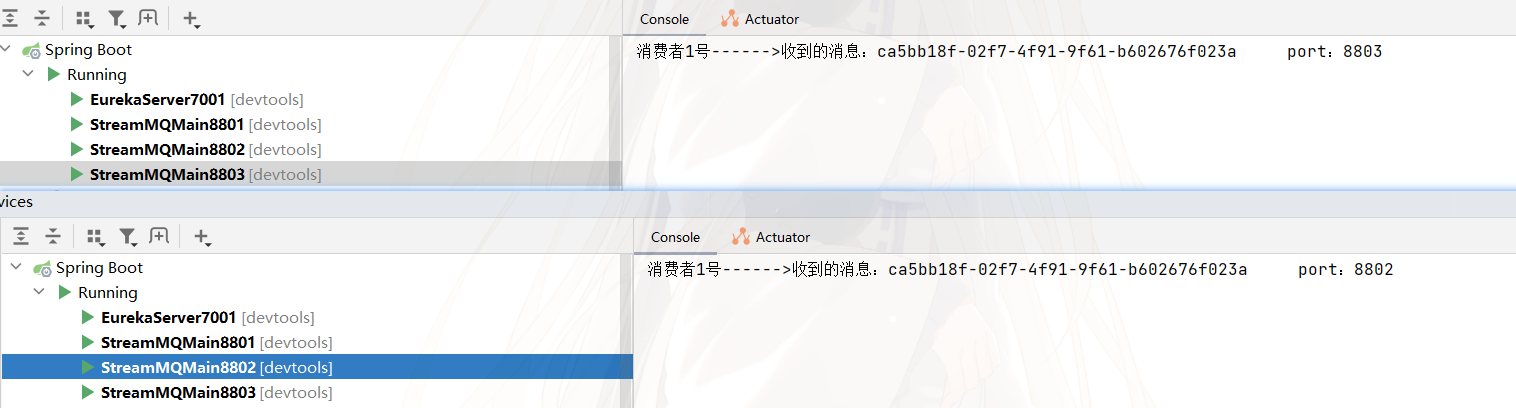
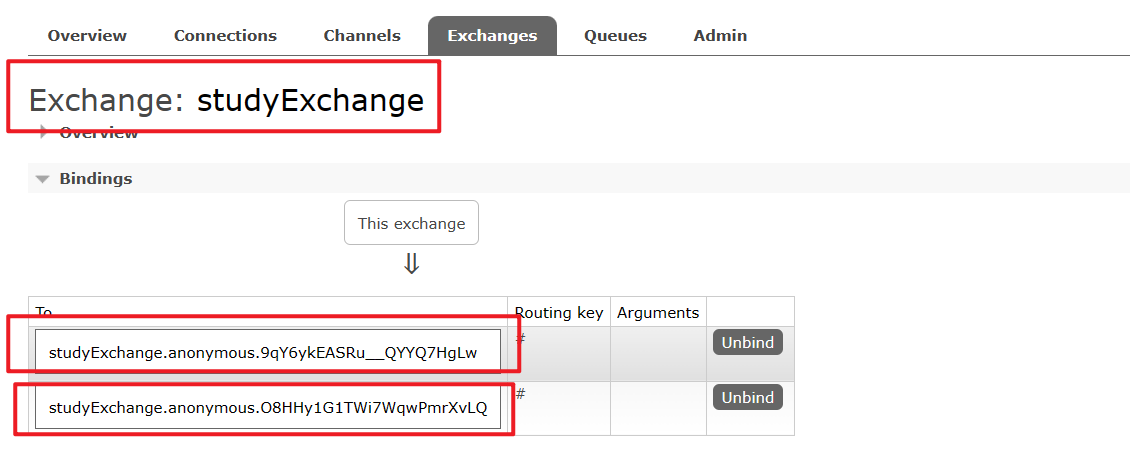
如图,8801发送消息,8802和8803都可以对该消息进行消费
为什么?
因为8802和8803各自对Exchange创建了队列,并且绑定到了8801创建的Exchange上,所以Exchange会分发两条相同的消息到他们各自的队列上,他们也会通过各自的队列消费:
③解决:分组
同一个组的多个微服务实例,每次只会有一个拿到Provider产生的消息。而不同组的多个微服务,每个组都可以消费一次:
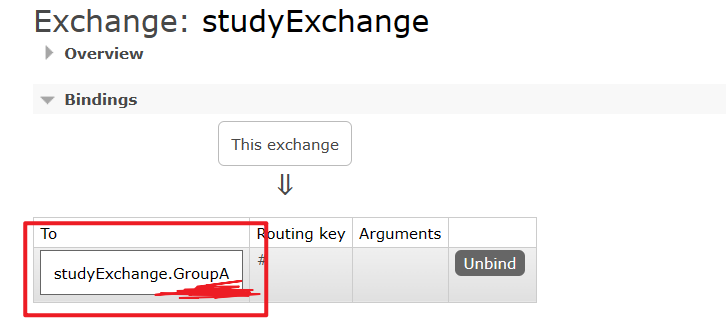
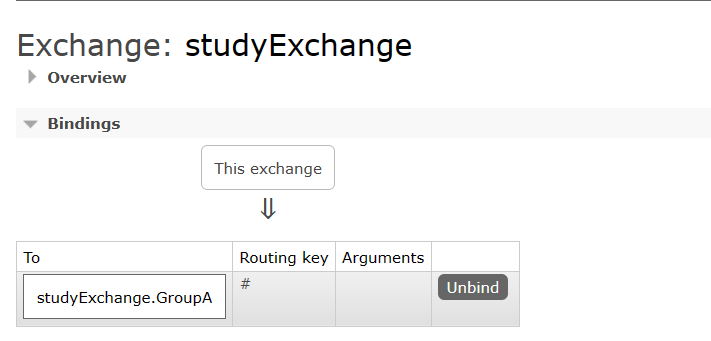
组?:
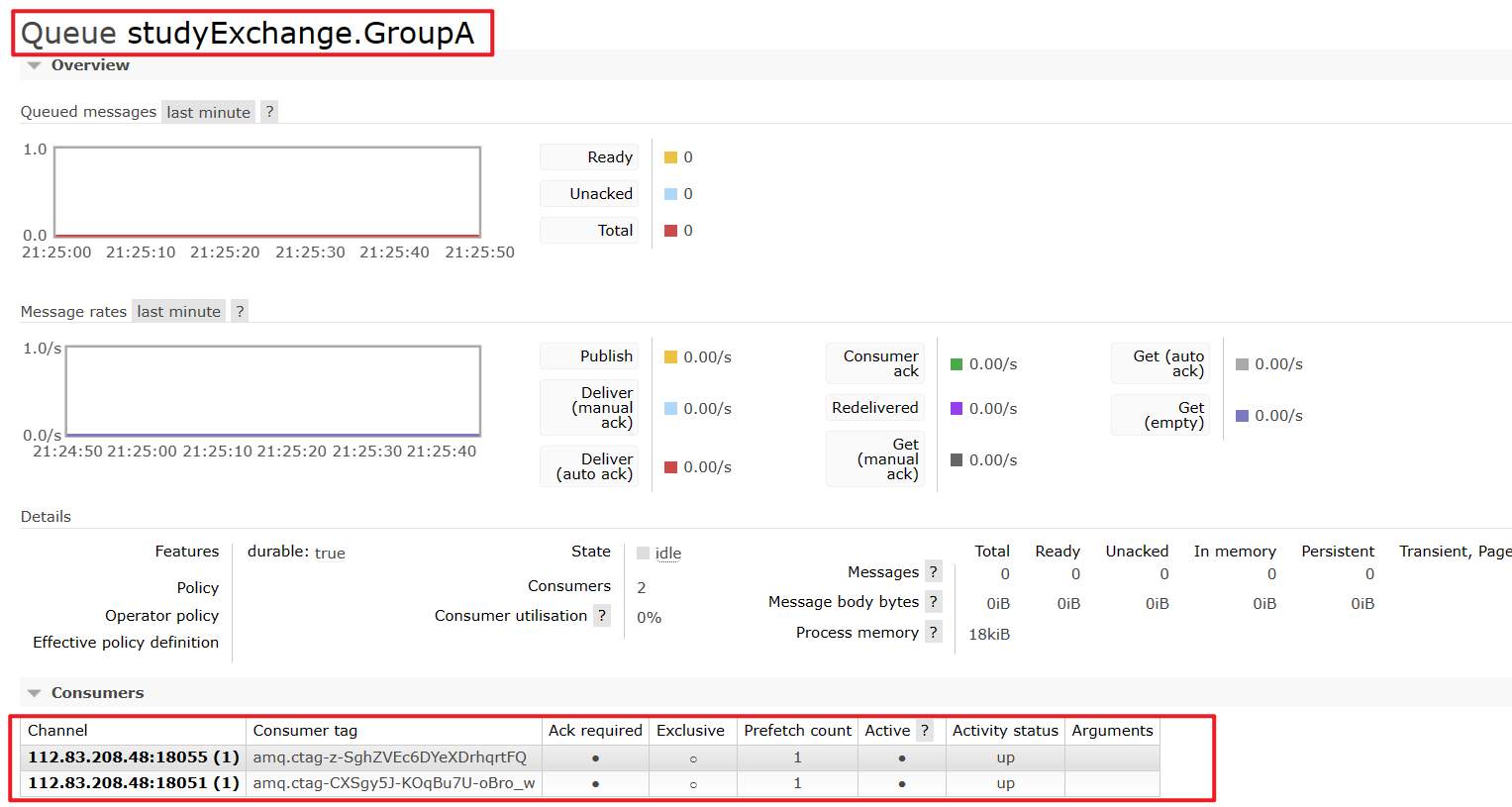
如下图所示,队列的Queue是由 Exchange的名词+
.+组名 组成的
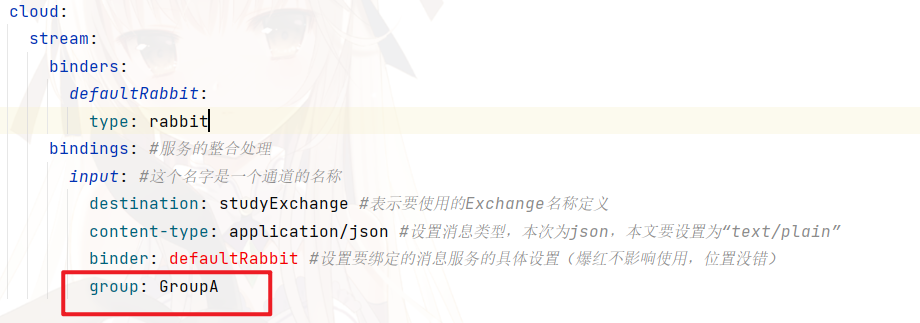
将Consumer8802和Consumer8803设置为同一个组:
在它们的配置中添加group都设置为GroupA
测试:
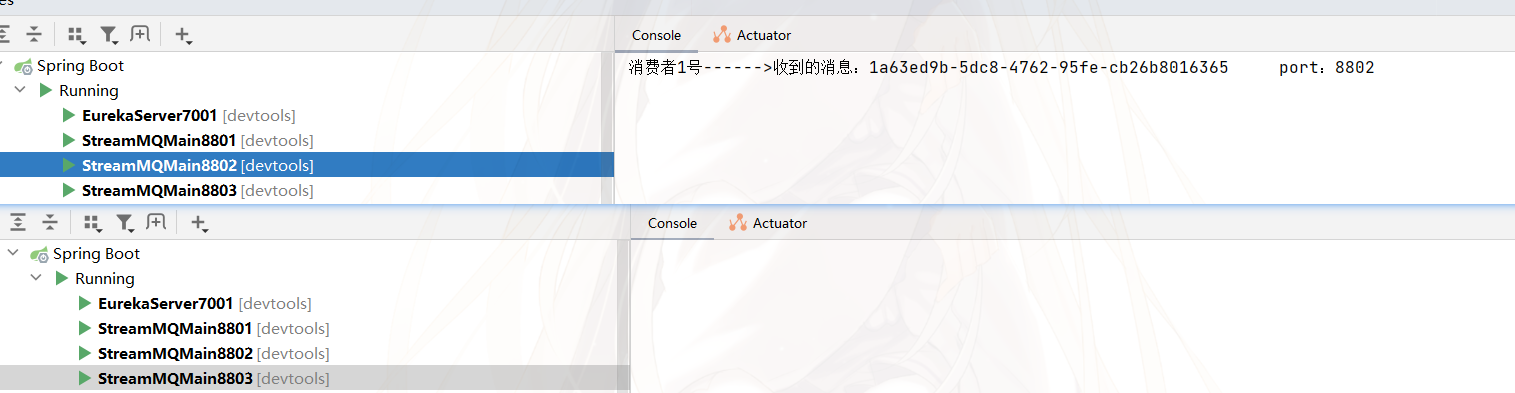
8802为8803都为GroupA,此时消息只会被消费一次
SpringCloud Stream消息驱动的更多相关文章
- SpringCloud Stream 消息驱动
1.什么是消息驱动 SpringCloud Stream消息驱动可以简化开发人员对消息中间件的使用复杂度,让系统开发人员更多尽力专注与核心业务逻辑的开发.SpringCloud Stream基于Spr ...
- 九. SpringCloud Stream消息驱动
1. 消息驱动概述 1.1 是什么 在实际应用中有很多消息中间件,比如现在企业里常用的有ActiveMQ.RabbitMQ.RocketMQ.Kafka等,学习所有这些消息中间件无疑需要大量时间经历成 ...
- SpringCloud学习之Stream消息驱动【自定义通道】(十一)
如果不清楚本篇内容的,请务必先去看完上一篇再看本篇,否则阅读起来可能会有部分障碍和困难: 上一篇文章<SpringCloud学习之Stream消息驱动[默认通道](十)>我们简单用自定义通 ...
- SpringCloud(七)Stream消息驱动
Stream消息驱动 概述 屏蔽底层消息中间件的差异,降低切换成本,统一消息的编程模型 官网:https://cloud.spring.io/spring-cloud-static/spring-cl ...
- spring cloud 2.x版本 Spring Cloud Stream消息驱动组件基础教程(kafaka篇)
本文采用Spring cloud本文为2.1.8RELEASE,version=Greenwich.SR3 本文基于前两篇文章eureka-server.eureka-client.eureka-ri ...
- Spring Cloud 系列之 Stream 消息驱动(二)
本篇文章为系列文章,未读第一集的同学请猛戳这里:Spring Cloud 系列之 Stream 消息驱动(一) 本篇文章讲解 Stream 如何实现消息分组和消息分区. 消息分组 如果有多个消息消费者 ...
- SpringCloud学习之Stream消息驱动【默认通道】(十)
在实际开发过程中,服务与服务之间通信经常会使用到消息中间件,而以往使用了中间件比如RabbitMQ,那么该中间件和系统的耦合性就会非常高,如果我们要替换为Kafka那么变动会比较大,这时我们可以使用S ...
- Spring Cloud 系列之 Stream 消息驱动(一)
在实际开发过程中,服务与服务之间通信经常会使用到消息中间件,消息中间件解决了应用解耦.异步处理.流量削锋等问题,实现高性能,高可用,可伸缩和最终一致性架构. 不同中间件内部实现方式是不一样的,这些中间 ...
- Spring Cloud Stream消息驱动之RocketMQ入门(一)
SpringCloudStream目前支持的中间件有RabbitMQ.Kafka,还有我最近在学习的RocketMQ,以下是我学习的笔记 学习Spring cloud Stream 可以先学习一下了解 ...
- Spring Cloud Stream消息驱动@SendTo和消息降级
参考程序员DD大佬的文章,自己新建demo学习学习,由于需要消息回执,看到了@SendTo这个注解能够实现,下面开始学习demo,新建两个项目cloud-stream-consumer消费端 和 cl ...
随机推荐
- HTTPS详解一
前言 作为一个有追求的程序员,了解行业发展趋势和扩充自己的计算机知识储备都是很有必要的,特别是一些计算机基础方面的内容,就比如本篇文章要讲的计算机网络方面的知识.本文将为大家详细梳理一下 HTTPS ...
- Go语言核心36讲36
在前面,我几乎已经把Go语言自带的同步工具全盘托出了.你是否已经听懂了会用了呢? 无论怎样,我都希望你能够多多练习.多多使用.它们和Go语言独有的并发编程方式并不冲突,相反,配合起来使用,绝对能达到& ...
- C++一个吃豆人小游戏
C++一个吃豆人小游戏 代码如下 #include <cstdio>#include <iostream>#include <ctime>#include < ...
- qtCreator警告解决
警告 qtCreator Warning: QT_DEVICE_PIXEL_RATIO is deprecated. Instead use: QT_AUTO_SCREEN_SCALE_FACTOR ...
- combotree 的简单使用2
上一次我在 combotree 的简单使用 中介绍了一种combotree的写法,不过有一个缺点,就是当输的结构非常大的时候,分级较多时,消耗内存的现象会比较严重,下面介绍的一种方法,使combotr ...
- editorial 专栏
社论 22.10.1 solution for pl_er 密码是我的名字的拼音 全小写无空格 社论 22.10.2 solution for Simu. 密码是联考密码 社论 22.10.4 sol ...
- 除了 filter 还有什么置灰网站的方式?
大家都知道,当一些重大事件发生的时候,我们的网站,可能需要置灰,像是这样: 当然,通常而言,全站置灰是非常简单的事情,大部分前端同学都知道,仅仅需要使用一行 CSS,就能实现全站置灰的方式. 像是这样 ...
- 【SQL】DML语句-SQL更新与删除:单表更新删除与连表更新删除语法
〇.概述 1.资料 sql连表删除:http://www.lanxinbase.com/?tag=sql%E8%BF%9E%E8%A1%A8%E5%88%A0%E9%99%A4 sql实现两表关联更新 ...
- 彻底理解Python中的闭包和装饰器(上)
什么是闭包 闭包(Closure)其实并不是Python独有的特性,很多语言都有对闭包的支持.(当然,因为Python是笔者除C/C++之外学习的第二门语言,所以也是第一次遇到闭包.)简而言之,闭包实 ...
- 周结之json补充、正则re模块、hashlib模块、logging模块
周结 目录 周结 json补充 正则表达式 re模块 第三方模块的下载 request模块 办公自动化openpyxl模块 hashlib加密模块 subprocess模块 logging日志模块 j ...