
scvmm应答文件 无人值守安装系统
我们可以通过这种windows配置文件实现winpe、光盘等无人职守安装配置操作系统,在scvmm虚拟化平台中这种文件叫做应答文件。
下面为一个windows server 2008 r2的一个完整应答文件。
 <?xml version="1.0" encoding="utf-8"?>

 <unattend xmlns="urn:schemas-microsoft-com:unattend">

   <!--配置应用系统设置-->

   <settings pass="specialize">

     <component name="Microsoft-Windows-Shell-Setup" processorArchitecture="amd64" publicKeyToken="31bf3856ad364e35" language="neutral" versionScope="nonSxS" xmlns:wcm="http://schemas.microsoft.com/WMIConfig/2002/State" xmlns:xsi="http://www.w3.org/2001/XMLSchema-instance">

       <ComputerName>*</ComputerName>

       <RegisteredOrganization>test01</RegisteredOrganization>

       <ShowWindowsLive>false</ShowWindowsLive>

       <ProductKey>RKC6Y-7BD92-KHVMB-HGFBD-R2CR6</ProductKey>

     </component>

     <!--windows激活-->

     <component name="Microsoft-Windows-Security-Licensing-SLC-UX" processorArchitecture="amd64" publicKeyToken="31bf3856ad364e35" language="neutral" versionScope="nonSxS" xmlns:wcm="http://schemas.microsoft.com/WMIConfig/2002/State" xmlns:xsi="http://www.w3.org/2001/XMLSchema-instance">

       <SkipAutoActivation>false</SkipAutoActivation>

     </component>

     <!--ie相关配置-->

     <component name="Microsoft-Windows-IE-ESC" processorArchitecture="amd64" publicKeyToken="31bf3856ad364e35" language="neutral" versionScope="nonSxS" xmlns:wcm="http://schemas.microsoft.com/WMIConfig/2002/State" xmlns:xsi="http://www.w3.org/2001/XMLSchema-instance">

       <IEHardenAdmin>false</IEHardenAdmin>

       <IEHardenUser>false</IEHardenUser>

     </component>

     <!--配置应用系统设置-->

     <component name="Microsoft-Windows-TerminalServices-LocalSessionManager" processorArchitecture="amd64" publicKeyToken="31bf3856ad364e35" language="neutral" versionScope="nonSxS" xmlns:wcm="http://schemas.microsoft.com/WMIConfig/2002/State" xmlns:xsi="http://www.w3.org/2001/XMLSchema-instance">

       <fDenyTSConnections>false</fDenyTSConnections>

     </component>

     <!--ip配置-->

     <component name="Microsoft-Windows-TCPIP" processorArchitecture="amd64" publicKeyToken="31bf3856ad364e35" language="neutral" versionScope="nonSxS" xmlns:wcm="http://schemas.microsoft.com/WMIConfig/2002/State" xmlns:xsi="http://www.w3.org/2001/XMLSchema-instance">

       <Interfaces>

         <Interface wcm:action="add">

           <Ipv4Settings>

             <DhcpEnabled>false</DhcpEnabled>

             <RouterDiscoveryEnabled>false</RouterDiscoveryEnabled>

           </Ipv4Settings>

           <Identifier>

           </Identifier>

           <UnicastIpAddresses>

             <IpAddress wcm:action="add" wcm:keyValue="1">192.168.0.182/6</IpAddress>

           </UnicastIpAddresses>

           <Routes>

             <Route wcm:action="add">

               <Identifier>0</Identifier>

               <Prefix>0.0.0.0/0</Prefix>

               <NextHopAddress>255.255.255.0</NextHopAddress>

               <Metric>20</Metric>

             </Route>

           </Routes>

         </Interface>

         <Interface wcm:action="add">

           <Ipv4Settings>

             <DhcpEnabled>false</DhcpEnabled>

             <RouterDiscoveryEnabled>false</RouterDiscoveryEnabled>

           </Ipv4Settings>

           <UnicastIpAddresses>

             <IpAddress wcm:action="add" wcm:keyValue="1">192.168.3.1/8</IpAddress>

           </UnicastIpAddresses>

           <Identifier>

           </Identifier>

         </Interface>

       </Interfaces>

     </component>

     <!--dns配置-->

     <component name="Microsoft-Windows-DNS-Client" processorArchitecture="amd64" publicKeyToken="31bf3856ad364e35" language="neutral" versionScope="nonSxS" xmlns:wcm="http://schemas.microsoft.com/WMIConfig/2002/State" xmlns:xsi="http://www.w3.org/2001/XMLSchema-instance">

       <Interfaces>

         <Interface wcm:action="add">

           <DNSServerSearchOrder>

             <IpAddress wcm:action="add" wcm:keyValue="1">192.168.0.1</IpAddress>

             <IpAddress wcm:action="add" wcm:keyValue="2">

             </IpAddress>

           </DNSServerSearchOrder>

           <Identifier>

           </Identifier>

           <EnableAdapterDomainNameRegistration>false</EnableAdapterDomainNameRegistration>

           <DNSDomain>test01.com</DNSDomain>

           <DisableDynamicUpdate>true</DisableDynamicUpdate>

         </Interface>

         <Interface wcm:action="add">

           <DNSServerSearchOrder>

             <IpAddress wcm:action="add" wcm:keyValue="1">192.168.3.1</IpAddress>

             <IpAddress wcm:action="add" wcm:keyValue="2">

             </IpAddress>

           </DNSServerSearchOrder>

           <Identifier>

           </Identifier>

           <DisableDynamicUpdate>false</DisableDynamicUpdate>

           <EnableAdapterDomainNameRegistration>false</EnableAdapterDomainNameRegistration>

           <DNSDomain>test01.com</DNSDomain>

         </Interface>

       </Interfaces>

       <UseDomainNameDevolution>true</UseDomainNameDevolution>

       <DNSDomain>test01.com</DNSDomain>

     </component>

     <!--本地会话管理器-->

     <component name="Microsoft-Windows-ServerManager-SvrMgrNc" processorArchitecture="amd64" publicKeyToken="31bf3856ad364e35" language="neutral" versionScope="nonSxS" xmlns:wcm="http://schemas.microsoft.com/WMIConfig/2002/State" xmlns:xsi="http://www.w3.org/2001/XMLSchema-instance">

       <DoNotOpenServerManagerAtLogon>true</DoNotOpenServerManagerAtLogon>

     </component>

     <!--oobe-->

     <component name="Microsoft-Windows-OutOfBoxExperience" processorArchitecture="amd64" publicKeyToken="31bf3856ad364e35" language="neutral" versionScope="nonSxS" xmlns:wcm="http://schemas.microsoft.com/WMIConfig/2002/State" xmlns:xsi="http://www.w3.org/2001/XMLSchema-instance">

       <DoNotOpenInitialConfigurationTasksAtLogon>true</DoNotOpenInitialConfigurationTasksAtLogon>

     </component>

     <!--加入工作组-->

     <component name="Microsoft-Windows-UnattendedJoin" processorArchitecture="amd64" publicKeyToken="31bf3856ad364e35" language="neutral" versionScope="nonSxS" xmlns:wcm="http://schemas.microsoft.com/WMIConfig/2002/State" xmlns:xsi="http://www.w3.org/2001/XMLSchema-instance">

       <Identification>

         <JoinWorkgroup>WorkGroup</JoinWorkgroup>

       </Identification>

     </component>

   </settings>

   <!--欢迎界面配置阶段-->

   <settings pass="oobeSystem">

     <!--本地化-->

     <component name="Microsoft-Windows-International-Core" processorArchitecture="amd64" publicKeyToken="31bf3856ad364e35" language="neutral" versionScope="nonSxS" xmlns:wcm="http://schemas.microsoft.com/WMIConfig/2002/State" xmlns:xsi="http://www.w3.org/2001/XMLSchema-instance">

       <InputLocale>2052:00002052</InputLocale>

       <SystemLocale>zh-CN</SystemLocale>

       <UILanguage>zh-CN</UILanguage>

       <UserLocale>zh-CN</UserLocale>

     </component>

     <!--登录密码 分辨率等自定义设置-->

     <component name="Microsoft-Windows-Shell-Setup" processorArchitecture="amd64" publicKeyToken="31bf3856ad364e35" language="neutral" versionScope="nonSxS" xmlns:wcm="http://schemas.microsoft.com/WMIConfig/2002/State" xmlns:xsi="http://www.w3.org/2001/XMLSchema-instance">

       <RegisteredOrganization>test01</RegisteredOrganization>

       <UserAccounts>

         <AdministratorPassword>

           <Value>test01!</Value>

           <PlainText>true</PlainText>

         </AdministratorPassword>

       </UserAccounts>

       <OOBE>

         <HideEULAPage>true</HideEULAPage>

         <NetworkLocation>Work</NetworkLocation>

         <ProtectYourPC>2</ProtectYourPC>

         <SkipUserOOBE>true</SkipUserOOBE>

       </OOBE>

       <Display>

         <ColorDepth>32</ColorDepth>

         <HorizontalResolution>800</HorizontalResolution>

         <VerticalResolution>600</VerticalResolution>

       </Display>

       <TimeZone>China Standard Time</TimeZone>

     </component>

   </settings>

   <!--DVD或安装共享位置-->

   <cpi:offlineImage cpi:source="wim:c:/sources/install.wim#Windows Server 2008 R2 SERVERENTERPRISE" xmlns:cpi="urn:schemas-microsoft-com:cpi" />

 </unattend>
在应答文件执行中,可能会出现一些错误,比如当dns的mac地址置空时。
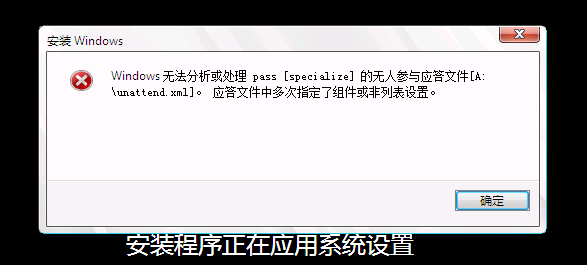
如果在scvmm中出现类似错误,手动去更改应答文件,重新执行作业,依然会出现错误,原因是此时应答文件已被写入vhd镜像。
scvmm应答文件 无人值守安装系统的更多相关文章
- 使用PXE+Kickstart无人值守安装系统
PXE预启动执行环境(即Preboot execute environment) 是一种能够让计算机通过网络启动的引导方式,只要网卡支持PXE协议即可使用,用于在无人值守安装系统服务中引导客户机安装服 ...
- PXE+Kickstart无人值守安装系统re
PXE(Preboot Excute Environment)预启动执行环境,可以让计算机通过网络启动系统,主要用于无人值守安装系统中引导客户端主机安装Linux操作系统. 由于之前有过使用cobbl ...
- 其他综合-Cobbler无人值守安装系统 CentOS 7
Cobbler 无人值守安装系统 CentOS 7 1.实验描述 1.1 概述 作为运维,在公司经常遇到一些机械性重复工作要做,例如:为新机器装系统,一台两台机器装系统,可以用光盘.U盘等介质安装,1 ...
- 其他综合-Kickstart无人值守安装系统CentOS 7
Kickstart无人值守安装系统CentOS 7 1.概述 1.1 关于PXE Preboot Execution Environment 翻译过来就是预启动执行环境:简称 PXE :传统安装操作系 ...
- KickStart 无人值守安装系统
一.简介 1.1 什么是PXE PXE(Pre-boot Execution Environment,预启动执行环境)是由Intel公司开发的最新技术,工作于Client/Server的网络模式,支持 ...
- Kickstart无人值守安装系统
1.导言 已经或未来将从事Linux系统运维工作的读者,经常会遇到一些机器式的重复的共走,例如:有时间同时上线几十甚至上百台服务器,而且需要我们在短时间内完成系统安装. q 光盘安装系统===> ...
- CentOS7.x安装cobbler无人值守安装系统
CentOS7.x cobbler无人值守安装 cobbler介绍 自打若干年前 Red Hat,推出了 Kickstart,不再需要刻了光盘一台一台地安装 Linux,只要搞定 PXE.DHCP.T ...
- Cobbler无人值守安装系统
环境说明 系统版本 CentOS 6.9 x86_64 Cobbler是一款Linux安装服务器,可以快速设置网络安装环境.它粘合在一起并自动执行许多相关的Linux任务,因此部署新系统时不必在 ...
- [ 总结 ] Linux kickstart 无人值守安装系统构建过程
环境:Vmare + Linux虚拟机 注意:网卡桥接
随机推荐
- Swift 延迟运行代码
// // DelayRun.swift // // Created by XuQing on 16/7/1. // Copyright © 2016年 xuqing. All rights rese ...
- SpringBoot核心
1.基本配置 1.1入口类和@SrpingBootApplication SpringBoot通常有一个名为*Application的入口类,入口类里有一个main方法,这个main方法就是一个标准的 ...
- [转] 基于C#的波形显示控件的实现
转自 基于C#的波形显示控件的实现[附完整源码下载] 编者记: 09年暑假正好在学院实验室呆了一段时间,做了个完整的上位机软件(具体实现:根据下位机的指令,实现通过串口来操纵下位机进行实验,并将采集的 ...
- 关于在Arduino中调用DS1302模块
DS1302时钟模块中的电池是起掉电保存作用的,在实际运行中必须给他的GND和VCC供电,否则得到的是错误的时间. 也就是说,电池是保存日期的,而无法提供芯片正常运行所需的电力. 从芯片引脚上可以看出 ...
- Please specify exact device preset UUID
Please specify exact device preset UUID 重启RAD IDE,重新选择 IOS Simulator ,iphone 机型!
- vertex shader(4)
Swizzling and Masking 如果你使用输入.常量.临时寄存器作为源寄存器,你可以彼此独立地swizzle .x,.y,.z,.w值.如果你使用输出.临时寄存器作为目标寄存器,你可以把. ...
- <转>杜绝 Defunct进程 僵尸进程
http://hanover.iteye.com/blog/881972 在测试基于 DirectFB+Gstreamer 的视频联播系统的一个 Demo 的时候,其中大量使用 system 调用的语 ...
- win10 wsl安装 命令行
用于一些精简版没有商店的安装方法 开启"Windows Subsystem for Linux" 可选特性 打开`PowerShell`,运行下面指令: Enable-Window ...
- 后端生成二维码 - C#生成二维码(QR)
最近在github上找到一个相对比较好的C#二维码生成类库.在这里和大家分享一下. github地址:https://github.com/codebude/QRCoder 把解决方案下载下来,编译生 ...
- 使用OpenSsl自己CA根证书,二级根证书和颁发证书(亲测步骤)
---恢复内容开始--- 一.介绍 企业自用, 到证书机构签发证书的费用和时间等都可以省下..... SSl证书的背景功用.......(省略万字,不废话) 可以参考: SSL证书_百度百科 X509 ...