
nGrinder工具进行接口性能测试
1.背景
之前在这篇文章中性能测试初探—接口性能测试介绍过nGrinder,本文将介绍在nGrinder脚本中使用资源文件中数据作为接口参数和解析生成的CSV结果,生成TPS标准差,TPS波动率,最小/大RT,RT 25/50/75/80/85/90/95/99百分位数(原生结果中无这些结果,这些结果更有利于性能分析)。
2.实现
2-1.创建脚本
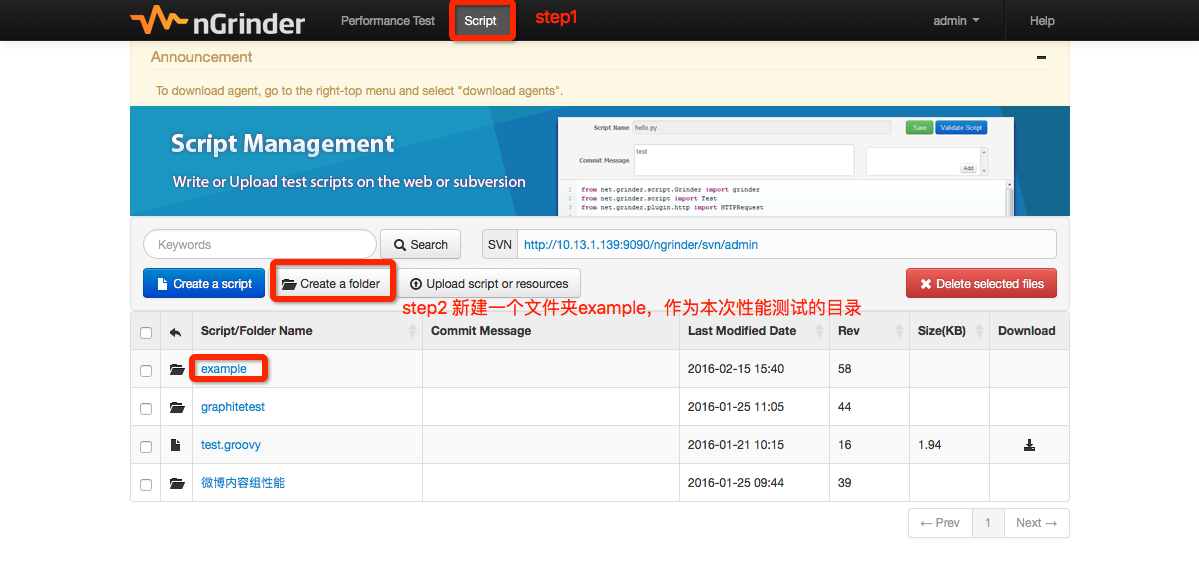
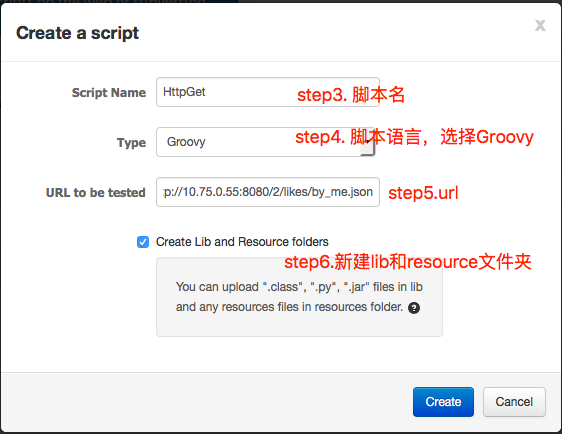
如果脚本中需获取参数,可以使用Performance Test菜单下的Test Configuration->Show Advanced Configuration->Parameter输入框中参数值(http://www.cubrid.org/wiki_ngrinder/entry/how-to-pass-a-parameter-to-the-script),但是只支持1-50字符长度;如果参数值较长,可以使用resources(http://www.cubrid.org/wiki_ngrinder/entry/how-to-use-resources), 支持json, csv, txt, properties格式。
脚本示例如下:
定义String[] basic用于存放文件./resources/basicauth.txt中的值(数组元素为文件中的每一行)
HTTP GET:
package org.ngrinder;

import static net.grinder.script.Grinder.grinder

import static org.junit.Assert.*

import static org.hamcrest.Matchers.*

import net.grinder.plugin.http.HTTPRequest

import net.grinder.plugin.http.HTTPPluginControl;

import net.grinder.script.GTest

import net.grinder.script.Grinder

import net.grinder.scriptengine.groovy.junit.GrinderRunner

import net.grinder.scriptengine.groovy.junit.annotation.BeforeProcess

import net.grinder.scriptengine.groovy.junit.annotation.BeforeThread

// import static net.grinder.util.GrinderUtils.* // You can use this if you're using nGrinder after 3.2.3

import org.junit.Before

import org.junit.BeforeClass

import org.junit.Test

import org.junit.runner.RunWith

import HTTPClient.HTTPResponse

import HTTPClient.NVPair

import java.util.ArrayList;

import java.util.Collections;

import java.util.List;

/**

 * A simple example using the HTTP plugin that shows the retrieval of a

 * single page via HTTP.

 *

 * This script is automatically generated by ngrinder.

 *

 * @author hugang

 */

@RunWith(GrinderRunner)

class TestRunner {

    public static GTest test

    public static HTTPRequest request

    public static File file

    public static String[] basic

    @BeforeProcess

    public static void beforeProcess() {

        HTTPPluginControl.getConnectionDefaults().timeout = 6000

        test = new GTest(1, "10.75.0.55")

        request = new HTTPRequest()

        test.record(request);

        // 将文件内容转成参数数组

        basic = new File("./resources/basicauth.txt") as String[];

        // grinder.logger.info(basic[0] + "  " + basic[1])

        grinder.logger.info("before process.");

    }

    @BeforeThread

    public void beforeThread() {

        grinder.statistics.delayReports=true;

        grinder.logger.info("before thread.");

    }

    @Test

    public void test(){

        // 随机获取auth

        int index = (int) (Math.random() * basic.length);

        String basicAuth = basic[index];

        println(basicAuth);

        // GET请求,wiki http://grinder.sourceforge.net/g3/script-javadoc/net/grinder/plugin/http/HTTPRequest.html

        // param1: uri, param2: queryData, param3: headers

        HTTPResponse result = request.GET("http://10.75.0.55:8080/2/likes/by_me.json",[new NVPair("object_type", "pic")] as NVPair[], [new NVPair("Authorization", basicAuth)] as NVPair[])

        if (result.statusCode == 301 || result.statusCode == 302) {

            grinder.logger.warn("Warning. The response may not be correct. The response code was {}.", result.statusCode);

        } else {

            assertThat(result.statusCode, is(200));

            // 请求返回的数据

            // println(result.text);

            // 定义一个事务,接口返回数据校验,是否包含

            assertThat(result.text, containsString("\"object_type\":\"pic\""));

        }

    }

}
HTTP post:
package org.ngrinder;

import static net.grinder.script.Grinder.grinder

import static org.junit.Assert.*

import static org.hamcrest.Matchers.*

import net.grinder.plugin.http.HTTPRequest

import net.grinder.plugin.http.HTTPPluginControl;

import net.grinder.script.GTest

import net.grinder.script.Grinder

import net.grinder.scriptengine.groovy.junit.GrinderRunner

import net.grinder.scriptengine.groovy.junit.annotation.BeforeProcess

import net.grinder.scriptengine.groovy.junit.annotation.BeforeThread

// import static net.grinder.util.GrinderUtils.* // You can use this if you're using nGrinder after 3.2.3

import org.junit.Before

import org.junit.BeforeClass

import org.junit.Test

import org.junit.runner.RunWith

import HTTPClient.HTTPResponse

import HTTPClient.NVPair

import java.util.ArrayList;

import java.util.Collections;

import java.util.List;

/**

 * A simple example using the HTTP plugin that shows the retrieval of a

 * single page via HTTP.

 *

 * This script is automatically generated by ngrinder.

 *

 * @author hugang

 */

@RunWith(GrinderRunner)

class TestRunner {

    public static GTest test

    public static HTTPRequest request

    public static File file

    public static String[] basic

    @BeforeProcess

    public static void beforeProcess() {

        HTTPPluginControl.getConnectionDefaults().timeout = 6000

        test = new GTest(1, "10.210.230.28")

        request = new HTTPRequest()

        test.record(request);

        // 将文件内容转成参数数组

        basic = new File("./resources/basicauth.txt") as String[];

        // grinder.logger.info(basic[0] + "  " + basic[1])

        grinder.logger.info("before process.");

    }

    @BeforeThread

    public void beforeThread() {

        grinder.statistics.delayReports=true;

        grinder.logger.info("before thread.");

    }

    @Test

    public void test(){

        // 随机获取auth

        int index = (int) (Math.random() * basic.length);

        String basicAuth = basic[index];

        println(basicAuth);

        // POST请求,wiki http://grinder.sourceforge.net/g3/script-javadoc/net/grinder/plugin/http/HTTPRequest.html

        // param1: uri, param2: queryData, param3: headers

        HTTPResponse result = request.POST("http://10.210.230.28/2/statuses/update.json",[new NVPair("status", "text " + Math.random())] as NVPair[], [new NVPair("Authorization", basicAuth)] as NVPair[])

        if (result.statusCode == 301 || result.statusCode == 302) {

            grinder.logger.warn("Warning. The response may not be correct. The response code was {}.", result.statusCode);

        } else {

            assertThat(result.statusCode, is(200));

            // 请求返回的数据

            // println(result.text);

            // 定义一个事务,接口返回数据校验,是否包含

            assertThat(result.text, containsString("\"created_at\":"));

        }

    }

}
2-2. 验证脚本
点击Validate Script, 会出现如下信息:
...

2016-02-15 16:56:32,140 INFO  Start time is 1455526592140 ms since Epoch

2016-02-15 16:56:32,318 INFO  http://10.75.0.55:8080/2/likes/by_me.json?object_type=pic -> 200 OK, 3414 bytes

2016-02-15 16:56:32,342 INFO  finished 1 run

2016-02-15 16:56:32,345 INFO  elapsed time is 204 ms

2016-02-15 16:56:32,345 INFO  Final statistics for this process:

2016-02-15 16:56:32,355 INFO

             Tests        Errors       Mean Test    Test Time    TPS          Mean         Response     Response     Mean time to Mean time to Mean time to

                                       Time (ms)    Standard                  response     bytes per    errors       resolve host establish    first byte

                                                    Deviation                 length       second                                 connection

                                                    (ms)

Test 1       1            0            32.00        0.00         4.90         3414.00      16735.29     0            1.00         5.00         24.00         "10.75.0.55"

Totals       1            0            32.00        0.00         4.90         3414.00      16735.29     0            1.00         5.00         24.00

...
Tests 为1, Errors 为0 表示脚本验证通过。
2-3.设计场景
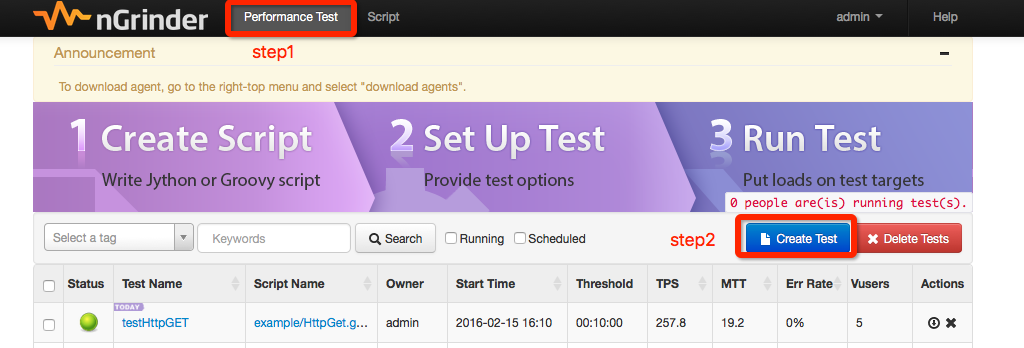
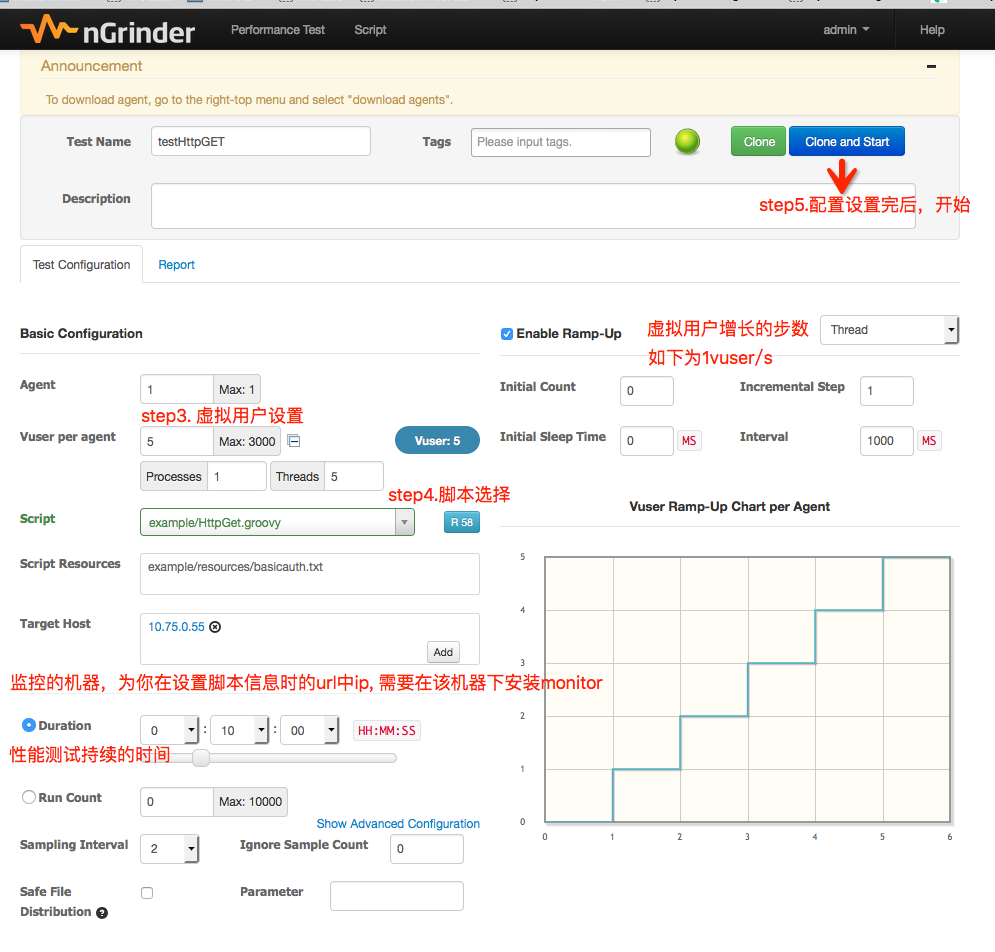
3.结果
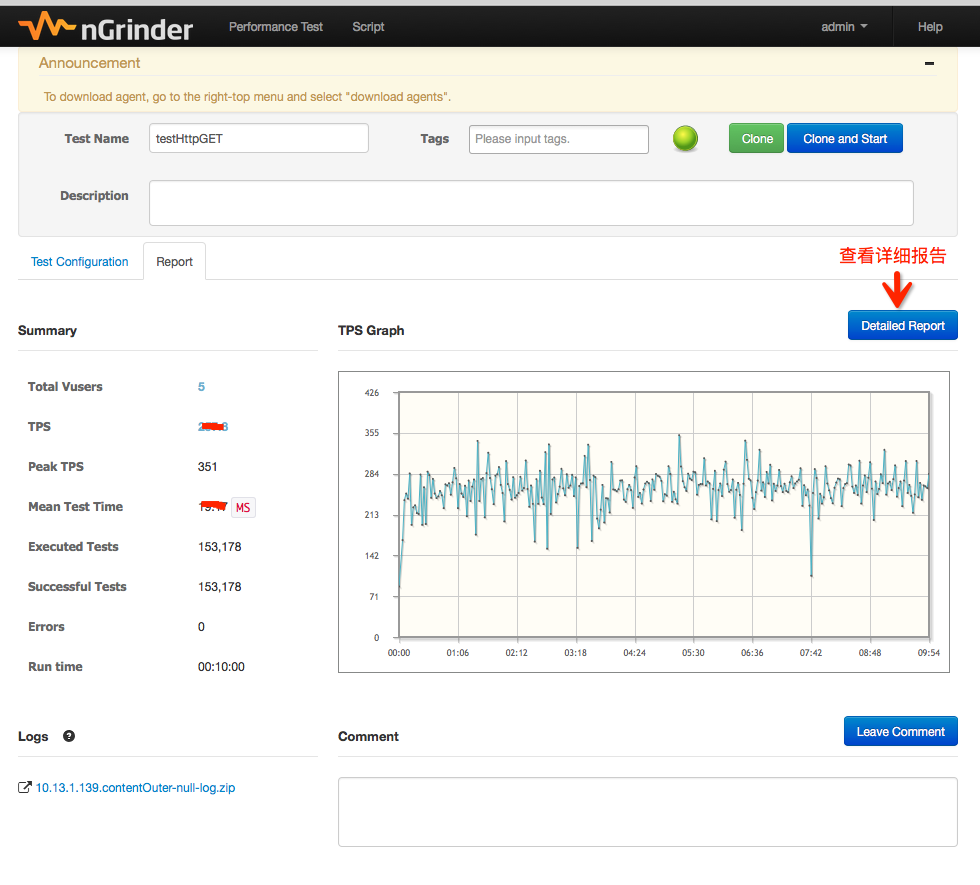
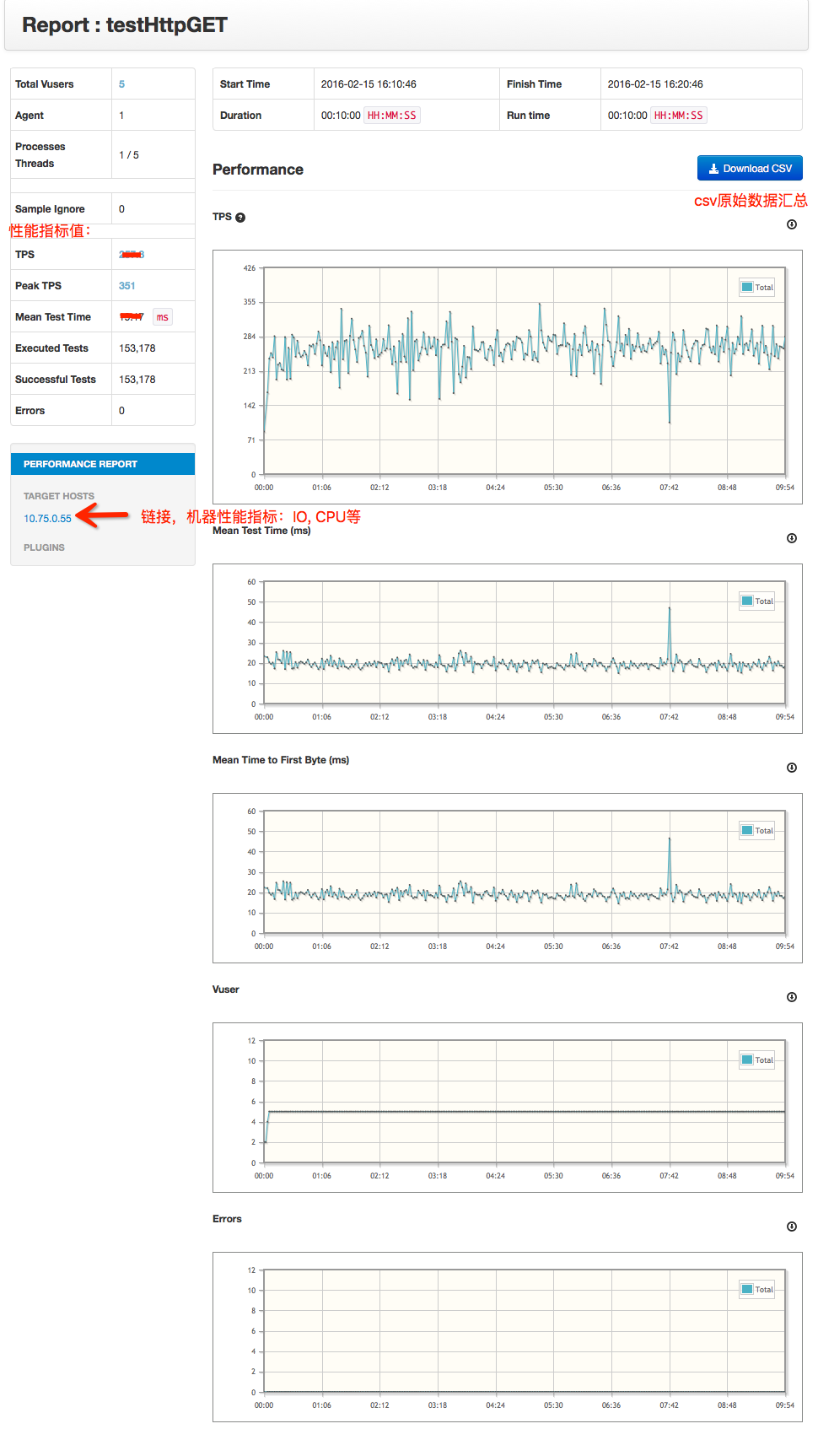
3.1.汇总信息
如果还需获取详细信息,需下载csv文件:
汇总数据项目地址:https://github.com/neven7/ngrinder-csv-analysis
解析ngrinder csv结果,统计TPS标准差,TPS波动率,最小/大RT,RT 25/50/75/80/85/90/95/99百分位数
步骤:
将ngrinder 生成的csv文件:output.csv,放到工程src/main/resources下
执行src/main/java下ParseCsv.java文件
Console输出结果示例:
TPS平均值:257.88
TPS标准差:33.10
TPS波动率:12.84%
RT平均响应时间:19.43 ms
Min RT:14.90 ms
RT 25百分位数:18.07 ms
RT 50百分位数:19.14 ms
RT 75百分位数:20.33 ms
RT 80百分位数:20.78 ms
RT 85百分位数:21.29 ms
RT 90百分位数:21.86 ms
RT 95百分位数:23.52 ms
RT 99百分位数:25.91 ms
Max RT:46.93 ms
nGrinder工具进行接口性能测试的更多相关文章
- 【原创】相对完整的一套以Jmeter作为工具的性能测试教程(接口性能测试,数据库性能测试以及服务器端性能监测)
准备工作 jmeter3.1,为什么是3.1,因为它是要配合使用的serveragent所支持的最高版本,下载链接 https://pan.baidu.com/s/1dWu5Ym JMeterPlug ...
- jmeter简单的接口性能测试
原文转自:https://blog.csdn.net/lovesoo/article/details/78579547 Apache JMeter是一款纯java编写负载功能测试和性能测试开源工具软件 ...
- JMETER之socket接口性能测试
公司的**产品经过换代升级,终于要上线了,纯java编码,包括POS(PC/安卓平板)版.WEB版.微信版,各终端通过 Webservice服务共享数据资源,因此Webservice各接口的性能测试就 ...
- 性能测试工具 Web Service 性能测试工具比较
[转自]https://testerhome.com/topics/3003 背景 希望选择一款Web Service性能测试工具,能真实模拟大量用户访问网站时的请求,从而获取服务器当前的请求处理能力 ...
- Jmeter Http接口性能测试
Jmeter Http接口性能测试 1. 启动Jmeter Jmeter下载解压即可使用,Jmeter启动,点击D:\ProgramFiles\jmeter\apache-jmeter-2. ...
- 接口性能测试方案 白皮书 V1.0
一. 性能测试术语解释 1. 响应时间 响应时间即从应用系统发出请求开始,到客户端接收到最后一个字节数据为止所消耗的时间.响应时间按软件的特点再可以细分,如对于一个 C/S 软件的响应时间可以细分为网 ...
- Locust 接口性能测试 - 转载一 (后期熟悉实践自己出一套完整的)
转载大佬 ,.. 另外一篇:https://www.cnblogs.com/imyalost/p/9758189.html记录一下接口性能测试的学习 先熟悉一下概念: Locust是使用Pytho ...
- 【技术博客】 利用Postman和Jmeter进行接口性能测试
利用Postman和Jmeter进行接口性能测试 作者:ZBW 版本:v1.1 在Phylab的开发过程中,对于生成报告接口的性能考量十分重要.原有的Latex接口虽然生成的报告美观,但编译Latex ...
- jmeter接口性能测试【CSV文件读取+接口关联+设置集合点】
一.前言 周计划上安排了个接口性能测试的任务,便开始了职业生涯的第一个接口性能测试... 接口进行压测之前,首先需要调通脚本.有两种方式,一种是通过抓包工具(如fiddler)抓取业务接口:另一种是通 ...
随机推荐
- ARM开发板搭建NFS网络文件共享方法
前边 已经提到过吧vmare的IP改成了静态IP,对于上网来说,这个是个麻烦的事.现在重新配置Vmware的IP VMware-Edit-Virtual network editor 选择PC机的无线 ...
- xpath相关巩固
python爬虫xpath的语法 XPath 是一门在 XML 文档中查找信息的语言.XPath 可用来在 XML 文档中对元素和属性进行遍历. XPath 是 W3C XSLT 标准的主要元素,并且 ...
- SpringMvc配置详解
在此做一个对Mvc的复习,便于以后快速复习mvc配置. 开发环境 : IDe :iDEA JDK:1.8 使用的框架技术:Mybtais ,Spring,Spring MVC 数据源选用Dbcp 首先 ...
- 线性DP POJ 1159 Palindrome
Palindrome Time Limit: 3000MS Memory Limit: 65536K Total Submissions: 59101 Accepted: 20532 Desc ...
- ACM -- 算法小结(六)逆波兰表达式
逆波兰表达式 //问题描述:逆波兰表达式是一种把运算符前置的算术表达式,例如普通的表达式2+3的 //逆波兰表达式法为+ 2 3.逆波兰表达式的优点是运算符之间不必有优先级关系,也不必 //用括号改 ...
- [转]jquery加载页面的方法(页面加载完成就执行)
jquery加载页面的方法(页面加载完成就执行),建议大家看下windows.onload与$(document).ready之间的区别. 1.$(function(){ $("#a&q ...
- MySQL之char、varchar和text的设计
最近有表结构设计中出现了varchar(10000)的设计引起了大家的讨论,我们下面就来分析分析. 首先我们先普及一下常识: 1.char(n)和varchar(n)中括号中n代表字符的个数,并不代表 ...
- 支持Tasker控制的app合集
跟各种Tasker插件打交道,原因有两点: 1.站在开发者的角度:Tasker虽为神器,也不能面面俱到,一个原因就是Android自身过于分裂化造成的,不可能兼顾全平台和机型:个人开发者精力有限,也满 ...
- hdu 2176 取石子游戏
http://acm.hdu.edu.cn/showproblem.php?pid=2176 提示:尼姆博弈,异或 #include <iostream> #include <cst ...
- MEF 导入(Import)和导出(Export)
前言: MEF不同于其他IOC容器(如:Castle)很重要的原因在于它使用了特性化编程模型(涉及到两个概念:“特性”和“编程模型”). 特性(Attribute):举例来说就是我们在开发过程中在类上 ...