
20-spring学习-Spring MVC基本操作
本次实现数据的CRUD功能,数据依然以VO类形式进行数据接收。
一,建立Message.java类操作,负责数据的接收操作。
package com.SpringMVC.vo;

public class Type {

    private String title;

    public String getTitle() {

        return title;

    }

    public void setTitle(String title) {

        this.title = title;

    }

    @Override

    public String toString() {

        return "Type [title=" + title + "]";

    }

}
和
package com.SpringMVC.vo;

import java.io.Serializable;

import java.util.Date;

@SuppressWarnings("serial")

public class Message implements Serializable{

    private Integer mid;

    private String title;

    private Double price;

    private Date  pubdate;

    private Type type;

    public Integer getMid() {

        return mid;

    }

    public void setMid(Integer mid) {

        this.mid = mid;

    }

    public String getTitle() {

        return title;

    }

    public void setTitle(String title) {

        this.title = title;

    }

    public Double getPrice() {

        return price;

    }

    public void setPrice(Double price) {

        this.price = price;

    }

    public Date getPubdate() {

        return pubdate;

    }

    public void setPubdate(Date pubdate) {

        this.pubdate = pubdate;

    }

    public Type getType() {

        return type;

    }

    public void setType(Type type) {

        this.type = type;

    }

    @Override

    public String toString() {

        return "Message [mid=" + mid + ", title=" + title + ", price=" + price + ", pubdate=" + pubdate + ", type="

                + type + "]";

    }

}
2,定义Action。
范例:定义MessageAction
package com.SpringMVC.action;

import org.springframework.stereotype.Controller;

import org.springframework.web.bind.annotation.RequestMapping;

import com.SpringMVC.vo.Message;

@Controller //定义控制器

@RequestMapping("/pages/back/message/*")         //整体访问路径

public class MessageAction {

    @RequestMapping("hello_demo")    //为demo方法定义映射子路径

    public void demo(Message msg)

    {

        System.out.println(msg);

    }

}
下面由于第一次执行,可以直接利用地址重写方式传递所需要数据。
http://localhost:8080/SpringMVC/pages/back/message/hello_demo.action?mid=12&title=今日头条&price=8&type.title=天天新闻
后台服务器结果:

以上地址组成结构如下:
1,action的父路径:http://localhost:8080/SpringMVC/pages/back/message/
2,配置的方法路径:/hello_demo.action。
3,表示Message对象的组成:?mid=12&title=今日头条&price=8&type.title=天天新闻。
此时的代码最大特点是,控制器不需要编写类属性接收参数,所有的接收参数放到了处理的业务方法上。
同时避免了的实例化对象问题。
而整个操作过程中最为关键的问题是:传递的参数只需要传递属性名称即可。如果是引用的关系,则只需要按照“.”排列即可(如上面的type.title)。
在springMVC中还可以设置某一个业务方法的请求类型。如对之前的action进行修改:
package com.SpringMVC.action;

import org.springframework.stereotype.Controller;

import org.springframework.web.bind.annotation.RequestMapping;

import org.springframework.web.bind.annotation.RequestMethod;

import com.SpringMVC.vo.Message;

@Controller //定义控制器

@RequestMapping("/pages/back/message/*")         //整体访问路径

public class MessageAction {

    @RequestMapping(value="hello_demo",method=RequestMethod.GET)    //为demo方法定义映射子路径

    public void demo(Message msg)

    {

        System.out.println(msg);

    }

}
如果使用这种语法表示配置的方法只能使用get请求模式进行触发。也可以修改为post请求。
@Controller //定义控制器

@RequestMapping("/pages/back/message/*")         //整体访问路径

public class MessageAction {

    @RequestMapping(value="hello_demo",method=RequestMethod.POST)    //为demo方法定义映射子路径

    public void demo(Message msg)

    {

        System.out.println(msg);

    }

}
如果业务处理方法设置为POST请求,那么就表示只能怪由表单提交到此方法上。
如果某个业务操作方法,即支持POST,也可以支持GET,那么不要写RequestMethod。
对于返回值的处理,Spring MVC有一些要求,在正常开发中,往往会提供一共forword.jsp页面。这个页面的功能是进行操作功能完成后的信息提示。
范例:定义forword.jsp页面:
<%@ page language="java" import="java.util.*" pageEncoding="ISO-8859-1"%>

<%

String path = request.getContextPath();

String basePath = request.getScheme()+"://"+request.getServerName()+":"+request.getServerPort()+path+"/";

%>

<!DOCTYPE HTML PUBLIC "-//W3C//DTD HTML 4.01 Transitional//EN">

<html>

  <head>

    <base href="<%=basePath%>">

    <title>My JSP 'forword.jsp' starting page</title>

    <meta http-equiv="pragma" content="no-cache">

    <meta http-equiv="cache-control" content="no-cache">

    <meta http-equiv="expires" content="0">

    <meta http-equiv="keywords" content="keyword1,keyword2,keyword3">

    <meta http-equiv="description" content="This is my page">

    <!--

    <link rel="stylesheet" type="text/css" href="styles.css">

    -->

  </head>

  <body>

        <script type="text/javascript">

            window.alert("${msg}");

            window.location="<%=basePath%>${url}";

        </script>

  </body>

</html>

如果由一共控制器,跳转到forword.jsp页面,至少需要以下内容:
1,控制器需要知道forword.jsp页面的路径。
2,控制器需要传递若干个request属性(如上面的$(msg)和$(url))。
正因为如此,在springMVC中专门设计了一个类:ModelAndView,而这个类里面定义了如下操作方法:
1,构造方法:public ModelAndView()。
2,构造方法:public ModelAndView(String viewName),viewName,跳转的路径地址;
3,保存属性:public ModelAndView addObject(String attrivbuteName,Object attrivateValue) ;
范例:更好的处理跳转:
package com.SpringMVC.action;

import org.springframework.stereotype.Controller;

import org.springframework.web.bind.annotation.RequestMapping;

import org.springframework.web.bind.annotation.RequestMethod;

import org.springframework.web.portlet.ModelAndView;

import com.SpringMVC.vo.Message;

@Controller //定义控制器

@RequestMapping("/pages/back/message/*")         //整体访问路径

public class MessageAction {

    @RequestMapping(value="hello_demo")    //为demo方法定义映射子路径

    public ModelAndView demo(Message msg)

    {

        ModelAndView md=new ModelAndView("/Pages/forword.jsp");

        md.addObject("msg","消息信息添加成功");

        md.addObject("url","/index.jsp");

        System.out.println(msg);

        return md;

    }

}
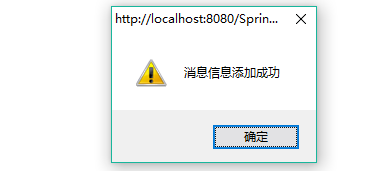
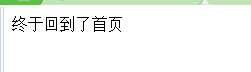
这里通过ModelAndView ,跳转到forword.jsp页面,同时,给这个页面传递两个属性值,msg和url。
效果:
然后跳到了下一页
通过以上程序分析就可以总结出MVC设计的优势
1,避免了复杂的路径跳转的配置操作。
2,避免了项目中出现过多的“.”作为参数的情况。
20-spring学习-Spring MVC基本操作的更多相关文章
- 2.《Spring学习笔记-MVC》系列文章,讲解返回json数据的文章共有3篇,分别为:
转自:https://www.cnblogs.com/ssslinppp/p/4528892.html 个人认为,使用@ResponseBody方式来实现json数据的返回比较方便,推荐使用. 摘要 ...
- 3.《Spring学习笔记-MVC》系列文章,讲解返回json数据的文章共有3篇,分别为:
转自:https://www.cnblogs.com/ssslinppp/p/4528892.html 概述 在文章:<[Spring学习笔记-MVC-3]SpringMVC返回Json数据-方 ...
- 1.《Spring学习笔记-MVC》系列文章,讲解返回json数据的文章共有3篇,分别为:
转自:https://www.cnblogs.com/ssslinppp/p/4528892.html [Spring学习笔记-MVC-3]SpringMVC返回Json数据-方式1:http://w ...
- 【转】Spring学习---Spring 学习总结
什么是Spring ? Spring是一个开源框架,Spring是于2003 年兴起的一个轻量级的Java 开发框架,由Rod Johnson在其著作Expert One-On-One J2EEDev ...
- 【转】Spring学习---Spring IoC容器的核心原理
[原文] Spring的两个核心概念:IoC和AOP的雏形,Spring的历史变迁和如今的生态帝国. IoC和DI的基本概念 IoC(控制反转,英文含义:Inverse of Control)是Spr ...
- [原创]java WEB学习笔记109:Spring学习---spring中事物管理
博客的目的:①总结自己的学习过程,相当于学习笔记 ②将自己的经验分享给大家,相互学习,互相交流,不可商用 内容难免出现问题,欢迎指正,交流,探讨,可以留言,也可以通过以下方式联系. 本人互联网技术爱好 ...
- Spring 学习——Spring框架结构、概念
maven项目结构 记忆:在一个项目中,project下一层级时src,也就是源文件,所有需要进行编译的文件都是在这个目录下,其实也就是这一个目录,然后向下扩展.在src目录下,存在main文件夹,里 ...
- Spring学习 6- Spring MVC (Spring MVC原理及配置详解)
百度的面试官问:Web容器,Servlet容器,SpringMVC容器的区别: 我还写了个文章,说明web容器与servlet容器的联系,参考:servlet单实例多线程模式 这个文章有web容器与s ...
- 【Spring学习笔记-MVC】Spring MVC之多文件上传 (zhan)
http://www.cnblogs.com/ssslinppp/p/4607330.html (zhan)
- [原创]java WEB学习笔记98:Spring学习---Spring Bean配置及相关细节:如何在配置bean,Spring容器(BeanFactory,ApplicationContext),如何获取bean,属性赋值(属性注入,构造器注入),配置bean细节(字面值,包含特殊字符,引用bean,null值,集合属性list map propert),util 和p 命名空间
本博客的目的:①总结自己的学习过程,相当于学习笔记 ②将自己的经验分享给大家,相互学习,互相交流,不可商用 内容难免出现问题,欢迎指正,交流,探讨,可以留言,也可以通过以下方式联系. 本人互联网技术爱 ...
随机推荐
- 在活动之间切换(隐式Intent)
实验名称:在活动之间切换 实验现象:在主活动中点击button1可以进入下一个活动 使用技术:隐式Intent 步骤: 1.创建一个项目,加载布局并在布局中添加一个button 部分截图未截,直接Ne ...
- 扩展gcd codevs 1200 同余方程
codevs 1200 同余方程 2012年NOIP全国联赛提高组 时间限制: 1 s 空间限制: 128000 KB 题目等级 : 钻石 Diamond 题目描述 Description 求关 ...
- nginx+php-fpm 配置和错误总结
<strong>空白页面:</strong>需要这个参数: fastcgi_param SCRIPT_FILENAME $document_root$fastcgi_scrip ...
- Ubuntu14.04环境下配置TFTP服务器
<<<<<<<<<<<<<<<<<<<<<<<<< ...
- jquery开发之第一个程序
前一段时间学习了js和css.可是发现好多的程序里面都用到了jquery当时本来想着先吧js弄熟了 再搞这个.后来发现不行,好多的程序好像是有益和自己为难似的,所以我决定接下来认认真真的把jquery ...
- Oracle初始安装内存设置参考
预备知识 shared memory:共享内存段: 一个内存区域,可以被不同的进程读取.oracle使用它来构成sga.oracle使用以下三种方法来创建一个sga区: 1. 使用单个共享内存段. ...
- 《Java虚拟机原理图解》3、JVM执行时数据区
[last updated :2014/11/7] JVM执行时数据区(JVM Runtime Area)事实上就是指JVM在执行期间,其对计算机内存空间的划分和分配.本文将通过下面几个话题来 ...
- [翻译] Canvas 不用写代码的动画
Canvas 不用写代码的动画 https://github.com/CanvasPod/Canvas Canvas is a project to simplify iOS development ...
- 3月题外:关于JS实现图片缩略图效果的一个小问题
由于3月可能要结束实习,所以应该不会有特别固定的主题,另外我会在月初陆续补上上个月的番外篇Projection和TMS,作为介绍性的内容对矢量切片部分进行补充,剩下时间不定期写一些杂烩. 最近两天在做 ...
- JSON数据转换成table表格
<%@ page contentType="text/html; charset=UTF-8" %> <%@taglib uri="/struts-ta ...